
1. Увод
The Keliiyo HDMI Splitter 1x4 is designed to duplicate a single HDMI input signal to four identical HDMI output signals. This device allows for simultaneous transmission of video and audio without any loss in quality. It supports a wide range of resolutions, including Full HD 1080P, 3D, and up to 4K@30Hz, making it suitable for various display setups.
2. Безбедносне информације
- Уверите се да је уређај постављен у добро проветреном простору како бисте спречили прегревање.
- Avoid exposing the splitter to moisture, water, or extreme temperatures.
- Use only the provided AC power adapter to prevent damage to the unit.
- Не покушавајте сами да растављате или поправљате уређај. За сервис контактирајте квалификовано особље.
- Чувати ван домашаја деце.
3. Садржај пакета
Молимо вас да проверите да ли су све ставке наведене у наставку укључене у ваш пакет:
- 1x Keliiyo HDMI Splitter 1x4
- 1к адаптер за наизменичну струју
- 1к упутство за употребу

Figure 3.1: Contents of the Keliiyo HDMI Splitter package, including the splitter unit, user manual, and power adapter.
4. Производ је готовview
The Keliiyo HDMI Splitter 1x4 features a robust metal casing for durability and efficient heat dissipation. Below is a description of its ports and indicators:
- УЛАЗНИ: HDMI input port for connecting your source device (e.g., computer, PS4, TV Box).
- ИЗЛАЗ 1-4: Four HDMI output ports for connecting display devices (e.g., monitors, TVs, projectors).
- ИН ЛЕД: Indicates when an input signal is detected.
- 1-4 LEDs: Indicate active output connections.
- PW LED: Индикатор напајања.
- ДЦ 5В: Улазни порт за напајање за АЦ адаптер.
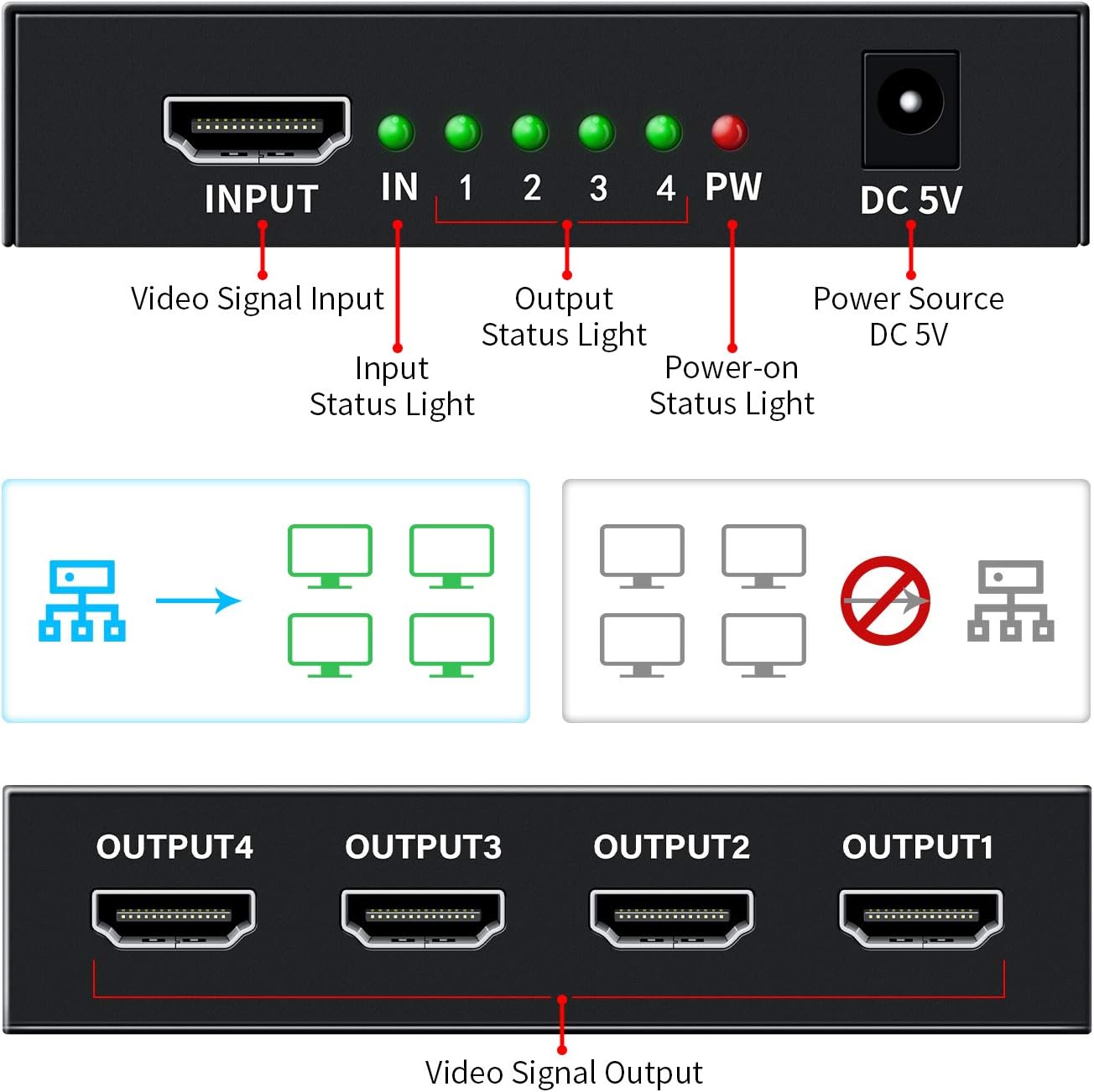
Слика 4.1: Предњи и задњи део view of the HDMI Splitter with labeled ports and indicator lights.

Слика 4.2: Прamples of compatible input and output devices for the HDMI Splitter.

Figure 4.3: Physical dimensions of the Keliiyo HDMI Splitter.
5. Упутства за подешавање
Follow these steps to set up your Keliiyo HDMI Splitter:
- Connect Input Device: Connect your HDMI source device (e.g., DVD player, gaming console, laptop) to the 'INPUT' port on the HDMI splitter using a high-quality HDMI cable (not included).
- Повежите излазне уређаје: Connect up to four HDMI display devices (e.g., TVs, monitors, projectors) to the 'OUTPUT 1', 'OUTPUT 2', 'OUTPUT 3', and 'OUTPUT 4' ports on the splitter using HDMI cables.
- Прикључите напајање: Plug the provided 5V AC power adapter into the 'DC 5V' port on the splitter, then plug the adapter into a power outlet. The 'PW' LED will illuminate.
- Укључено: Power on your HDMI source device and all connected display devices. The corresponding 'IN' and '1-4' LEDs on the splitter will light up, indicating active connections.
Важна напомена: For optimal performance and to ensure normal operation, please ensure that all connected output devices are set to the same resolution. If different resolutions are detected, the splitter will output the lowest common resolution to all displays.

Figure 5.1: Illustrates mirroring one screen to four identical screens simultaneously.
Video 5.1: An official Keliiyo video demonstrating the setup process and functionality of the HDMI Splitter, showing how to connect input and output devices and power supply.
6. Упутство за употребу
Once the setup is complete and all devices are powered on, the Keliiyo HDMI Splitter will automatically duplicate the input signal to all connected output displays. No additional configuration is typically required.
- The green 'IN' LED indicates that an HDMI source is connected and providing a signal.
- The green '1', '2', '3', '4' LEDs indicate which output ports have active display devices connected and receiving a signal.
- The red 'PW' LED confirms that the device is receiving power.
The splitter is designed for simple plug-and-play operation, allowing you to share your video and audio content across multiple screens effortlessly.
7. Одржавање
To ensure the longevity and optimal performance of your HDMI Splitter, please follow these maintenance guidelines:
- Чишћење: Користите меку, суву крпу за чишћење спољашњости уређаја. Не користите течна средства за чишћење или аеросоле.
- Складиштење: Када се уређај не користи дуже време, чувајте га на хладном и сувом месту, даље од директне сунчеве светлости и екстремних температура.
- Руковање: Avoid dropping or subjecting the device to strong impacts. Handle cables carefully to prevent damage to the ports.
- вентилација: Ensure that the ventilation holes on the device are not blocked to allow for proper airflow and prevent overheating.
КСНУМКС. Решавање проблема
If you encounter issues with your Keliiyo HDMI Splitter, refer to the following common problems and solutions:
| Проблем | Могући узрок | Решење |
|---|---|---|
| No picture or sound on display(s). | Loose connections, no power, incompatible resolution, faulty cables. |
|
| Flickering or distorted image. | Poor quality HDMI cables, long cable runs, resolution mismatch. |
|
| Image briefly disappears when a new display is turned on. | Splitter adjusting to new display connection. | This is normal behavior as the splitter may need to re-establish the signal handshake. The image should return shortly. |
9. Спецификације
| Феатуре | Детаљ |
|---|---|
| Број модела | 104 |
| Димензије производа | 2.44 к 3.77 к 0.86 инча |
| Тежина артикла | 7.8 унци |
| Боја | Црно |
| Тип конектора | ХДМИ |
| Цабле Типе | ХДМИ |
| Подржане резолуције | 408i/576i/576p/720p/1080i/1080P, up to 4K@30Hz |
| 3Д подршка | Да |
| ХДЦП верзија | В1.4 |
| Мак Трансмиссион Дистанце | Up to 100ft (Input 40ft, Output 60ft with AWG26 HDMI cable) |
| Повер Суппли | DC 5V (AC Adapter included) |
10. Гаранција и подршка
For any questions, technical support, or warranty inquiries regarding your Keliiyo HDMI Splitter, please contact Keliiyo customer service. Refer to the contact information provided with your product packaging or visit the official Keliiyo webсајт за помоћ.
Сачувајте доказ о куповини за гаранцијске захтеве.


