
1. Увод
Хвала вам на куповиниasing the Medeli DD620NR Electronic Drum Kit. This comprehensive electronic drum kit is designed for both practice and performance, offering a rich set of features to enhance your drumming experience. It includes advanced functions such as Auto-Fill (AFI), Double Bass Trigger (DBT), and a Coach mode to assist in learning and skill development. With 226 high-quality sounds, 25 preset drum kits, and 60 sequencer patterns, the DD620NR provides versatility for various musical styles. This manual will guide you through the setup, operation, maintenance, and troubleshooting of your new instrument.
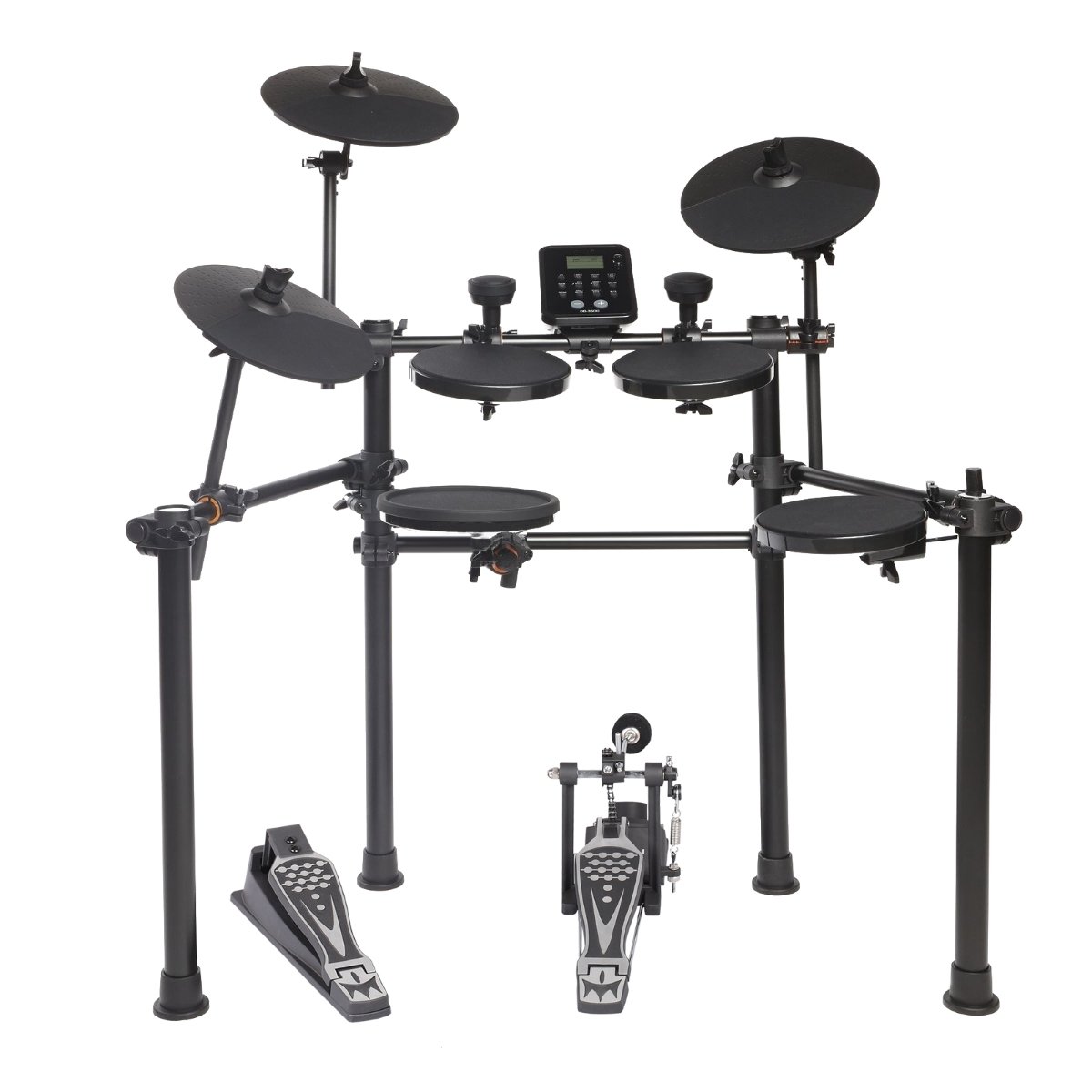
Figure 1.1: The Medeli DD620NR Electronic Drum Kit, showcasinг његов компактан и робустан дизајн.
2. Безбедносне информације
Please read these safety instructions carefully before using your Medeli DD620NR Electronic Drum Kit to ensure safe and optimal performance. Keep this manual for future reference.
- Напајање: Користите само наведени адаптер за напајање. Уверите се да је јачина звукаtagе одговара вашем локалном извору напајања.
- Вода и влага: Do not expose the unit to rain, moisture, or excessive humidity. Keep liquids away from the drum kit.
- вентилација: Do not block any ventilation openings. Ensure adequate airflow around the module.
- Пласман: Place the drum kit on a stable, level surface to prevent it from falling. Avoid placing it near heat sources or in direct sunlight.
- Чишћење: Clean the unit only with a dry, soft cloth. Do not use abrasive cleaners or solvents.
- Сервисирање: Не покушавајте сами да сервисирате уређај. Сва сервисирања препустите квалификованом сервисеру.
- деца: Држите ситне делове и материјал за паковање ван домашаја деце како бисте спречили опасност од гушења.
3. Подешавање
3.1 Садржај пакета
Пре склапања, проверите да ли су све компоненте присутне у паковању:
- DD620NR Drum Module
- Drum Pads (Snare, Tom x3, Crash x2, Ride, Hi-Hat)
- Kick Pad and Kick Pedal
- Хи-Хат контролна педала
- Оквир сталака за бубњеве
- Cables for Pad Connections
- Повер Адаптер
- Кориснички приручник (овај документ)
- Drum Sticks (optional, may vary by region)
3.2 Упутство за састављање
Follow these steps to assemble your drum kit:
- Распакујте компоненте: Пажљиво уклоните све делове из паковања.
- Саставите сталак: Connect the frame tubes as shown in the assembly diagram. Ensure all clampс су добро затегнути.
- Монтажне јастучиће и чинеле: Attach the snare, tom pads, and cymbal pads (crash, ride, hi-hat) to the rack using the provided clamps and arms. Adjust their positions for comfortable playing.
- Position Kick Pad and Pedals: Place the kick pad in front of the rack and attach the kick pedal. Position the hi-hat control pedal on the floor.
- Монтирајте модул бубња: Secure the DD620NR drum module to the rack using its dedicated mount.

Figure 3.1: Assembly diagram illustrating the correct placement and connection points for the drum kit components.
3.3 Повезивање каблова
Once the physical assembly is complete, connect the pads and pedals to the drum module:
- Pad Cables: Connect each drum pad and cymbal pad to its corresponding input on the DD620NR module using the included trigger cables. Labels on the module indicate "Snare," "Tom1," "Crash," etc.
- Pedal Cables: Connect the kick pad cable and the hi-hat control pedal cable to their respective inputs on the module.
- Адаптер за напајање: Connect the power adapter to the DC IN jack on the module, then plug it into a wall outlet.
- Аудио излаз: For sound, connect headphones to the ПХОНЕС jack or connect the ОУТПУТ jacks to an amplifier, mixer, or speakers.
- УСБ/МИДИ: To connect to a computer, use a standard USB cable to connect the module's УСБ НА ХОСТ порт на ваш рачунар.
- Помоћни улаз: To play along with external audio, connect a mobile device or audio player to the АУКС ИН Јацк.
4. Упутство за употребу
This section details the basic operation and functions of your DD620NR drum kit.
4.1 Укључивање/искључивање
- Укључено: Притисните тастер ПОВЕР button located on the drum module. The display will illuminate.
- Искључивање: Притисните и држите ПОВЕР button until the display turns off. Always power off the unit when not in use.
4.2 Основне функције
The DD620NR module features an intuitive control panel for accessing various functions.

Figure 4.1: The DD620NR drum module control panel, showing the display, navigation buttons, and function keys.
- Drum Kit Selection: Користите КИТ дугме и +/- buttons or data dial to select from 25 preset drum kits or 5 user-defined kits.
- Избор звука: In Voice mode, use the ВОИЦЕ дугме и +/- buttons to browse through 226 available sounds.
- Sequencer (Patterns): Притисните тастер ПЕСМА button to enter sequencer mode. Use +/- to select from 60 preset patterns or 1 user-defined pattern. Press СТАРТ/СТОП играти/паузирати.
- Auto-Fill (AFI): This function automatically adds drum fills to your playing. Refer to the module's display and dedicated button (if present) for activation and settings.
- Double Bass Trigger (DBT): Enhances the response for double bass drumming techniques. Consult the module's settings menu for configuration.
- Coach Function: Ангажујте ТРЕНЕР mode to access various exercises and timing drills designed to improve your drumming skills.
4.3 Повезивање
- Веза мобилног уређаја: Connect your smartphone or tablet to the АУКС ИН jack using a stereo audio cable. You can then play along with your favorite music through the drum kit's audio output.
- USB/MIDI Connection: Тхе УСБ НА ХОСТ port allows you to connect the DD620NR to a computer. This enables MIDI communication for recording, using virtual instruments, or updating firmware (if applicable). No special drivers are usually required for basic MIDI functionality on modern operating systems.
5. Одржавање
Proper maintenance will ensure the longevity and optimal performance of your Medeli DD620NR.
- Чишћење: Regularly wipe down the drum pads, cymbals, and module with a soft, dry, lint-free cloth. For stubborn dirt, a slightly damp cloth can be used, followed immediately by a dry cloth. Avoid using chemical cleaners, waxes, or solvents.
- Нега јастучића: Avoid striking the pads with excessive force, which can reduce their lifespan. Rotate pad positions periodically to distribute wear evenly.
- Управљање кабловима: Keep cables neatly organized and avoid sharp bends or kinks. Periodically check cable connections for looseness.
- Складиштење: When not in use for extended periods, store the drum kit in a clean, dry environment away from extreme temperatures and direct sunlight. If disassembling, store components carefully to prevent damage.
КСНУМКС. Решавање проблема
If you encounter issues with your DD620NR, refer to the following common problems and solutions:
| Проблем | Могући узрок | Решење |
|---|---|---|
| Нема звука из слушалица/звучника. | Volume too low; cables disconnected; incorrect output selected. | Check master volume and individual pad volumes. Ensure headphones/speakers are properly connected and powered on. Verify correct output (PHONES/OUTPUT) is used. |
| A specific pad is not triggering sound. | Pad cable loose or damaged; pad sensitivity too low; pad faulty. | Check the cable connection for the specific pad at both the pad and module ends. Adjust pad sensitivity in the module settings. If issue persists, try swapping cables with a working pad to isolate the problem. |
| Модул се не укључује. | Power adapter not connected; power outlet faulty; adapter damaged. | Ensure the power adapter is securely connected to the module and a working power outlet. Try a different outlet. Verify the power adapter is the correct one for the unit. |
| MIDI connection to computer not working. | USB cable faulty; incorrect driver/software settings; module not recognized. | Try a different USB cable. Ensure your computer's software (DAW, MIDI utility) is configured to recognize the DD620NR as a MIDI input device. Restart both the module and computer. |
If the problem persists after trying these solutions, please contact Medeli customer support.
7. Спецификације
- Модел: Medeli DD620NR
- звуци: 226
- Комплети бубњева: 25 Preset, 5 User-defined
- Sequencer Patterns: 60 Preset, 1 User-defined
- Функције: Auto-Fill (AFI), Double Bass Trigger (DBT), Coach Mode
- Повезивање: USB TO HOST (MIDI), AUX IN, PHONES Out, OUTPUT L/MONO, R
- Произвођач: МЕДЕЛИ
- Референца произвођача: ЕКСНУМКСЕ
- ASIN: B0774RDYY7
- Product Launch Date: 4. новембар 2017
8. Гаранција и подршка
Medeli products are manufactured to high-quality standards and are backed by a limited warranty. Please refer to the warranty card included with your product or visit the official Medeli webсајт за детаљне услове гаранције специфичне за ваш регион.
For technical support, service, or inquiries regarding your Medeli DD620NR, please contact your local dealer or visit the official Medeli support website. Have your product model and serial number ready when contacting support.