
Увод
Thank you for choosing the Capello Extra Large Display Digital Alarm Clock. This manual provides detailed instructions to help you set up, operate, and maintain your new alarm clock. Designed for clarity and ease of use, this clock features a large digital display and a stylish wood-grain finish, making it a perfect addition to any bedroom or living space.
Производ је завршенview
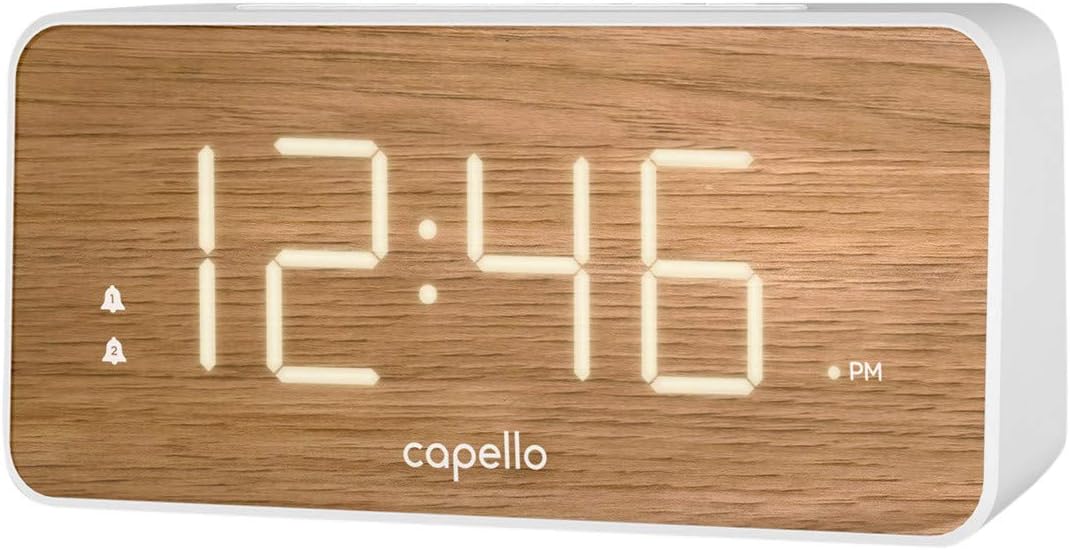
The Capello Digital Alarm Clock (Model: 43213-14795) features an extra-large digital display for easy readability from across the room. Its elegant white and pine D-frame design with a wood-grain finish complements various interior styles. The clock is equipped with intuitive controls for setting time and alarms, ensuring a user-friendly experience.
Сетуп
Повер Цоннецтион
The alarm clock requires a continuous power supply via its included AC adapter for full functionality. Insert the adapter into a standard wall outlet and connect it to the clock's power input port. For backup during power outages, install 2 AAA batteries (not included) into the battery compartment located on the underside of the unit. These batteries will preserve time and alarm settings but will not power the display or alarm functions during an outage.
Подешавање времена
- Притисните и држите ВРЕМЕНСКИ СКЛОП button (or similar button, refer to specific button labels on your unit) until the hour digits begin to flash.
- Користите ХОУР button to adjust the hour. Pay attention to the AM/PM indicator.
- Притисните тастер ВРЕМЕНСКИ СКЛОП button again to move to the minute digits.
- Користите МИН тастер за подешавање минута.
- Притисните ВРЕМЕНСКИ СКЛОП још једном да бисте потврдили и изашли из режима подешавања времена.
Постављање аларма
This clock supports dual alarms.
- Притисните и држите АЛАРМ 1 дугме док цифре сата аларма не затрепере.
- Користите ХОУР и МИН buttons to set the desired alarm time for Alarm 1.
- Притисните АЛАРМ 1 again to confirm. The alarm indicator for Alarm 1 will illuminate.
- Поновите кораке 1-3 за АЛАРМ 2 if a second alarm is desired.
- To activate/deactivate an alarm, simply press the corresponding АЛАРМ 1 or АЛАРМ 2 button. The alarm indicator will show its status.
Упутство за употребу
Функција одлагања
Када се огласи аларм, притисните велико СНООЗЕ button located on the top of the clock. This will temporarily silence the alarm for approximately 9 minutes, allowing for extra rest. The alarm will sound again after the snooze period ends.
Заустављање аларма
To turn off the alarm completely after it sounds, press the corresponding АЛАРМ 1 or АЛАРМ 2 button. The alarm indicator will turn off, signifying that the alarm is deactivated for the next day.
Дисплаи Бригхтнесс
The display brightness can be adjusted to suit your preference. Locate the ЛИГХТ or ДИММЕР button (often represented by a sun icon) on the top panel. Press this button repeatedly to cycle through different brightness levels (e.g., High, Medium, Low, Off).
Одржавање
To ensure the longevity and optimal performance of your Capello Digital Alarm Clock, follow these simple maintenance guidelines:
- Чишћење: Wipe the clock's surface with a soft, dry cloth. Do not use abrasive cleaners, waxes, or solvents as they may damage the finish.
- Пласман: Поставите сат на стабилну, равну површину, даље од директне сунчеве светлости, извора топлоте и прекомерне влаге.
- Замена батерије: Replace backup batteries annually or when the display shows signs of dimming during a power outagе. Обезбедите исправан поларитет приликом уметања нових батерија.
Решавање проблема
If you encounter any issues with your alarm clock, please refer to the following common problems and solutions:
| Проблем | Могуће решење |
|---|---|
| Екран је празан или замагљен. | Ensure the AC adapter is securely plugged into both the clock and a working wall outlet. Check the display brightness setting using the LIGHT/DIMMER button. |
| Аларм се не оглашава. | Verify that the alarm is activated (alarm indicator is lit). Ensure the alarm time is set correctly (AM/PM). Check if the volume is set to an audible level. |
| Време је погрешно. | Reset the time following the 'Setting the Time' instructions. If using backup batteries, ensure they are fresh and correctly installed. |
| Дугмад не реагују. | Unplug the AC adapter, remove backup batteries, wait for 1 minute, then reconnect power. This performs a soft reset. |
Спецификације
- Бренд: Цапелло
- Број модела: 43213-14795
- Боја: Бела
- Тип приказа: Дигитал
- Стил: Модерна
- Посебна карактеристика: Large Display, Alarm
- Димензије производа: 8.74" Ш x 5.83" В
- Извор напајања: AC Powered (with battery backup for settings)
- Материјал: Пластика
- Тежина артикла: 1.01 фунти
Званични видео снимци производа
Тренутно нису доступни званични видео снимци производа од продавца за овај артикал.
Гаранција и подршка
For warranty information and customer support, please refer to the manufacturer's official documentation included with your product or visit the Capello webсајту. Сачувајте рачун о куповини за гаранције.