
Увод
Thank you for choosing the Brookstone Big Blue True Wireless Earbuds. These earbuds are designed to provide a seamless audio experience, allowing you to enjoy music and manage calls wirelessly. This manual provides essential information on setting up, operating, maintaining, and troubleshooting your new earbuds.
Кључне карактеристике:
- True wireless design for freedom of movement.
- Rich, full-range audio with deep bass.
- Integrated microphone with Qualcomm cVc noise-cancelling technology for clear calls.
- Bluetooth connectivity for easy pairing with your smartphone or device.

Image: Brookstone Big Blue True Wireless Earbuds in their black charging case.
Сетуп
Шта је у кутији
- Brookstone Big Blue True Wireless Earbuds (Left and Right)
- Футрола за бежично пуњење
Пуњење слушалица и футроле
- Ставите обе слушалице у кутијицу за пуњење. Уверите се да су правилно постављене.
- Повежите кућиште за пуњење са УСБ извором напајања помоћу приложеног кабла за пуњење.
- The indicator lights on the case and earbuds will show charging status. Refer to the specific light patterns in your product packaging for details.
- Сачекајте довољно времена за потпуно пуњење пре прве употребе.
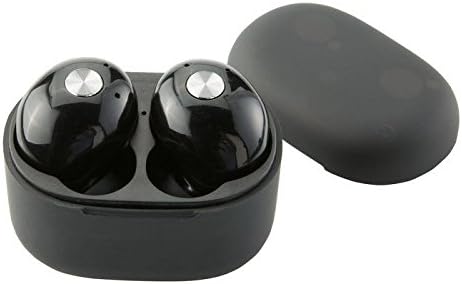
Слика: Крупни план view of the earbuds within the charging case, illustrating proper placement for charging.
Блуетоотх упаривање
- Уверите се да су слушалице напуњене.
- Remove both earbuds from the charging case. They will automatically enter pairing mode, indicated by flashing LED lights (refer to your product packaging for specific light patterns).
- На паметном телефону или уређају који подржава Bluetooth, идите на подешавања Bluetooth-а.
- Тражи new devices and select "BIG BLUE" (or similar name) from the list.
- Once connected, the earbud indicator lights will change, typically turning solid or off.
- Ако упаривање не успе, вратите слушалице у футролу, затворите је и поновите кораке.
Упутство за употребу
Укључивање/искључивање
- Укључено: Remove the earbuds from the charging case. They will automatically power on and attempt to connect to the last paired device.
- Искључивање: Вратите слушалице у кутијицу за пуњење и затворите поклопац. Аутоматски ће се искључити и почети са пуњењем.
Music Playback and Call Management
The earbuds feature integrated controls for media playback and call handling. Specific functions may vary slightly; refer to your product's quick start guide for exact button presses.
- Пусти/паузирај: Typically a single press on either earbud.
- Следећа нумера: Often a double press on the right earbud.
- Претходни запис: Often a double press on the left earbud.
- Одговори/заврши позив: A single press on either earbud during an incoming call or active call.
- Одбиј позив: A long press on either earbud during an incoming call.
- Активирање гласовног помоћника: A triple press or long press on an earbud (check specific model instructions).

Image: A man wearing a Brookstone Big Blue True Wireless Earbud, demonstrating typical use.
Одржавање
Чишћење
- Користите меку, суву крпу која не оставља влакна да бисте очистили слушалице и кућиште за пуњење.
- Не користите абразивна средства за чишћење, раствараче или аеросолне спрејеве.
- Gently clean ear tips and speaker grilles with a dry cotton swab to remove earwax or debris.
Складиштење
- Увек чувајте слушалице у кутији за пуњење када их не користите како бисте их заштитили и одржали напуњеним.
- Чувати на хладном и сувом месту, даље од екстремних температура и директне сунчеве светлости.
Баттери Царе
- Да бисте продужили век трајања батерије, избегавајте често потпуно пражњење слушалица и футроле.
- Редовно пуните уређај, чак и ако га не користите често.
Решавање проблема
| Проблем | Могуће решење |
|---|---|
| Слушалице се не упарују са уређајем. |
|
| Sound skipping or cutting out. |
|
| Једна слушалица нема звук. |
|
| Слушалице се не пуне. |
|
Спецификације
| Феатуре | Детаљ |
|---|---|
| Број модела | BIG BLUE |
| Бежична комуникациона технологија | Блуетоотх |
| Укључене компоненте | Футрола за бежично пуњење |
| Материјал | Пластика |
| Тип контроле | Контрола медија |
| Цабле Феатуре | Витхоут Цабле |
| Тежина артикла | 2.4 унце (0.15 фунте) |
| Димензије производа | 3.35 к 1.57 к 5.71 инча |
| Посебне карактеристике | Microphone Included, Noise Cancellation, Wireless |
| Боја | Црно |
| Форм Фацтор | Ин Еар |
| УПЦ / ГТИН | 883594061516 |
Информације о гаранцији
Brookstone products are designed with quality and reliability in mind. For specific warranty details regarding your Big Blue True Wireless Earbuds, please refer to the warranty card included in your product packaging or visit the official Brookstone webсајт. Сачувајте доказ о куповини за евентуалне рекламације по гаранцији.
Корисничка подршка
If you encounter any issues not covered in this manual or require further assistance, please contact Brookstone customer support. Contact information can typically be found on the product packaging or the official Brookstone webсајту.