
1. Увод
The POMIACAM Mini 2-Channel Mobile DVR is designed for vehicle surveillance, allowing you to record video from two cameras simultaneously. This device saves recorded footage to SD cards for later review, serving as a reliable witness for your driving activities. It supports various camera types and offers flexible recording options.
2. Безбедносне информације
- Ensure all connections are secure before operating the DVR.
- Do not expose the DVR to extreme temperatures, moisture, or direct sunlight for prolonged periods.
- Avoid obstructing the ventilation openings of the DVR.
- Only use the provided power cable and accessories. Incorrect power supply can damage the unit.
- Consult a professional for complex electrical installations in your vehicle.
3. Садржај пакета
Проверите да ли су све ставке присутне у вашем пакету:
- One (1) Mini 2-Channel Mobile DVR Unit
- One (1) Mobile DVR Remote Control
- Three (3) 3-in-1 Cables (for camera and power connections)
- Једно (1) корисничко упутство (овај документ)
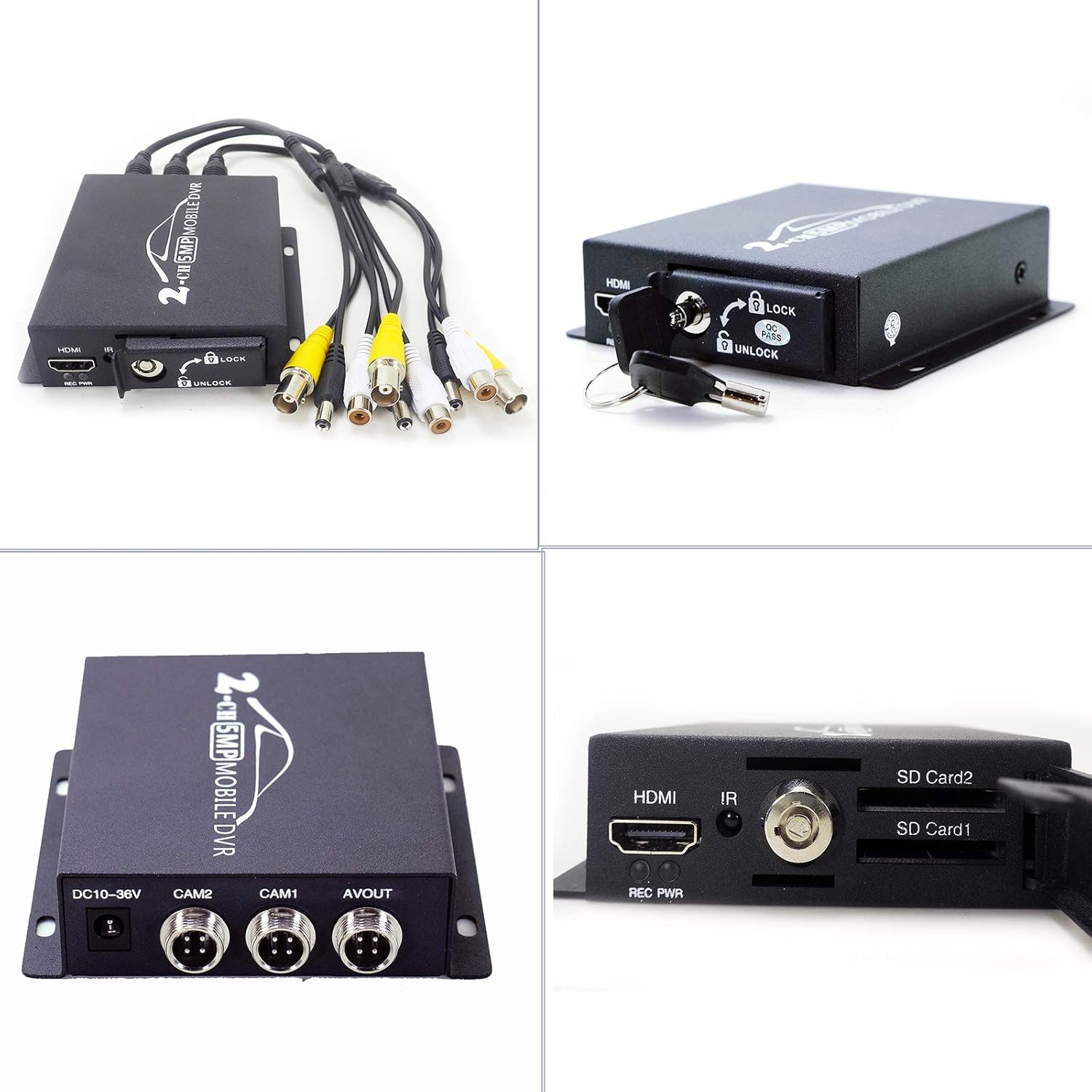
Image: The Mini 2-Channel Mobile DVR unit shown with its accompanying cables and remote control, illustrating the complete set of accessories.
4. Производ је готовview
Familiarize yourself with the various ports and indicators on your Mobile DVR unit.

Слика: Детаљна view of the Mobile DVR unit, highlighting the DC power input, CAM1 and CAM2 video inputs, AV OUT port, HDMI output, IR receiver, REC/PWR indicators, and dual SD card slots.
Предњи панел:
- ХДМИ порт: For connecting to an external display (e.g., monitor) to view live feed or playback.
- REC/PWR Indicators: LED lights indicating recording status (REC) and power status (PWR).
- ИЦ пријемник: For receiving signals from the remote control.
- SD Card Slots (SD Card1, SD Card2): Dual slots for inserting SD cards (up to 512GB each) for video storage. The cover can be locked for security.
Задња плоча:
- DC10-36V Input: Power input port for connecting the DVR to your vehicle's power supply.
- CAM1 / CAM2 (AV IN): Video input ports for connecting up to two AHD or CVBS cameras.
- АВ ОУТ: Analog video output port.
5. Упутства за подешавање
5.1 Прикључак за напајање
- Connect the provided power cable to the DC10-36V input port on the DVR.
- Connect the other end of the power cable to your vehicle's power supply. Ensure proper polarity.
- Важна напомена: Some vehicles may require a 3-wire power connection (ground, constant 12V, switched 12V/accessory power) to ensure the DVR powers off with the vehicle. If your DVR remains constantly on, consult a professional for a switched power connection.
5.2 Повезивање камере
- Connect your AHD (3MP, 4MP, 5MP, 720P, 1080P) or CVBS (960P) cameras to the CAM1 and/or CAM2 input ports using the appropriate cables.
- Ensure connections are secure to prevent signal loss.
5.3 Инсталација СД картице
- Open the SD card slot cover on the front panel.
- Insert up to two SD cards (maximum 512GB each) into the designated SD Card1 and SD Card2 slots. Ensure the cards are inserted correctly until they click into place.
- Close and lock the SD card slot cover using the provided key for security.
5.4 Почетно укључивање
Once all connections are made, turn on your vehicle's ignition. The DVR should power on automatically, indicated by the PWR LED. The REC LED will illuminate when recording begins.
6. Упутство за употребу
6.1 Аутоматско снимање
The DVR is designed to begin recording automatically once powered on and an SD card is detected. Videos from both connected cameras will be saved to the inserted SD cards.
6.2 Навигација кроз мени и подешавања
Use the included remote control to navigate the on-screen menu. Connect the DVR to an external display via the HDMI port to access the menu. From the menu, you can:
- Adjust recording resolution and modes.
- Конфигуришите системске поставке.
- Access disk setup options.
- View снимљених видео записа и слика.
6.3 Disk Setup and Formatting
It is crucial to format new SD cards before first use and periodically thereafter to ensure optimal performance and prevent recording issues.
- Access the main menu using the remote control and an external display.
- Navigate to the 'DISK SETUP' option.
- Select the desired SD card (SD1 or SD2) for formatting.
- Choose the 'FORMAT DISK' option and confirm. This will erase all data on the selected card.
6.4 Репродукција видео записа
То реview снимљено фооtage:
- Connect the DVR to an external display via HDMI.
- From the main menu, select 'PLAY AVI' to access video files.
- Use the remote control to navigate through files, play, pause, fast-forward, or rewind.
Video: This video demonstrates the camera test and menu interface of the Mini 2-Channel Mobile DVR, showing how to navigate through settings and view фооtage. It provides a visual guide to the DVR's operational capabilities.
7. Одржавање
- Управљање СД картицама: Редовно правите резервне копије важних датотекаtage and format your SD cards to maintain optimal recording performance and prevent data corruption. Replace old or faulty SD cards as needed.
- Чишћење: Use a soft, dry cloth to clean the exterior of the DVR. Do not use liquid cleaners or solvents. Keep ports free of dust and debris.
- Ажурирања фирмвера: Проверите произвођача website periodically for any available firmware updates to improve performance or add features.
КСНУМКС. Решавање проблема
- DVR Not Powering On: Check the power cable connection and ensure your vehicle's power supply is active. Verify the DC10-36V input.
- DVR Stays Constantly On: If the DVR does not power off with your vehicle, your power connection may be to a constant 12V source. A switched 12V/accessory power connection is required for the DVR to power off with the ignition. Consult a professional for wiring modifications.
- SD Card Not Formatting/Recording: Ensure the SD card is not write-protected. Try formatting the card through the DVR's menu (see Section 6.3). If issues persist, try a different SD card.
- Recording on Wrong Disk: If you have only one camera connected to CAM1 but the DVR records to SD Card2, check the DVR's menu settings under 'REC SETUP' or 'DISK SETUP' to ensure the correct SD card is assigned for recording from CAM1.
- Нема видео излаза: Verify camera connections. Ensure the external display is correctly connected to the HDMI or AV OUT port and is set to the correct input source.
- Даљински управљач не ради: Check the remote control's battery. Ensure there are no obstructions between the remote and the DVR's IR receiver.
9. Спецификације
| Феатуре | Спецификација |
|---|---|
| Број модела | ИД-207А |
| Технологија повезивања | ХДМИ |
| Компатибилни уређаји | AHD Cameras (3MP, 4MP, 5MP, 720P, 1080P), CVBS Cameras (960P) |
| Димензије производа (Д к Ш к В) | 3.94" x 4.41" x 1.1" (10 цм x 11.2 цм x 2 цм) |
| Капацитет меморије | Up to 512 GB per SD card (Dual SD Slots) |
| Број канала | 2 |
| Медијски формат Дигитални видео | СД картица |
| Аудио улаз | Integrated microphone(s) support |
| Укупно УСБ портова | 1 |
| Видео улаз | HDMI (for display output, not input) |
| Тежина артикла | 1 фунта |
| Повер Инпут | ДЦ КСНУМКС-КСНУМКСВ |
10. Информације о гаранцији
All POMIACAM products come with a 12-month warranty from the date of purchase. Accessories included with the product are covered by a 3-month warranty. This warranty covers manufacturing defects and malfunctions under normal use. It does not cover damage caused by misuse, accidents, unauthorized modifications, or improper installation.
11. Корисничка подршка
If you have any questions, encounter issues, or require technical assistance with your POMIACAM Mini 2-Channel Mobile DVR, please contact our customer service team. We are committed to providing support and will respond to your inquiries within 24 hours.
Please refer to your purchase documentation or the POMIACAM official webсајт за конкретне контакт податке.