

Увод
This manual provides comprehensive instructions for the setup, operation, and maintenance of your MASTER & DYNAMIC MH40 Over-Ear Headphones. Please read this guide thoroughly to ensure optimal performance and longevity of your device.
Садржај пакета
Проверите да ли су све ставке присутне у вашем пакету:
- MASTER & DYNAMIC MH40 Over-Ear Headphones
- Audio Cable with In-line Microphone
- USB-C Charging Cable (for Bluetooth functionality)
- Canvas Carrying Case
- Кориснички приручник (овај документ)
Производ је завршенview
The MH40 headphones are designed with premium materials for durability and comfort. Key components include:
- Forged Aluminum Body: Provides a robust and lightweight structure.
- Lambskin Ear Pads: Offer comfort for extended listening sessions.
- Custom Neodymium Drivers: Engineered for superior sound reproduction.
- Подесива трака за главу: Осигурава сигурно и удобно приањање.
- Одвојиви каблови: For both audio and charging.

Figure 1: MASTER & DYNAMIC MH40 Over-Ear Headphones, showcasing black metal and camo leather design.
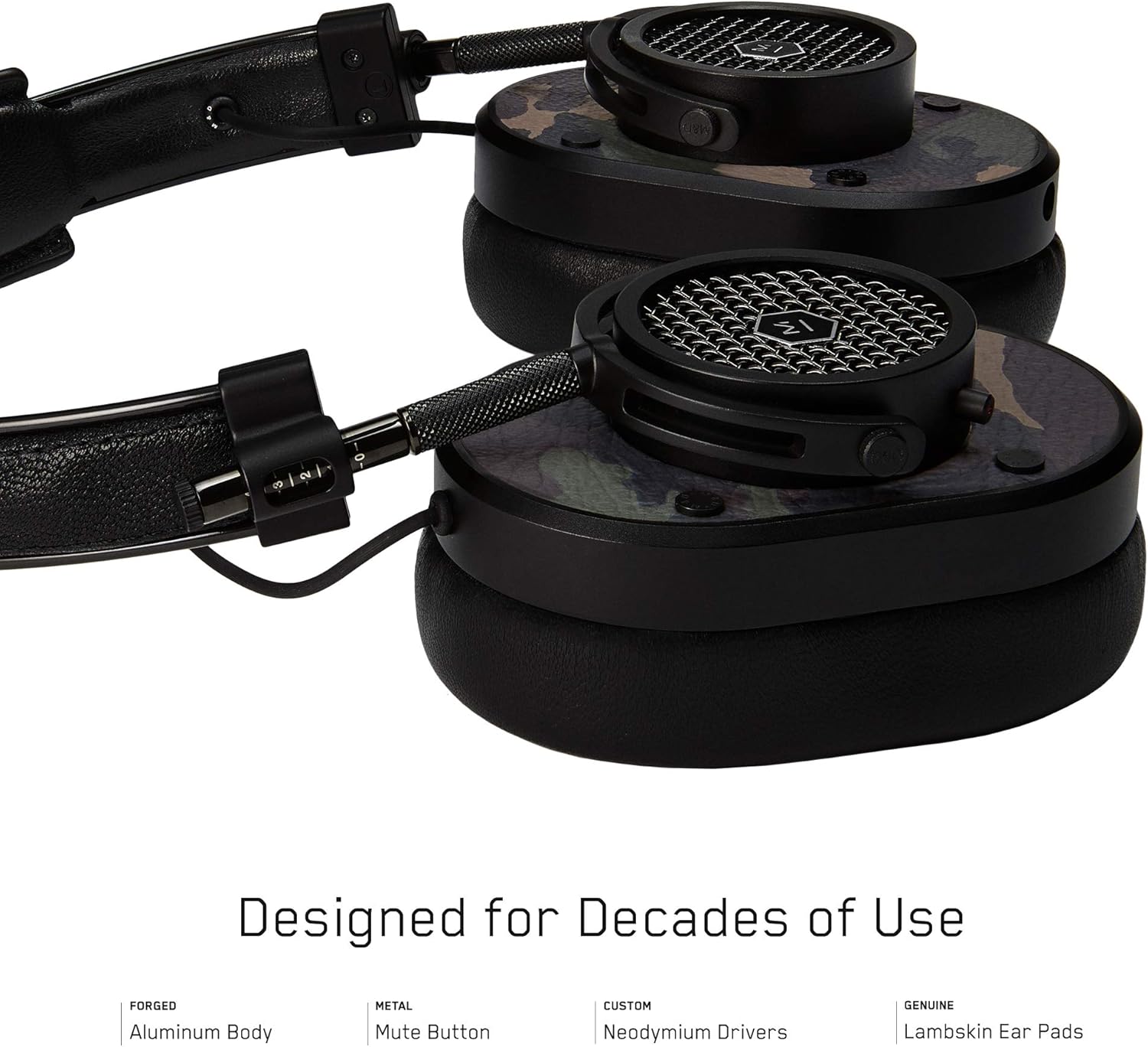
Слика 2: Детаљно view of the MH40 headphone earcups, highlighting the lambskin ear pads, metal grille, and adjustable hinge.
Сетуп
1. Подешавање уклапања
- Gently extend or retract the metal arms on each side of the headband to adjust the height.
- Поставите слушалице тако да потпуно покривају ваше уши, осигуравајући удобно и сигурно приањање.
- The lambskin ear pads are designed to conform to your head shape for optimal sound isolation and comfort.
2. Жична веза
- Locate the audio input port on the left earcup.
- Insert one end of the provided audio cable into the headphone's audio input.
- Connect the other end of the audio cable to your audio device's 3.5mm jack.
3. Упаривање путем Bluetooth-а (бежична веза)
The MH40 headphones support Bluetooth connectivity for wireless audio. Ensure the headphones are charged before pairing.
- Укључено: Press and hold the power button (usually located on one of the earcups) until the indicator light flashes.
- Режим упаривања: Continue holding the power button or press a dedicated Bluetooth pairing button (if available) until the indicator light flashes rapidly, indicating pairing mode.
- Веза уређаја: On your audio device (smartphone, tablet, computer), navigate to Bluetooth settings and select "MH40" from the list of available devices.
- Потврда: The indicator light on the headphones will turn solid blue or green once successfully paired.
Напомена: Домет Bluetooth-а је приближно 10 метара (33 стопе).
Упутство за употребу
Аудио репродукција
- Пусти/паузирај: Press the multi-function button (often on the in-line microphone or earcup) once.
- Следећа нумера: Press the multi-function button twice rapidly.
- Претходни запис: Press the multi-function button three times rapidly.
- Контрола јачине звука: Use the volume up/down buttons on the in-line microphone or dedicated earcup controls.
Управљање позивима
- Одговори/заврши позив: Притисните вишенаменско дугме једном.
- Одбиј позив: Притисните и држите вишефункционално дугме приближно 2 секунде.
- Искључивање микрофона: The MH40 features a dedicated mute button, typically located on the earcup or in-line control. Press to mute/unmute during a call.
Одржавање
- Чишћење: Use a soft, dry cloth to wipe the headphones. For leather parts, use a specialized leather cleaner if necessary. Avoid harsh chemicals or abrasive materials.
- Складиштење: When not in use, store the headphones in the provided canvas carrying case to protect them from dust and scratches.
- Нега каблова: Handle cables gently. Avoid sharp bends or excessive pulling to prevent damage. The retractable cable feature helps manage cable length.
- Јастучићи за уши: The magnetic ear pads are removable for cleaning or replacement. Gently pull them off and reattach by aligning the magnets.
Решавање проблема
Нема звука
- Виред: Ensure the audio cable is securely connected to both the headphones and the audio source. Check the volume level on both the headphones and the source device.
- Блуетоотх: Verify that the headphones are powered on and successfully paired with your device. Check the volume levels. Try re-pairing the headphones.
Упаривање није могуће преко Bluetooth-а
- Ensure the headphones are in pairing mode (rapidly flashing indicator light).
- Уверите се да је Bluetooth омогућен на вашем изворном уређају.
- Приближите слушалице свом уређају (у кругу од 10 метара).
- Turn off and on both the headphones and your device, then attempt pairing again.
- If previously paired, try "forgetting" the device on your source and re-pairing.
Микрофон не ради
- Проверите да ли је дугме за искључивање микрофона активирано.
- Ensure the audio cable with the in-line microphone is fully inserted.
- Verify microphone input settings on your connected device.
Спецификације
| Назив модела | МХ40 |
| Технологија повезивања | Жичани, Блуетоотх |
| Бежична комуникациона технологија | Блуетоотх |
| Материјал | Copper (components), Lambskin (ear pads), Canvas (carrying case) |
| Тип контроле | Call Control, Touch |
| Цабле Феатуре | Ретрацтабле |
| Тежина артикла | 0.36 килограма (12.7 унци) |
| Тип аудио драјвера | Динамички возач |
| Блуетоотх домет | 10 метара |
| Облик слушалице | Преко уха |
| Посебне карактеристике | Carrying case included, Lightweight, Microphone Included, Noise Isolation, Wireless |
| Димензије производа | 7.48 к 6.3 к 2.76 инча |
| Произвођач | MASTER & DYNAMIC |
| Боја | Black Metal / Camo Leather |
| Постављање уха | Преко уха |
| Контрола буке | Звучна изолација |
| УПЦ | 858901007099 |
Гаранција и подршка
For detailed warranty information and customer support, please refer to the official MASTER & DYNAMIC webсајт или директно контактирајте њихову корисничку службу. Сачувајте доказ о куповини за потребе гаранције.
Подршка на мрежи: www.masterdynamic.com/support (Example link, actual link may vary)