
1. Увод
This manual provides instructions for the safe and efficient use of your Woods 50012WD 2-Outlet Outdoor 24-Hour Heavy Duty Mechanical Timer. This device is designed to automate the on/off cycles of outdoor electrical devices, such as seasonal lighting or pond pumps, for convenience and energy saving.
The timer features two grounded outlets and a durable, weather-resistant housing suitable for outdoor use. Please read this manual thoroughly before installation and operation.
2. Важне информације о безбедности
УПОЗОРЕЊЕ: Да бисте смањили ризик од пожара, струјног удара или телесних повреда, увек се придржавајте ових основних мера безбедности:
- Do not immerse the timer in water or expose it to direct water spray. It is weather-resistant, not waterproof.
- Ensure the timer is plugged into a Ground Fault Circuit Interrupter (GFCI) protected outlet when used outdoors.
- Do not exceed the electrical ratings of the timer: 125V, 15A, 1875W, 60Hz.
- Увек искључите тајмер из извора напајања пре чишћења или било каквог одржавања.
- Do not use with extension cords that are not rated for outdoor use.
- Keep children away from the timer and connected devices.
- Do not disassemble the timer. There are no user-serviceable parts inside.
- Ensure all connections are secure and dry before applying power.
3. Садржај пакета
- Woods 50012WD Outdoor Mechanical Timer
- Упутство за употребу (овај документ)
4. Производ је готовview
The Woods 50012WD timer features a rotating dial with segments for setting ON/OFF times, a manual override switch, and two grounded outlets.
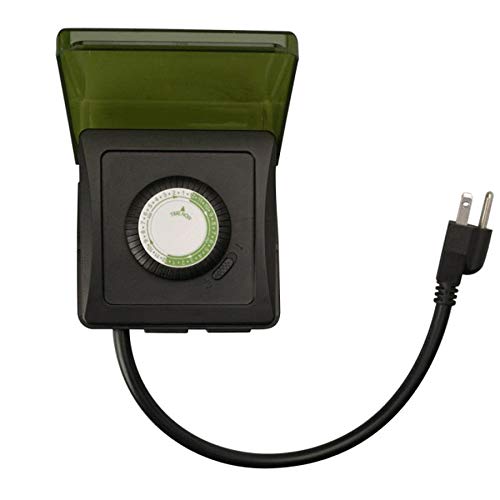
Слика 1: Предња страна view of the Woods 50012WD Outdoor Mechanical Timer. The timer is black with a green central dial and a short power cord extending from the bottom. Two grounded outlets are visible on the side.
5. Подешавање и инсталација
- Изаберите локацију: Select a suitable outdoor location that is protected from direct heavy rain and snow, preferably under an overhang or in a sheltered area. Ensure the timer is placed on a stable surface or mounted securely.
- Укључите тајмер: Insert the timer's power cord into a 125V, 60Hz GFCI-protected outdoor electrical outlet.
- Повежите уређаје: Plug the devices you wish to control into the two grounded outlets on the timer. Ensure the total wattagснага повезаних уређаја не прелази 1875W.
6. Упутство за употребу
The Woods 50012WD is a 24-hour mechanical timer. Its operation relies on setting the current time and then pushing down segments on the dial to define ON periods.
6.1 Подешавање тренутног времена
- Locate the rotating dial on the front of the timer. The dial is marked with 24 hours (1-24 or AM/PM indicators).
- Rotate the entire dial clockwise until the current time aligns with the "TIME NOW" arrow or indicator on the timer's housing. For example, if it's 6 PM, align the "18" (or "6 PM") mark with the indicator.
6.2 Подешавање времена укључивања/искључивања
The dial is surrounded by small segments. Each segment typically represents a 15 or 30-minute interval. Pushing a segment доле activates the connected device during that time interval. Pulling a segment up deactivates the device.
- Identify the time periods when you want your connected devices to be ON.
- For each desired ON period, push the corresponding segments on the dial доле.
- For all other times, ensure the segments are pulled up.
- The timer will now cycle ON and OFF according to your settings every 24 hours.
6.3 Прекидач за ручно управљање
The timer includes a manual override switch, usually located near the dial. This switch allows you to bypass the programmed settings.
- Тајмер УКЉУЧЕН: The timer will operate according to the programmed ON/OFF segments.
- Увек: The connected devices will remain ON, overriding any programmed OFF times.
- Увек ИСКЉУЧЕНО: The connected devices will remain OFF, overriding any programmed ON times.
Refer to the specific markings on your timer for the exact positions of the manual override switch.
7. Одржавање
- Чишћење: Искључите тајмер из утичнице пре чишћења. Обришите спољашњост меком,amp тканина. Немојте користити абразивна средства за чишћење или раствараче.
- Складиштење: Ако тајмер складиштите дуже време, уверите се да је чист и сув. Чувати на хладном и сувом месту, заштићено од директне сунчеве светлости.
- инспекција: Periodically inspect the timer and its cord for any signs of damage, such as cracks, fraying, or discoloration. If damage is found, discontinue use and replace the unit.
КСНУМКС. Решавање проблема
| Проблем | Могући узрок | Решење |
|---|---|---|
| Device does not turn ON/OFF at programmed times. |
|
|
| Timer is not working at all. |
|
|
9. Спецификације
- Модел: 50012ВД
- Тип: Heavy Duty Outdoor Mechanical Timer
- Продајна места: 2 уземљених утичница
- Волtagе Оцена: 125 В
- Ampераге Оцена: 15 А
- Оцена фреквенције: 60 Хз
- Оцена снаге: 1875 В
- Тип тајмера: 24-часовна механичка служба
- Бренд: Woods (Southwire/Coleman Cable)
- УПЦ: 078693500121
10. Гаранција и подршка
Woods products are manufactured to high-quality standards. For warranty information or technical support, please refer to the official Woods (Southwire/Coleman Cable) webсајту или се обратите њиховом одељењу за корисничку подршку.
Сачувајте доказ о куповини за гаранцијске захтеве.
Контакт информације: For the most up-to-date support information, please visit the Woods Store on Amazon or the official manufacturer's webсајту.