
1. Производ је готовview
The KAYSUDA USB Speakerphone SP300U is a portable audio device designed for clear communication in various settings, including conference calls, online meetings, and VoIP calls. It integrates both a speaker and a 360-degree omnidirectional microphone, featuring echo cancellation and noise reduction for optimal audio quality.
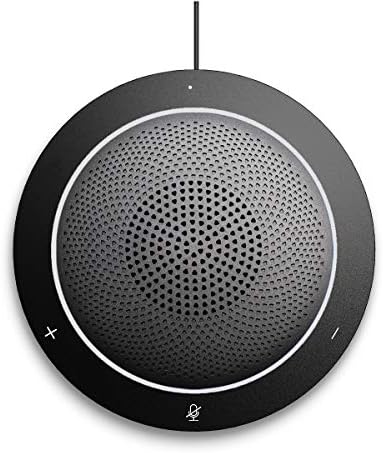
Слика 1.1: Предња страна view of the KAYSUDA USB Speakerphone SP300U, showing the speaker grille and control buttons.
Кључне карактеристике:
- 360° Omnidirectional Microphone: Captures sound from all directions, ideal for group discussions.
- Потпуно дуплексни звук: Allows simultaneous speaking and listening without interruption.
- Echo Cancellation & Noise Reduction: Enhances clarity by minimizing background noise and acoustic echo.
- Повезивање „укључи и играј“: No drivers or external power supply needed; connects via USB.
- 3.5 мм прикључак за слушалице: За приватно слушање.
- Широка компатибилност: Works with Windows, Microsoft Communicator, Microsoft Lync, and PS4.
2. Упутства за подешавање
The KAYSUDA USB Speakerphone SP300U is designed for simple plug-and-play operation. Follow these steps to set up your device:
- Повежите се са рачунаром: Locate an available USB port on your computer (PC or laptop). It is recommended to use a USB 3.0 port for optimal performance.
- Прикључак: Insert the USB connector of the speakerphone's cable into the USB port on your computer.
- Аутоматско препознавање: Your operating system (Windows) should automatically detect and install the necessary drivers. No additional software installation is required.
- Select as Audio Device: In your communication software (e.g., Skype, Microsoft Teams, Zoom) or operating system sound settings, select "KAYSUDA SP300U" (or similar) as your default microphone and speaker device.

Image 2.1: The speakerphone connected to a laptop, demonstrating its use in a meeting environment.
For private listening, connect a 3.5mm earphone or headphone to the earphone port located on the side of the speakerphone.
3. Упутство за употребу
The KAYSUDA USB Speakerphone SP300U features intuitive controls for managing your calls and audio.
Контроле:
- Јачина звука (+): Increases speaker volume.
- Утишавање (-): Decreases speaker volume.
- Mute Microphone (Microphone Icon): Toggles the microphone on/off. An indicator light typically shows the microphone status.

Слика 3.1: Готовоview of the speakerphone's features, including its 360° omnidirectional microphone and noise cancellation capabilities.
Аудио Феатурес:
- Вишесмерни микрофон: The 360-degree microphone ensures that voices from all participants around the speakerphone are clearly captured. Position the speakerphone centrally in your meeting space for best results.
- Echo Cancellation and Noise Reduction: These features work automatically to provide clear audio by reducing ambient noise and preventing echo during calls.
- Privacy Headphone Jack: Use the 3.5mm port to connect headphones for private conversations or to avoid disturbing others.
4. Одржавање
To ensure the longevity and optimal performance of your KAYSUDA USB Speakerphone SP300U, follow these simple maintenance guidelines:
- Чишћење: Use a soft, dry cloth to wipe the exterior of the speakerphone. Avoid using abrasive cleaners, solvents, or harsh chemicals, as these can damage the surface.
- Складиштење: When not in use, store the speakerphone in a cool, dry place, away from direct sunlight and extreme temperatures. The included pouch can be used for protection during transport.
- Нега каблова: Avoid bending or twisting the USB cable excessively. Do not pull the cable to disconnect the device; always grasp the plug.
- Услови животне средине: Do not expose the device to water, moisture, or high humidity. Keep it away from dust and debris.

Image 4.1: The speakerphone, its USB cable, and the protective carrying pouch.
КСНУМКС. Решавање проблема
If you encounter issues with your KAYSUDA USB Speakerphone SP300U, refer to the following common solutions:
| Проблем | Могући узрок / решење |
|---|---|
| No Sound from Speakerphone |
|
| Microphone Not Picking Up Voice |
|
| Echo or Poor Audio Quality |
|
| Уређај није препознат |
|
Ако проблем и даље постоји након што сте испробали ове кораке, обратите се корисничкој подршци за даљу помоћ.
6. Спецификације
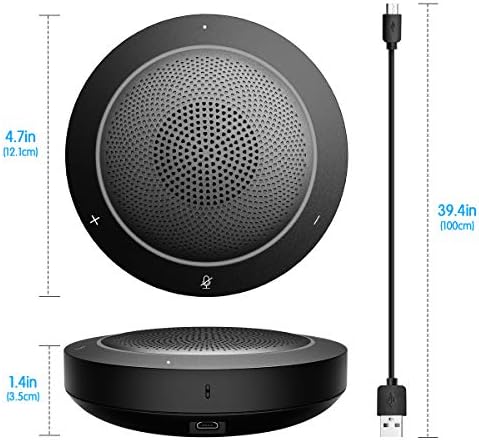
Image 6.1: Physical dimensions of the speakerphone and its integrated USB cable length.
| Феатуре | Детаљ |
|---|---|
| Модел | СП300У |
| Бранд | КАИСУДА |
| Технологија повезивања | USB, Auxiliary (3.5mm Jack) |
| Тип микрофона | Омнидирецтионал |
| Хардверска платформа | PC |
| Димензије производа (Д к Ш к В) | 4.76 к 4.76 к 1.38 инча (12.1 к 12.1 к 3.5 цм) |
| Тежина артикла | 7.1 унци (200 грама) |
| Однос сигнала и шума | 58 дБ |
| Аудио Осетљивост | 65 децибела |
| Материјал | Акрилонитрил бутадиен стирен |
| Извор напајања | DC (USB Powered) |
| Укључене компоненте | Speakerphone, USB Cable |
7. Гаранција и подршка
KAYSUDA products are manufactured with quality and performance in mind. For any questions, technical support, or warranty claims, please contact KAYSUDA customer service.
Please refer to the product packaging or the official KAYSUDA webсајт за најновије информације о гаранцији и контакт податке.
When contacting support, please have your product model (SP300U) and purchase information readily available.