
1. Увод
Thank you for choosing the Car and Driver CDC-632 Dash Cam. This device is designed to record your journeys in high definition, providing security and peace of mind on the road. It features 2K Ultra HD video recording, built-in Wi-Fi, GPS tracking, and app connectivity for convenient operation and file менаџмент.
2. Садржај пакета
Молимо вас да означите поље за следеће ставке:
- Car and Driver CDC-632 Dash Cam
- Windshield Suction Mount
- Ауто адаптер
- 8GB Micro-SD Card

Image: The retail packaging for the Car and Driver CDC-632 Dash Cam, highlighting key features like G-sensor, 1080P Full HD HDR, Wi-Fi, Loop Recording, and GPS Tracking. An 8GB memory card is also indicated as included.
3. Производ је готовview
Familiarize yourself with the components of your dash cam.

Image: The Car and Driver CDC-632 Dash Cam attached to its suction mount. The 2.4-inch LCD screen is visible, displaying a road view with recording indicators, resolution (1920x1080 P60), and current date/time.
Фронт View

Слика: Крупни план предње стране view of the Car and Driver CDC-632 Dash Cam, highlighting the central camera lens and ventilation grilles on the sides.
Позади View (ЛЦД екран)

Слика: Задњи део view of the Car and Driver CDC-632 Dash Cam, featuring the 2.4-inch LCD screen displaying a road scene with HDR indicator, exposure value, and battery status. Control buttons are visible below the screen.
4. Инсталација
4.1 Монтирање камере за аутомобил
- Очистите подручје ветробранског стакла где намеравате да монтирате камеру за аутомобил.
- Причврстите вакуумски носач на камеру на инструмент табли.
- Чврсто притисните вакуумску чашицу уз ветробранско стакло и померите полугу да бисте је учврстили.
- Подесите угао камере да бисте осигурали јасноћу view пута испред.
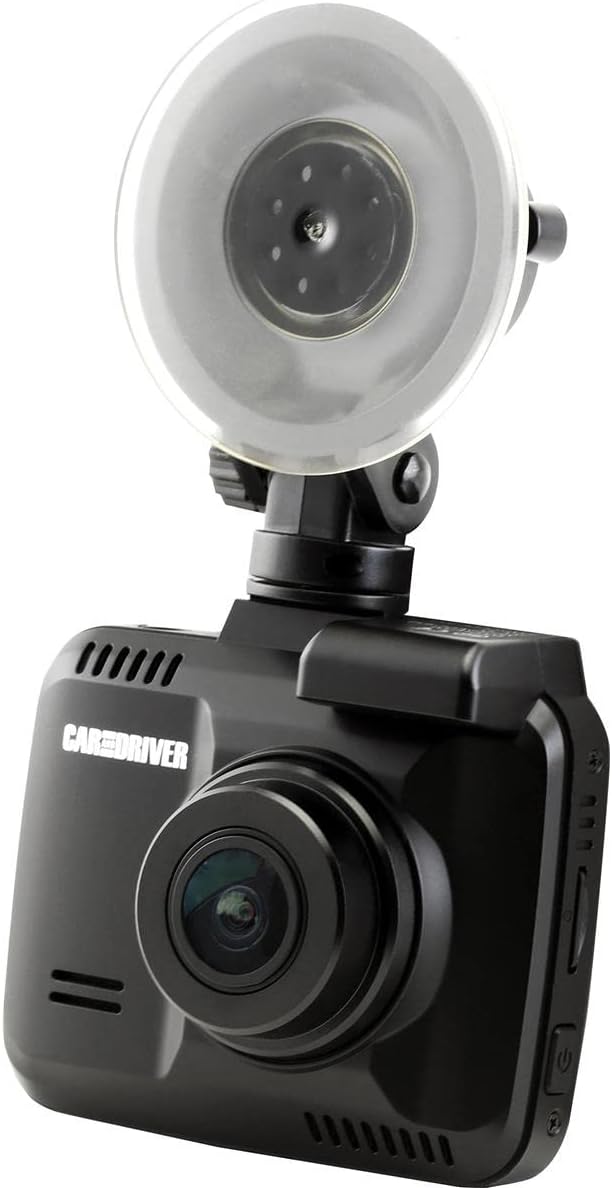
Image: The Car and Driver CDC-632 Dash Cam is shown mounted on a car's windshield using its suction cup. The camera is angled to capture the road ahead, with the power cable connected.
4.2 Напајање уређаја
- Connect the car adapter to the dash cam's power input port.
- Plug the car adapter into your vehicle's 12V power outlet (cigarette lighter socket).
- The dash cam will typically power on automatically when the vehicle's ignition is turned on and begin recording.
5. Почетно подешавање
5.1 Inserting the Micro-SD Card
The dash cam supports Micro-SD cards up to 64GB. An 8GB Micro-SD card is included.
- With the dash cam powered off, locate the Micro-SD card slot on the side of the device.
- Insert the Micro-SD card with the gold contacts facing the back of the dash cam until it clicks into place.
- Да бисте је уклонили, нежно гурните картицу унутра док не искочи.
5.2 Formatting the Micro-SD Card
It is recommended to format the Micro-SD card before first use and periodically thereafter to ensure optimal performance and prevent data corruption.
- Укључите камеру у аутомобилу.
- Navigate to the 'Settings' menu using the control buttons.
- Изаберите „Форматирање SD картице“ и потврдите акцију. Сви подаци на картици ће бити обрисани.
5.3 Подешавања датума и времена
Ensure the correct date and time are set for accurate timestampснимања.
- Access the 'Settings' menu.
- Locate 'Date/Time' settings.
- Adjust the year, month, day, hour, and minute using the navigation buttons.
- Потврдите своје изборе.
6. Основна операција
6.1 Аутоматско снимање
Once powered on, the dash cam will automatically begin recording in a continuous loop. The recording indicator (usually a red dot or icon) will appear on the screen.
6.2 Снимање у петљи
The dash cam records video in segments (e.g., 1, 3, or 5 minutes). When the Micro-SD card is full, the oldest unlocked fileбиће преписани новим снимцима. Ово обезбеђује континуирано снимање без ручне интервенције.
6.3 G-Sensor Protection
The built-in G-sensor detects sudden impacts or collisions. When triggered, the current video segment will be automatically locked and saved to a protected folder, preventing it from being overwritten by loop recording. The sensitivity of the G-sensor can usually be adjusted in the settings menu.
6.4 NiteVision Recording
The dash cam features NiteVision technology with intelligent IR for enhanced recording clarity in low-light conditions or at night.
7. Напредне функције
7.1 Wi-Fi Connectivity and App Control
The dash cam features 802.11 B/G/N 2.4GHZ Wi-Fi connectivity, allowing you to connect your smartphone via the Car and Driver App.
- Download the Car and Driver App from your smartphone's app store.
- Enable Wi-Fi on your dash cam through the settings menu.
- На паметном телефону се повежите са Wi-Fi мрежом камере за аутомобил (SSID и лозинка се обично приказују на екрану камере за аутомобил).
- Open the Car and Driver App to access live view, playback recordings, download fileи даљински подесите подешавања.
7.2 GPS праћење
The built-in GPS module accurately records your driving location and speed. This data can be viewed during video playback using the dedicated Car and Driver App or compatible desktop software, providing crucial information for incident analysis.
8. Репродукција и File Менаџмент
8.1 On-Device Playback
- Stop recording (if active).
- Enter playback mode via the menu buttons.
- Browse through recorded videos. Locked files are usually in a separate folder.
- Select a video to play it on the 2.4-inch LCD screen.
8.2 App Playback and Download
Using the Car and Driver App, you can wirelessly view, download, and manage recorded videos on your smartphone. This is the most convenient method for accessing files.
8.3 Репродукција рачунара
You can also remove the Micro-SD card and insert it into a computer's card reader to access files directly. Dedicated player software may be required to view GPS data alongside the video.
9. Одржавање
9.1 Чишћење камере за аутомобил
- Ensure the device is powered off and disconnected from power.
- Use a soft, dry cloth to wipe the dash cam body.
- За сочиво користите специјализовану крпу и раствор за чишћење сочива како бисте избегли огреботине.
- Не користите јаке хемикалије или абразивна средства за чишћење.
9.2 Micro-SD Card Care
- Periodically format the Micro-SD card (monthly is recommended) to maintain optimal performance and prevent file грешке.
- Use high-quality, reputable brand Micro-SD cards designed for dash cam use (Class 10 or higher).
КСНУМКС. Решавање проблема
- Камера у аутомобилу се не укључује: Ensure the car adapter is securely plugged into both the dash cam and the vehicle's 12V power outlet. Check if the vehicle's power outlet is functional.
- Recording stops or freezes: Format the Micro-SD card. Ensure you are using a high-speed (Class 10 or higher) Micro-SD card. Try a different Micro-SD card.
- Лош квалитет видеа: Очистите објектив камере. Уверите се да је заштитна фолија уклоњена са објектива. Проверите подешавања резолуције видеа.
- Проблеми са Ви-Фи везом: Ensure Wi-Fi is enabled on the dash cam. Restart both the dash cam and your smartphone. Make sure you are within close proximity to the dash cam.
- ГПС не ради: Уверите се да камера за аутомобил има јасан view of the sky. It may take a few minutes for the GPS signal to be acquired after powering on.
- Дугмад не реагују: Try resetting the device (if a reset button is available, use a thin object to press it).
11. Спецификације
| Феатуре | Детаљ |
|---|---|
| Назив модела | Ултра ХД камера за аутомобил |
| Број модела | ЦДЦ-632 |
| Резолуција снимања видео записа | 2K |
| Поље View | 130 степени |
| Величина екрана | 2.4 инча |
| Технологија повезивања | Wi-Fi (802.11 B/G/N 2.4GHZ) |
| Посебне карактеристике | Built-In WiFi, Night Vision (NiteVision), Built-in G-sensor, GPS Tracking |
| Тип монтаже | Усисни носач |
| Тип флеш меморије | MicroSD (до 64GB) |
| Фраме Рате | 30 ФПС |
| Контролни метод | Touch (via physical buttons) |
| Тежина артикла | 10.4 унци |
12. Информације о гаранцији
This Car and Driver CDC-632 Dash Cam comes with a 1-годишња гаранција произвођача from the date of purchase. Please retain your proof of purchase for warranty claims. The warranty covers defects in materials and workmanship under normal use. It does not cover damage caused by misuse, accidents, unauthorized modifications, or natural disasters.
13. Корисничка подршка
If you encounter any issues or have questions not covered in this manual, please contact Car and Driver customer support. Refer to the product packaging or the official Car and Driver webсајт за контакт детаље.