
1. Увод
Хвала вам на куповиниasing the Capello Play it All Bluetooth Wireless Home Stereo Speaker CI302. This device offers versatile audio playback options including Bluetooth wireless streaming, CD player functionality, and FM digital radio. This manual provides detailed instructions for setup, operation, maintenance, and troubleshooting to ensure optimal performance and longevity of your speaker system.
2. Важне информације о безбедности
- Прочитајте сва упутства пре употребе уређаја.
- Сачувајте ово упутство за будућу употребу.
- Не излажите јединицу киши или влази да бисте спречили опасност од пожара или удара.
- Обезбедите одговарајућу вентилацију; не блокирајте ниједан вентилациони отвор.
- Поставите јединицу на стабилну, равну површину.
- Користите само додатке/прибор које је навео произвођач.
- Искључите јединицу из струје током олуја са грмљавином или када се не користи дуже време.
- Све сервисирање препустите квалификованом сервисном особљу.
3. Садржај пакета
Молимо вас да проверите да ли су све ставке присутне:
- Capello Play it All Bluetooth Wireless Home Stereo Speaker CI302
- Ремоте Цонтрол
- АЦ адаптер
- Кориснички приручник (овај документ)
4. Производ је готовview
Familiarize yourself with the main components and controls of your Capello Play it All speaker.
Фронт View

Слика 4.1: Фронт view of the Capello Play it All speaker, showing the speaker grille, digital clock display, and subtle branding.
Контроле горње плоче

Слика 4.2: Top panel of the Capello Play it All speaker, illustrating the CD compartment, 'capello' logo, and various control buttons including PRESET, MODE, PAIRING, PROGRAM/CLOCK SET, SKIP, PLAY/PAUSE, STOP, REPEAT, and VOLUME.
- УНАПРЕД ПОДЕСОВАНО +/-: Navigate through saved FM radio stations.
- НАЧИН: Switch between Bluetooth, CD, FM Radio, and Line-In modes.
- ПАРЕЊЕ: Покрените режим упаривања путем Bluetooth-а.
- PROGRAM/CLOCK SET: Program CD tracks or set the clock.
- SKIP ◀◀ / ▶▶: Skip tracks on CD or adjust FM frequency.
- PLAY/PAUSE ▶▶: Репродукција или паузирање репродукције CD-а.
- STOP ■: Stop CD playback.
- ПОНАВЉАЊЕ: Repeat current track or all tracks on CD.
- ВОЛ +/-: Подесите ниво јачине звука.
- ОТВОРИ/ЗАТВОРИ: Отворите или затворите одељак за ЦД.
- ПРИЧЕКАТИ: Power on/off the unit.
Rear Panel (Typical)
The rear panel typically includes the AC power input, FM antenna connection, and Line-In jack.
5. Подешавање
5.1 Прикључак за напајање
- Connect the AC power adapter to the DC IN jack on the rear of the speaker.
- Укључите други крај адаптера у стандардну зидну утичницу.
- The unit will enter standby mode, and the digital clock display will illuminate.
5.2 FM Antenna Setup
For optimal FM radio reception, extend the FM wire antenna fully and position it for the best signal. Avoid placing it near other electronic devices that may cause interference.
5.3 Подешавање сата
- У пасивном режиму притисните и држите PROGRAM/CLOCK SET дугме.
- The hour digits will begin to flash. Use the SKIP ◀◀ / ▶▶ дугмад за подешавање сата.
- Притисните PROGRAM/CLOCK SET поново да потврдите сат.
- The minute digits will flash. Use the SKIP ◀◀ / ▶▶ дугмад за подешавање минута.
- Притисните PROGRAM/CLOCK SET one last time to save the setting.
6. Упутство за употребу
6.1 Укључивање/искључивање и избор режима
- Притисните тастер ПРИЧЕКАТИ button on the unit or the remote control to turn the speaker on or off.
- Притисните тастер МОДЕ button repeatedly to cycle through available modes: Bluetooth, CD, FM Radio, and Line-In.
6.2 Bluetooth Wireless Streaming
- Turn on the speaker and select Bluetooth mode using the МОДЕ button. The display will show 'BT' and flash, indicating it's in pairing mode.
- On your Bluetooth-enabled device (smartphone, tablet, computer), enable Bluetooth and search for available devices.
- Select 'Capello CI302' (or similar) from the list of devices.
- Once paired, the speaker will emit a confirmation tone, and 'BT' on the display will stop flashing.
- You can now play audio from your device through the speaker. Use your device or the speaker's controls for volume and track navigation.
6.3 Репродукција ЦД-а
- Притисните тастер ОПЕН/ЦЛОСЕ дугме за отварање одељка за CD.
- Carefully place an audio CD (CD, CD-R/-RW) with the label side facing up into the compartment.
- Затворите одељак за CD. Уређај ће прочитати диск.
- If not already in CD mode, press the МОДЕ дугме за избор ЦД режима.
- Притисните тастер ПЛАИ/ПАУСЕ дугме за почетак репродукције.
- Користите SKIP ◀◀ / ▶▶ to skip tracks, СТОП ■ да зауставим, и РЕПЕАТ to cycle through repeat options.
6.4 FM Digital Radio
- Притисните тастер МОДЕ button to select FM radio mode. The current frequency will be displayed.
- Аутоматско скенирање: Притисните и држите ПЛАИ/ПАУСЕ button to automatically scan and save available FM stations as presets.
- Ручно подешавање: Притисните SKIP ◀◀ / ▶▶ briefly to fine-tune the frequency. Press and hold to scan for the next strong station.
- Accessing Presets: Користите УНАПРЕД ПОДЕСОВАНО +/- дугмад за прелазак кроз сачуване станице.
6.5 Line-In Operation
- Connect an audio cable (not included) from the headphone jack or line-out of an external audio device to the ЛИНИЈА У jack on the speaker.
- Притисните тастер МОДЕ button to select Line-In mode.
- Play audio from your connected device. Volume can be controlled via the speaker or the external device.
6.6 УСБ пуњење
The speaker features a USB port for charging compatible devices (e.g., smartphones, tablets). Connect your device's USB charging cable (not included) to the USB port on the speaker. The speaker does not need to be in a specific mode for USB charging to function.
6.7 Употреба даљинског управљача
The included remote control provides convenient access to all functions. Ensure the remote has working batteries and is pointed towards the front of the speaker.
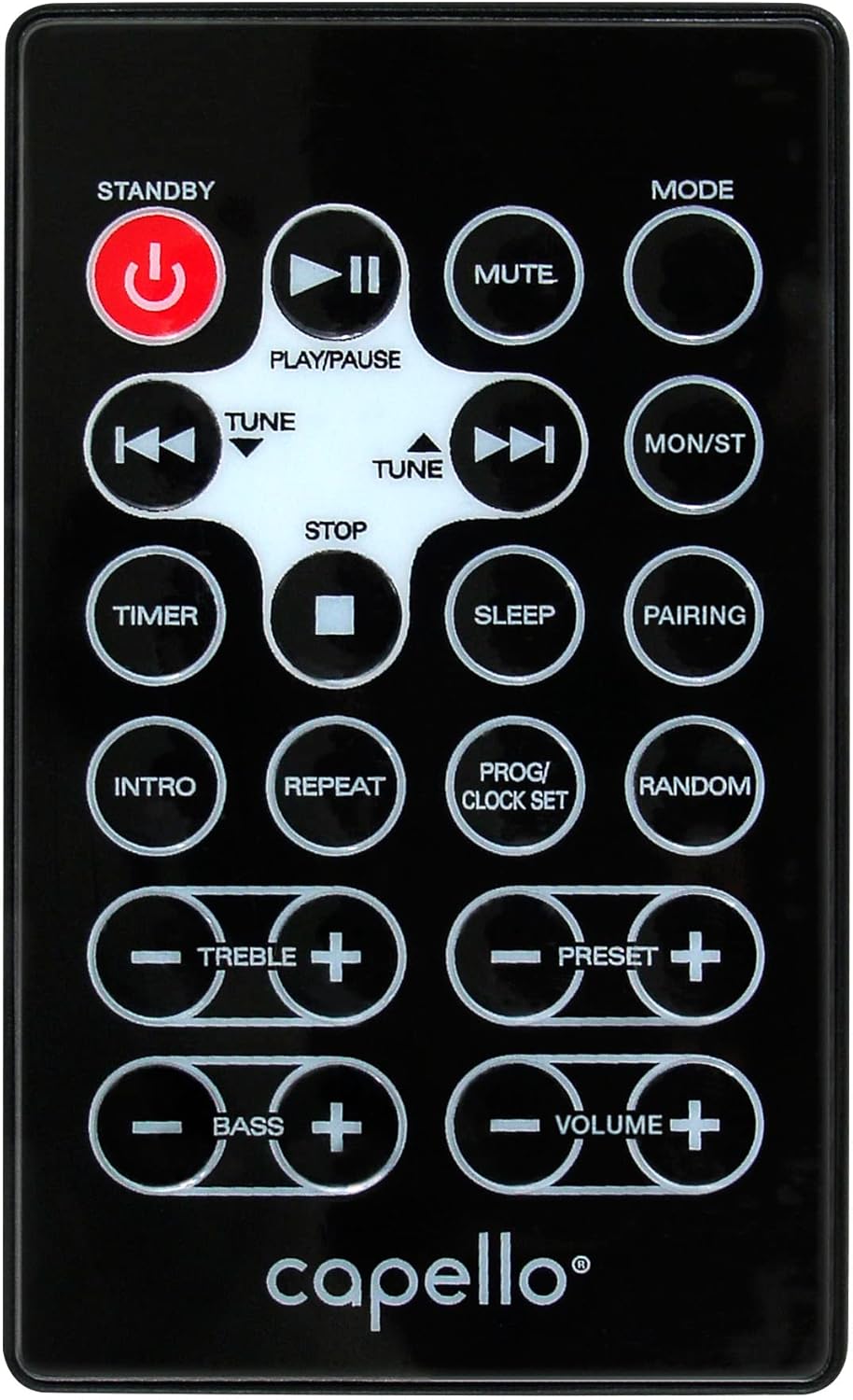
Слика 6.1: Layout of the remote control for the Capello Play it All speaker, showing buttons for Standby, Play/Pause, Mute, Mode, Skip/Tune, Stop, Timer, Sleep, Pairing, Intro, Repeat, Program/Clock Set, Random, Treble, Bass, and Volume controls.
- ПРИЧЕКАТИ: Uključivanje/isključivanje.
- ПЛАИ/ПАУСЕ: Пустите или паузирајте звук.
- МУТЕ: Искључите или укључите звук.
- НАЧИН: Cycle through input modes.
- SKIP/TUNE ◀◀ / ▶▶: Skip tracks or tune radio frequency.
- СТОП: Зауставите репродукцију.
- ТАЈМЕР: Подесите тајмер за спавање.
- СПАВАЊЕ: Activate sleep function.
- ПАРЕЊЕ: Покрените Bluetooth упаривање.
- ИНТРО: Play the first few seconds of each CD track.
- ПОНАВЉАЊЕ: Repeat current track or all tracks.
- PROG/CLOCK SET: Program CD tracks or set clock.
- СЛУЧАЈНО: Репродукујте нумере са CD-а насумичним редоследом.
- ТРЕБЛЕ +/-: Подесите нивое високих тонова.
- БАСС +/-: Подесите нивое баса.
- ВОЛУМЕ +/-: Подесите укупну јачину звука.
7. Одржавање
7.1 Чишћење
- Увек искључите јединицу из утичнице пре чишћења.
- Користите меку, суву крпу за брисање спољашњих површина.
- Не користите абразивна средства за чишћење, воскове или раствараче јер могу оштетити завршну обраду.
- За CD сочиво користите специјализовани диск за чишћење CD сочива.
7.2 Складиштење
If storing the unit for an extended period, unplug it from the power source and store it in a cool, dry place away from direct sunlight and extreme temperatures.
КСНУМКС. Решавање проблема
| Проблем | Могући узрок | Решење |
|---|---|---|
| Нема струје | Кабл за напајање није повезан; утичница није активна. | Уверите се да је кабл за напајање добро прикључен; покушајте са другом утичницом. |
| Нема звука | Volume too low; incorrect mode selected; external device muted. | Increase volume; select correct input mode; check external device volume/mute. |
| CD прескаче или се не репродукује | Dirty or scratched CD; CD inserted incorrectly; dirty CD lens. | Clean or replace CD; insert CD label-side up; use a CD lens cleaner. |
| Блуетоотх упаривање није успело | Device too far; Bluetooth not enabled on device; speaker not in pairing mode. | Move device closer; enable Bluetooth; ensure speaker is in BT pairing mode. |
| Лош ФМ пријем | Антена није испружена; сметње. | Fully extend and reposition FM antenna; move away from other electronics. |
| Даљински управљач не ради | Batteries depleted; obstruction; not pointed at sensor. | Replace batteries; remove obstructions; point remote directly at the unit. |
9. Спецификације
| Феатуре | Спецификација |
|---|---|
| Бранд | Цапелло |
| Број модела | ЦИ302 |
| Технологија повезивања | Блуетоотх |
| Спеакер Типе | Стерео |
| Режим аудио излаза | Стерео |
| Подржани аудио формати | ЦД, МП3 |
| Speakers Nominal Output Power | 10 Ваттс |
| Максимална излазна снага звучника | 10 Ваттс |
| Конфигурација канала за окружујући звук звучника | 2.0 |
| Врста извора напајања | Цордед Елецтриц |
| Компатибилни уређаји | Лаптоп, паметни телефон, таблет |
| Посебне карактеристике | Digital Display, Portable, USB Port |
| Врста материјала | Пластика |
| Тип монтаже | Табле Топ |
| Тежина артикла | 2.57 килограма |
| Димензије пакета | 38.3 к 24.2 к 18.5 цм |
| Батерије укључене | бр |
| Батерије су потребне | бр |
10. Гаранција и подршка
This product is covered by a limited warranty. Please refer to the warranty card included in your package for specific terms and conditions. For technical support or customer service inquiries, please contact Capello customer support through their official webсајт или контакт информације које сте добили уз документацију о куповини.