
1. Увод
Thank you for choosing the Hanwha Techwin Wisenet QND-6020R 2 Megapixel Network Camera. This manual provides essential information for the safe and efficient installation, operation, and maintenance of your new surveillance camera. Please read this manual thoroughly before using the product and retain it for future reference.
2. Безбедносне информације
Придржавајте се следећих мера предострожности како бисте спречили повреде или оштећење производа:
- Извор напајања: Use only the specified power adapter (AC/DC) for this device. Incorrect voltagе може изазвати пожар или струјни удар.
- Инсталација: Ensure the camera is securely mounted to prevent it from falling. Wall mounting is recommended.
- Вода и влага: This camera has an IP65 waterproof rating, meaning it is protected against dust and low-pressure water jets. However, avoid submerging the camera in water or exposing it to high-pressure water.
- Чишћење: Искључите напајање пре чишћења. Користите меку, суву крпу. Не користите течна или аеросолна средства за чишћење.
- Радна температура: Не користите камеру ван њеног наведеног температурног опсега.
- Сервисирање: Не покушавајте сами да сервисирате овај производ. Све сервисирање препустите квалификованом сервисном особљу.
3. Садржај пакета
Проверите да ли су све ставке присутне у пакету:
- Hanwha Techwin Wisenet QND-6020R Network Camera
- Монтажни завртњи и анкери
- Упутство за инсталацију
- Адаптер за напајање (АЦ/ДЦ)
4. Производ је готовview
The Hanwha Techwin Wisenet QND-6020R is a 2-megapixel network dome camera designed for reliable surveillance. It features advanced video compression (H.264, H.265, Motion JPEG), 1080p video capture, and a 3.60 mm lens. Key features include night vision up to 65.62 ft and motion detection capabilities.
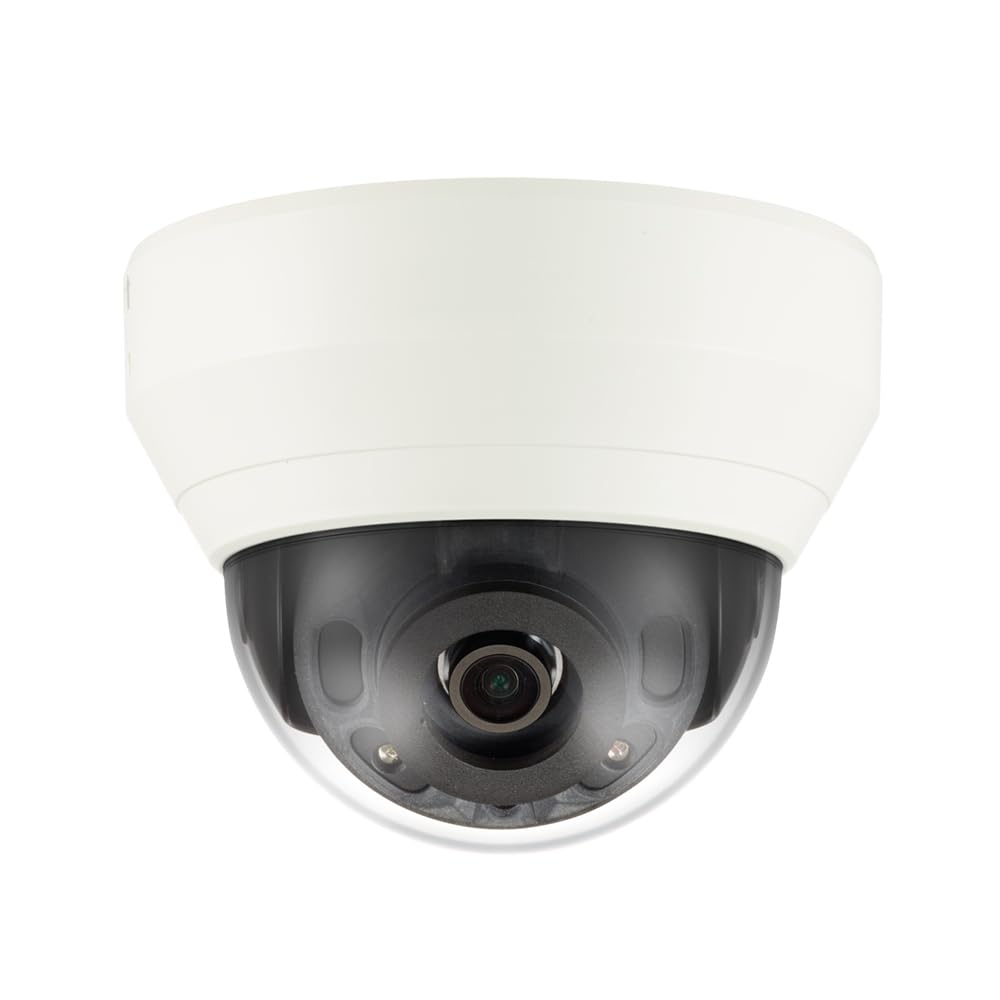
Слика 4.1: Фронт view of the Hanwha Techwin Wisenet QND-6020R 2 Megapixel Network Dome Camera. This image shows the compact dome design, suitable for discreet surveillance installations. The camera features a dark housing and a clear dome covering the lens, indicating its robust construction for various environments.
5. Подешавање
5.1 Монтирање камере
- Изаберите локацију: Choose a suitable wall location for optimal surveillance coverage. Ensure the surface is strong enough to support the camera.
- Избушене рупе: Use the provided mounting template (if applicable) to mark and drill pilot holes for the mounting screws.
- Осигурајте носач: Attach the camera's mounting base to the wall using the screws and anchors.
- Подесите угао: Once mounted, adjust the camera's viewугао по потреби.
5.2 Напајање и мрежна веза
- Прикључак за напајање: Connect the supplied AC/DC power adapter to the camera's power input port and then to a power outlet.
- Мрежна веза (жична): For a wired connection, connect an Ethernet cable from the camera's network port to your network router or switch.
- Мрежна веза (Wi-Fi): For Wi-Fi connectivity, refer to the camera's initial setup wizard or the dedicated network configuration section in the full digital manual for pairing instructions. The camera supports Wi-Fi connectivity.
5.3 Почетна конфигурација
After connecting power and network, the camera will boot up. Access the camera's web interface via a browser using its IP address (refer to your network's DHCP client list or use the manufacturer's discovery tool). Follow the on-screen prompts to set up administrator credentials, network settings, and initial video configurations.
6. Упутство за употребу
6.1 Уживо View и Снимање
Приступите преносу уживо са камере view through its web interface or a compatible network video recorder (NVR) / surveillance software. Configure recording schedules, motion-triggered recording, and continuous recording settings as desired. Video is captured at 1080p resolution in MP4 format.
6.2 Детекција покрета
The camera features a motion sensor. Configure motion detection zones and sensitivity settings within the camera's web interface. You can set up alerts (e.g., email notifications) to be triggered upon motion detection.
6.3 Ноћни вид
The QND-6020R is equipped with night vision capabilities, providing clear images in low-light conditions up to 65.62 ft. The camera automatically switches between day and night modes based on ambient light levels. Night vision is in color.
7. Одржавање
7.1 Чишћење
Regularly clean the camera's lens and housing with a soft, dry cloth to ensure optimal image quality. Avoid using harsh chemicals or abrasive materials.
7.2 Ажурирања фирмвера
Periodically check the Hanwha Techwin webсајт за ажурирања фирмвера. Одржавање фирмвера вашег фотоапарата ажурираним обезбеђује оптималне перформансе, безбедност и приступ новим функцијама.
КСНУМКС. Решавање проблема
- Нема напајања: Ensure the power adapter is securely connected to both the camera and a working power outlet. Verify the outlet has power.
- Нема видеа/офлајн: Check network cable connections (if wired) or Wi-Fi signal strength (if wireless). Verify the camera's IP address and network settings. Restart the camera and your network router.
- Лош квалитет слике: Очистите сочиво камере. Уверите се да нема препрека у видном пољу камере. view. Check lighting conditions.
- Детекција покрета не ради: Review motion detection zone settings and sensitivity in the camera's web interface. Ensure the feature is enabled.
- Не могу приступити Web Интерфејс: Verify the camera's IP address. Ensure your computer is on the same network segment as the camera. Try a different web претраживач.
9. Спецификације
| Феатуре | Опис |
|---|---|
| Број модела | КНД-6020Р |
| Бранд | HANWHA |
| Препоручена употреба | Надзор |
| Посебне карактеристике | Сензор покрета, ноћни вид |
| Извор напајања | АЦ/ДЦ |
| Цоннецтивити Протоцол | Ви-Фи |
| Тип контролера | Х.264 |
| Моунт Типе | Валл Моунт |
| Тип упозорења | Мотион Онли |
| Водоотпорна оцена | ИП65 |
| Бежична технологија | Ви-Фи |
| Технологија фото сензора | ЦМОС |
| Резолуција снимања видео записа | 1080п |
| Формат видео снимања | МП4 |
| Нигхт Висион | Нигхт Цолор |
| Произвођач | Hanwha Group |
10. Гаранција и подршка
This Hanwha Techwin product is covered by a manufacturer's warranty provided by Hanwha Group. For detailed warranty terms and conditions, please refer to the warranty card included with your product or visit the official Hanwha Techwin website. For technical support, troubleshooting assistance, or service inquiries, please contact Hanwha Techwin customer support through their official channels.