
1. Увод
Thank you for choosing the Fifine K670 USB Microphone. This manual provides essential information for setting up, operating, and maintaining your microphone to ensure optimal performance. The K670 is a versatile condenser microphone designed for high-quality audio capture on Mac and Windows computers, suitable for various applications including recording, streaming, podcasting, and voice overs.

The Fifine K670 USB Microphone, shown with its included desktop stand and USB cable, ready for connection.
2. Производ је готовview & Карактеристике
- УСБ повезивање: Plug-and-play operation for seamless connection to Mac and Windows computers.
- Звук високог квалитета: Optimized for clear, rich, and warm audio capture, ideal for various vocal applications.
- Издржљива конструкција: Features an all-metal body for enhanced durability and a premium feel.
- Интегрисане контроле: Includes a convenient volume control knob and a 3.5mm headphone jack for real-time, zero-latency monitoring.
- Подесиво постоље: Comes with a detachable desktop stand that allows for height and angle adjustments, offering flexibility in placement.
- Звучна изолација: Designed to minimize background noise and prevent echo, ensuring crisp and clean audio output.
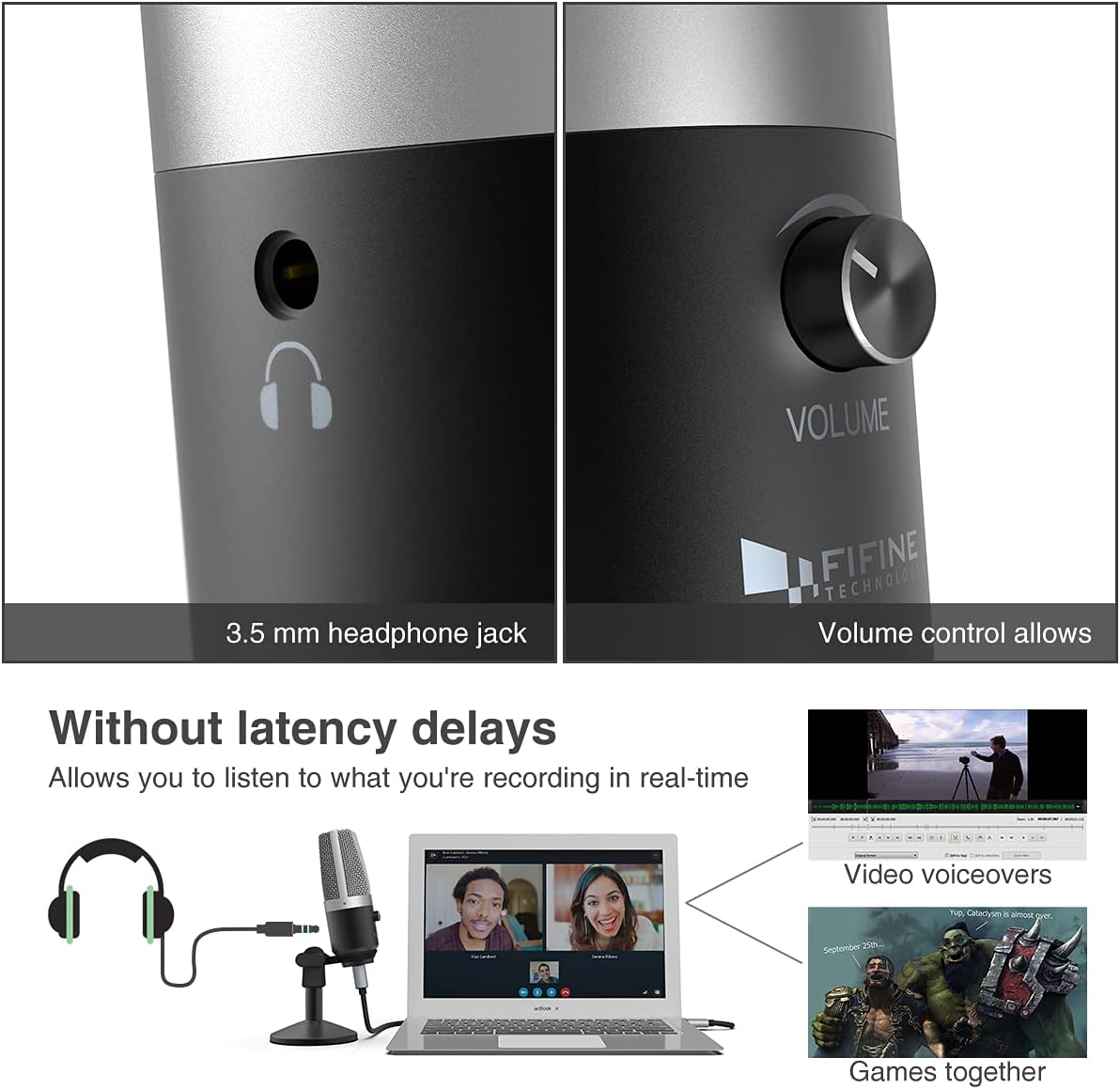
Крупни план view highlighting the 3.5mm headphone jack for real-time monitoring and the integrated volume control knob for easy audio adjustments.
3. Шта је у кутији
Your Fifine K670 USB Microphone package includes the following items:
- Fifine K670 USB Microphone
- Detachable Desktop Stand (base and adjustable pole sections)
- USB Cable (approximately 6.56 ft / 2 meters)
- 3/8" to 5/8" Adapter (for compatibility with various boom arms)
- Упутство за употребу
All components included in the package: the K670 microphone, a 6.56 ft USB cable, a detachable desktop stand, a 3/8" to 5/8" adapter, and the user's guide.
4. Подешавање
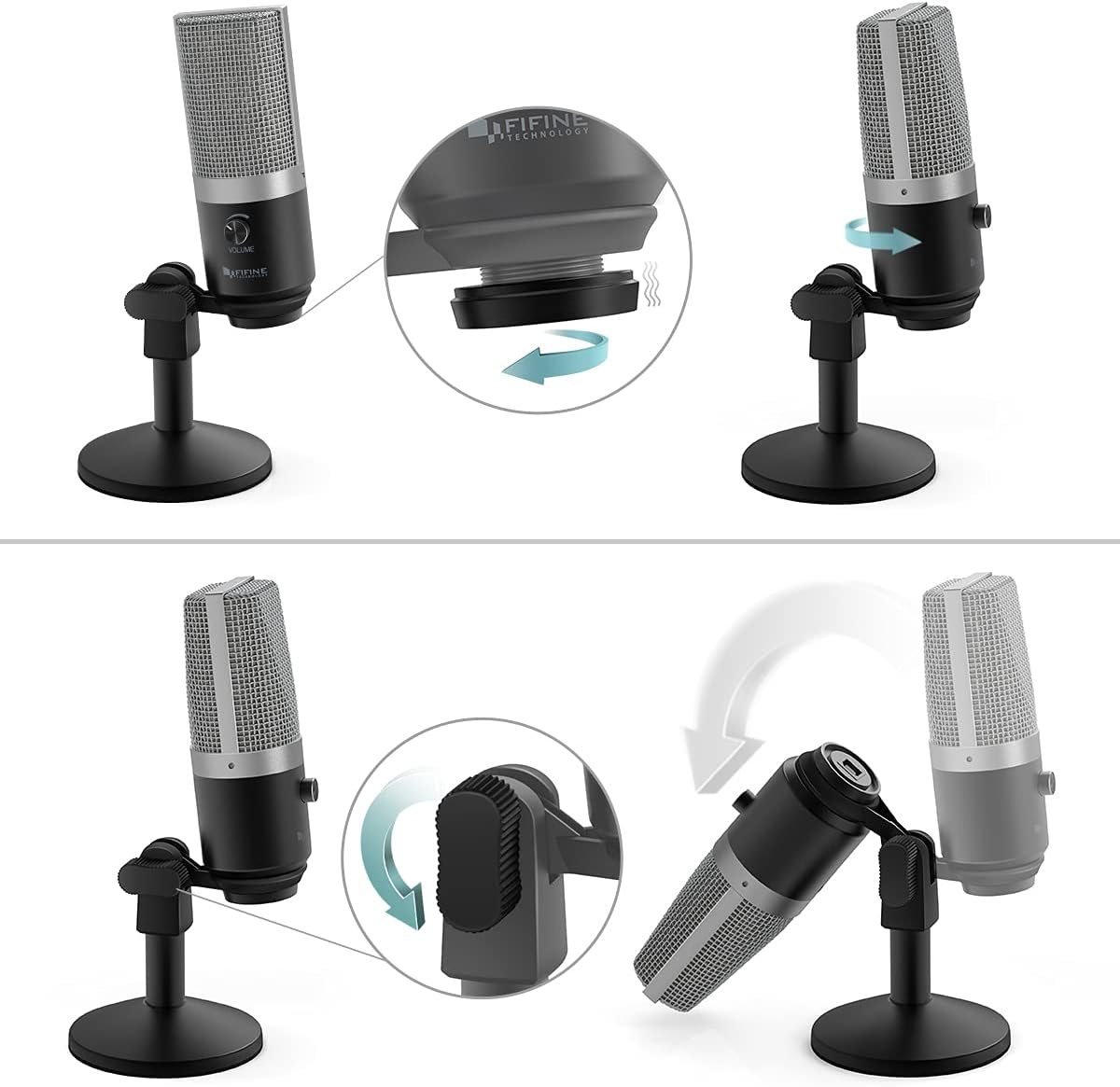
- Саставите штанд: Screw the microphone onto the desktop stand. The stand is designed for stability and can be adjusted for height and angle.
- Повежите УСБ кабл: Plug the USB-C end of the provided cable into the microphone's USB port. Connect the USB-A end to an available USB port on your Mac or Windows computer.
- Плуг-анд-Плаи: The microphone is plug-and-play, meaning no additional drivers are typically required. Your computer should automatically recognize the device.
- Optional: Boom Arm Connection: If using a boom arm, attach the included 3/8" to 5/8" adapter to the microphone, then mount it onto your boom arm.

Visual guide on assembling the microphone stand and adjusting the microphone's angle for optimal positioning.

Детаљно view of the USB port on the microphone, where the included USB cable connects for power and data.
An official product video from Fifine showcasing the K670 USB Microphone, highlighting its ease of use and suitability for PC recording on Mac and Windows computers.
5. Упутство за употребу
- Подесите јачину звука: Use the volume knob on the microphone to control the input gain. Adjust it to an appropriate level to avoid distortion or low audio.
- Праћење у реалном времену: Plug your headphones into the 3.5mm jack on the microphone to monitor your audio in real-time with zero latency. This allows you to hear exactly what is being recorded or transmitted.
- Функција искључивања звука: (If applicable) Refer to the microphone's physical controls for a dedicated mute button, if present.

The Fifine K670 USB Microphone in use for video voiceovers and gaming, demonstrating real-time monitoring capabilities.
6. Компатибилност
The Fifine K670 USB Microphone is compatible with:
- Мац Цомпутерс
- Виндовс рачунари
- Gaming Consoles (check specific console compatibility)
- Лаптопови и рачунари
It is optimized for use with various applications including:
- Recording music and vocals
- Streaming (Twitch, OBS)
- Подцастинг
- Voice Overs
- Online communication (Skype, Zoom, Discord)

The microphone connected to a computer, illustrating its simple plug-and-play functionality for various uses.
7. Одржавање
- Одржавајте микрофон чистим брисањем меком, сувом крпом.
- Избегавајте излагање микрофона екстремним температурама, влази или директној сунчевој светлости.
- Store the microphone in a safe place when not in use to prevent damage.
КСНУМКС. Решавање проблема
- Microphone not picking up sound (Windows 10): If the microphone suddenly stops working after a Windows 10 update, navigate to Settings > Privacy > Microphone and ensure that apps are allowed to access the microphone.
- Нема звука из слушалица: Ensure your headphones are properly plugged into the 3.5mm jack and the volume knob on the microphone is turned up. Check your computer's audio settings to ensure the microphone is selected as the input device.
- Изобличен звук: Lower the microphone's volume knob to prevent clipping. Ensure you are not speaking too close to the microphone.
9. Спецификације
| Феатуре | Спецификација |
|---|---|
| Тежина артикла | 1.96 фунти (890 грама) |
| Импеданса | 2200 Охмс |
| Фактор форме микрофона | Велика дијафрагма |
| Димензије артикла Д к Ш к В | 4.88 к 2.6 к 7.28 инча |
| Извор напајања | УСБ микрофон |
| Материјал | Метал |
| Однос сигнала и шума | 78 дБ |
| Хардверска платформа | Играчка конзола, лаптоп, рачунар |
| Број канала | 1 |
| Фреквенцијски одзив | 15 КХз |
| Број модела артикла | К670 |
| Препоручена употреба за производ | Podcasting, Streaming |
| Технологија повезивања | УСБ |
| Тип конектора | 3.5 mm прикључак, USB |
| Посебна карактеристика | 1-Touch Recording |
| Боја | Сребро |
| Полар Паттерн | Једносмерно |
10. Гаранција и подршка
For warranty information or technical support, please refer to the contact details provided in your product packaging or visit the official Fifine Technology webсајт. Сачувајте рачун за куповину у случају евентуалних рекламација по гаранцији.