
Увод
This manual provides essential instructions for the Jam Audio Out There Active Noise Cancelling On-Ear Bluetooth Headphones. Please read this guide thoroughly to ensure proper use, maintenance, and to maximize your listening experience. These headphones offer active noise cancellation, Bluetooth connectivity, hands-free calling, and a comfortable on-ear design.
Шта је у кутији
Проверите да ли су сви предмети присутни у паковању:
- Out There Headphones
- AUX кабл (3.5 мм)
- УСБ кабл за пуњење
- Кратки водич (погледајте овај приручник за детаљна упутства)

Image: Contents of the Jam Audio Out There headphone package, including the headphones, AUX cable, and USB charging cable.
Производ је завршенview и контроле
Familiarize yourself with the headphone's layout and controls for optimal use.
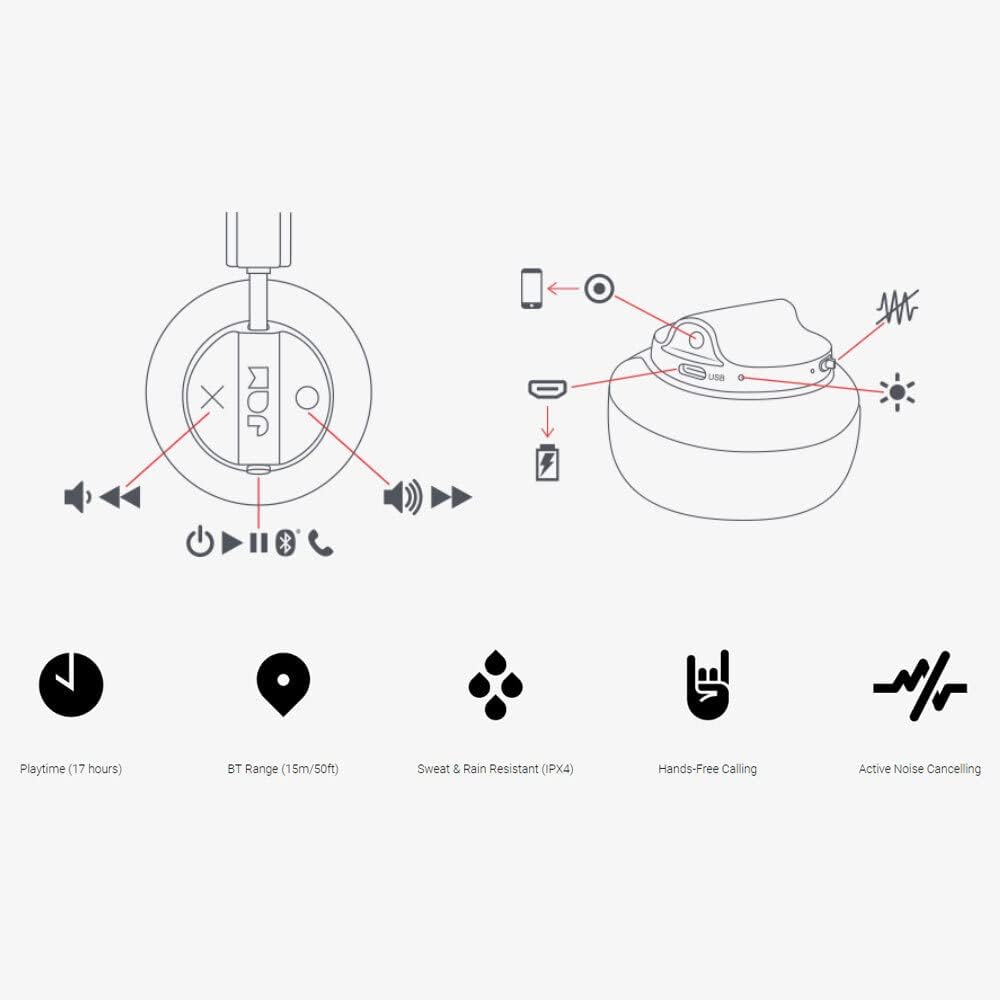
Image: Detailed diagram illustrating the control buttons and ports on the Jam Audio Out There headphones, including power, volume, track navigation, call management, and the charging port.
- Дугме за напајање: Притисните и држите за укључивање/искључивање.
- Појачавање/следећа нумера: Кратак притисак за појачавање јачине звука, дуг притисак за следећу нумеру.
- Смањивање јачине звука/претходна нумера: Кратак притисак за смањивање јачине звука, дуг притисак за претходну нумеру.
- Пусти/Паузирај/Одговори на позив: Single press to play/pause music or answer/end a call.
- Active Noise Cancelling (ANC) Switch: Toggle to activate or deactivate noise cancellation.
- Порт за пуњење: Микро УСБ порт за пуњење.
- AUX-in порт: 3.5 мм прикључак за жично повезивање звука.
Сетуп
1. Пуњење слушалица
Before first use, fully charge your headphones. Connect the provided USB charging cable to the charging port on the headphones and the other end to a USB power source. The LED indicator will show charging status and turn off when fully charged. A full charge takes approximately 2 hours and provides up to 17 hours of playtime.

Image: The Jam Audio Out There headphones provide up to 17 hours of playtime on a single charge.
2. Укључивање/искључивање
- To power on: Press and hold the Power button for 3 seconds. The LED indicator will flash.
- To power off: Press and hold the Power button for 3 seconds. The LED indicator will turn off.
3. Блуетоотх упаривање
- Уверите се да су слушалице искључене.
- Press and hold the Power button for 5 seconds until the LED indicator flashes red and blue, indicating pairing mode.
- На свом уређају (паметном телефону, таблету, рачунару) омогућите Блутут и потражите доступне уређаје.
- Select "JAM Out There" from the list of devices.
- Once paired, the LED indicator on the headphones will turn solid blue.
- The headphones have a Bluetooth range of up to 15 meters (50 feet).

Image: The Jam Audio Out There headphones offer Bluetooth compatibility, allowing a range of up to 15 meters or 50 feet from your connected device.
Упутство за употребу
Репродукција музике
- Пусти/паузирај: Притисните дугме Плаи/Паусе једном.
- Следећа нумера: Дуго притисните дугме за појачавање јачине звука.
- Претходни запис: Дуго притисните дугме за смањивање јачине звука.
- Подешавање јачине звука: Short press the Volume Up or Volume Down buttons.
Хандс-фрее позивање
- Одговори/заврши позив: Притисните дугме Плаи/Паусе једном.
- Одбиј позив: Притисните и држите дугме Плаи/Паусе 2 секунде.
- Позивање: Initiate the call from your connected device. The audio will automatically transfer to the headphones.
- Music will automatically pause during a call and resume after the call ends.
Активно поништавање буке (АНЦ)
- To activate ANC: Slide the ANC switch to the ON position. The ANC indicator light will illuminate.
- To deactivate ANC: Slide the ANC switch to the OFF position. The ANC indicator light will turn off.
- Using ANC can reduce ambient noise, enhancing your listening experience. Note that ANC can be used independently or with Bluetooth audio.
Wired Connection (AUX-in)
For a wired connection, use the provided 3.5mm AUX cable. Plug one end into the headphone's AUX-in port and the other into your audio device. This allows you to continue listening even if the headphone battery is depleted or if Bluetooth is not available.
Одржавање
- Чишћење: Обришите слушалице меком, сувом крпом. Не користите јаке хемикалије или абразивне материјале.
- Складиштење: Чувајте слушалице на хладном и сувом месту, даље од екстремних температура.
- Отпорност на воду: These headphones are IPX4 rated, meaning they are resistant to sweat and light splashes of water. Do not submerge them in water or expose them to heavy rain. Ensure the charging port cover is securely closed when not charging to maintain water resistance.
- Одржавање батерије: Да бисте продужили век трајања батерије, избегавајте често потпуно пражњење слушалица. Редовно их пуните, чак и ако се не користе дуже време.
Решавање проблема
| Проблем | Решење |
|---|---|
| Слушалице се не укључују | Уверите се да су слушалице напуњене. Повежите их са извором напајања помоћу USB кабла. |
| Упаривање преко Bluetooth-а није могуће |
|
| Нема звука или је тиха |
|
| Active Noise Cancelling not working | Ensure the ANC switch is in the ON position and the ANC indicator light is illuminated. |
| Headphones falling apart or breaking | While the product is designed for durability, excessive force or improper handling can cause damage. Handle with care. If issues persist, refer to warranty information. |
Спецификације
- Назив модела: Напољу
- Број модела: HX-HP303BK
- Повезивање: Bluetooth, 3.5 mm Jack (AUX-in)
- Домет бежичне мреже: До 15 метара (50 стопе)
- Трајање батерије: До 17 сати
- Контрола буке: Активно поништавање буке
- Отпорност на воду: IPX4 Rated (Sweat and Rain Resistant)
- Положај уха: Он Еар
- Материјал: Гума, силикон
- Тежина артикла: 5.1 унце (0.32 фунте)
- Димензије производа: 8.58 к 3.19 к 8.66 инча
- Укључене компоненте: Headphones, Charging Cord, AUX Cable
Видео производа прекоview
Погледајте овај званични видео производа за визуелни прегледview of the Jam Audio product line, including the Out There headphones.
Video: An official Jam Audio sizzle video showcasing various products, including the Out There headphones, highlighting their design and features.
Гаранција и подршка
For warranty information, product registration, or technical support, please refer to the official Jam Audio webсајт или контактирајте њихову корисничку службу. Сачувајте доказ о куповини за потребе гаранције.