
1. Увод
This manual provides detailed instructions for the installation, operation, and maintenance of your AVIPAS AV-1081W 10x Full HD HDMI PTZ Camera. This camera is designed for professional video applications, offering high-quality video output, flexible control options, and robust streaming capabilities. Please read this manual thoroughly before using the product to ensure proper setup and optimal performance.
2. Карактеристике производа
- Излаз високе резолуције: Delivers 1920 x 1080 Full HD video with frame rates up to 60fps.
- Оптички зум: Features a 10x optical zoom lens for detailed image capture.
- Широкоугаони објектив: Equipped with a 60.9° wide-angle lens.
- Напредно снимање слика: High Signal-to-Noise Ratio (SNR) CMOS sensor combined with 2D & 3D noise reduction algorithms for clear images.
- Видео компресија: Supports H.264/H.265 video compression for efficient streaming.
- Вишеструки излази: Provides IP streaming and HDMI output.
- Контролни интерфејси: Supports RS-232 (VISCA/Pelco-D/Pelco-P), VISCA over IP, and IR remote control.
- Енергетски ефикасан: Low-power sleep function, consuming less than 0.4W.
- Дизајн: Elegant, compact design with a super quiet and smooth pan/tilt mechanism.
3. Product Components and Diagram
Familiarize yourself with the various parts of your AVIPAS AV-1081W camera.

Слика 3.1: Предња страна View. This image shows the front of the AVIPAS AV-1081W PTZ camera, highlighting the main lens assembly and the AVIPAS branding on the base. The lens features 10x zoom capabilities.
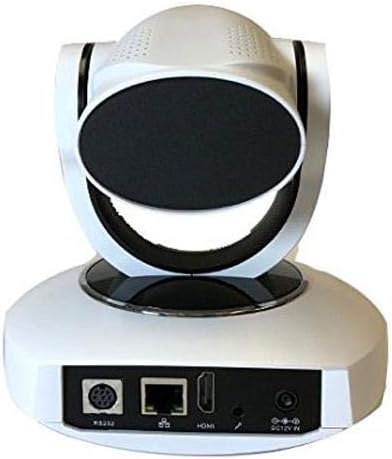
Слика 3.2: Задња страна View са портовима за повезивање. This image displays the rear panel of the AVIPAS AV-1081W camera, detailing the various input and output ports. From left to right, these include the RS-232 control port, Ethernet (IP) port, HDMI output, audio input, and DC 12V power input.
4. Упутства за подешавање
4.1 Распакивање
Carefully remove the camera and all accessories from the packaging. Verify that all components are present.
4.2 Постављање
The AV-1081W is designed for indoor use. It can be placed on a flat surface or mounted to a wall. Ensure the camera is positioned to capture the desired area without obstruction. For wall mounting, use appropriate hardware (not included) to secure the camera firmly.
4.3 Повезивање камере
- Прикључак за напајање: Connect the provided power adapter to the DC 12V IN port on the rear of the camera (refer to Figure 3.2) and then plug it into a power outlet.
- Видео излаз (HDMI): Connect an HDMI cable from the HDMI port on the camera to an HDMI input on your display or video switcher.
- Network Connection (IP Streaming): For IP streaming and network control, connect an Ethernet cable from the camera's Ethernet port to your network router or switch.
- Serial Control (RS-232): For serial control, connect an RS-232 cable from the camera's RS-232 port to your control device.
- Аудио улаз: If external audio is required, connect an audio source to the audio input port.
Once all connections are made, power on the camera. The camera will perform a self-test and initialize.
5. Упутство за употребу
5.1 Методе контроле
The AV-1081W camera can be controlled via multiple methods:
- ИР даљински управљач: Use the included infrared remote control for basic pan, tilt, zoom, and preset functions. Ensure a clear line of sight to the camera's IR receiver.
- Serial Control (RS-232): Utilize a compatible control panel or software with VISCA, Pelco-D, or Pelco-P protocols connected via the RS-232 port.
- IP Control (VISCA over IP): Приступите камери web interface or use IP-based control software for comprehensive control over your network. Refer to the camera's network settings for its IP address.
5.2 Pan, Tilt, and Zoom (PTZ) Functions
Use your chosen control method to adjust the camera's view:
- Пан: Ротирајте камеру хоризонтално.
- Нагиб: Adjust the camera vertically.
- Зумирање: Adjust the optical zoom to get closer or further from the subject. The camera features 10x optical zoom.
5.3 Пресетс
Most control methods allow you to save and recall specific camera positions (pan, tilt, zoom, focus) as presets. Consult your control device's manual for detailed instructions on setting and recalling presets.
5.4 IP Streaming
Once connected to a network, the camera can stream video using H.264/H.265 compression. Access the camera's web interface via its IP address to configure streaming settings, including resolution, bitrate, and streaming protocols.
6. Одржавање
- Чишћење: Use a soft, dry cloth to clean the camera body. For the lens, use a lens cleaning cloth and specialized lens cleaning solution. Avoid harsh chemicals or abrasive materials.
- Ажурирања фирмвера: Periodically check the AVIPAS webсајт за ажурирања фирмвера. Одржавање ажурираног фирмвера обезбеђује оптималне перформансе и приступ новим функцијама.
- Окружење: Ensure the camera is operated within its specified environmental conditions (indoor use only). Avoid extreme temperatures, humidity, or dusty environments.
КСНУМКС. Решавање проблема
| Проблем | Могући узрок | Решење |
|---|---|---|
| No power indicator light. | Адаптер за напајање није повезан или је неисправан. | Ensure the power adapter is securely connected to the camera and a working power outlet. Test the outlet with another device. |
| No video output via HDMI. | HDMI cable faulty or incorrect input selected on display. | Check HDMI cable connection. Ensure the display is set to the correct HDMI input. Try a different HDMI cable. |
| Cannot access camera via IP. | Network cable disconnected, incorrect IP address, or network configuration issue. | Verify Ethernet cable connection. Confirm the camera's IP address and ensure your computer is on the same network subnet. Clear browser cache and cookies if using the web интерфејс. |
| IR remote control not working. | Batteries low/dead, IR receiver blocked, or remote out of range. | Replace remote batteries. Ensure no obstructions between the remote and the camera's IR receiver. Operate within the specified range. |
| Camera freezes or crashes during streaming. | Network bandwidth issues, outdated firmware, or camera fault. | Ensure sufficient network bandwidth. Update camera firmware. If issues persist, contact AVIPAS support. |
8. Спецификације
| Феатуре | Детаљ |
|---|---|
| Назив модела | AV-1081W |
| Унутрашња/спољна употреба | Индоор |
| Цоннецтивити Протоцол | Wi-Fi, HDMI, IP Streaming |
| Резолуција снимања видео записа | 1080p (1920 x 1080) up to 60fps |
| Оптицал Зоом | 10к |
| Ленс Англе | КСНУМКС ° широк угао |
| Видео Цомпрессион | Х.264/Х.265 |
| Методе контроле | RS-232 (VISCA/Pelco-D/Pelco-P), VISCA over IP, IR Remote |
| Тип монтаже | Валл Моунт |
| Потрошња енергије | Less than 0.4W (sleep function) |
| Димензије (Д к Ш к В) | 5.95 к 4.99 к 6 инча |
| Тежина артикла | 3.08 фунте (1.4 килограма) |
| Боја | Бела |
| Технологија фото сензора | ЦМОС |
| УПЦ | 858738005336 |
9. Гаранција и подршка
For warranty information, technical support, or service inquiries, please contact AVIPAS customer support. Refer to the official AVIPAS webсајт за најновије контакт информације и ресурсе за подршку.
AVIPAS Official Webсајт: ввв.авипас.цом