
1. Увод
The VisionTek VT1000 Universal Dual Full HD USB 3.0 Laptop Monitor Docking Station is designed to expand the connectivity of your laptop, whether it runs Windows, macOS, or Chrome OS. This docking station allows you to connect to dual displays and a variety of peripherals through a single USB connection, transforming your laptop into a complete workstation.
Производ је завршенview
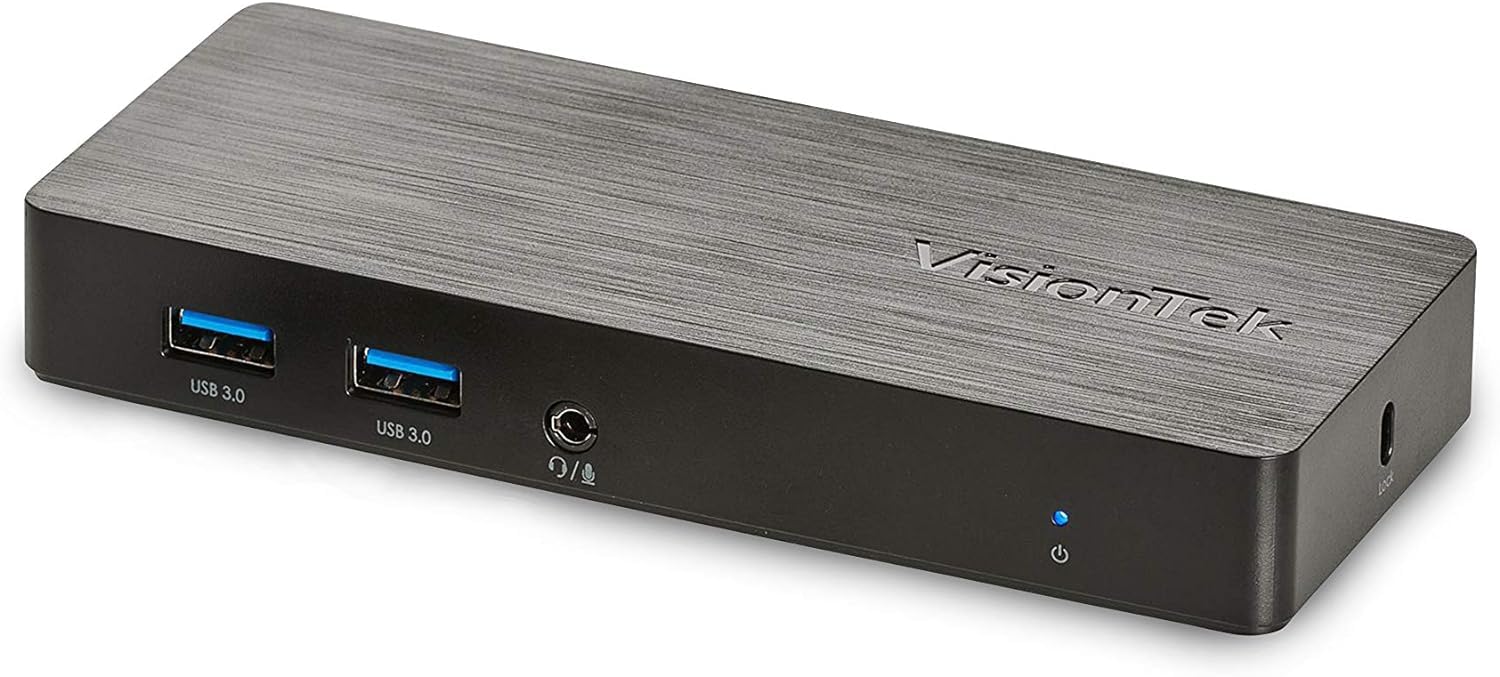
Слика: Фронт view of the VisionTek VT1000 docking station.
Шта је у кутији
- ВТ1000 Дуал Дисплаи Универзална УСБ 3.0 прикључна станица
- УСБ КСНУМКС кабл
- User Manual (Quick Installation Guide)
- Повер Адаптер

Image: The VisionTek VT1000 docking station and its included accessories.
2. Кључне карактеристике
- Dual Full HD Displays: Connect two monitors to your laptop with full HD resolution (1920 x 1080 @ 60Hz) via 1x DisplayPort, 1x HDMI, and 1x 1080P VGA.
- Проширено повезивање: Features 3x USB 3.0 ports (5 Gbps transfer speed), 1x RJ45 (10/100/1000) Gigabit Ethernet port, and a headphone audio line in/out jack.
- Plug and Display: Utilizes DisplayLink drivers for plug-and-play functionality, simplifying setup for various workspaces.
- Широка компатибилност са оперативним системом: Compatible with Ultrabook, MacBook, Microsoft Surface Pro, Chromebook, Windows 11, Windows 10, Windows 8.1, Windows 7, and Mac OS 10.13 and up operating systems.
- Компактан дизајн: Designed to be compact, taking up minimal desk space while providing extensive functionality.
3. Портови и индикатори
The VT1000 docking station provides a comprehensive set of ports for various connectivity needs. Refer to the video below for a visual guide to the ports.
Предња плоча
- 2x USB 3.0 порта: За повезивање USB уређаја велике брзине.
- Аудио излаз (прикључак за слушалице): За повезивање слушалица или екстерних звучника.
- Улаз микрофона: За повезивање микрофона.
- ЛЕД индикатор напајања: Illuminates when the dock is powered on.
Реар Панел
- 1x VGA Port: For connecting a VGA monitor.
- 1x HDMI порт: For connecting an HDMI monitor.
- 1x DisplayPort: For connecting a DisplayPort monitor.
- 1x RJ45 Gigabit Ethernet Port: За жичану мрежну везу.
- 1x USB 3.0 порт: За повезивање USB уређаја велике брзине.
- USB-B Port (Upstream): For connecting the dock to your laptop via the included USB 3.0 cable.
- ДЦ 5В Улаз за напајање: За повезивање адаптера за напајање.
- Отвор за сигурносну браву: For securing the docking station.
Official Product Video: VisionTek VT1000 Universal Dual Display USB 3.0 Dock
Video: This official VisionTek video provides a visual overview of the VT1000 docking station, highlighting its features, ports, and connectivity options. It demonstrates how the dock can expand your laptop's capabilities into a full workstation.
4. Упутства за подешавање
- Прикључите напајање: Plug the included power adapter into the DC 5V input port on the rear of the VT1000 docking station, then plug the adapter into a power outlet. The power indicator LED on the front of the dock should illuminate.
- Повезивање са лаптопом: Use the provided USB 3.0 cable to connect the USB-B port on the rear of the docking station to an available USB 3.0 port on your laptop.
- Повежите мониторе: Connect your external monitors to the desired video output ports on the rear of the docking station (HDMI, DisplayPort, or VGA). The VT1000 supports dual displays.
- Повежите периферне уређаје: Connect your keyboard, mouse, external hard drives, printers, webcams, or other USB devices to the USB 3.0 ports on the front and rear of the docking station.
- Повежи мрежу (опционо): For a wired internet connection, connect an Ethernet cable from your router or network switch to the RJ45 Gigabit Ethernet port on the rear of the docking station.
- Повежите аудио (опционо): If desired, connect headphones or speakers to the audio out jack and a microphone to the mic in jack on the front of the docking station.
- Инсталација драјвера: The VT1000 features DisplayLink Plug and Play technology, typically requiring no manual driver installation on compatible operating systems. If prompted, follow on-screen instructions or visit the VisionTek support website for the latest DisplayLink drivers.
5. Упутство за употребу
Once the VT1000 docking station is set up, it operates seamlessly with your connected laptop.
- Конфигурација екрана: After connecting your monitors, your operating system should automatically detect them. You can configure display settings (e.g., extend, duplicate, primary display) through your computer's display settings.
- Употреба USB уређаја: Connected USB devices will function as if directly connected to your laptop.
- Приступ мрежи: Гигабитни Етернет порт пружа стабилну и брзу жичну мрежну везу.
- Аудио функционалност: The audio ports allow for external audio output and microphone input. Ensure your operating system's sound settings are configured to use the docking station's audio device.
- Управљање струјом: The docking station requires external power and does not supply power to your laptop. Ensure your laptop's power adapter is connected for charging.
6. Спецификације
| Феатуре | Детаљ |
|---|---|
| Бранд | ВисионТек |
| Број модела | 901147 (VT1000 Series) |
| Компатибилност оперативног система | Windows 11, Windows 10, Windows 8.1, Windows 7, macOS 10.13 and later, Chrome OS |
| Тежина артикла | 8 унци |
| Димензије производа (ДкШкВ) | 5.95 к 2.8 к 0.8 инча |
| Хардверски интерфејс | DisplayPort, Ethernet, HDMI, USB, USB 3.0, VGA |
| Компатибилни уређаји | Лаптоп |
| Укупно УСБ портова | 3 (УСБ 3.0) |
| Укупни ХДМИ портови | 1 |
| Ватtage | 20 Ваттс |
КСНУМКС. Решавање проблема
- Нема излаза на екран:
- Ensure the docking station's power adapter is securely connected and the power indicator LED is on.
- Verify that the USB 3.0 cable connecting the dock to your laptop is firmly seated at both ends.
- Check that monitor cables (HDMI, DisplayPort, VGA) are securely connected to both the dock and the monitors.
- Confirm that your monitors are powered on and set to the correct input source.
- Restart your laptop and the docking station.
- Ensure DisplayLink drivers are installed and up-to-date, if necessary. Although typically plug-and-play, some systems may benefit from manual driver installation from the DisplayLink webсајту.
- USB уређаји не раде:
- Ensure the docking station is powered on and connected to your laptop.
- Try connecting the USB device to a different USB port on the dock or directly to your laptop to rule out device issues.
- Some high-power USB devices may require their own external power supply.
- Проблеми са мрежном везом:
- Verify the Ethernet cable is securely connected to both the dock and your network.
- Check your laptop's network settings to ensure the Ethernet adapter is enabled.
- Restart your router/modem, the docking station, and your laptop.
- Audio Not Working:
- Check your laptop's sound settings to ensure the docking station's audio output is selected as the default playback device.
- Ensure headphones/speakers are properly connected to the audio out jack.
- Adjust volume levels on both your laptop and the connected audio device.
8. Одржавање
- Чишћење: Користите меку, суву крпу за чишћење спољашњости базне станице. Избегавајте употребу течних средстава за чишћење или растварача.
- Складиштење: Store the docking station in a cool, dry place away from direct sunlight and extreme temperatures when not in use for extended periods.
- Управљање кабловима: Ensure cables are not excessively bent or tangled to prevent damage.
9. Гаранција и подршка
The VisionTek VT1000 Universal Dual Full HD USB 3.0 Laptop Monitor Docking Station comes with a 2-годишња ограничена гаранција. To ensure coverage, register your product with VisionTek within 30 days of purchase.
VisionTek offers excellent US-based customer support for any technical assistance or inquiries you may have. For support, please visit the official VisionTek webсајт или погледајте контакт информације које се налазе на паковању производа.
For further information and driver downloads, please visit: ВисионТек подршка