
1. Увод
This manual provides detailed instructions for the setup, operation, and maintenance of your BluDento BLT-2 Hi-Fi Bluetooth 5.1 Audio Receiver. Please read this manual thoroughly before using the device to ensure proper functionality and to maximize your audio experience.
2. Производ је готовview
The BluDento BLT-2 is a high-fidelity Bluetooth audio receiver designed to integrate wireless audio streaming into your existing home stereo system. It features Bluetooth 5.1 technology, supports aptX HD, aptX Low Latency, AAC, and SBC codecs, and incorporates a Texas Instruments PCM5102A DAC for superior sound quality. The device offers multiple output options including RCA, Optical, and Coaxial, allowing versatile connectivity with various audio equipment.

Image 2.1: The BluDento BLT-2 Hi-Fi Bluetooth 5.1 Audio Receiver with its external antenna.
3. Садржај пакета
Проверите да ли су све ставке присутне у пакету:
- БлуДенто БЛТ-2 Блуетоотх аудио пријемник
- Оптички аудио кабл
- РЦА аудио кабл
- RCA to 3.5mm adapter (female to male)
- Микро УСБ кабл за напајање
- Упутство за употребу
Note: A USB power adapter is not included and must be supplied by the user. Use a 5V power supply.
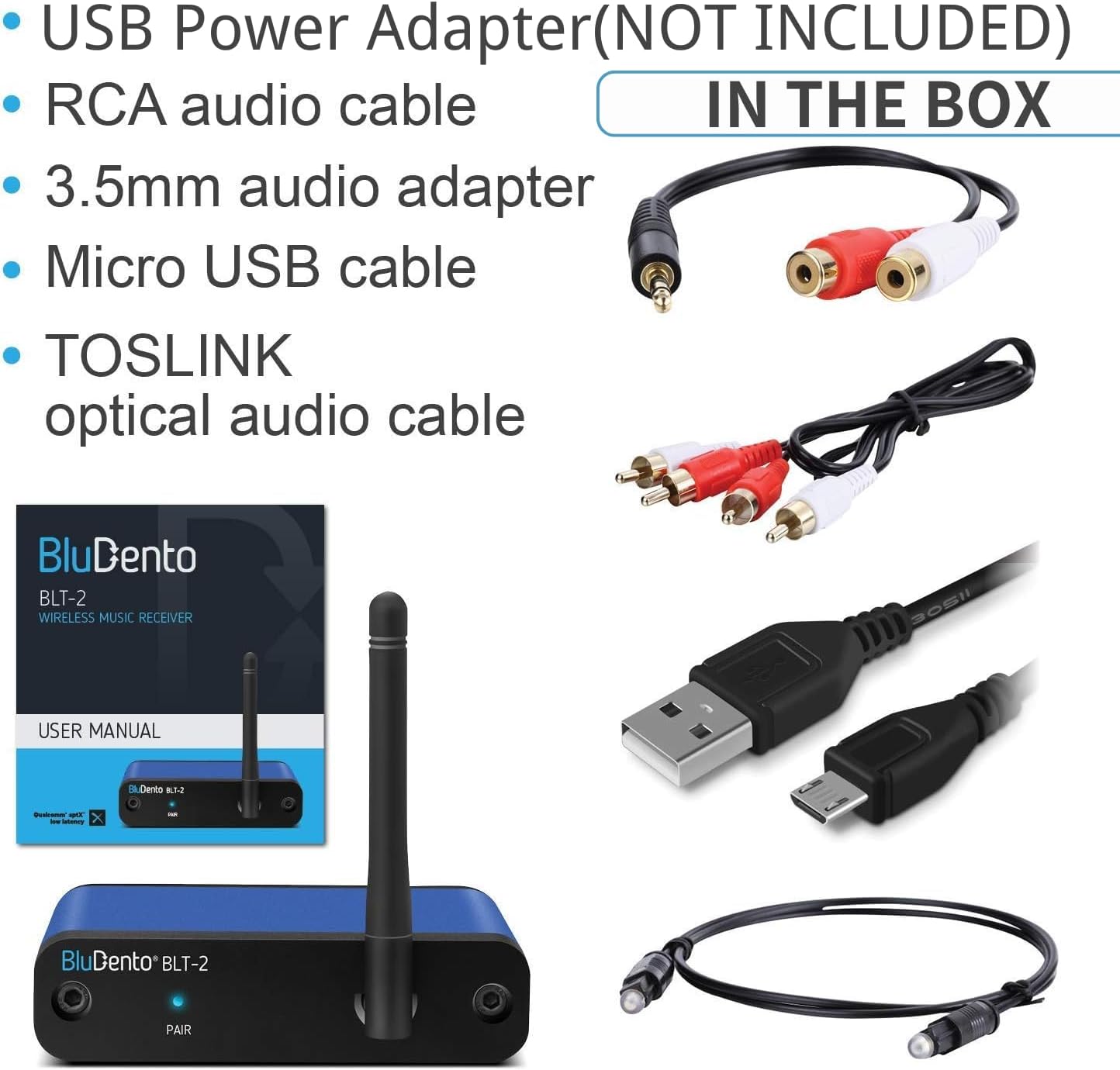
Image 3.1: Included accessories: optical cable, RCA cable, 3.5mm adapter, micro USB cable, and user manual. USB power adapter is not included.
4. Подешавање
Follow these steps to set up your BluDento BLT-2 receiver:
- Прикључите напајање: Connect the micro USB power cable to the PWR port on the BLT-2 and plug the other end into a 5V USB power adapter (not included). The device will automatically power on.
- Повежите се са аудио системом: Choose one of the following output methods to connect the BLT-2 to your amplifier, receiver, or powered speakers:
- РЦА излаз: Use the supplied RCA cable to connect the red and white RCA ports on the BLT-2 to the corresponding analog audio input ports on your audio system.
- Optical Output (TOSLINK): Use the supplied optical cable to connect the OPT port on the BLT-2 to the optical digital input on your audio system.
- Коаксијални излаз: Use a coaxial digital audio cable (not supplied) to connect the COAX port on the BLT-2 to the coaxial digital input on your audio system.
All outputs (RCA, Optical, Coaxial) can work simultaneously.
- Позиција антене: The external antenna provides a strong and stable Bluetooth range. Rotate the antenna to the left, right, or up for optimal signal reception. Do not rotate it downwards, as this may cause damage.
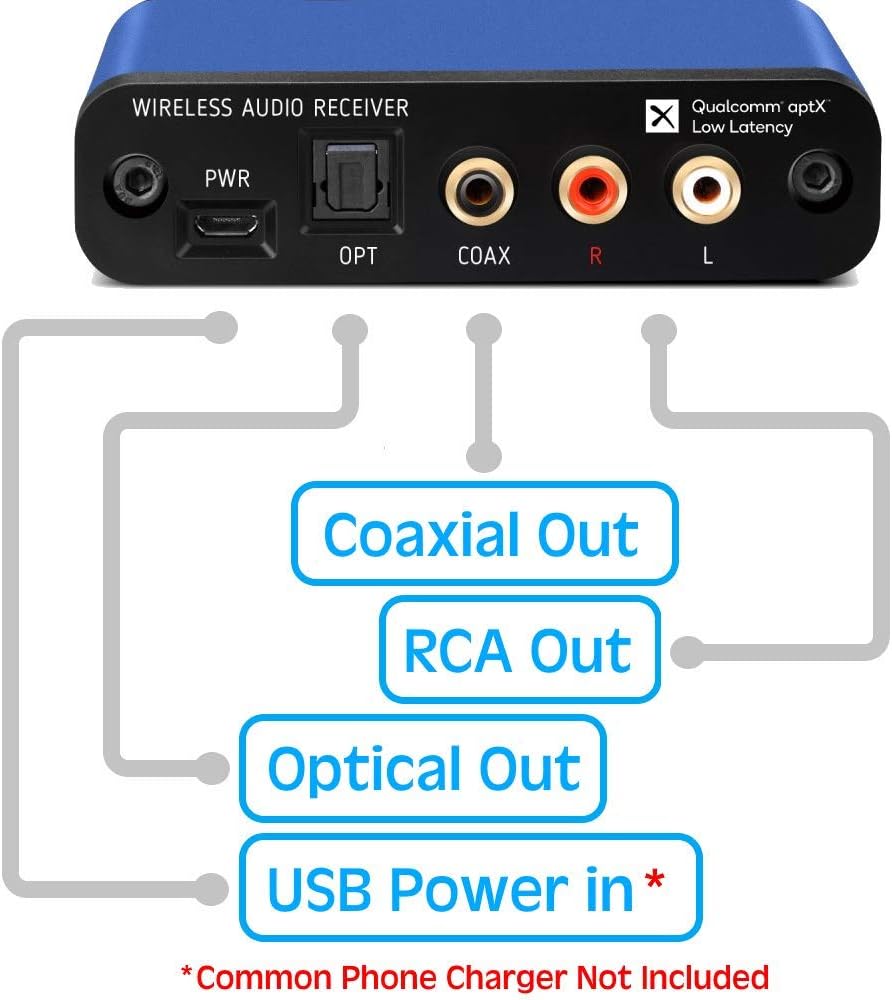
Image 4.1: Rear panel connections including USB Power In, Optical Out, Coaxial Out, and RCA Out.

Image 4.2: The BLT-2 can connect to Hi-Fi systems, AV receivers, and active speakers.
5. Упутство за употребу
5.1. Упаривање са Блуетоотх уређајем
The BluDento BLT-2 automatically enters pairing mode when powered on. The indicator light will flash blue.
- Ensure your BLT-2 is powered on. The 'PAIR' indicator light will flash blue.
- On your audio source device (e.g., smartphone, tablet, computer), enable Bluetooth and search for available devices.
- Select "BLT-2" from the list of found devices to connect.
- Once connected, the indicator light on the BLT-2 will turn solid blue. You can now stream audio from your device to your stereo system.
5.2. Аутоматско поновно повезивање
The BLT-2 supports automatic reconnection to the last paired device. To ensure successful auto-reconnection:
- Turn on your phone's Bluetooth first.
- Then, power on the BluDento BLT-2. It will automatically attempt to reconnect to the last device.
5.3. Повезивање више уређаја
The BLT-2 can remember multiple paired devices, though it can only play audio from one at a time. To switch between devices, disconnect the currently playing device and connect with another previously paired device.

Image 5.1: The BLT-2 can be linked to multiple Bluetooth devices, but only one can be actively streaming at a time.
5.4. Supported Bluetooth Codecs
The BLT-2 supports various Bluetooth audio codecs to ensure high-quality streaming:
- аптКс ХД: For high-resolution audio streaming (up to 576kbps).
- aptX LL (Low Latency): Reduces audio delay, ideal for video synchronization (up to 352kbps).
- ААЦ: Advanced Audio Coding, commonly used by Apple devices (up to 250kbps).
- СБЦ: Standard Bluetooth codec (up to 328kbps).
Note: iPhone devices primarily support AAC. For aptX HD, your Android device must support it, and you may need to enable it in Developer Options.

Image 5.2: Visual representation of supported Bluetooth codecs and their maximum bitrates.
6. Спецификације
| Феатуре | Опис |
|---|---|
| Бранд | БлуДенто |
| Број модела | БЛТ-2 |
| Технологија повезивања | Bluetooth 5.1, Coaxial, RCA, USB (for power) |
| Тип аудио излаза | RCA (Analog), Optical (Digital), Coaxial (Digital) |
| Аудио Енцодинг | Аналог |
| Режим аудио излаза | Стерео (2-канални) |
| ДАЦ | Texas Instruments PCM5102A (32-bit, 384kHz interface) |
| Подржани Блуетоотх кодеци | aptX HD, aptX LL, AAC, SBC |
| Компатибилни уређаји | iPhone, iPad, PC, Android, Tablet, iMac, MacBook Pro, MacBook Air, etc. |
| Димензије артикла (Д к Ш к В) | 3.94" x 3.35" x 1.18" (10 цм x 8.5 цм x 3 цм) |
| Тежина артикла | 0.15 килограма |
| Боја | Плава |

Image 6.1: The BLT-2 features a built-in Texas Instruments PCM5102A Digital-to-Analog Converter (DAC).
КСНУМКС. Решавање проблема
- No Sound or Sound Problems with Optical/Coaxial Output:
- Ensure your connected home theater system, audio receiver, or soundbar is correctly configured to decode the digital signal.
- If your audio system does not support a 48kHz sample rate, try switching the Bluetooth source device's sampбрзина до 44.1 кХз.
- Verify that the optical or coaxial cable is securely connected at both ends.
- Check if the optical or coaxial cable is faulty by testing with another cable if possible.
- Connecting to Amazon Echo Dot:
- Connect the BluDento BLT-2 to your stereo system using an audio cable (RCA, optical, or coaxial), not directly to the Echo Dot.
- Отворите апликацију Алека на свом паметном телефону или таблету.
- Дођите до Settings > Devices/Echo > Bluetooth.
- Изаберите Упарите нови уређај and choose "BLT-2" from the list.
- Audible Sound on Connection/Disconnection:
- The BLT-2 does not produce an audible sound when connecting or disconnecting from a device. Connection status is indicated by the LED light.
- Antenna Rotation:
- The antenna can be rotated to the left, right, and up. Do not rotate it downwards, as this can cause damage to the unit.
- Напајање:
- Always use a 5V power supply for the BLT-2. Using a mismatched power supply (e.g., 9V or 12V) may cause the unit to malfunction or be damaged.
- Using a proper power adapter helps eliminate ground loop noise.
Видео 7.1: Оверview of the BluDento BLT-2, demonstrating its features and connectivity options.
8. Одржавање
To ensure the longevity and optimal performance of your BluDento BLT-2:
- Држите уређај на сувом месту, даље од влаге и екстремних температура.
- Очистите уређај меком, сувом крпом. Избегавајте употребу јаких хемикалија или абразивних средстава за чишћење.
- Do not attempt to disassemble or repair the unit yourself. Refer to qualified service personnel for any repairs.
9. Гаранција и подршка
The BluDento BLT-2 comes with a 1-year warranty from the date of original purchase, covering manufacturing defects. For technical support or warranty claims, please contact BluDento customer service through their official channels.