
1. Увод
Welcome to the user manual for your Braeburn 7205 Digital Programmable Wi-Fi Thermostat. This device is designed to provide efficient and convenient control over your home's heating and cooling system. Featuring Wi-Fi connectivity, you can manage your climate settings remotely using the Braeburn BlueLink app on your smartphone or tablet. The thermostat supports 7-day programming and is compatible with conventional HVAC equipment, often without requiring a common wire.

Figure 1.1: Contents of the Braeburn 7205 thermostat package, including the thermostat unit, batteries, and mounting hardware.
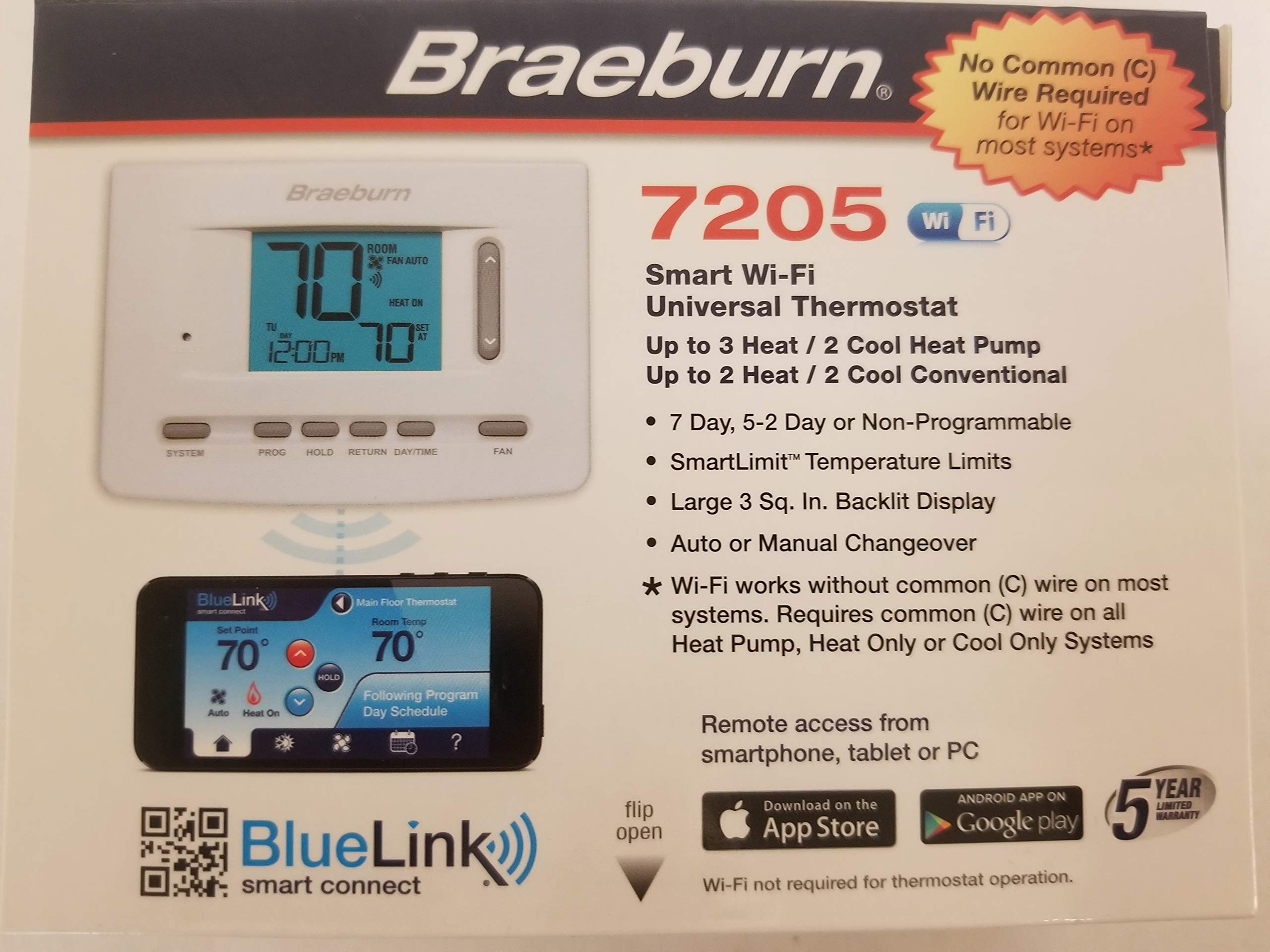
Слика 1.2: Завршеноview of Braeburn BlueLink app features for smart control and scheduling. Download the app from goo.gl/9jhYnT.
2. Подешавање и инсталација
2.1 Садржај пакета
Пре почетка инсталације, уверите се да су све компоненте присутне:
- Braeburn 7205 Thermostat Unit
- Опрема за монтажу (шрафови и зидни типлови)
- АА батерије (2)
- Упутство за инсталацију и рад
2.2 Кораци инсталације
Follow these general steps for installation. Refer to the detailed wiring diagrams included with your product for specific connections.
- Искључивање: Искључите напајање система за грејање и хлађење на главном прекидачу.
- Уклоните стари термостат: Carefully remove your old thermostat from the wall. Take a picture of the wiring connections for reference.
- Монтирајте термостатску базу: Install the new Braeburn 7205 thermostat base plate to the wall using the provided mounting hardware.
- Жичне везе: Connect the HVAC system wires to the appropriate terminals on the new thermostat base. The Braeburn 7205 can operate without a common (C) wire on most conventional systems, but a C-wire is recommended for consistent Wi-Fi operation.
- Инсталирајте термостат: Attach the thermostat unit to its base plate.
- Уметните батерије: Install the two AA batteries into the designated compartment.
- Укључено: Вратите напајање система за грејање и хлађење на прекидачу.

Слика 2.1: Предња страна view of the Braeburn 7205 thermostat, showing the digital display and control buttons.

Слика 2.2: Задња страна view of the Braeburn 7205 thermostat, displaying wiring terminals and FCC information.
2.3 Ви-Фи веза
To enable Wi-Fi features and remote control:
- Download the Braeburn BlueLink app from the Apple App Store or Google Play Store.
- Направите налог или се пријавите ако га већ имате.
- Follow the in-app instructions to add your new Braeburn 7205 thermostat to your account and connect it to your home Wi-Fi network.
3. Упутство за употребу
3.1 Основне контроле
The Braeburn 7205 features several buttons for direct control:
- СИСТЕМ: Cycles through system modes: OFF, HEAT, COOL, AUTO, EM HEAT (if applicable).
- ПРОГ: Accesses programming settings for scheduling.
- ДРЖАТИ: Initiates or cancels a temporary temperature hold.
- ПОВРАТАК: Navigates back through menus or confirms selections.
- ДАН/ВРЕМЕ: Sets the current day and time.
- ЛЕПЕЗА: Cycles through fan modes: AUTO (fan runs only when heating/cooling) or ON (fan runs continuously).
- Стрелице горе/доле: Adjusts temperature setpoints or navigates menu options.
3.2 Распоред програма
The thermostat allows for 7-day programmable scheduling to optimize energy usage and comfort. To set a program:
- Притисните тастер ПРОГ дугме.
- Користите Стрелице горе/доле to select the day or group of days you wish to program.
- Follow the on-screen prompts to set desired temperatures for different time periods (e.g., Wake, Leave, Return, Sleep).
- Користите РЕТУРН button to confirm settings and exit programming mode.
3.3 Функција чекања
The HOLD function allows you to temporarily override the programmed schedule. This is useful if you are home during a time you would normally be away, or vice versa.
- To initiate a hold: Adjust the temperature using the Стрелице горе/доле. The thermostat will automatically enter a temporary hold. Press ХОЛД to make it a permanent hold until cancelled.
- To cancel a hold: Press the ХОЛД button again. The thermostat will revert to its programmed schedule.
4. Одржавање
4.1 Замена батерије
The Braeburn 7205 uses two AA alkaline batteries for backup power and can also operate on hardwired 24V power. When the battery indicator appears on the display, replace the batteries promptly.
- Gently pull the thermostat unit away from its wall plate.
- Извадите старе АА батерије из одељка.
- Уметните две нове алкалне батерије типа АА, водећи рачуна о исправном поларитету.
- Snap the thermostat unit back onto its wall plate.
4.2 Чишћење
To clean your thermostat, gently wipe the exterior with a soft, damp крпу. Не користите абразивна средства за чишћење или раствараче, јер могу оштетити екран илиasing.
КСНУМКС. Решавање проблема
If you experience issues with your Braeburn 7205 thermostat, refer to the following common problems and solutions:
| Проблем | Могући узрок | Решење |
|---|---|---|
| Дисплеј термостата је празан | No power (batteries dead or 24V power off) | Replace batteries. Check circuit breaker for HVAC system. Ensure 24V wiring is secure. |
| Систем не реагује на подешавања термостата | Incorrect wiring, system mode incorrect, safety lockout | Verify wiring connections. Ensure SYSTEM mode is set to HEAT or COOL. Wait 5 minutes for system lockout to reset. |
| Проблеми са Ви-Фи везом | Weak signal, incorrect password, router issues | Ensure thermostat is within Wi-Fi range. Re-enter Wi-Fi password in the BlueLink app. Restart your home router. Ensure a C-wire is connected for stable Wi-Fi. |
| Очитавање температуре делује нетачно | Thermostat exposed to drafts or direct sunlight | Уверите се да термостат није на директној сунчевој светлости или у близини извора топлоте/промаје. |
| Cannot program schedule | In HOLD mode, or incorrect button sequence | Cancel HOLD mode. Refer to Section 3.2 for programming steps. |
If problems persist, you may need to reset the thermostat. A small РЕСЕТ button is located on the front of the unit (refer to Figure 2.1). Use a small pointed object to press it.
6. Спецификације
| Феатуре | Детаљ |
|---|---|
| Бранд | Браебурн |
| Број модела | 7205 |
| Технологија повезивања | Ви-Фи |
| Извор напајања | Dual Powered (Battery/Hardwire) |
| Волtage | 24 Волтс |
| Дисплаи Типе | Дигитал |
| Величина екрана | 3 инча |
| Тип контроле | Push Button, Remote (via app) |
| Тип монтаже | Валл Моунт |
| Позадинско осветљење | Да |
| Батерије | 2 АА батерије (укључене) |
| Тежина артикла | 15.2 унци |
| Посебна карактеристика | Programmable (7-day) |
| Специфичне употребе за производ | Heat Pump, Conventional HVAC |
| УПЦ | 833732001799 |
| ФЦЦ ИД | 2ADX6-7205 |
7. Гаранција и подршка
Your Braeburn 7205 Digital Programmable Wi-Fi Thermostat is backed by a manufacturer's warranty. Please refer to the warranty card included in your product packaging for specific terms and conditions. For technical support, troubleshooting assistance, or to learn more about your thermostat's features, please visit the official Braeburn website or contact their customer service department. The BlueLink Smart Connect app also provides additional support resources.