
podofo PD-M1520A6
Podofo 7-inch 1 DIN MP5 Car Stereo with GPS and Camera User Manual
Model: PD-M1520A6
Увод
This manual provides detailed instructions for the installation, operation, and maintenance of your Podofo 7-inch 1 DIN MP5 Car Stereo. This unit features a high-definition touchscreen, integrated GPS navigation, Bluetooth hands-free calling and audio streaming, FM radio, USB/TF card playback, and support for a rear view камера. Молимо вас да пажљиво прочитате ово упутство пре употребе производа како бисте осигурали исправну функционалност и безбедност.
Производ је завршенview
The Podofo PD-M1520A6 is a versatile car multimedia player designed to enhance your driving experience with advanced features.
Кључне карактеристике:
- 7-inch High-Definition Touchscreen: Digital, thin-film transistor (TFT) LCD display with dynamic menu interface.
- ГПС навигација: Supports both online and offline maps with an external antenna for precise positioning.
- Блуетоотх хандс-фрее: For safe calling and audio streaming, compatible with iPhone and Android devices.
- Висок квалитет звука: Stereo sound system for an immersive listening experience.
- Позади View Подршка за камеру: Includes a camera for safe reversing with guidelines.
- Мултимедијална репродукција: MP3, MP5, WMA, USB, and TF card compatibility.
- ФМ радио: Electronic digital control, automatic tuning, 18 memory stations.
- Миррор Линк: Connect your Android or iOS smartphone to mirror its screen.
- УСБ пуњење: Large USB output for mobile phone charging (compatibility may vary).
Садржај пакета:
Приликом распакивања, проверите да ли су сви предмети присутни:
- Podofo 7-inch Car Stereo Unit
- Повер Цабле
- Ремоте Цонтрол
- Mounting Brackets (Metal sheets)
- GPS Module/Antenna
- Позади View Camera (8 IR CCD)
- Video Cable for Camera
- Кабл за напајање камере
- Упутство за употребу
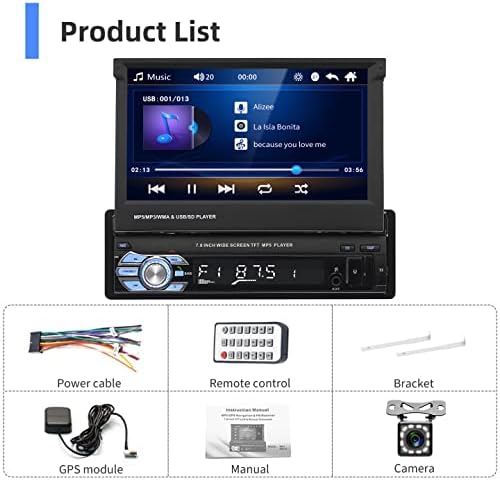
Image: Contents of the Podofo Car Stereo package, including the main unit, power cable, remote, brackets, GPS module, camera, and cables.
Подешавање и инсталација
Proper installation is crucial for optimal performance. If you are unsure about any steps, consult a professional installer.
Дијаграм ожичења:
Refer to the rear panel diagram for correct connections. Ensure all connections are secure before powering on the unit.

Image: Rear panel of the Podofo car stereo showing various ports and their labels, including antenna, audio/video outputs, power interface, and fuse. Dimensions are also indicated.
- Интерфејс антене
- Аудио излаз
- Видео излаз
- Видео улаз
- Аудио излаз
- Видео излаз
- Видео улаз
- Интерфејс за напајање
- Осигурач
GPS Antenna Installation:
Connect the GPS module to the designated port on the rear of the unit. Mount the GPS antenna in a location with a clear view of the sky, typically on the dashboard or near the windshield, to ensure strong satellite signal reception.
Позади View Инсталација камере:
Повежите задњи део view camera's video cable to the "Video Input" port (e.g., port 4 or 7) on the stereo's rear panel. Connect the camera's power cord to your vehicle's reverse light circuit so it activates automatically when shifting into reverse. Ensure the camera is securely mounted at the rear of your vehicle.
Упутство за употребу
Front Panel Controls and External Inputs:

Слика: Детаљна view of the car stereo's front panel, highlighting buttons and ports such as AMS (Automatic Searching Station), PWR/MUTE, MOD (Mode), Band, Volume/Return, Function Switch/Hang Up, EQ, DISP (Display), USB, AUX, and TF card slot.
- АМС: Аутоматска претрага станице.
- PWR/MUTE: Power on/off or mute audio.
- МОД: Cycle through input modes (Radio, USB, TF, AUX, Bluetooth).
- бенд: Switch between FM bands.
- Дугме за јачину звука: Rotate to adjust volume. Press to return to previous menu or confirm selection.
- Function Switch/Hang Up: Used for various functions and to end calls.
- ЕК: Приступите подешавањима еквилајзера.
- ДИСП: Adjust display settings or show time.
- УСБ порт: Connect USB drives for media playback or charging.
- АУКС улаз: Повежите екстерне аудио уређаје преко 3.5 мм прикључка.
- Слот за ТФ картицу: Insert a TF (microSD) card for media playback.
ГПС навигација:
The unit comes with pre-installed EU maps. Ensure the GPS antenna is properly connected and positioned for optimal signal reception.
- From the main menu, tap the "Navigation" icon.
- The system will acquire GPS satellites. This may take a few minutes on first use.
- Enter your destination using the on-screen keyboard.
- Select your preferred route and start navigation.
- The system supports both online and offline maps. Ensure maps are updated periodically for accuracy.

Image: The car stereo display showing GPS navigation with a map, current location, destination, and estimated travel time. Icons for online and offline maps are also visible.
Блуетоотх повезивање:
Pair your mobile phone for hands-free calls and audio streaming.
- Go to the main menu and select the "Bluetooth" icon.
- Омогућите Блутут на свом мобилном телефону и потражите доступне уређаје.
- Select "PODOFO" (or similar name) from the list on your phone.
- Потврдите код за упаривање ако се то од вас затражи.
- Once paired, you can make/receive calls, access your phonebook, and stream music.

Image: The car stereo display showing both Bluetooth and FM radio interfaces. Bluetooth features include music, phonebook, and call functions. Radio shows frequency and station presets.
ФМ радио:
Access and tune into your favorite radio stations.
- Изаберите икону „Радио“ из главног менија.
- Use the "Band" button to switch between FM1, FM2, FM3.
- Press the "AMS" button for automatic station search and storage.
- Manually tune using the on-screen arrows or seek function.
Функција Миррор Линк-а:
Пресликајте екран свог паметног телефона на екрану ауто стерео уређаја.
- Connect your smartphone to the stereo's USB port using a high-quality USB cable.
- For Android devices, enable USB debugging in developer options. For iOS, follow the on-screen prompts for trust.
- Select the "Mirror Link" icon from the main menu.
- Follow the instructions on the stereo screen and your phone to establish the connection.
- Android devices typically support two-way control, while iOS devices usually support one-way control (view само).
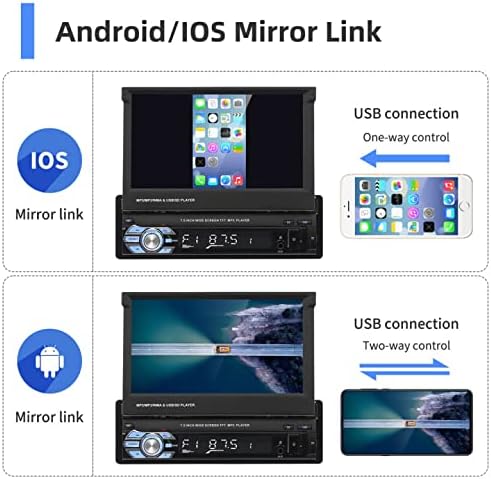
Image: Demonstrates the Mirror Link function for both iOS and Android phones. iOS shows one-way control via USB, while Android shows two-way control via USB.
Позади View камера:
The included camera provides a clear view подручја иза вашег возила приликом вожње уназад.
- When the vehicle is shifted into reverse gear, the stereo automatically switches to the camera display.
- Parking guidelines will appear on the screen to assist with maneuvering.
- The camera features HD resolution, 12 LED lights for night vision, and is waterproof.

Image: The car stereo display showing the rear view camera feed with parking guidelines. Icons indicate HD camera, 12 LED lights, waterproof design, and night vision capabilities.
Контрола на волану (SWC):
The unit supports original steering wheel controls. Connect the SWC wires from your vehicle to the corresponding inputs on the stereo's wiring harness. Configuration may be required in the system settings menu.

Image: The car stereo display showing the settings menu for steering wheel control, with options to configure buttons. A steering wheel graphic illustrates the feature.
Audio Equalizer (EQ):
Прилагодите своје аудио искуство помоћу уграђеног еквилајзера.
- Press the "EQ" button on the front panel or select the "EQ" icon from the main menu.
- Adjust bass, mid-range, and treble frequencies to your preference.
- Pre-set equalizer modes (e.g., Pop, Rock, Classic, Jazz) are available.

Image: The car stereo display showing the audio equalizer settings, with sliders for adjusting various frequency bands (e.g., 100Hz, 1KHz, 10KHz) and preset options like Custom, Classical, Jazz, Pop, and Rock.
Одржавање
- Чишћење: Користите меку, суву крпу за чишћење екрана и уређаја. Избегавајте абразивна средства за чишћење или раствараче.
- температура: Избегавајте излагање јединице екстремним температурама.
- Ажурирања софтвера: Проверите произвођача website periodically for any available software or map updates.
- Замена осигурача: If the unit does not power on, check the fuse located on the rear panel (refer to wiring diagram). Replace with a fuse of the same rating.
Решавање проблема
| Проблем | Могући узрок | Решење |
|---|---|---|
| Јединица се не укључује. | No power connection; blown fuse. | Check power wiring. Replace fuse if necessary (same rating). |
| Нема звука. | Volume too low; incorrect audio source; speaker wires disconnected. | Појачајте јачину звука. Изаберите исправан извор звука. Проверите везе звучника. |
| ГПС сигнал је изгубљен или је нетачан. | GPS antenna obstructed or disconnected; outdated maps. | Ensure GPS antenna has clear sky view and is connected. Update maps if available. |
| Блутут се не повезује. | Bluetooth not enabled on phone/stereo; incorrect pairing. | Уверите се да је Bluetooth укључен на оба уређаја. Обришите претходна упаривања и поново их упарите. |
| Позади view камера не приказује. | Camera not connected; power issue; incorrect wiring to reverse light. | Check camera video and power connections. Ensure reverse light trigger is correctly wired. |
| Settings not saving after power off. | Constant power wire (yellow) not connected or incorrectly wired. | Verify the yellow wire is connected to a constant 12V power source in your vehicle. |
Спецификације
| Феатуре | Детаљ |
|---|---|
| Број модела | PD-M1520A6 |
| Величина екрана | 7 инча |
| Тип екрана | LCD, Touchscreen |
| Резолуција | 720п |
| Технологија повезивања | Блуетоотх, УСБ |
| Капацитет меморије | 8 GB (for maps/system) |
| Compatible Flash Memory | microSD (TF Card) |
| Режим аудио излаза | Стерео |
| Контролни метод | Додирните |
| Димензије производа | 26 к 21 к 5.8 цм |
| Тежина производа | 1.7 кг |
Гаранција и подршка
For warranty information, please refer to the documentation included with your purchase or contact Podofo customer support. Keep your proof of purchase for any warranty claims.
For further assistance or technical support, please visit the official Podofo store on Amazon or their website. You can also refer to the provided PDF manual for additional details.
- Official Podofo Store: Посетите продавницу
- Упутство за употребу (PDF): Преузмите ПДФ
Ask a question about this manual
Ask about setup, troubleshooting, compatibility, parts, safety, or missing instructions. Manuals+ will review the question and use this page’s manual context to help answer it.