
1. Увод
Thank you for choosing the Dareu EH722 Lightweight Gaming Headset. This headset is designed to provide a high-quality audio experience with exceptional comfort for professional gamers. It features precise sound quality and powerful sound drivers, allowing you to clearly hear explosions and gunfire, enhancing your gaming immersion. Its lightweight design ensures comfort during extended use, and its flexible structure provides an excellent fit.

Image 1.1: Dareu EH722 Gaming Headset. This image shows the headset from a front-side angle, highlighting its black earcups with ice blue diamond-like light accents and the attached microphone.
2. Карактеристике производа
- Имерзивни 7.1 сурроунд звук: Experience a 360-degree sound field that allows you to detect sounds you might not visually perceive, providing a competitive edge.
- Дизајниран за удобност: Features lightweight, soft fabric earcups with 90-degree rotation for maximum comfort and a personalized fit during long gaming sessions.
- Foldable, Noise-Cancelling Microphone: Reduces background noise for clear voice pickup. The microphone can be folded up and out of the way when not in use.
- Convenient On-Cable Controls: Volume adjustment and mute switch are easily accessible on the cable for quick audio setting changes.
- Широка компатибилност: Works with PS4 and Windows 10, Windows 8, Windows 7, or Windows Vista computers.
3. Водич за подешавање
Follow these steps to set up your Dareu EH722 Gaming Headset:
- Повежите се са уређајем: Plug the headset's USB connector into an available USB port on your PS4 or Windows PC (Windows 10, 8, 7, or Vista).
- Инсталација драјвера (PC): For Windows PCs, the necessary drivers should install automatically. If not, check your operating system's sound settings.
- Избор аудио излаза:
- За ПЦ: Navigate to your sound settings (usually right-click the speaker icon in the taskbar). Select the Dareu EH722 as your default playback and recording device.
- За ПС4: Go to Settings > Devices > Audio Devices. Select "Dareu EH722" for both Input Device and Output Device. Ensure "Output to Headphones" is set to "All Audio".
- Подесите јачину звука: Use the on-cable volume control to set your desired listening level.
- Позиција микрофона: Adjust the flexible microphone boom to a comfortable position near your mouth for optimal voice clarity.

Image 3.1: Headset with Microphone Extended. This image shows the Dareu EH722 headset with its flexible microphone boom positioned forward, ready for use.
4. Упутство за употребу
The Dareu EH722 headset features intuitive controls for easy operation during gameplay.
- Контрола јачине звука: Locate the inline control unit on the headset cable. Use the scroll wheel or buttons (depending on model variation) to increase or decrease the audio volume.
- Искључивање микрофона: The inline control unit also features a switch to mute or unmute the microphone. Slide the switch to the "Mute" position to prevent your voice from being transmitted. Slide it back to "Unmute" to enable the microphone.
- Позиционирање микрофона: For optimal voice clarity, ensure the noise-cancelling microphone is positioned approximately 2-3 cm from your mouth. When not in use, the microphone can be folded upwards and out of your line of sight.
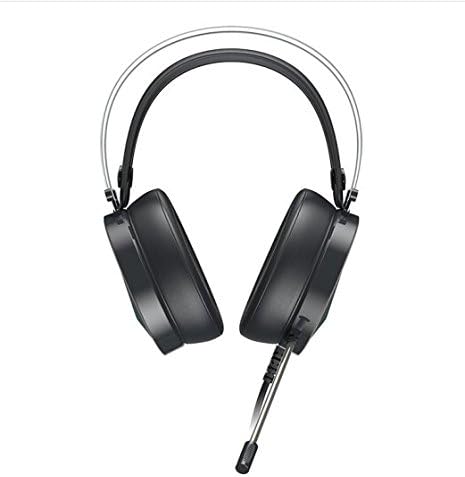
Image 4.1: Headset with Microphone Folded. This image displays the Dareu EH722 headset from a top-down perspective, showing the microphone folded upwards and away from the user's face.
5. Одржавање и њега
Proper maintenance ensures the longevity and optimal performance of your Dareu EH722 Gaming Headset.
- Чишћење слушалица: Gently wipe the earcup cushions with a soft, damp cloth. Avoid using harsh chemicals or abrasive cleaners. Ensure the earcups are completely dry before use.
- Cleaning Headband: Wipe the headband with a soft, dry cloth.
- Нега каблова: Avoid sharp bends or excessive pulling on the cable to prevent damage. Store the headset in a way that the cable is not tangled or stressed.
- Складиштење: When not in use, store the headset in a clean, dry place away from direct sunlight and extreme temperatures.
- Избегавајте влагу: Не излажите слушалице води или прекомерној влази.
КСНУМКС. Решавање проблема
If you encounter issues with your Dareu EH722 Gaming Headset, refer to the following common problems and solutions:
| Проблем | Могући узрок / решење |
|---|---|
| Нема звука из слушалица |
|
| Микрофон не ради |
|
| Sound Quality is Poor or Distorted |
|
| Headset is Uncomfortable |
|
7. Спецификације
| Феатуре | Детаљ |
|---|---|
| Бранд | Дареу |
| Модел | ЕХ722 |
| Форм Фацтор | Циркум-ауралне (прекоушне) |
| Материјал | Вештачка кожа (шкољке за уши) |
| Повезивање | УСБ |
| Карактеристике звука | 7.1 Сурроунд звук |
| Микрофон | Foldable, Noise-Cancelling |
| Контроле | On-cable volume and mute switch |
| Компатибилност | PS4, Windows 10, Windows 8, Windows 7, Windows Vista |
| GTIN / UPC | 680465965344 |

Image 7.1: Headset Dimensions. This image provides a visual representation of the Dareu EH722 headset with its key dimensions in millimeters.
8. Гаранција и подршка
Dareu products are manufactured to high quality standards. For information regarding warranty coverage, please refer to the warranty card included with your product or visit the official Dareu webсајту.
For technical support, troubleshooting assistance beyond this manual, or to inquire about replacement parts, please contact Dareu customer service through their official channels. Keep your purchase receipt as proof of purchase for warranty claims.
Онлине ресурси: For the most up-to-date information, drivers, and FAQs, please visit the official Dareu support webсајту.