
1. Увод
The EPEVER VS6048AU is a 60A common positive Pulse Width Modulation (PWM) solar charge controller designed for 12V, 24V, 36V, and 48V solar panel power systems. It incorporates advanced digital techniques to ensure efficient and reliable battery charging and load management. This controller is suitable for various applications, including solar home systems, traffic signals, solar street lights, and solar garden lamps.
Кључне карактеристике:
- 3-Сtagе интелигентно ПВМ пуњење: Булк, Боост/Екуализе, Флоат.
- Supports three battery charging options: Sealed, Gel, and Flooded.
- Integrated LCD display for dynamic monitoring of operating data and working conditions.
- Dual USB output ports (Max. 5VDC/2.4A) for charging electronic devices.
- User-friendly button settings for comfortable and convenient operation.
- Multiple load control modes for versatile application.
- Energy statistics function.
- Функција компензације температуре батерије.
- Extensive electronic protections for system safety.

Image 1.1: The EPEVER VS6048AU Solar Charge Controller shown in various application settings, including home power supply, street lighting, monitoring, and green energy solutions.
2. Безбедносне информације
Please read all instructions and warnings carefully before installation and operation. Failure to follow these instructions may result in electric shock, fire, or severe injury.
- Ensure all wiring is correctly polarized and securely connected to prevent damage to the controller and other components.
- Увек искључите соларни панел и батерију пре инсталирања или подешавања контролера.
- Install the controller in a well-ventilated area, away from flammable gases, moisture, and direct sunlight.
- Use appropriate circuit breakers or fuses for the solar panel, battery, and load circuits.
- Do not disassemble or attempt to repair the controller yourself. Contact qualified personnel for service.
- Wear appropriate personal protective equipment, including eye protection, when working with batteries.
- Keep children away from the solar power system components.
Електронске заштите: The VS6048AU controller includes comprehensive electronic protections:
- ПВ заштита од обрнутог поларитета
- Батерија преко волtagе заштита
- Заштита батерије од прекомерног пражњења
- Заштита од обрнутог поларитета батерије
- Заштита од прегревања батерије
- Заштита од преоптерећења
- Заштита од кратког споја оптерећења
- Заштита контролера од прегревања

Image 2.1: Visual representation of the electronic protections integrated into the controller and a basic solar power system connection diagram.
3. Производ је готовview
Familiarize yourself with the components and interface of your EPEVER VS6048AU solar charge controller.

Слика 3.1: Предња страна view of the EPEVER VS6048AU controller with key components labeled.
- ЛЦД екран: Shows system status, parameters, and error codes.
- Дугме МЕНУ: Used to navigate through different display interfaces and enter/exit setting modes.
- СЕТ дугме: Used to confirm selections, modify parameters, and clear data.
- USB Output Ports (5VDC/2.4A): For charging external electronic devices.
- Temp. Sensor Port (RTS Port): Connects to the optional remote temperature sensor for accurate battery temperature compensation.
- PV Terminals: Connect to the solar panel array.
- Терминали батерије: Connect to the battery bank.
- Load Terminals: Connect to DC loads.
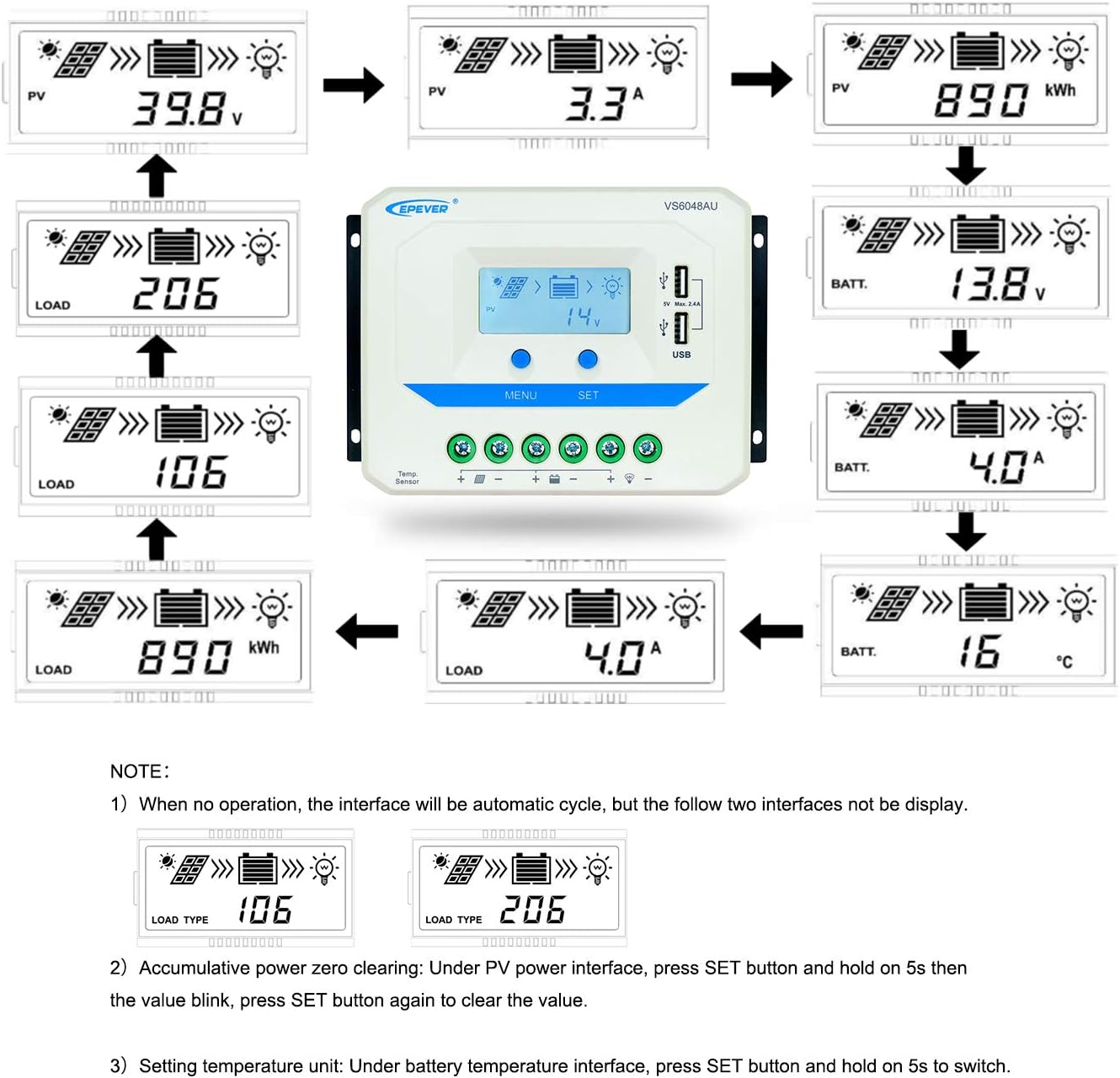
Image 3.2: Dimensions of the EPEVER VS6048AU Solar Charge Controller (approximately 21.4 cm x 12.87 cm x 7.22 cm).
LCD Display Status Description
The LCD display provides visual feedback on the system's operational status. Refer to the table below for icon meanings:

Image 3.3: Detailed description of the icons displayed on the VS6048AU LCD screen.
4. Подешавање и инсталација
Follow these steps for proper installation of your solar charge controller. Ensure all power sources are disconnected before making any connections.
Редослед ожичења:
- Повежите батерију: Connect the battery to the controller's battery terminals. Ensure correct polarity (positive to positive, negative to negative). The controller will detect the battery voltage.
- Connect the Load: Connect the DC load to the controller's load terminals. Ensure correct polarity.
- Повежите соларну плочу: Connect the solar panel array to the controller's PV terminals. Ensure correct polarity.
Важно: Always connect the battery first, then the solar panel, and finally the load. Disconnect in the reverse order: load, then solar panel, then battery.
Видео водич за инсталацију:
Video 4.1: An official EPEVER video demonstrating the connection process for the solar charge controller, including battery and load connections. This visual guide can assist with proper installation.
5. Упутство за употребу
The EPEVER VS6048AU controller features an intuitive LCD display and button interface for monitoring and configuration.
LCD Display Navigation:
When no operation is performed, the LCD interface will automatically cycle through various display screens, showing real-time data such as PV voltage, current, battery voltage, and load status.
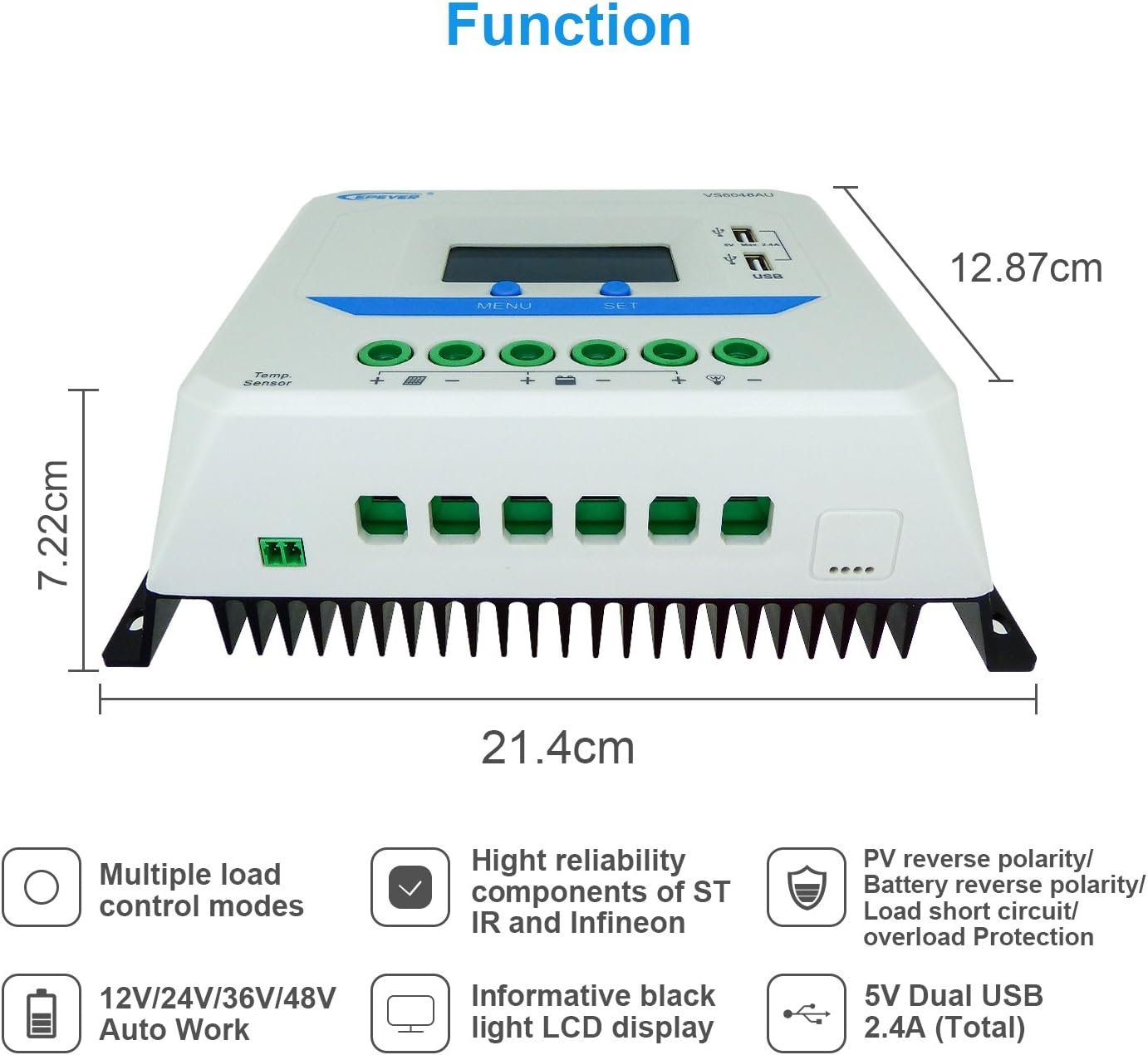
Image 5.1: Illustration of the automatic cycling interfaces on the VS6048AU LCD display.
- Притисните тастер МЕНУ button to manually cycle through the display interfaces.
- Притисните и држите МЕНУ button to enter or exit the parameter setting mode.
- In parameter setting mode, use the СЕТ button to adjust values or confirm selections.
Специјалне операције:
- Accumulative Power Clearing: Under the PV power interface, press and hold the СЕТ button for 5 seconds until the value blinks, then press СЕТ again to clear the accumulative power value.
- Подешавање јединице температуре: Under the battery temperature interface, press and hold the СЕТ button for 5 seconds to switch between Celsius (°C) and Fahrenheit (°F).
Режими пуњења:
Контролер користи 3-сtage intelligent PWM charging algorithm:
- Масовно пуњење: The battery is charged at maximum current until its voltagе достиже Боост волtage.
- Boost/Equalize Charging: Батерија се пуни константним напономtage. An Equalize charge is typically performed once a month to balance battery cells.
- Плутајуће пуњење: Вол. батеријеtage is maintained at the Float voltage, and the charging current is reduced to a trickle to keep the battery fully charged.
The controller supports charging for Sealed, Gel, and Flooded battery types. Ensure the correct battery type is selected in the settings for optimal charging performance.
УСБ излаз:
The dual USB ports provide a maximum output of 5VDC/2.4A for charging compatible electronic devices.
6. Одржавање
Regular maintenance ensures the longevity and optimal performance of your EPEVER VS6048AU solar charge controller.
- чистоћа: Одржавајте контролер чистим и без прашине и прљавштине. Користите суву крпу за чишћење.
- Везе: Periodically check all wiring connections for tightness and corrosion. Loose connections can cause overheating and damage.
- вентилација: Ensure the installation area has adequate ventilation to prevent overheating of the controller.
- инспекција: Inspect the controller and wiring for any signs of damage, such as frayed cables or cracked casing. Replace damaged components immediately.
- Здравље батерије: Запремина батерије монитораtage and performance regularly. Ensure the battery type setting in the controller matches your battery.
КСНУМКС. Решавање проблема
Овај одељак се бави уобичајеним проблемима са којима се можете сусрести са вашим соларним контролером пуњења.
| Проблем | Могући узрок | Решење |
|---|---|---|
| Нема дисплеја на ЛЦД-у | Батерија није повезана или је низак ниво напуњеностиtagе; обрнути поларитет. | Check battery connections and polarity. Ensure battery voltagе је изнад 9 В. |
| Батерија се не пуни | PV panels not connected; PV reverse polarity; insufficient sunlight; PV open circuit voltagе прениско. | Check PV connections and polarity. Ensure adequate sunlight. Verify PV open circuit voltagе је у оквиру спецификација. |
| Учитавање не ради | Load disconnected; load short circuit; load overload; battery low voltagе прекинути везу. | Check load connections. Remove short circuit. Reduce load. Recharge battery. |
| Прегревање контролера | Poor ventilation; excessive ambient temperature; prolonged high current operation. | Ensure proper ventilation. Relocate controller to a cooler environment. Reduce load if possible. |
| USB излаз не ради | Device not compatible; controller fault. | Try another USB device. If issue persists, contact support. |
8. Спецификације
Detailed technical specifications for the EPEVER VS6048AU Solar Charge Controller.

Image 8.1: Comprehensive technical specifications table for the EPEVER VS-AU series, including the VS6048AU model.
| Параметар | Value (VS6048AU) |
|---|---|
| Модел | ВС6048АУ |
| Номинал Систем Волtage | 12V/24V/36V/48V Auto Work |
| Улаз батерије Волtagе Распон | КСНУМКСВ ~ КСНУМКСВ |
| Називна струја пуњења/пражњења | 60А |
| Макс. ПВ Опен Цирцуит Волtage | 96В |
| Тип батерије | Sealed (Default) / Gel / Flooded |
| Боост Цхаргинг Волtage | Sealed: 14.4V, Gel: 14.2V, Flooded: 14.6V |
| Екуализе Цхаргинг Волtage | Sealed: 14.6V, Gel: No, Flooded: 14.8V |
| Флоат Цхаргинг Волtage | Запечаћен/гел/потопљен: 13.8В |
| Лов Волtagе Рецоннецт Волtage | Запечаћен/гел/потопљен: 12.6В |
| Лов Волtagе Дисцоннецт Волtage | Запечаћен/гел/потопљен: 11.1В |
| Самопотрошња | ≤10mA (12V), ≤18mA (24V) |
| Температурна компензација | -3mV/°C/2V (77°F) |
| Уземљење | Цоммон Поситиве |
| УСБ излаз | 5ВДЦ/2.4А (укупно) |
| Укупна димензија | 214к128.7к72.2 мм |
| Терминали | 3АВГ (25мм²) |
| Нето тежина | 1.02 кг |
| Енцлосуре | ИП30 |
| Температура радног окружења | -25°Ц ~ +55°Ц |
| влажност Опсег | ≤95% (N.C.) |
9. Гаранција и подршка
EPEVER products are designed for reliability and performance. For technical assistance or warranty inquiries, please refer to the following:
- техничка подршка: EPEVER provides technical support through its local service centers. For assistance, please contact the authorized dealer or service center in your region.
- Информације о гаранцији: Please refer to the warranty card included with your product or visit the official EPEVER webсајт за детаљне услове гаранције.
- Free Solar System Design: EPEVER's service centers may offer free solar system design assistance to help you optimize your setup.