
Bytech BCAUBS134BK
Bytech Massive Bluetooth Long Bar Speaker-BK User Manual
Model: BCAUBS134BK
1. Увод
Хвала вам на куповиниasing the Bytech Massive Bluetooth Long Bar Speaker-BK. This manual provides essential information for the proper setup, operation, and maintenance of your new speaker. Please read this manual thoroughly before using the product to ensure optimal performance and longevity.
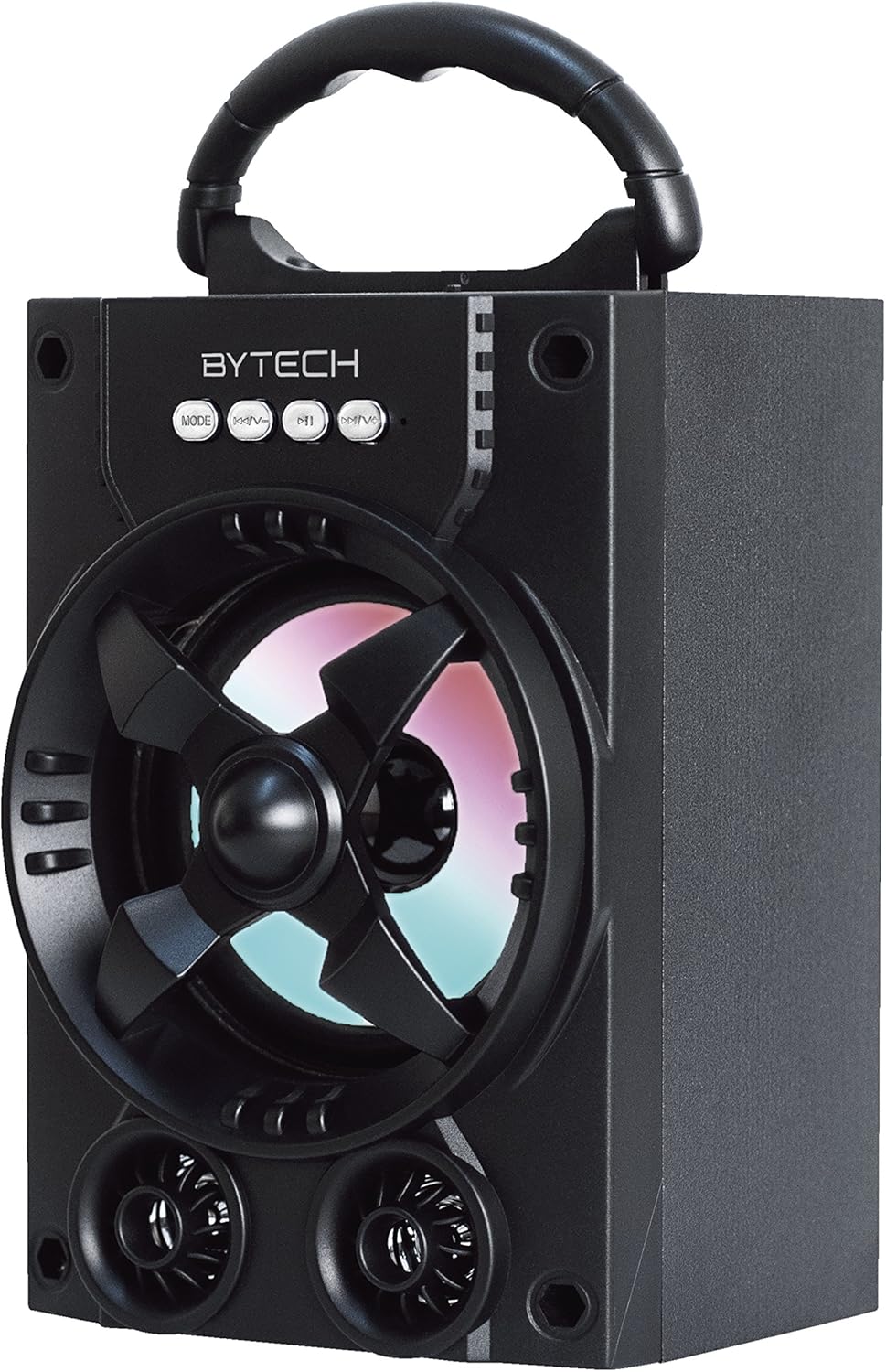
Слика 1.1: Предња страна view of the Bytech Massive Bluetooth Long Bar Speaker-BK, showcasing its design, handle, and speaker grille with LED lights.
2. Садржај пакета
Молимо вас да проверите пакет за следеће ставке:
- Bytech Massive Bluetooth Long Bar Speaker-BK
- УСБ кабл за пуњење
- Кориснички приручник (овај документ)
Ако неке ставке недостају или су оштећене, обратите се корисничкој подршци.
3. Карактеристике производа
- LED Performance Lights: Dynamic LED lights that synchronize with your music for an enhanced audio-visual experience.
- Convenient Carrying Handle: Integrated handle for easy portability, allowing you to take your music anywhere.
- Universal Bluetooth Connectivity: Seamlessly connect wirelessly to your smartphone, tablet, or other Bluetooth-enabled devices.
- Сурроунд звук: Designed to deliver a high-quality surround sound experience.
- Преносиви дизајн: Ideal for various settings, including parties, outdoor gatherings, and personal use.

Figure 1.2: The speaker shown with its retail packaging, illustrating its key features such as multi-color LED lights, Bluetooth connectivity, and surround sound capability.
4. Контроле и индикатори
The speaker features intuitive controls and indicators for easy operation:
- Дугме МОДЕ: Press to switch between available input modes (e.g., Bluetooth).
- В- Дугме: Press to decrease volume. Long press to skip to the previous track.
- Дугме В+: Притисните да бисте повећали јачину звука. Дуго притисните да бисте прешли на следећу нумеру.
- М дугме: (Function not explicitly detailed, typically for mode or mute)
- ЛЕД светла: Indicate power status, charging status, and provide dynamic light effects during audio playback.
5. Водич за подешавање
5.1 Пуњење звучника
- Повежите мањи крај УСБ кабла за пуњење са портом за пуњење на звучнику.
- Повежите већи крај USB кабла за пуњење са USB адаптером за напајање (није укључен) или USB портом рачунара.
- ЛЕД индикатор ће приказивати статус пуњења (нпр. црвена боја за пуњење, искључена када је потпуно напуњена).
- Allow approximately 3-4 hours for a full charge before first use.
5.2 Укључивање/искључивање
- To power on, press and hold the Power button (location not specified, typically near charging port or on control panel) for a few seconds until you hear an audible prompt or see the LED lights activate.
- Да бисте искључили звучник, поново притисните и држите дугме за напајање док се он не искључи.
5.3 Блуетоотх упаривање
- Ensure the speaker is powered on and in Bluetooth pairing mode (indicated by a flashing LED light or audible prompt).
- На паметном телефону или таблету идите на подешавања Bluetooth-а.
- Тражи available devices. The speaker will appear as "BYTECH" or a similar name.
- Изаберите звучник са листе да бисте започели упаривање.
- Once successfully paired, the LED indicator will typically become solid, and you may hear a confirmation tone.
6. Упутство за употребу
6.1 Репродукција звука преко Блуетоотх-а
- After successful Bluetooth pairing, open your preferred music application on your connected device.
- Select and play your desired audio. The sound will be streamed wirelessly to the speaker.
- Use the V+ and V- buttons on the speaker or your connected device to adjust the volume.
- Long press V+ or V- to skip tracks.
6.2 LED Performance Lights
The speaker features integrated LED lights that enhance your listening experience. These lights typically activate automatically when the speaker is powered on and playing audio. Specific controls for light modes are not detailed, but they are designed to provide dynamic visual effects.
6.3 Промена режима
Притисните тастер МОДЕ button to cycle through available input modes. While Bluetooth is the primary connectivity, other modes (if available, such as FM radio or AUX input) can be accessed via this button.
7. Одржавање и њега
- Чишћење: Користите меку, суву крпу за чишћење спољашњости звучника. Не користите абразивна средства за чишћење, воскове или раствараче.
- Складиштење: Када се звучник не користи дуже време, чувајте га на хладном и сувом месту, даље од директне сунчеве светлости и екстремних температура.
- Одржавање батерије: Да бисте продужили век трајања батерије, избегавајте често потпуно пражњење батерије. Редовно пуните звучник, чак и ако га не користите, како бисте одржали здравље батерије.
- Отпорност на воду: Овај производ је НЕ waterproof. Avoid exposure to water, rain, or excessive moisture to prevent damage.
КСНУМКС. Решавање проблема
Ако наиђете на проблеме са звучником, погледајте следеће уобичајене проблеме и решења:
| Проблем | Могући узрок | Решење |
|---|---|---|
| Звучник се не укључује. | Ниска батерија. | Потпуно напуните звучник. |
| Нема звука из звучника. | Јачина звука је прениска; Није упарено; Неисправан режим. | Increase volume on speaker and device; Ensure successful Bluetooth pairing; Press MODE button to select correct input. |
| Блутут веза је нестабилна или прекида. | Уређај је предалеко; Сметње; Проблем са упаривањем. | Move device closer to speaker (within 33 ft/10m); Avoid obstacles; Forget device on your phone and re-pair. |
| ЛЕД светла не раде. | Speaker not powered on or playing audio. | Ensure speaker is on and audio is playing. |
9. Спецификације
| Феатуре | Детаљ |
|---|---|
| Бранд | Битецх |
| Назив модела | БИТЕЦХ |
| Број модела ставке | БЦАУБС134БК |
| Спеакер Типе | Сурроунд Соунд |
| Технологија повезивања | Блуетоотх |
| Бежична комуникациона технологија | Блуетоотх |
| Компатибилни уређаји | Смартпхоне |
| Максимална излазна снага звучника | 20 Ваттс |
| Фреквенцијски одзив | 20 КХз |
| Импеданса | 1 Охм |
| Величина звучника | 5 инча |
| Извор напајања | Електрични са каблом (за пуњење) |
| Тип батерије | Потребна је 1 литијум-јонска батерија |
| Боја | Црно |
| Димензије производа | 4.75 к 5.5 к 8.5 инча |
| Тежина артикла | 1.3 фунти |
| Је водоотпоран | бр |
| Земља порекла | Кина |
| УПЦ | 805112038121 |
10. Информације о гаранцији
Bytech products are manufactured to the highest quality standards. For specific warranty terms and conditions, please refer to the warranty card included with your purchase or visit the official Bytech webсајт. Сачувајте доказ о куповини за потребе гаранције.
11. Корисничка подршка
For technical assistance, troubleshooting, or general inquiries, please contact Bytech customer support. Contact information can typically be found on the product packaging, the official Bytech webсајт или ваш рачун о куповини.
Note: No official product videos from the seller were available for embedding based on the provided data.
Ask a question about this manual
Ask about setup, troubleshooting, compatibility, parts, safety, or missing instructions. Manuals+ will review the question and use this page’s manual context to help answer it.