
1. Увод
This manual provides comprehensive instructions for the M-Wave Bicycle Computer, model Cicli Bonin_CVC911. It covers installation, operation, maintenance, and troubleshooting to ensure optimal performance and longevity of your device. Please read this manual thoroughly before using the product.

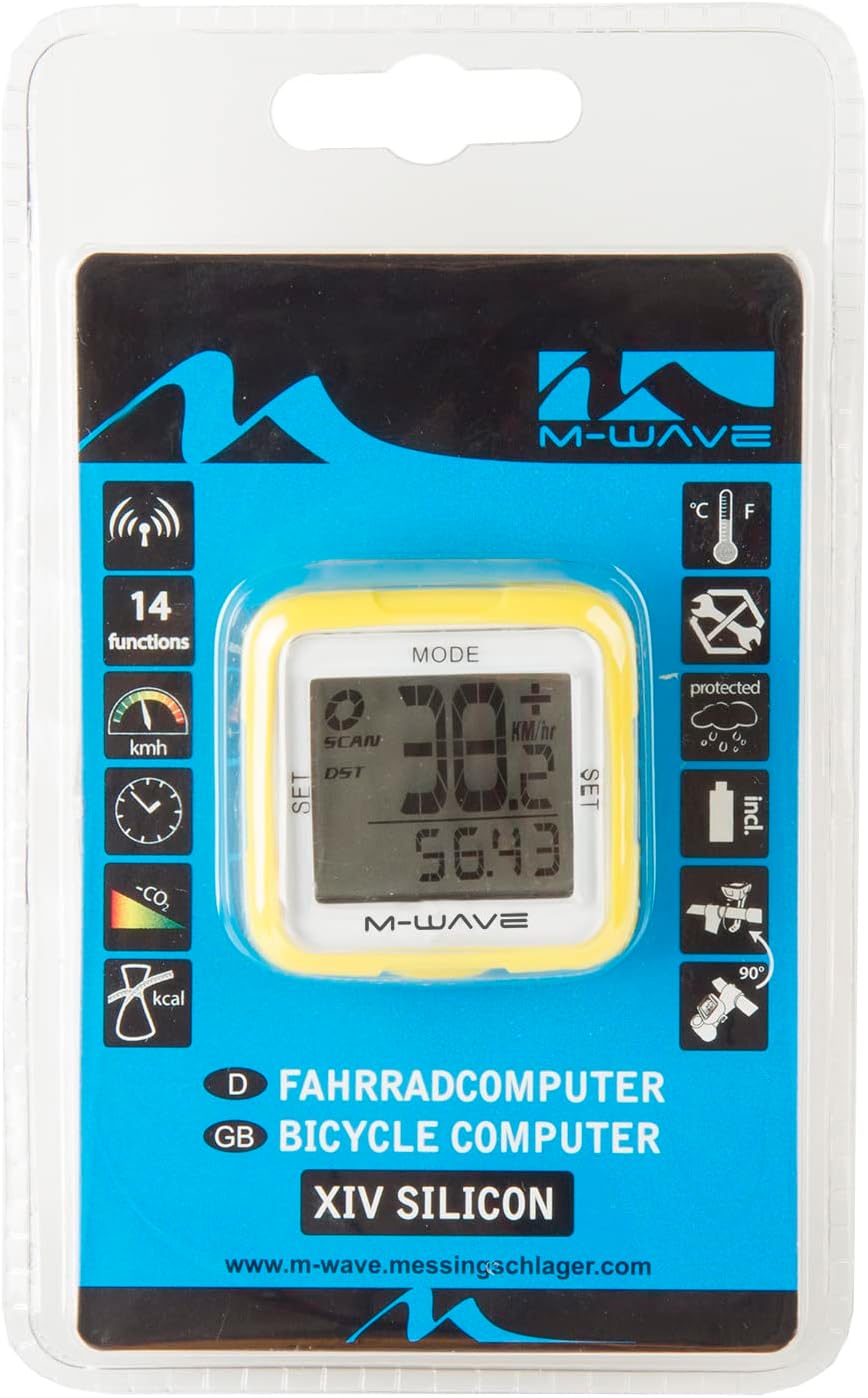
Image 1: M-Wave Bicycle Computer head unit, yellow model.
2. Безбедносне информације
Always prioritize safety when cycling. Ensure the computer is securely mounted and does not obstruct your view or control of the bicycle. Do not attempt to operate the computer while riding in traffic or hazardous conditions. Keep batteries out of reach of children. Dispose of batteries responsibly according to local regulations.
3. Садржај пакета
Проверите да ли су све компоненте присутне у пакету:
- M-Wave Bicycle Computer Head Unit
- Бежични сензор брзине
- Вхеел Магнет
- Mounting Bracket for Handlebar/Stem
- Zip Ties for Sensor and Bracket
- Батерије (унапред инсталиране или одвојене)
- Упутство за употребу
4. Подешавање
4.1 Инсталација батерије
The M-Wave Bicycle Computer uses alkaline batteries. If not pre-installed, open the battery compartment on the back of the head unit and the speed sensor. Insert the batteries with correct polarity, observing the '+' and '-' markings, and securely close the compartments.
4.2 Sensor and Magnet Mounting
Attach the wireless speed sensor to the front fork using the provided zip ties. Position the wheel magnet on a spoke so that it passes within 2mm of the sensor when the wheel rotates. Ensure the magnet and sensor are aligned for reliable signal transmission.
4.3 Computer Mounting
Mount the computer head unit to your handlebar or stem using the provided bracket and zip ties. Ensure it is firmly secured and visible without obstructing your view или контроле.
Слика 2: Бочна страна view of the M-Wave Bicycle Computer, illustrating its compact design and potential mounting points.
4.4 Почетна подешавања
Upon first use or after battery replacement, you will need to set up the computer. This typically involves:
- Пречник точка: Refer to your bicycle tire's sidewall for the circumference or use a measurement chart. Input this value into the computer for accurate speed and distance readings.
- Јединице: Select your preferred units for speed (km/h or mph) and temperature (C° or F°).
- време: Подесите тренутно време.
Consult the on-screen prompts and use the 'SET' and 'MODE' buttons for navigation and selection.
5. Упутство за употребу
The M-Wave Bicycle Computer features 14 functions. Use the 'MODE' button to cycle through different display modes and the 'SET' button for adjustments within a mode.

Image 3: Product packaging showing the 14 functions of the M-Wave Bicycle Computer.
- Тренутна брзина: Displays your real-time cycling speed.
- Просечна брзина: Shows the average speed for your current ride.
- Максимална брзина: Records the highest speed achieved during your ride.
- Удаљеност (ДСТ): Displays the distance covered during your current ride.
- Total Distance (ODO): Shows the accumulated total distance.
- Време вожње: Tracks the duration of your current ride.
- Сат: Приказује тренутно време.
- температура: Shows the ambient temperature in Celsius or Fahrenheit.
- Бројач калорија: Estimates calories burned during your ride.
- CO2 Savings: Calculates estimated CO2 savings compared to driving.
- Auto Start/Stop: The computer automatically starts recording when you begin cycling and pauses when you stop.
- Speed Tendency/Comparison: Indicates if your current speed is higher or lower than your average speed.
6. Одржавање
6.1 Чишћење
Wipe the computer and sensor with a soft, damp cloth. Do not use abrasive cleaners or solvents. The unit is waterproof, but avoid submerging it for extended periods.
6.2 Замена батерије
When the display becomes dim or functions become erratic, it's time to replace the batteries. Follow the battery installation steps outlined in Section 4.1, ensuring correct polarity. Resetting initial settings may be required after battery replacement.
КСНУМКС. Решавање проблема
If your M-Wave Bicycle Computer is not functioning as expected, consider the following:
- No Speed Display:
- Check the distance between the sensor and magnet. It should be no more than 2mm.
- Ensure the sensor and magnet are correctly aligned.
- Verify that the sensor battery is not depleted.
- Confirm the computer head unit battery is not depleted.
- Нетачна очитавања:
- Re-check the wheel diameter setting.
- Ensure the sensor and magnet are securely mounted and not shifting.
- Екран је празан:
- Replace the computer head unit battery.
- Уверите се да је батерија уметнута са исправним поларитетом.
- Дугмад не реагују:
- Покушајте да извадите и поново уметнете батерију да бисте извршили меко ресетовање.
8. Спецификације
| Феатуре | Детаљ |
| Бранд | M-Wave |
| Број модела | Cicli Bonin_CVC911 |
| Технологија повезивања | Wireless (Funk) |
| Дисплаи Типе | ЛЕД |
| Тип сензора | Speed Sensor (Geschwindigkeitssensor) |
| Тип батерије | Алкална |
| Тип монтаже | Stem mount or Handlebar mount |
| Тежина артикла | 0.1 килограма |
| Димензије (Д к Ш к В) | 30 Д к 30 Ш к 30 В центиметара |
| Функције | 14 functions (Digital radio transmission, speed: actual/diameter/max., speed tendency/comparison, total/daily kilometres, automatic display change, time, CO2 savings, calorie counter, temperature display (C°/F° selectable), auto start/stop, mileage/mile selection) |
| Водоотпоран | Да |
9. Гаранција и подршка
For warranty information and technical support, please refer to the M-Wave official webсајт или контактирајте продавца. Сачувајте рачун као доказ о куповини.