
1. Увод
This manual provides essential information for the safe and efficient use of your ZTE Trek 2 HD K88 Tablet. The ZTE Trek 2 HD K88 is an 8-inch tablet featuring an HD display, an Octa-core processor, 2GB RAM, 16GB internal storage (expandable), and a 4600mAh battery. It operates on Android 6.0 Marshmallow and supports Wi-Fi and 4G-LTE connectivity.
Please read this manual thoroughly before operating your device to ensure proper functionality and to understand its features.

Слика 1.1: Позади view of the ZTE Trek 2 HD K88 Tablet, showing the AT&T logo and product labels.
2. Подешавање
2.1. Пуњење батерије
Before first use, fully charge the tablet's battery. Connect the included power adapter to the tablet's charging port and then to a power outlet. The battery indicator on the screen will show charging status.
- Use only the power adapter provided with your device.
- A full charge can take several hours.
2.2. Укључивање/искључивање
- За укључивање: Притисните и држите дугме за напајање док се не појави ZTE лого.
- За искључивање: Притисните и држите дугме за напајање док се не појави мени са опцијама напајања, а затим изаберите „Искључи“.
2.3. Почетно подешавање
Upon first power-on, follow the on-screen prompts to configure basic settings:
- Изаберите жељени језик.
- Повежите се на Ви-Фи мрежу.
- Пријавите се помоћу свог Google налога или креирајте нови.
- Review и прихватите услове и одредбе.
2.4. Уметање MicroSD картице (опционо)
The tablet supports expandable memory up to 128GB via a microSD card. Locate the microSD card slot, typically on the side of the device. Carefully insert the card with the gold contacts facing down until it clicks into place.

Слика 2.1: Бочна страна view of the ZTE Trek 2 HD K88 Tablet, illustrating its thin design. The microSD slot is typically located on one of the side edges.
3. Упутство за употребу
3.1. Основна навигација
The ZTE Trek 2 HD K88 features a responsive touchscreen. Use the following gestures:
- Додирните: Да бисте изабрали ставку или отворили апликацију.
- Додирните и држите: За приступ контекстуалним менијима или премештање ставки.
- Превуците: За кретање кроз екране или листе.
- Прстохват: To zoom in or out on content like photos or web странице.
3.2. Home Screen and Apps
The home screen displays your favorite apps, widgets, and notifications. Swipe left or right to access additional home screens. Tap the "Apps" icon to view све инсталиране апликације.

Слика 3.1: Предња страна view of the ZTE Trek 2 HD K88 Tablet with the display active, showing the Android home screen with various application icons.
3.3. Повезивање на Ви-Фи
- Иди на Подешавања > Ви-Фи.
- Укључи/искључи Wi-Fi On.
- Изаберите жељену мрежу са листе.
- Унесите лозинку ако се то од вас затражи, а затим додирните Повежите се.
3.4. Коришћење камере
The tablet is equipped with 5 MP front and rear cameras. Open the Camera app to capture photos and videos.
- Додирните дугме затварача да бисте снимили фотографију.
- Пребацујте се између предње и задње камере помоћу иконе за пребацивање камере.
- Истражите различите режиме и подешавања у апликацији камере.
3.5. Аудио функције
The ZTE Trek 2 HD K88 features Dolby Audio powered dual front-facing speakers for an enhanced audio experience. Adjust volume using the physical volume buttons on the side of the tablet or through the on-screen volume controls.
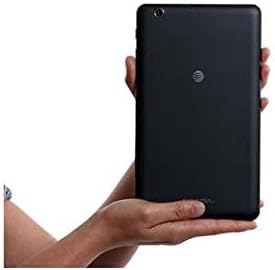
Image 3.2: The ZTE Trek 2 HD K88 Tablet held horizontally in two hands, demonstrating its comfortable and portable 8-inch form factor.
4. Одржавање
4.1. Чишћење уређаја
To clean your tablet, use a soft, lint-free cloth. For stubborn marks, slightly dampНавлажите крпу водом. Избегавајте употребу јаких хемикалија, абразивних средстава за чишћење или аеросолних спрејева, јер могу оштетити екран и завршну обраду.
4.2. Ажурирања софтвера
Periodically check for software updates to ensure your tablet has the latest features and security patches. Go to Подешавања > О таблету > Ажурирања система.
4.3. Управљање складиштем
Редовно управљајте меморијским простором таблета како бисте одржали оптималне перформансе. Избришите непотребне fileс, деинсталирајте некоришћене апликације и преместите велике медије files to a microSD card or cloud storage. Go to Подешавања > Складиштење и УСБ да view коришћење складиштења.
4.4. Брига о батерији
Да бисте продужили век трајања батерије:
- Избегавајте екстремне температуре.
- Не дозволите да се батерија често потпуно испразни.
- Искључите пуњач када се батерија потпуно напуни.
- Adjust screen brightness and disable unused features like Wi-Fi or Bluetooth when not needed.
КСНУМКС. Решавање проблема
5.1. Уобичајени проблеми и решења
| Иссуе | Решење |
|---|---|
| Таблет се не укључује | Уверите се да је батерија напуњена. Притисните и држите дугме за напајање најмање 10-15 секунди да бисте поново покренули уређај. |
| Проблеми са Ви-Фи везом | Restart the tablet and your Wi-Fi router. Forget the network in Wi-Fi settings and reconnect. |
| Апликације се руше или замрзавају | Close and reopen the app. Clear the app's cache (Settings > Apps > [App Name] > Storage > Clear cache). Restart the tablet. |
| Споро перформансе | Затворите некоришћене апликације. Обришите кеш меморију. Ослободите простор за складиштење. Поново покрените таблет. |
5.2. Фацтори Ресет
If issues persist, a factory reset may resolve them. This will erase all data on your tablet, so back up important information first. Go to Подешавања > Прављење резервних копија и ресетовање > Ресетовање фабричких података.
6. Спецификације
| Феатуре | Детаљ |
|---|---|
| Бранд | ЗТЕ |
| Назив модела | К88 |
| Оперативни систем | Андроид 6.0 Маршмелоу |
| Величина екрана | 8 инча |
| Резолуција екрана | 1280 к 800 (ХД) |
| Процесор | Qualcomm Snapdragon 617 Octa-core (1.5 GHz) |
| РАМ меморија | 2 ГБ |
| Капацитет складиштења | 16 GB (expandable up to 128 GB with microSD) |
| Задња камера | 5 МП |
| Предња камера | 5 МП |
| Капацитет батерије | 4600 mAh (up to 10 hours average life) |
| Повезивање | Wi-Fi (802.11n), 4G-LTE (AT&T) |
| Аудио | Dolby Audio, Dual Front-Facing Speakers |
| Тежина | 1.3 фунти |
| Укључена додатна опрема | Адаптер за напајање |
7. Гаранција и подршка
7.1. Информације о гаранцији
This ZTE Trek 2 HD K88 Tablet comes with a 90-day limited warranty. Please refer to your purchase documentation for specific terms and conditions regarding warranty claims.
7.2. Корисничка подршка
For further assistance, technical support, or warranty inquiries, please contact the retailer or ZTE customer service. You may also visit the official ZTE support webсајт за често постављана питања и додатне ресурсе.