
1. Увод
Хвала вам на куповиниasing the Homtime D2qi Bluetooth Speaker with Wireless Charging and Alarm Clock. This device is designed to provide a versatile audio experience with convenient features for your daily life. Please read this manual carefully before use to ensure proper operation and to maximize the product's lifespan.
2. Безбедносне информације
- Не излажите уређај екстремним температурама, влажности или директној сунчевој светлости.
- Чувати даље од воде и других течности.
- Не растављајте и не покушавајте сами да поправите уређај. Све сервисирање препустите квалификованом особљу.
- Use only the provided or recommended power adapter.
- Избегавајте испуштање или излагање уређаја јаким ударима.
3. Садржај пакета
Молимо вас да проверите пакет за следеће ставке:
- Homtime D2qi Bluetooth Speaker
- Повер Адаптер
- Упутство за употребу
4. Производ је готовview
The Homtime D2qi combines a high-quality Bluetooth speaker with a digital alarm clock and a convenient wireless charging pad. It features intuitive controls for easy operation.

Слика 4.1: Предња страна view of the Homtime D2qi speaker with a smartphone placed on its top surface for wireless charging.

Figure 4.2: The Homtime D2qi speaker positioned on a book, showcasing its compact design and the digital clock display.

Figure 4.3: The Homtime D2qi speaker in a home setting, demonstrating wireless charging functionality.
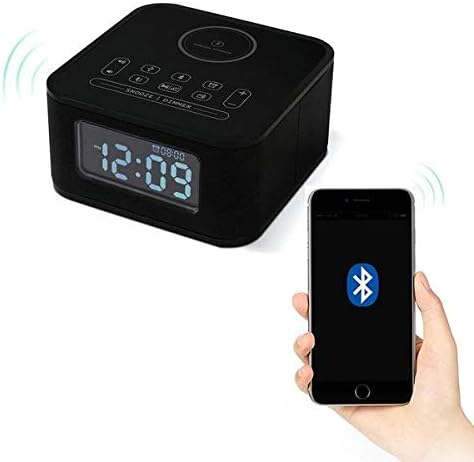
Figure 4.4: The Homtime D2qi speaker connected via Bluetooth to a smartphone.
5. Подешавање
5.1 Прикључак за напајање
- Connect the provided power adapter to the DC input port on the back of the Homtime D2qi.
- Укључите адаптер за напајање у стандардну зидну утичницу.
- Екран ће се упалити, што указује да је уређај укључен.
5.2 Почетно подешавање времена
При првом укључивању или након нестанка струјеtage, you may need to set the time. Refer to the 'Operating Instructions' section for detailed steps on setting the clock.
6. Упутство за употребу
6.1 Блуетоотх веза
- Притисните тастер Блуетоотх дугме on the top panel to enter Bluetooth pairing mode. The Bluetooth indicator will flash.
- На паметном телефону или аудио уређају омогућите Bluetooth и потражите доступне уређаје.
- Select "Homtime D2qi" from the list.
- Once connected, the Bluetooth indicator will stop flashing and remain solid. You can now play audio through the speaker.
6.2 Бежично пуњење
- Place your Qi-compatible smartphone centrally on the wireless charging pad located on the top surface of the speaker.
- Ensure the phone is properly aligned with the charging coil.
- The charging indicator on your phone will show that charging has begun.
6.3 Функција будилника
- Притисните тастер Дугме за аларм за улазак у режим подешавања аларма.
- Користите +/- тастери да подесите сат и минут.
- Притисните тастер Дугме за аларм again to confirm each setting.
- Да бисте активирали/деактивирали аларм, притисните дугме Дугме за аларм briefly when not in setting mode.
- Да бисте одложили будилац, притисните Дугме за одлагање/затамњење када се огласи аларм.
6.4 Радио функција
- Притисните тастер Дугме за режим да бисте прешли на режим ФМ радија.
- Притисните и држите Дугме за репродукцију/паузу to auto-scan and save available stations.
- Користите Дугмад Претходно/Следеће to navigate through saved stations.
6.5 Јављање на позиве
Када је повезан путем Блутут-а, звучник се може користити за позиве без употребе руку.
- Да бисте одговорили на долазни позив, притисните тастер Дугме за репродукцију/паузу.
- Да бисте прекинули позив, притисните Дугме за репродукцију/паузу опет.
7. Одржавање
- Очистите уређај меком, сувом крпом. Не користите абразивна средства за чишћење или раствараче.
- Keep the charging pad free of dust and debris to ensure efficient wireless charging.
- Чувајте уређај на хладном и сувом месту када се не користи дуже време.
КСНУМКС. Решавање проблема
| Проблем | Могући узрок | Решење |
|---|---|---|
| Нема струје | Адаптер за напајање није повезан или је утичница неисправна. | Ensure power adapter is securely plugged into the device and a working wall outlet. |
| Нема звука из звучника | Bluetooth not connected; volume too low; incorrect mode. | Ensure Bluetooth is paired. Increase volume on both the speaker and your device. Check if the speaker is in the correct mode (Bluetooth/Radio). |
| Бежично пуњење не ради | Phone not Qi-compatible; phone not aligned; phone case too thick. | Verify phone supports Qi wireless charging. Realign phone on the charging pad. Remove thick phone cases. |
| Buttons difficult to locate in the dark | Buttons are flush with the surface. | Familiarize yourself with button layout during daylight. Use the dimmer function to adjust display brightness. |
| Bluetooth disconnects automatically | Power saving feature; device out of range. | Reconnect Bluetooth manually. Keep devices within Bluetooth range (approx. 10 meters). |
9. Спецификације
| Феатуре | Детаљ |
|---|---|
| Бранд | Хомтиме |
| Број модела | D2qi |
| Боја | Црно |
| Спеакер Типе | Блуетоотх звучници |
| Повезивање | Бежични |
| Компатибилни уређаји | Смартпхонес |
| Излазна снага | 5 - 10 вати |
| Тежина производа | 0.5 кг |
| Димензије пакета | 19.6 к 18.8 к 14.8 цм |
| Хардверски интерфејс | Audio/Video Port |
10. Гаранција и подршка
Homtime products are manufactured to the highest quality standards. For warranty information and customer support, please refer to the warranty card included in your package or visit the official Homtime webсајт. Сачувајте рачун као доказ о куповини.