
Увод
Welcome to the world of retro gaming with your new My Arcade All Star Arena Micro Player! This compact and portable mini arcade machine brings the excitement of classic arcade games right to your fingertips. Featuring 7 officially licensed Jaleco titles and an additional 300 retro-style bonus games, this device is designed for hours of entertainment at home or on the go. Please read this manual carefully to ensure proper setup and operation.
Шта је у кутији
- My Arcade All Star Arena Micro Player
- Упутство за употребу
Карактеристике производа
- 7 officially licensed Jaleco titles: GOAL!, BASES LOADED 1, 2, 3 & 4, RACKET ATTACK, and HOOPS.
- Over 300 additional retro-style bonus games.
- Full color 2.75" screen for clear display.
- Built-in speaker with adjustable volume control.
- 3.5 mm headphone port for private listening.
- Powered by 4 AA batteries (not included) or any USB-C cable (not included).
- Removable joystick for versatile gameplay.
- Compact design for playing at home or on the go.
Сетуп
Powering Your Micro Player
Your My Arcade All Star Arena Micro Player can be powered in two ways:
- Коришћење АА батерија: Insert 4 AA batteries (not included) into the battery compartment located on the back of the unit. Ensure correct polarity.
- Коришћење УСБ-Ц кабла: Connect a USB-C cable (not included) to the USB-C port on the back of the unit and plug the other end into a compatible USB power source.

Слика: Позади view of the Micro Player, highlighting the battery compartment and USB-C input for power.
Attaching/Removing the Joystick
The Micro Player features a removable joystick. You can attach it for classic arcade control or remove it to use the directional pad for certain games or personal preference.
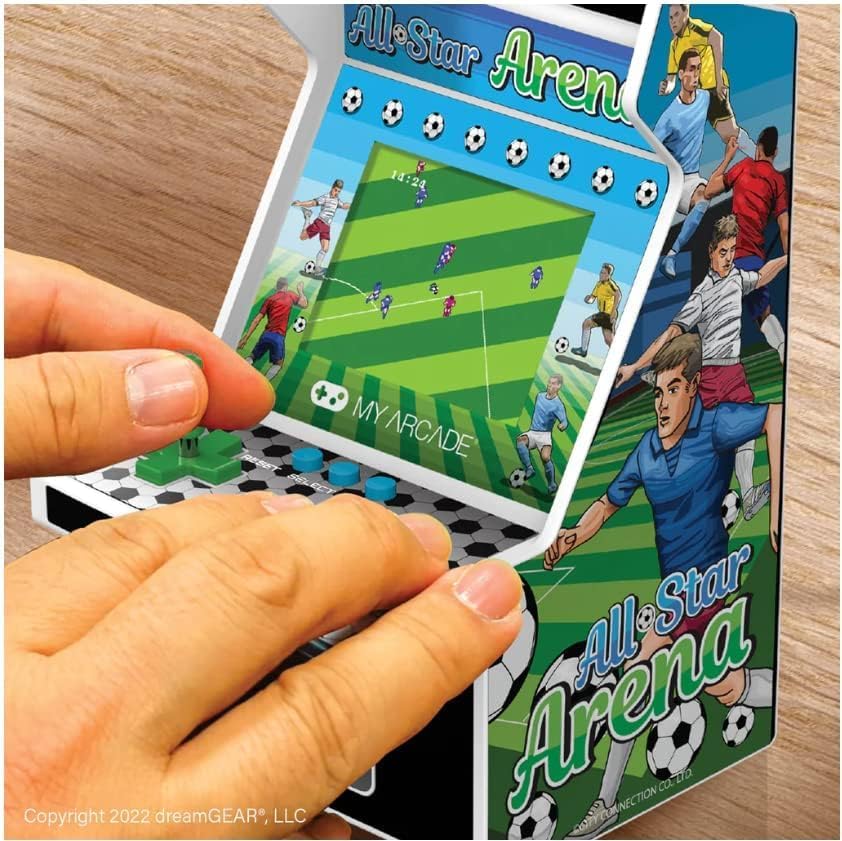
Image: A user's hands operating the My Arcade All Star Arena Micro Player, demonstrating the use of the joystick and buttons.
Упутство за употребу
Укључивање/искључивање
To turn on the Micro Player, press the power button, often designed to resemble a coin slot, located below the control panel. Press it again to turn the unit off.
Selecting and Playing Games
- Once powered on, use the joystick or directional pad to navigate the game selection menu.
- Press the 'Start' button to begin playing your selected game.
- Use the joystick/directional pad for movement and the action buttons for in-game commands (e.g., shoot, jump, pass).
- The 'Reset' button can be used to restart a game or return to the main menu.
Контрола јачине звука и прикључак за слушалице
Volume control buttons (+ and -) and a 3.5 mm headphone jack are located on the back of the unit. Use these to adjust the audio level or connect headphones for a private gaming experience.
Видео: Званична видео презентација производаasing the My Arcade All Star Arena Micro Player, demonstrating its features and gameplay.
Безбедносне информације
WARNING: Not suitable for children under 3 years old due to small parts which may present a choking hazard.
Always supervise young children during play. Keep the device away from water and extreme temperatures. Do not attempt to disassemble or modify the unit.
Одржавање
- Очистите уређај меком, сувом крпом. Не користите абразивна средства за чишћење или раствараче.
- If using batteries, remove them if the unit will not be used for an extended period to prevent leakage.
- Store the Micro Player in a cool, dry place when not in use.
Решавање проблема
Уређај се не укључује
- Check if batteries are inserted correctly and are not depleted. Replace with fresh batteries if necessary.
- If using USB-C, ensure the cable is securely connected to a working power source.
Нема звука или је изобличен звук
- Adjust the volume using the volume control buttons on the back of the unit.
- If headphones are connected, ensure they are fully plugged into the 3.5 mm jack.
For further assistance, please contact My Arcade customer support.
Спецификације
| Феатуре | Детаљ |
|---|---|
| Број модела | ДГУНЛ-4125 |
| Величина екрана | 2.75 инча |
| Тип контролера | Joystick (Removable) |
| Извор напајања | 4 AA Batteries (not included) or USB Type C (cable not included) |
| Хардверски интерфејс | УСБ тип Ц |
| Дисплаи Типе | ЛЦД |
| Материјал | Пластика |
| Форм Фацтор | Хандхелд |
| Димензије производа | 4.5 к 4 к 6.8 инча |
| Тежина артикла | 1.04 фунти (470 грама) |
| УПЦ | 845620041251 |
| Препоручена старост произвођача | 14 година и више |
| Датум изласка | 31. августа 2022. године |
Гаранција и подршка
My Arcade products are designed for durability and enjoyment. For information regarding warranty coverage, technical support, or replacement parts, please visit the official My Arcade webсајт или контактирајте њихову службу за кориснике. Сачувајте рачун за куповину за потребе гаранције.