Увод
Хвала вам што сте изабрали Цamp Chef SmokePro XT Wood Pellet Grill Smoker. This manual provides essential information for the safe assembly, operation, maintenance, and troubleshooting of your new pellet grill. Please read all instructions carefully before use to ensure optimal performance and safety.
Безбедносне информације
УПОЗОРЕЊЕ: For outdoor use only. Do not operate this appliance indoors. Failure to follow these instructions could result in fire, explosion, or burn hazard, which could cause property damage, personal injury, or death.
- Always operate the grill on a level, non-combustible surface.
- Maintain a minimum clearance of 10 feet from combustible materials.
- Држите децу и кућне љубимце даље од роштиља током рада.
- Never use gasoline, kerosene, or alcohol for lighting or relighting.
- Осигурајте одговарајућу вентилацију.
- Always unplug the grill before cleaning or servicing.
- Refer to local codes and regulations for installation and use.
Подешавање и монтажа
Ваш Цamp Chef SmokePro XT grill requires minimal assembly. Ensure all components are present and undamaged before proceeding.
Цомпонент Оверview

Слика 1: Предња страна view of the Camp Chef SmokePro XT Wood Pellet Grill Smoker.
Pellet Hopper Installation and Filling
The pellet hopper is located on the left side of the grill. Open the hopper lid and fill with food-grade wood pellets. Do not overfill.

Слика 2: Страна view showing the pellet hopper.

Figure 3: Wood pellets loaded into the hopper.
Повер Цоннецтион
Connect the power cord to a grounded electrical outlet. Ensure the outlet is protected from weather elements.
Упутство за употребу
Контролна табла је завршенаview
The digital control panel allows you to manage temperature settings and monitor internal temperatures.

Figure 4: Digital control panel for temperature and probe readings.
Initial Startup (First Burn-in)
- Ensure the pellet hopper is filled.
- Plug in the grill and turn the power switch to ON.
- Set the temperature dial to 350°F (175°C).
- Allow the grill to run for 30-45 minutes to burn off any manufacturing oils.
- Turn off the grill and allow it to cool completely.
Стандардна операција
- Fill the pellet hopper.
- Plug in the grill and turn the power switch to ON.
- Set the desired temperature using the dial (range 160°F to 500°F).
- Allow the grill to preheat to the set temperature. The digital display will show the current chamber temperature.
- Use the included meat probes to monitor internal food temperature.
- The Smart Smoke Technology minimizes temperature swings for consistent cooking.
Side Grill Operation (Optional Accessory)
The SmokePro XT is compatible with an optional side grill attachment for direct flame grilling. This attachment uses a separate propane tank.
Figure 5: The SmokePro XT grill with the optional side grill attachment.
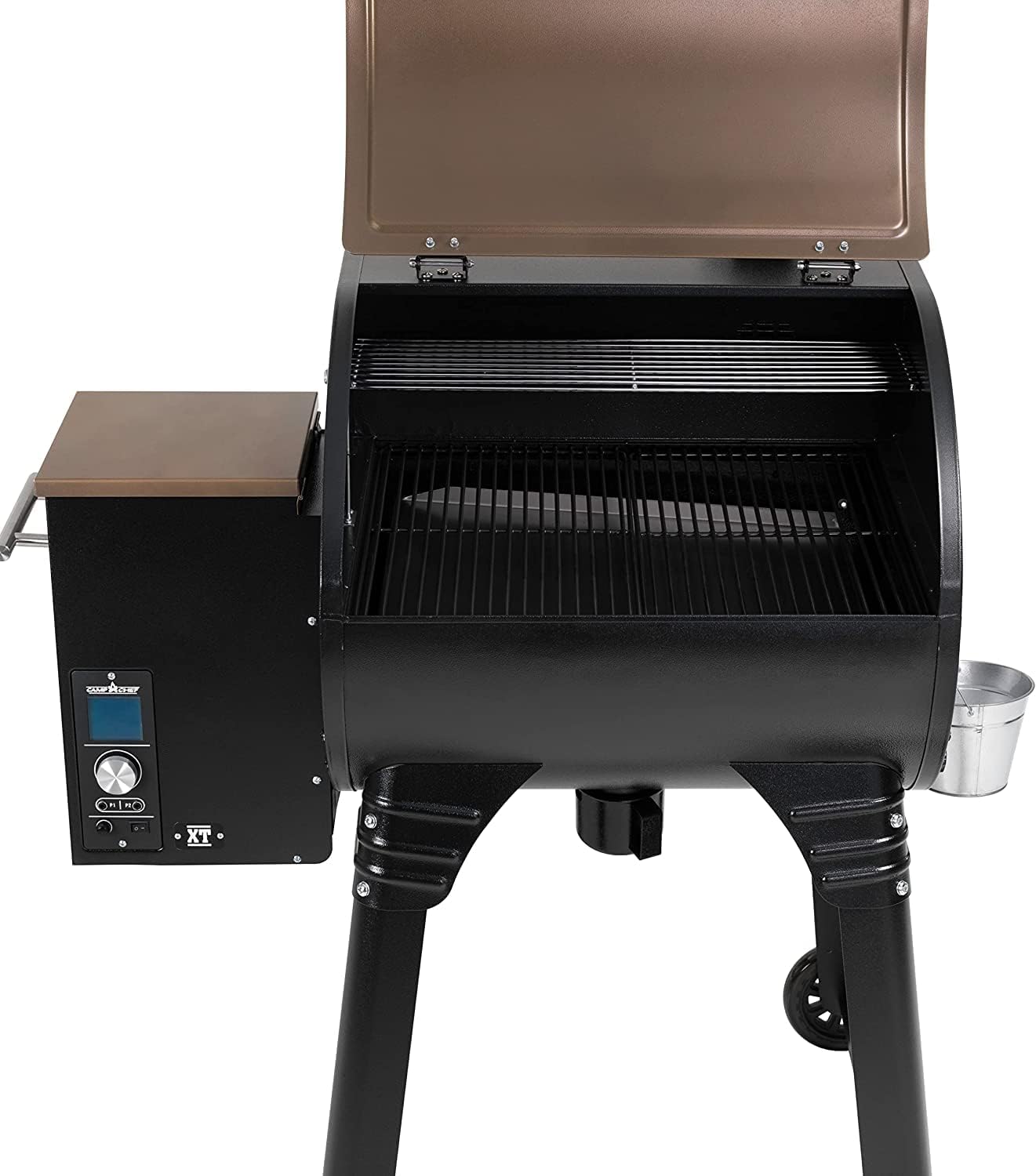
Figure 6: Interior cooking grates of the main grill chamber.
Одржавање
Ash Clean-Out System
The patented Ash Clean-Out Cup System simplifies cleaning. After the grill has cooled, pull the ash clean-out knob to empty ash into the removable cup.

Figure 7: Ash clean-out cup for easy ash removal.
Генерал Цлеанинг
- Regularly clean cooking grates with a grill brush.
- Обришите спољашње површине огласомamp тканина.
- Periodically inspect and clean the grease management system.
- Ensure the grill is completely cool before cleaning.
Решавање проблема
| Проблем | Могући узрок | Решење |
|---|---|---|
| Роштиљ се не греје | No power, empty pellet hopper, igniter issue | Check power connection, refill pellets, consult support |
| Температурне флуктуације | Low pellets, strong winds, dirty temperature probe | Ensure sufficient pellets, position grill away from wind, clean probe |
| Превише дима | Wet pellets, improper startup | Use dry pellets, follow startup procedure |
| Auger not feeding pellets | Pellet jam, motor issue | Clear pellet jam, contact customer support |
Спецификације
- Назив модела: SmokePro XT 24 Pellet Grill
- Број модела: PG24XTB
- Бренд: Camp Цхеф
- Извор напајања: Дрвени пелет
- Врста горива: Дрво
- Спољашњи материјал: нерђајући челик
- Тежина артикла: 133 фунти
- Димензије производа: 50"Д к 24.5"Ш к 47.5"В
- Температурни опсег: 160°C - 500°C
- БТУ: 25,000 БТУ
- Кључне карактеристике: Patented Ash Clean-Out System, Smart Smoke Technology, Digital Controller

Слика 8: Димензије производа.
Гаранција и подршка
Camp Chef products are designed for durability and performance. For specific warranty details, please refer to the warranty card included with your product or visit the official Camp Цхеф website. For technical assistance, replacement parts, or customer service, please contact Camp Chef customer support.
Контакт информације: Please refer to your product packaging or the official Camp Цхеф webсајт за најновије контакт информације.