
WISE TIGER WT-RT8501
WISE TIGER AC1200 Wireless Router User Manual
Model: WT-RT8501
1. Производ је готовview
The WISE TIGER AC1200 Wireless Router is a high-speed dual-band router designed for robust wireless internet connectivity in homes, offices, and restaurants. It features 802.11AC/N/G/B/A Wi-Fi technology, beamforming for enhanced signal reliability, and four external 5dBi antennas to ensure long-range coverage, even in basements or attics.
This router supports up to 300Mbps at 2.4GHz and 866Mbps at 5GHz, providing smooth online gaming and video streaming experiences. It also includes a WAN port and four LAN Fast ports (10/100Mbps) for wired connections. Security features include WPA/WPA2-PSK encryption, firewall, parental controls, and guest network capabilities.

Слика 1: Предња страна view of the WISE TIGER AC1200 Wireless Router.
2. Садржај пакета
Молимо вас да проверите да ли су све ставке присутне у вашем пакету:
- АЦ1200 бежични двопојасни рутер
- Јединица за напајање
- Водич за брзу инсталацију
- Мрежни кабл
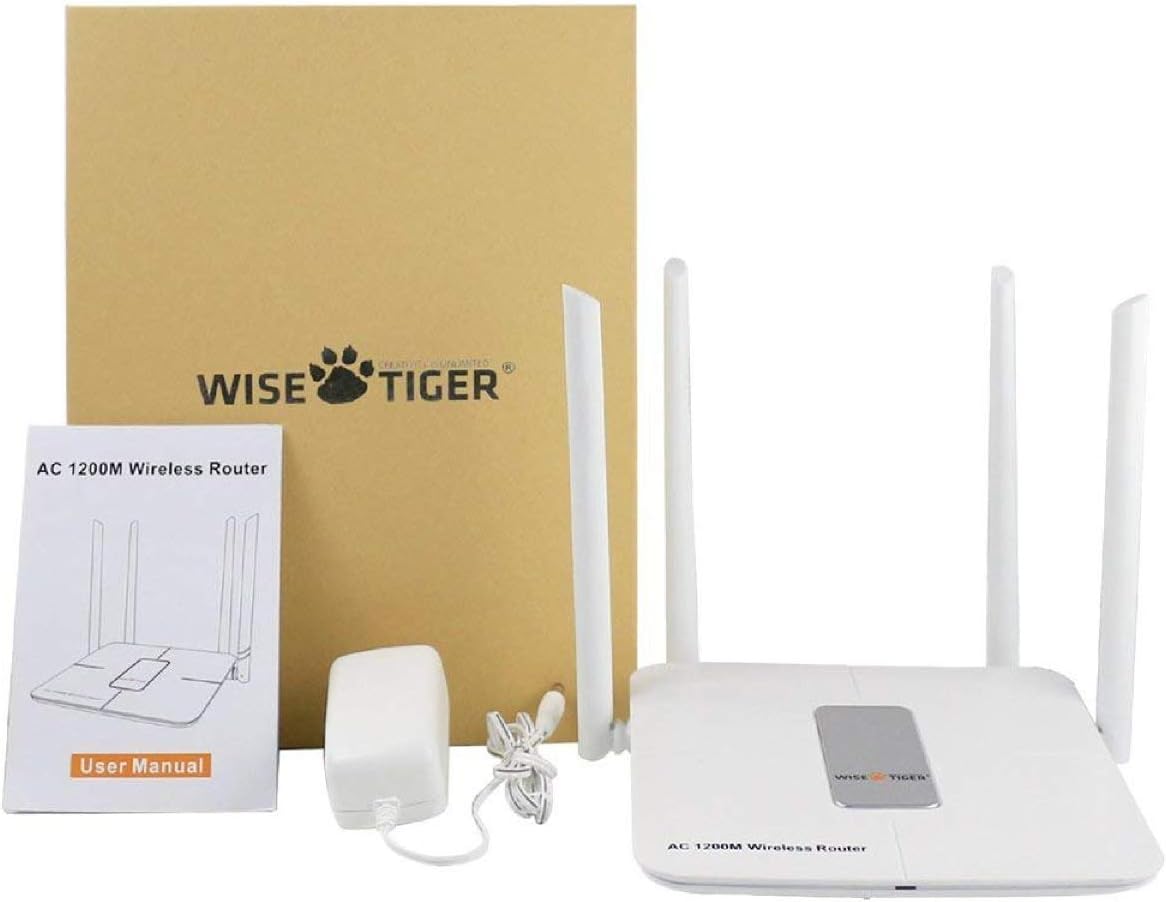
Figure 2: All components included in the WISE TIGER AC1200 Wireless Router package.
3. Product Diagram and Ports
Familiarize yourself with the router's physical layout and ports:

Слика 3: Задња страна view of the router with labeled ports.
- ЛАН портови (x4): Connect your wired devices such as computers, gaming consoles, or smart TVs.
- Интернет порт (WAN): Повежите Етернет кабл вашег модема на овај порт да бисте добили приступ интернету.
- Улазна снага: Овде прикључите приложени адаптер за напајање.
- Дугме за ресетовање: Used to restore the router to factory default settings. Press and hold for several seconds while the router is powered on.
- ВПС дугме: For quick and secure wireless connection setup with WPS-compatible devices.
4. Спецификације
| Феатуре | Спецификација |
|---|---|
| Бранд | ВИСЕ ТИГЕР |
| Назив модела | WT-RT8501 |
| Вирелесс Типе | 802.11а/б/г/н/ац |
| Класа фреквенцијског опсега | Двопојасни (2.4 GHz и 5 GHz) |
| Брзина преноса података | До 300 Mbps (2.4 GHz), 866 Mbps (5 GHz) |
| Антена | 4 x 5dBi External Antennas |
| Етхернет портови | 1 x WAN, 4 x LAN (10/100Mbps) |
| Дугмад | WPS, Reset |
| Безбедност | WPA/WPA2-PSK, Firewall, Parental Controls, Guest Network |
| Компатибилност оперативног система | Windows XP/7/8/10/Vista, Mac, Android |
| Тежина артикла | 2.75 унци |
| Димензије производа | 1.48 к 6.6 к 5.58 инча |

Figure 4: Router dimensions for placement planning.
5. Водич за подешавање
Follow these steps to set up your WISE TIGER AC1200 Wireless Router:
5.1 Почетно повезивање хардвера
- Повежите ВАН кабл: Plug the broadband wire from your modem into the blue WAN port on the router.
- Повежите ЛАН кабл (опционо): For wired devices, connect one end of the network patch cable to a yellow LAN port on the router and the other end to your PC's LAN network port.
- Укључено: Прикључите адаптер за напајање на улаз за напајање рутера и укључите га у електричну утичницу.
5.2 Приступ Web Интерфејс
- Join Wi-Fi: On your computer or mobile device, connect to the router's default Wi-Fi network. The default Wi-Fi name (SSID) and password can usually be found on a sticker on the bottom of the router.
- Отвори прегледач: Отвори а web прегледач (нпр. Chrome, Firefox, Edge).
- Унесите ИП адресу: У адресној траци откуцајте
192.168.0.1и притисните Ентер. - Пријава: Enter the default username and password. Typically, both are
admin.
5.3 WAN Setup (Internet Connection Type)
Select the connection type provided by your Internet Service Provider (ISP):
- ПППоЕ: If your ISP provides a username and password for internet access, select PPPoE and enter the credentials.
- Статичка интернет протокол адреса: If your ISP provided a fixed IP address, subnet mask, default gateway, and DNS settings, select Static IP and input these details.
- Динамичка ИП адреса: If your ISP uses a DHCP server, select Dynamic IP. The router will automatically obtain network settings. No account or static IP info is needed.
- PPTP/L2TP: If your ISP provided PPTP/L2TP connection details including a server IP or domain, select this option and enter the required information.
- WISP (Wireless ISP): This mode allows the router to connect to another Wi-Fi network as its internet source, acting as a Wi-Fi repeater. Select a Wi-Fi network from the list and log in with its password.
5.4 Подешавања бежичне везе
Configure your Wi-Fi networks for both 2.4GHz and 5GHz bands:
- Ви-Фи назив (ССИД): Change the default Wi-Fi name to a custom one for easy identification.
- Шифровање: Select a strong encryption type, such as WPA2-PSK, for network security.
- Лозинка за Ви-Фи: Set a strong, unique password for your Wi-Fi network.
- Ширина појаса: Adjust the channel width for optimal performance (e.g., 20/40MHz for 2.4GHz, 40/80MHz for 5GHz).
Video 1: Official product video demonstrating the unboxing, features, and installation process of the WISE TIGER AC1200 Wireless Router.
6. Управљање рутером
6.1 Оптимално постављање
For the best wireless performance, place your router in a central location, away from obstructions like thick walls, metal objects, and other electronic devices that may cause interference. The four high-gain external antennas are designed to provide extensive coverage.

Figure 5: Illustration of the router's high-power signal penetration.

Figure 6: Visual representation of 2.4GHz (longer distance) and 5GHz (faster transmission) band characteristics.
6.2 Напредне функције
- Родитељски надзор: Manage and restrict internet access for specific devices or users.
- Мрежа гостију: Create separate Wi-Fi networks for guests, providing internet access without sharing your main network password or resources. The router supports up to 3 guest access points.
- заштитни зид: The built-in firewall helps protect your network from unauthorized access and malicious attacks.
- MAC Filtering (Restricted List): You can block or allow specific devices on your network based on their MAC addresses. This feature is found under the 'Restricted list' in the web интерфејс.
- Контрола пропусног опсега: Allocate specific download and upload limits to connected devices to manage network traffic effectively. This can be configured in the 'Bandwidth Control' section of the web интерфејс.
7. Одржавање
Редовно одржавање осигурава оптималне перформансе и дуговечност вашег рутера:
- Ажурирања фирмвера: Periodically check the WISE TIGER official webсајт за ажурирања фирмвера. Ажурирање фирмвера може побољшати перформансе, додати нове функције и поправити грешке.
- Редовно поновно покретање: Rebooting your router every few weeks can help clear its memory and resolve minor connectivity issues. Simply unplug the power adapter, wait 10 seconds, and plug it back in.
- Чишћење: Одржавајте рутер чистим и без прашине. Користите меку, суву крпу за брисање спољашњости. Уверите се да вентилациони отвори нису блокирани.
КСНУМКС. Решавање проблема
Ако наиђете на проблеме са рутером, покушајте са следећим решењима:
- Нема приступа интернету:
- Check all cable connections (WAN, LAN, Power) to ensure they are secure.
- Verify your modem is working correctly. Try rebooting both the modem and the router.
- Confirm your WAN settings in the router's web interface match your ISP's requirements.
- Слаб Wi-Fi сигнал или мртве зоне:
- Relocate the router to a more central position in your home/office.
- Adjust the router's antennas for better signal direction.
- Минимизирајте сметње од других електронских уређаја (бежичних телефона, микроталасних пећница).
- Consider using the WISP mode to extend coverage if you have another Wi-Fi network.
- Не могу приступити рутеру Web Интерфејс:
- Уверите се да је ваш уређај повезан на Wi-Fi рутера или путем Ethernet кабла на LAN порт.
- Verify you are typing the correct IP address (
192.168.0.1). - Обришите кеш меморију и колачиће прегледача или покушајте са другим прегледачем.
- If you forgot your login credentials, you may need to perform a factory reset.
- Фацтори Ресет: If all else fails, use a paperclip or pin to press and hold the Reset button on the back of the router for about 10 seconds while it is powered on. This will restore all settings to their factory defaults, including Wi-Fi name and password. You will then need to reconfigure the router.
9. Гаранција и подршка
WISE TIGER provides a 1 година гаранције for this product. In case the product does not meet your satisfaction or experiences issues within this period, a new replacement will be provided.
For technical support or warranty claims, please refer to the contact information provided in your product packaging or visit the official WISE TIGER webсајт за најновије ресурсе за подршку.
Молимо вас да сачувате доказ о куповини ради гаранције.