
TRONIC SMV9809
TRONIC 3-in-1 Detector SMV9809 User Manual
Model: SMV9809
1. Увод
Thank you for choosing the TRONIC 3-in-1 Detector, Model SMV9809. This device is designed to detect wood, metal, and live electrical voltage behind walls, ceilings, and floors. Please read this manual thoroughly before using the device to ensure safe and effective operation. Keep this manual for future reference.
2. Безбедносна упутства
УПОЗОРЕЊЕ: Непоштовање ових безбедносних упутстава може довести до струјног удара, пожара или озбиљних повреда.
- Always assume that live electrical wires are present behind walls. Exercise extreme caution.
- Do not rely solely on the detector to locate live wires. Always turn off power to the area before drilling or cutting.
- The device is designed for indoor use only. Avoid exposure to moisture or extreme temperatures.
- Не отварајте нити модификујте уређај. Поправке треба да обавља само квалификовано особље.
- Држите уређај ван домашаја деце.
- Очистите уређај сувом, меком крпом. Не користите абразивна средства за чишћење или раствараче.
3. Производ је готовview
The TRONIC SMV9809 detector features an LCD display and intuitive controls for easy operation.
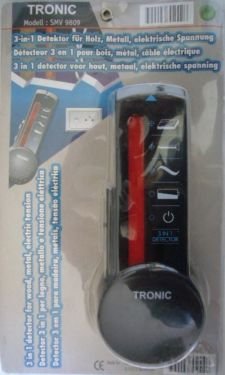
Слика 1: Предња страна view of the TRONIC 3-in-1 Detector SMV9809, showing the LCD screen and control buttons.
3.1 Компоненте
- ЛЦД екран: Shows detection mode, signal strength, and battery status.
- Дугме за режим: Switches between Wood, Metal, and AC Voltage detection modes.
- Дугме за скенирање: Покреће процес скенирања.
- Област сензора: Located on the back of the device, this area must be placed flat against the surface for accurate detection.
- Одељак за батерије: Налази се на задњој страни, за уградњу батерије.
4. Подешавање
4.1 Инсталација батерије
The TRONIC SMV9809 requires a 9V battery (not included).
- Отворите поклопац одељка за батерије на задњој страни уређаја.
- Уметните нову батерију од 9 V, водећи рачуна о исправном поларитету (+/-).
- Добро затворите поклопац одељка за батерије.
Note: Replace the battery when the low battery indicator appears on the LCD display.
5. Упутство за употребу
5.1 Општи савети за рад
- Ensure the surface is dry and free of dust.
- Hold the device flat against the surface. Do not tilt or lift it during scanning.
- Move the device slowly and steadily across the surface.
- Mark the detected areas with a pencil.
5.2 Wood Detection Mode
This mode is used to locate wood studs behind drywall or other common wall materials.
- Притисните тастер Дугме за режим until the "WOOD" indicator appears on the LCD.
- Place the device flat against the wall where you want to start scanning.
- Притисните и држите Дугме за скенирање. Wait for calibration (a beep may sound).
- Полако померајте уређај хоризонтално преко површине.
- The signal strength indicator on the LCD will increase as you approach a wood stud. A distinct sound and full bar indication will signal the center of the stud.
5.3 Режим детекције метала
This mode detects ferrous and non-ferrous metals, such as pipes, rebar, or conduit.
- Притисните тастер Дугме за режим until the "METAL" indicator appears on the LCD.
- Place the device flat against the wall.
- Притисните и држите Дугме за скенирање.
- Slowly slide the device horizontally.
- The signal strength will increase as you approach metal. A continuous tone and full bar indication will signal the presence of metal.
5.4 АЦ Волtage Detection Mode
CAUTION: This mode detects live, unshielded AC wires. Always confirm power is off before working.
- Притисните тастер Дугме за режим until the "AC" indicator appears on the LCD.
- Place the device flat against the wall.
- Притисните и држите Дугме за скенирање.
- Slowly slide the device horizontally.
- The signal strength will increase, and an audible alarm will sound when live AC voltage is detected. The "AC" symbol will flash on the display.
6. Одржавање
- Чишћење: Wipe the device with a dry, soft cloth. Do not use liquids or chemical cleaners.
- Складиштење: Store the device in a dry, dust-free environment at room temperature. Remove the battery if the device will not be used for an extended period.
- Замена батерије: Replace the 9V battery when the low battery indicator is displayed.
КСНУМКС. Решавање проблема
| Проблем | Могући узрок | Решење |
|---|---|---|
| Уређај се не укључује. | Мртва или неправилно инсталирана батерија. | Проверите поларитет батерије; замените батерију. |
| Нетачна очитавања. | Device not calibrated correctly; surface too wet/uneven; interference. | Ensure proper calibration (press and hold scan button on clear area); ensure dry, flat surface; avoid scanning near strong electromagnetic fields. |
| Нема детекције у AC режиму. | Wires are shielded or too deep; power is off. | Ensure power is on for the circuit; AC detection depth is limited. |
8. Спецификације
- Модел: СМВ9809
- Режими детекције: Wood, Metal, AC Voltage
- Извор напајања: 9V батерија (није укључена)
- Приказ: ЛЦД
- Материјал: Пластика
- Међународни рејтинг заштите: IP66 (Dust tight and protected against powerful jets of water)
- Подесива дужина: Да
9. Гаранција и подршка
TRONIC products are manufactured to high-quality standards. For warranty information or technical support, please refer to the documentation provided with your purchase or contact your retailer. Keep your proof of purchase for any warranty claims.
Ask a question about this manual
Ask about setup, troubleshooting, compatibility, parts, safety, or missing instructions. Manuals+ will review the question and use this page’s manual context to help answer it.