
1. Увод
Хвала вам на куповиниasing the CAIWEI A8AB-NEW Video Projector. This manual provides essential information for the safe and efficient operation of your device. Please read it thoroughly before use and retain it for future reference.
2. Безбедносна упутства
- Не гледајте директно у сочиво пројектора када је укљученоamp је укључен.
- Осигурајте одговарајућу вентилацију око пројектора како бисте спречили прегревање.
- Не излажите пројектор киши или влази.
- Користите само адаптер за напајање који је испоручени уз пројектор.
- Keep the projector away from flammable materials.
- Unplug the projector during lightning storms or when unused for long periods.
- Не покушавајте сами да поправите пројектор. Све сервисирање препустите квалификованом особљу.
3. Садржај пакета
Молимо вас да проверите да ли су сви предмети присутни приликом распакивања:
- CAIWEI A8AB-NEW Video Projector
- Повер Цабле
- Ремоте Цонтрол
- ХДМИ кабл
- ВГА кабел
- АВ кабл
- Упутство за употребу
4. Производ је готовview
Familiarize yourself with the projector's components:
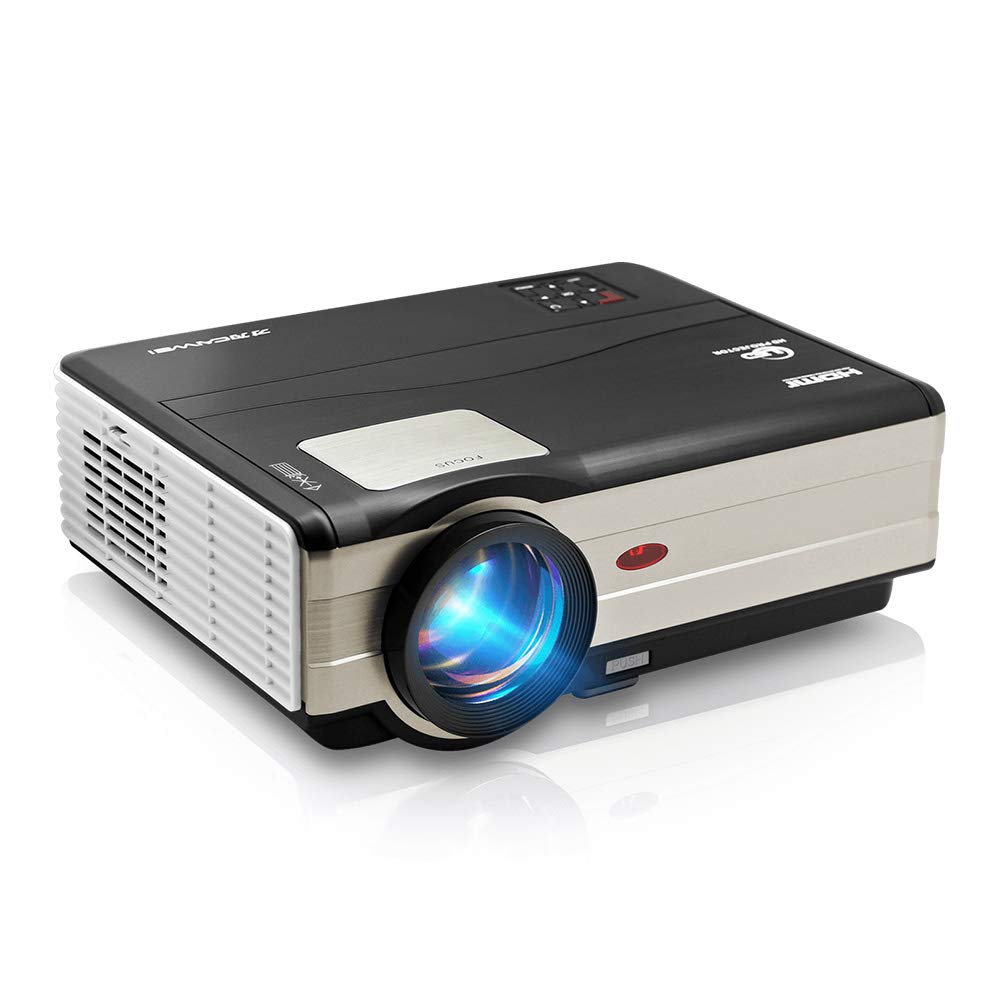
Слика 1: Фронт view of the CAIWEI A8AB-NEW Video Projector, showing the lens and ventilation.
Предња плоча
- Пројекционо сочиво: Емитује слику.
- Прстен за фокусирање: Подешава јасноћу слике.
- Кеистоне Цоррецтион: Исправља трапезоидно изобличење слике.
Реар Панел
- Напајање: Повезује се са каблом за напајање.
- HDMI портови (x2): Connects to HDMI-enabled devices (e.g., Blu-ray player, game console).
- USB портови (x2): Connects to USB storage devices or other USB peripherals.
- ВГА порт: Connects to computers or laptops with VGA output.
- AV порт: Connects to older devices using composite video and stereo audio.
- Аудио излаз (3.5 мм): Повезује се са екстерним звучницима или слушалицама.
5. Подешавање
5.1 Постављање
Place the projector on a stable, flat surface or mount it to a ceiling. Ensure the projector is perpendicular to the projection screen or wall. The optimal projection distance varies, but generally, a larger distance yields a larger image.
5.2 Прикључак за напајање
- Connect the power cable to the projector's power port.
- Укључите други крај кабла за напајање у утичницу.
- Лампица индикатора напајања ће засветлети.
5.3 Connecting Input Devices
Пројектор подржава различите улазне изворе:
- ДВИ: Connect an HDMI cable from your device (e.g., laptop, game console, streaming stick) to one of the projector's HDMI ports.
- УСБ: Insert a USB flash drive into a USB port to play media fileс директно.
- ВГА: Connect a VGA cable from your computer to the projector's VGA port.
- АВ: Use the provided AV cable to connect to devices with composite video output.
- Wireless (WiFi): For screen mirroring from smartphones or tablets, navigate to the 'Wireless Display' or 'Screen Mirroring' option in the projector's menu and follow the on-screen instructions. Ensure your device and the projector are on the same Wi-Fi network.
- Блуетоотх: To connect external Bluetooth speakers, go to the Bluetooth settings in the projector's menu, enable Bluetooth, and pair with your desired audio device.
5.4 Подешавање фокуса и трапезоидног искривљења
- Укључите пројектор и прикажите слику.
- Ротирајте Фокусни прстен on the lens until the image appears sharp and clear.
- If the image is trapezoidal (wider at the top or bottom), adjust the Кеистоне Цоррецтион dial or setting until the image is rectangular.
6. Упутство за употребу
6.1 Укључивање/искључивање
- Укључено: Притисните дугме за напајање на пројектору или даљинском управљачу.
- Искључивање: Поново притисните дугме за напајање. Потврдите искључивање ако се то од вас затражи.
6.2 Навигација кроз мени
Use the navigation buttons (Up, Down, Left, Right, OK) on the projector or remote control to browse the on-screen menu. The 'Menu' button typically opens the main settings, and 'Exit' or 'Back' closes sub-menus.
6.3 Избор улазног извора
Press the 'Source' or 'Input' button on the remote control or projector. A list of available input sources (HDMI1, HDMI2, USB1, USB2, VGA, AV, Wireless Display) will appear. Select the desired source using the navigation buttons and press 'OK'.
6.4 Аудио подешавања
Access the audio settings through the main menu to adjust volume, select audio output (internal speaker, external via 3.5mm jack, or Bluetooth), and modify sound modes.
6.5 Wireless/Bluetooth Connection
Refer to section 5.3 for detailed instructions on connecting via Wi-Fi for screen mirroring or Bluetooth for audio output.
7. Одржавање
7.1 Чишћење сочива
Use a soft, lint-free cloth specifically designed for optical lenses. Gently wipe the lens surface. Avoid using abrasive cleaners or excessive force, which can scratch the lens.
7.2 Cleaning the Air Filter/Vents
Regularly check the air intake and exhaust vents for dust accumulation. Use a soft brush or a can of compressed air to gently clean the vents. This helps maintain proper airflow and prevents overheating.
7.3 Складиштење
When not in use, store the projector in a cool, dry, and dust-free environment. Use the original packaging or a protective case to prevent damage.
КСНУМКС. Решавање проблема
| Проблем | Могући узрок | Решење |
|---|---|---|
| Нема слике на екрану | Power not connected; Incorrect input source; Device not powered on. | Check power cable; Select correct input source; Ensure connected device is on. |
| Слика је мутна | Фокус није подешен; Пројектор је превише далеко/близу. | Подесите прстен за фокусирање; Поново поставите пројектор. |
| Слика је трапезоидног облика | Кејстоун није подешен. | Подесите корекцију кеистоне. |
| Нема звука | Volume too low; Muted; Incorrect audio output; Cable issue. | Increase volume; Unmute; Check audio settings; Verify cable connections. |
| Даљински управљач не ради | Batteries dead; Obstruction; Out of range. | Replace batteries; Remove obstructions; Ensure line of sight to IR receiver. |
| Упозорење о прегревању | Blocked vents; Poor ventilation. | Clear vents; Ensure adequate space around projector. |
9. Спецификације
- Модел: A8AB-NEW
- Бренд: ЦАИВЕИ
- Резолуција екрана: 1280 к 800
- Технологија повезивања: Bluetooth, HDMI, USB, VGA, Wireless
- Посебне карактеристике: Built-In Wi-Fi, Portable, Wireless
- Препоручена употреба: Gaming, Home Theater
- Тежина артикла: 6.1 фунти
- Димензије производа: 11.2 к 14.7 к 5 инча
10. Гаранција и подршка
CAIWEI products are designed for reliability and performance. For specific warranty details, please refer to the warranty card included with your purchase or contact CAIWEI customer support. If you encounter any issues not covered in this manual, please reach out to our support team for assistance.
Корисничка подршка: Please visit the official CAIWEI website or contact your retailer for support information.