
1. Увод
The Canon PowerShot G5 X is a compact digital camera featuring a 1.0-inch, 20.2 Megapixel High-Sensitivity CMOS sensor and a built-in 2.36 million dot electronic viewfinder. This camera is designed for advanced photographers seeking high-quality stills and video with comprehensive control. It includes Wi-Fi and NFC capabilities for easy sharing and remote operation.
Кључне карактеристике укључују:
- 1.0-inch, 20.2 Megapixel High-Sensitivity CMOS sensor.
- Canon DIGIC 6 Image Processor for enhanced image quality and fast operation.
- Built-in 2.36 million dot electronic viewфиндер
- Multi-angle capacitive 3.0-inch touch panel LCD with 1.04 million dots.
- Full HD 1080p video recording at 60p/30p/24p.
- Integrated Wi-Fi and NFC for wireless connectivity.
2. Шта је у кутији
Verify that all items are present before initial use:
- Canon PowerShot G5 X Camera Body
- Баттери Пацк
- Пуњач батерија
- Ремен за врат

Figure 2.1: Included items with the Canon PowerShot G5 X camera.
3. Почетно подешавање
3.1 Пуњење батерије
- Убаците батерију у пуњач.
- Укључите пуњач у утичницу. Индикаторска лампица пуњења ће се упалити.
- Once charging is complete, the indicator light will change or turn off. Remove the battery.
3.2 Уметање батерије и меморијске картице
- Отворите поклопац одељка за батерију/картицу на дну фотоапарата.
- Insert the charged battery into the compartment, ensuring correct orientation.
- Insert a compatible SD, SDHC, or SDXC memory card into the card slot until it clicks into place.
- Добро затворите поклопац одељка.
3.3 Укључивање камере
Притисните тастер ОН/ОФФ button located on the top of the camera to power it on. The lens will extend, and the LCD screen will activate.

Слика 3.1: Предња страна view of the Canon PowerShot G5 X.
4. Руковање камером
4.1 Основни режими снимања
Точкић за избор режима на врху камере омогућава избор различитих режима снимања:
- Аутоматски режим: For automatic settings.
- П (Програм АЕ): Камера подешава отвор бленде и брзину затварача, али дозвољава и друга подешавања.
- Av (Aperture Priority AE): Ви подешавате отвор бленде, камера подешава брзину затварача.
- Tv (Shutter Priority AE): Ви подешавате брзину затварача, камера подешава отвор бленде.
- М (Ручно): Ви контролишете и отвор бленде и брзину затварача.
- Custom Modes (C1/C2): Save and recall your preferred settings.
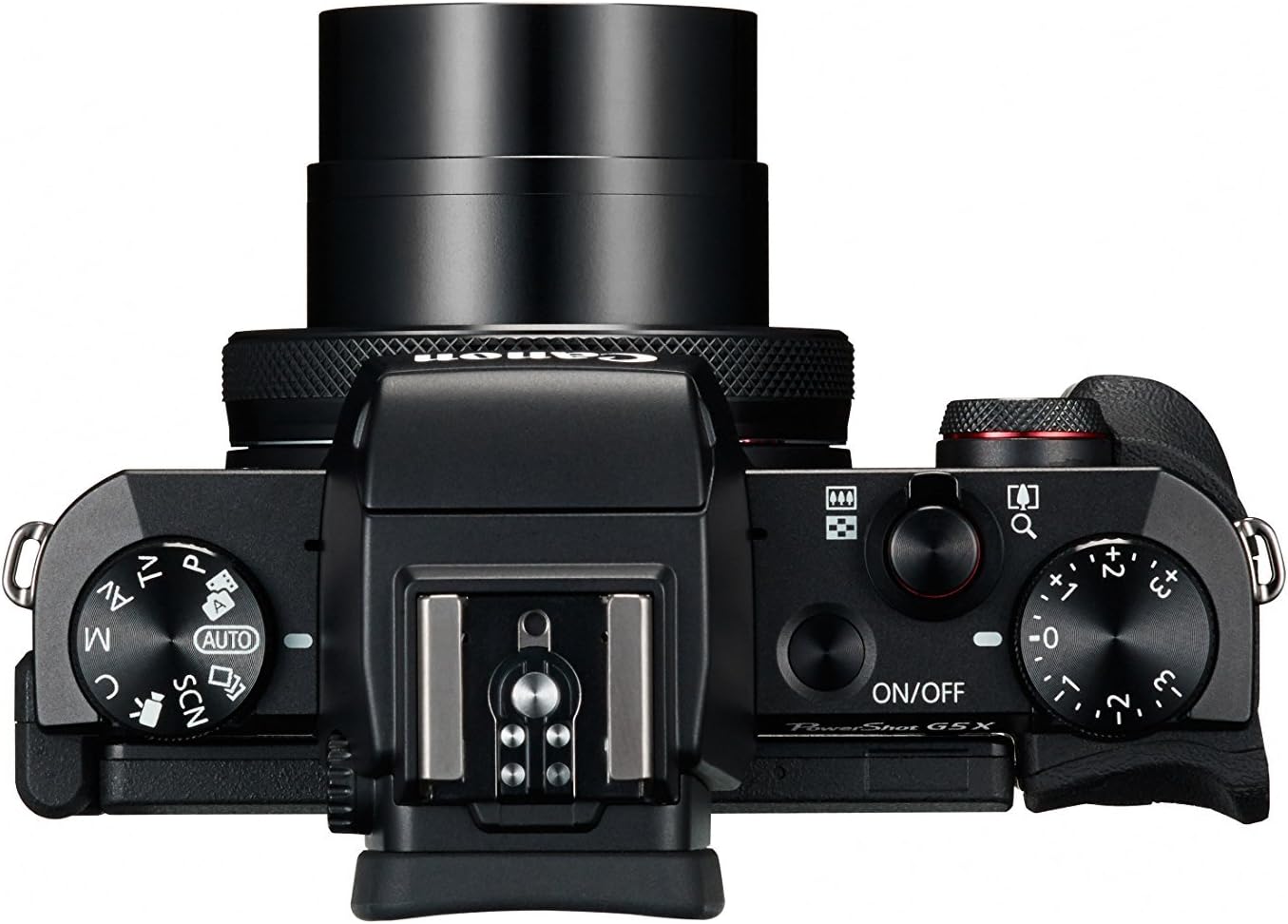
Figure 4.1: Top controls of the Canon PowerShot G5 X.
4.2 Коришћењем Viewfinder and LCD Screen
The camera features both an electronic viewfinder (EVF) and a multi-angle touch panel LCD. You can switch between them or use the EVF for composing shots in bright conditions. The LCD screen can be articulated for various shooting angles and touch operations.

Figure 4.2: Canon PowerShot G5 X with articulated LCD screen.

Слика 4.3: Задња страна view of the Canon PowerShot G5 X.
4.3 Снимање видео записа
To record video, set the mode dial to the movie mode icon. Press the dedicated movie button to start and stop recording. The camera supports 1080p Full HD video at various frame rates (60p/30p/24p).
4.4 Wi-Fi и NFC повезивање
The camera's built-in Wi-Fi and NFC functions allow for wireless transfer of images and videos to compatible smart devices or computers. Refer to the camera's menu for detailed instructions on setting up these connections.
5. Одржавање и њега
5.1 Чишћење камере
- Објектив: Use a lens brush or blower to remove dust, then gently wipe with a microfiber lens cloth. Avoid touching the lens surface directly.
- ЛЦД екран: Wipe gently with a soft, dry cloth. For stubborn smudges, use a screen cleaner specifically designed for electronics.
- Тело камере: Wipe with a soft, dry cloth. Do not use organic solvents or strong cleaning agents.
5.2 Складиштење
Када се не користи, чувајте камеру на хладном и сувом месту, даље од директне сунчеве светлости и екстремних температура. Извадите батерију ако се камера неће користити дуже време.
КСНУМКС. Решавање проблема
This section addresses common issues you might encounter with your Canon PowerShot G5 X camera.
| Проблем | Могући узрок / решење |
|---|---|
| Камера се не укључује. | Battery is depleted. Charge the battery. Ensure battery is inserted correctly. |
| Слике су мутне. | Lens is dirty. Clean the lens. Shutter speed is too slow. Increase shutter speed or use image stabilization. Camera shake. Hold the camera steady or use a tripod. |
| Cannot connect to Wi-Fi/NFC. | Ensure Wi-Fi/NFC is enabled in camera settings. Check device compatibility and network settings. Refer to the camera's connectivity guide in the menu. |
| Грешка меморијске картице. | Меморијска картица је пуна. Обришите непотребне files or replace card. Card is corrupted. Format the card (this will erase all data). Card is incompatible. Use a supported SD, SDHC, or SDXC card. |
| Блиц се не активира. | Flash is set to OFF. Change flash mode to Auto or On. Subject is too far. Check flash range. |
7. Спецификације
| Феатуре | Детаљ |
|---|---|
| Тип сензора | 1.0-inch High-Sensitivity CMOS |
| Ефективна резолуција мировања | 20.2 МП |
| Процесор слике | ДИГИЦ 6 |
| Оптицал Зоом | 4.2к |
| Отвор објектива | ф/1.8-2.8 |
| Focal Length (35mm equivalent) | 24-100мм |
| Стабилизација слике | Дигитал |
| Viewналазач | Built-in Electronic Viewfinder (2.36 million dots) |
| ЛЦД екран | 3.0-inch Multi-angle Capacitive Touch Panel (1.04 million dots) |
| Видео Ресолутион | 1080p Full HD (60p/30p/24p) |
| Повезивање | Wi-Fi, NFC, HDMI, USB |
| Медији за складиштење | SD, SDHC, SDXC Memory Cards |
| Тежина артикла | 1.8 фунти |
| Број модела | 0510Ц001 |
| УПЦ | 748926548632 |
8. Гаранција и подршка
8.1 Информације о гаранцији
This Canon PowerShot G5 X camera comes with a 90-day limited warranty from the date of purchase. This warranty covers manufacturing defects under normal use. Please retain your proof of purchase for warranty claims.
8.2 Корисничка подршка
For technical assistance, service, or further inquiries, please refer to the official Canon support webсајту или контактирајте њихову службу за кориснике. Контакт информације се обично могу наћи на произвођачевој webсајту.