
1. Увод
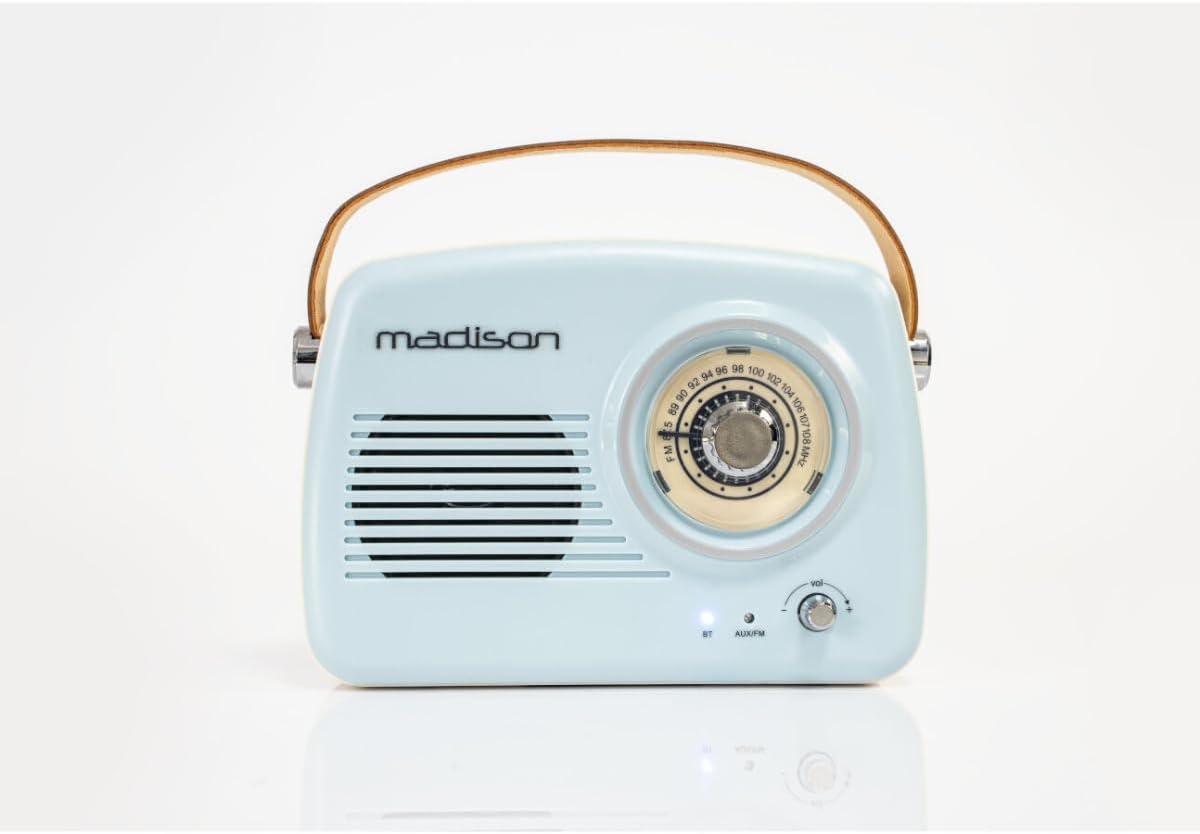
The Madison FREESOUND-VR30 is a vintage-style portable radio designed to combine classic aesthetics with modern audio technology. This device features FM radio, Bluetooth connectivity, and an AUX input, allowing you to enjoy your favorite music and radio stations from various sources. Its compact design, long-lasting rechargeable battery, and integrated carrying handle make it ideal for portable use.

Слика 1: Предња страна view of the Madison FREESOUND-VR30 radio.
2. Карактеристике производа
- Analog Dial Tuner: For precise FM radio station selection.
- Блуетоотх повезивање: Бежично стримовање звука са компатибилних уређаја.
- АУКС улаз: Connect external audio sources via a 3.5mm audio cable.
- ФМ радио: Enjoy local and national radio broadcasts.
- Bass Reinforcement: Integrated subwoofer at the rear for enhanced low-frequency sound.
- УСБ пуњиви: Convenient charging via USB (cable included).
- Дршка за ношење: Durable faux leather handle for easy portability.
- Телескопска антена: Издувна антена за бољи ФМ пријем.
- Дуг век трајања батерије: Up to 16 hours of playback at medium volume.
3. Подешавање и почетна употреба
3.1 Распакивање
Carefully remove the radio from its packaging. Ensure all components, including the USB charging cable and this user manual, are present.
3.2 Пуњење батерије
Before first use, fully charge the radio's internal lithium-polymer battery. Connect the supplied USB charging cable to the micro-USB port on the back of the radio and plug the other end into a compatible USB power adapter (not included) or a computer's USB port. The charging indicator light will illuminate during charging and turn off or change color when fully charged.
Слика 2: Задња страна view of the radio with charging and AUX ports.
3.3 Extending the Antenna
For optimal FM radio reception, extend the telescopic antenna located on the back of the unit to its full length and adjust its direction as needed.
4. Упутство за употребу
4.1 Укључивање/искључивање и контрола јачине звука
To power on the radio, rotate the volume knob clockwise. Continue rotating to increase the volume. To power off, rotate the volume knob counter-clockwise until it clicks.
4.2 Selecting Modes (FM / Bluetooth / AUX)
Press the 'MODE' button located on the back of the radio to cycle through the available input modes: FM Radio, Bluetooth (BT), and AUX. The indicator light on the front will change to reflect the selected mode.
Рад са 4.3 FM радиом
- Ensure the telescopic antenna is fully extended.
- Select FM mode using the 'MODE' button.
- Rotate the large tuning dial on the front of the radio to scan for FM stations. The frequency scale will indicate the current tuning position.
- Podesite jačinu zvuka pomoću dugmeta za jačinu zvuka.

Figure 3: Analog tuning dial for FM radio.
4.4 Блуетоотх упаривање
- Select Bluetooth mode using the 'MODE' button. The Bluetooth indicator light on the front will blink, indicating it is in pairing mode.
- На паметном телефону, таблету или другом уређају који подржава Bluetooth омогућите Bluetooth и потражите доступне уређаје.
- Select "FREESOUND-VR30" from the list of devices.
- Once paired, the Bluetooth indicator light will stop blinking and remain solid. You can now stream audio wirelessly to the radio.
4.5 AUX Input Operation
- Connect one end of a 3.5mm audio cable (not included) to the AUX input port on the back of the radio.
- Повежите други крај аудио кабла са прикључком за слушалице или аудио излазом вашег екстерног уређаја.
- Select AUX mode using the 'MODE' button.
- Play audio from your external device. Control the volume using the radio's volume knob and your external device's volume controls.
Видео 1: Крајview of Madison FREESOUND-VR30 features, including tuning, volume, antenna extension, and AUX connection.
5. Одржавање
To ensure the longevity and optimal performance of your Madison FREESOUND-VR30 radio, follow these maintenance guidelines:
- Чишћење: Користите меку, суву крпу за чишћење спољашњости радија. Не користите абразивна средства за чишћење, воскове или раствараче.
- Складиштење: Када се радио не користи дуже време, чувајте га на хладном и сувом месту, даље од директне сунчеве светлости и екстремних температура.
- Одржавање батерије: To maintain battery health, avoid fully discharging the battery frequently. Recharge the radio periodically if it is not used for a long time.
КСНУМКС. Решавање проблема
| Проблем | Могући узрок | Решење |
|---|---|---|
| Радио се не укључује. | Батерија је испражњена. | Connect the radio to a USB power source using the charging cable and allow it to charge. |
| Слаб ФМ радио пријем. | Антена није издужена или је сигнал лош. | Fully extend the telescopic antenna and adjust its position. Try moving the radio to a different location. |
| Блутут уређај не може да се упари. | Radio not in Bluetooth pairing mode or device too far. | Press the 'MODE' button until the Bluetooth indicator light blinks. Ensure your device's Bluetooth is on and within range (approx. 10 meters). Forget previous pairings on your device if necessary. |
| Нема звука у АУКС режиму. | Изабран је погрешан режим или кабл није потпуно уметнут. | Ensure AUX mode is selected. Check that the 3.5mm audio cable is securely connected to both the radio and the external device. Verify volume levels on both devices. |
7. Спецификације

Слика 4: Димензије производа.
| Феатуре | Детаљ |
|---|---|
| Број модела | 10-5546МА |
| Бранд | Мадисон |
| Технологија повезивања | Блуетоотх, помоћни |
| Технологија тјунера | FM |
| Извор напајања | Баттери Поверед |
| Тип батерије | 1 литијум-полимер (укључена) |
| Димензије производа (Д к Ш к В) | 21 к 8 к 16 цм |
| Max Product Power Output | 30 Ваттс |
| Компатибилни уређаји | Smartphone, Tablet, Laptop, Speaker (any device with Bluetooth or AUX output) |
| Дисплаи Типе | Аналог |
| Интерни материјал | Пластика |
8. Гаранција и подршка
This Madison FREESOUND-VR30 radio is covered by a legal warranty. Spare parts availability is guaranteed for 2 years from the date of purchase.
For further assistance, technical support, or warranty claims, please refer to the contact information provided with your purchase documentation or visit the official Madison webсајту.