
Увод
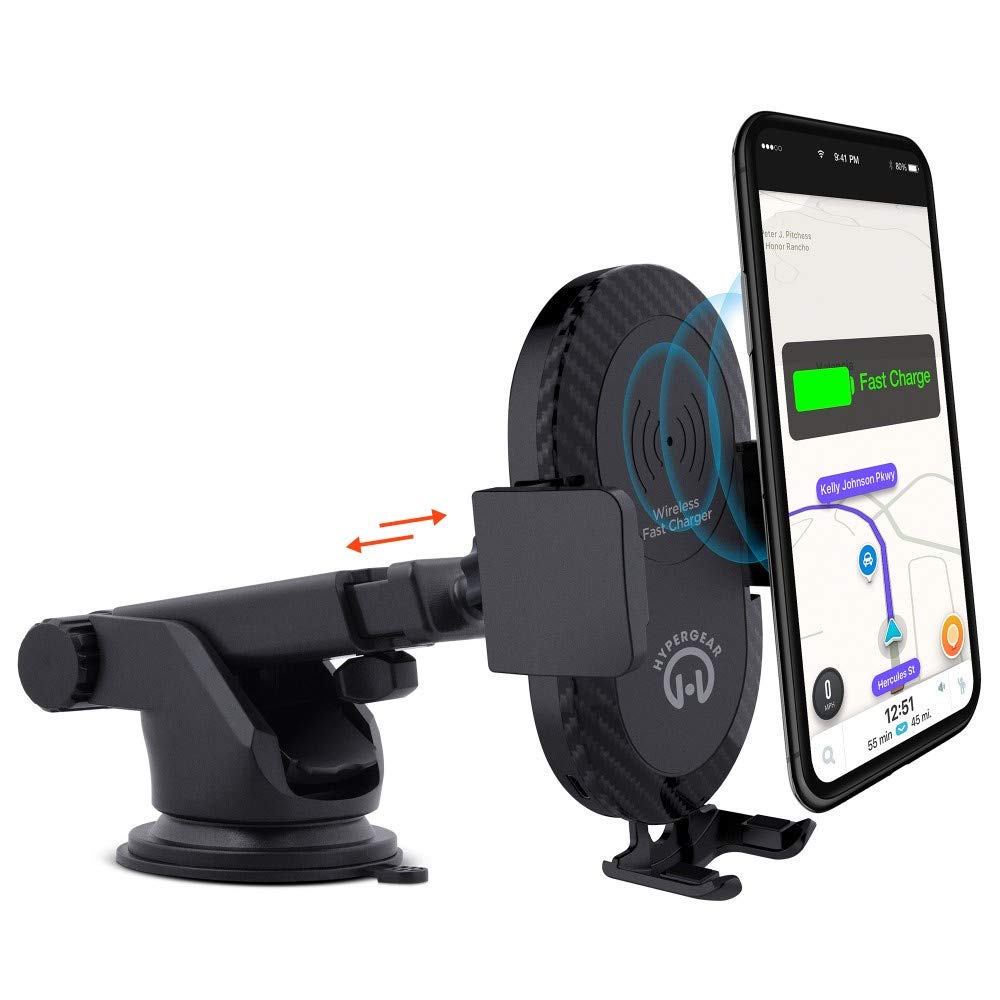
This manual provides instructions for the HyperGear HYG-14590 Wireless Fast Charging Car Dash Mount. This device is designed to securely hold and wirelessly charge Qi-enabled smartphones in your vehicle, offering hands-free navigation and communication.
Садржај пакета
Проверите да ли су све ставке присутне у пакету:
- Telescopic Mount
- Fast Charge Car Adapter
- Мицро УСБ кабл
- Кориснички приручник (овај документ)
Упутства за подешавање
- Изаберите локацију за монтажу: Select a clean, flat surface on your dashboard or windshield. Ensure the location does not obstruct your view или ометају контролу возила.
- Причврстите носач:
- Clean the chosen surface thoroughly.
- Remove the protective film from the sticky gel suction cup.
- Чврсто притисните вакуумску чашицу на површину.
- Engage the 2-step locking lever to secure the mount in place.
- Прикључите напајање:
- Insert the Micro USB cable into the charging port on the mount.
- Plug the other end of the Micro USB cable into the Fast Charge Car Adapter.
- Insert the Fast Charge Car Adapter into your vehicle's 12V power outlet (cigarette lighter socket).
- Adjust the Mount:
- Extend the telescopic arm up to 8 inches as needed.
- Pivot the arm up to 230° to achieve the desired angle.
- Rotate the cradle head 360° to switch between portrait and landscape orientation.
Упутство за употребу
- Placing Your Device: Gently open the adjustable padded cradle grips and place your Qi-enabled smartphone into the mount. The grips will automatically secure the device.
- Бежично пуњење: Once your device is placed in the mount and the mount is powered, wireless charging will begin automatically. Ensure your device is centered on the charging pad for optimal performance.
- Уклањање вашег уређаја: To remove your device, gently open the cradle grips and lift your smartphone out.
- Употреба без употребе руку: The mount allows for hands-free use of navigation, calls, and other applications while driving. Always ensure your device is positioned safely and does not obstruct your view на путу.
Одржавање
- Чишћење: Use a soft, dry cloth to clean the mount. Do not use abrasive cleaners or solvents.
- Нега вакуумске чаше: If the sticky gel suction cup loses adhesion, rinse it with warm water and let it air dry. This can help restore its stickiness.
- Складиштење: When not in use for extended periods, store the mount in a cool, dry place away from direct sunlight.
Решавање проблема
- Уређај се не пуни бежично:
- Ensure your smartphone is Qi-enabled or has a Qi-enabled receiver.
- Verify the Micro USB cable is securely connected to both the mount and the car adapter.
- Check that the car adapter is firmly seated in the vehicle's 12V power outlet.
- Ensure your phone is centered on the charging pad of the mount.
- Уклоните све дебеле футроле са телефона које би могле ометати бежично пуњење.
- Mount not sticking to surface:
- Clean the dashboard or windshield surface thoroughly before attachment.
- Ensure the 2-step locking lever is fully engaged.
- Rinse the sticky gel suction cup with warm water and air dry to restore adhesion.
- Avoid mounting on textured or porous surfaces.
- Phone not held securely:
- Ensure the adjustable padded cradle grips are properly closed around your device.
- Verify that your phone's size is compatible with the mount's adjustable range.
Спецификације
| Број модела | HYG-14590 |
| Бранд | ХиперГеар |
| Технологија повезивања | Бежични |
| Тип конектора | УСБ, бежични |
| Компатибилни уређаји | Cellular Phones (Qi-enabled) |
| Компатибилни модели телефона | iPhone X/8/8 Plus, Samsung Galaxy S9/S9+, S8/S8+, Note 8, and other Qi-enabled devices |
| Посебна карактеристика | Брзо пуњење, бежично пуњење |
| Ватtage | 10 вати |
| Извор напајања | Vehicle 12V Power Outlet |
| Тип главног конектора за напајање | USB Type C (for car adapter) |
| Тежина артикла | 11.84 унци |
| Материјал кућишта | Gel (suction cup) |
| Боја | Црно |
| УПЦ | 633755145902 |
Информације о гаранцији
This HyperGear product comes with a 30-дневна гаранција from the date of purchase. This warranty covers manufacturing defects. Please retain your proof of purchase for warranty claims. For further details or to initiate a claim, please refer to the HyperGear official webсајту или контактирајте њихову корисничку подршку.
Корисничка подршка
For technical assistance, product inquiries, or warranty support, please visit the official HyperGear webсајт или контактирајте њихову службу за кориснике. Контакт информације се обично могу наћи на паковању производа или на званичном онлајн сајту бренда.