
1. Увод
The Marantz NR1609 is a slim-profile 7.2 channel AV Surround Receiver designed to deliver exceptional audio and video performance in a compact form factor. It supports the latest audio formats like Dolby Atmos and DTS:X, along with 4K Ultra HD video pass-through, HDR, and Dolby Vision. With built-in HEOS multi-room audio technology, Bluetooth, and AirPlay 2, the NR1609 offers versatile connectivity for all your entertainment needs.
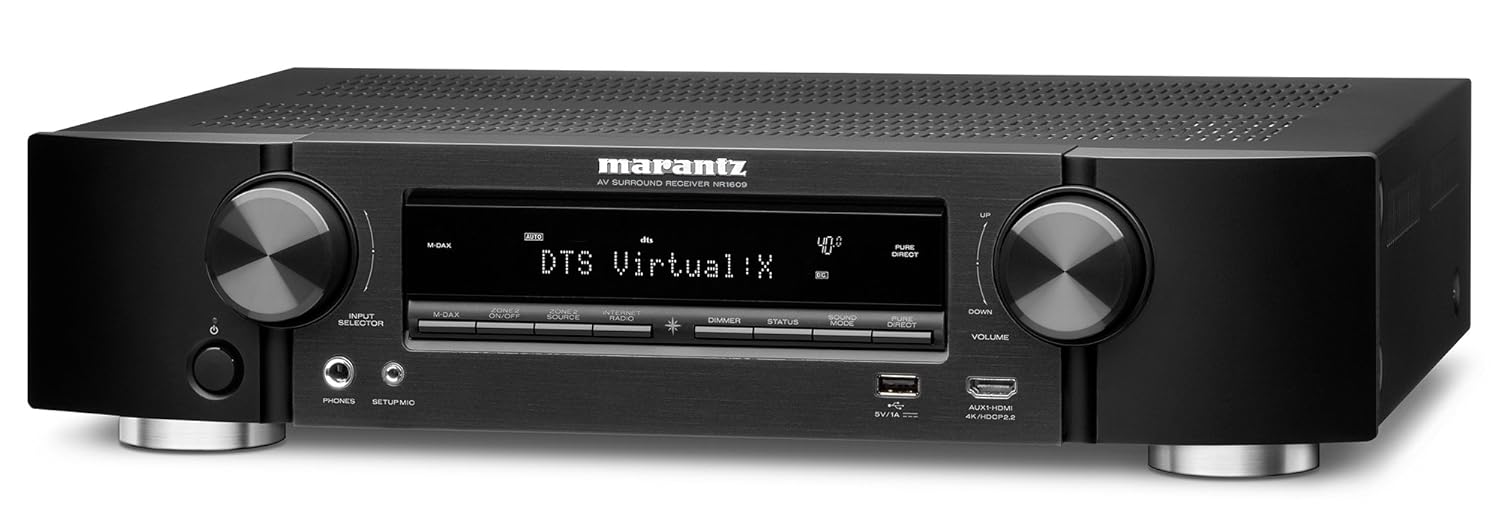
Слика 1: Предња страна view of the Marantz NR1609 AV Surround Receiver, showcasing its sleek design and front panel controls.
2. Безбедносне информације
Please read these safety instructions carefully before operating the unit. Failure to comply may result in fire, electric shock, or other injury.
- вентилација: Обезбедите довољно простора око уређаја за правилну вентилацију. Не блокирајте вентилационе отворе.
- Извор напајања: Уређај повежите само на АЦ утичницу вол.tagе наведено на задњој плочи.
- Влага: Не излажите уређај киши или влази. Не стављајте предмете напуњене течношћу, као што су вазе, на уређај.
- Пласман: Place the unit on a flat, stable surface away from direct sunlight, heat sources, and excessive dust.
- Сервисирање: Не покушавајте сами да сервисирате уређај. Сва сервисирања препустите квалификованом сервисеру.
3. Кључне карактеристике
The Marantz NR1609 offers a range of advanced features for an immersive home theater experience:
- Слим Проfile Дизајн: Half the height of traditional AV receivers, ideal for space-constrained setups.
- 7-Channel Discrete Power Ampдизалица: Delivers 90W per channel for dynamic sound.
- Advanced HDMI Connectivity: 8 HDMI inputs (including 1 front) and 1 ARC output, all with HDCP 2.2 support.
- 4К Ултра ХД подршка: 4K/60 Hz full-rate pass-through, 4:4:4 color resolution, HDR, BT.2020, Dolby Vision, and HLG.
- Object-Based Audio: Supports Dolby Atmos, DTS:X, and DTS Virtual:X processing for three-dimensional sound.
- Аудио високе резолуције: Decodes ALAC, FLAC, WAV (up to 24-bit/192-kHz), and DSD (2.8MHz/5.6MHz) files.
- HEOS Built-in: Wireless multi-room audio technology for streaming music throughout your home.
- Контрола гласом: Compatible with Amazon Alexa via the HEOS Home Entertainment skill.
- Услуге стримовања: Access popular music services like Spotify, TuneIn, and Deezer via Bluetooth, AirPlay 2, or the HEOS app.
4. Водич за подешавање
4.1 Распакивање и постављање
Carefully remove the NR1609 from its packaging. Ensure all accessories, including the remote control, power cord, setup microphone, and antennas, are present. Place the receiver on a sturdy, level surface with adequate ventilation space around it (at least 10 cm on sides and top).
4.2 Везе
Before making any connections, ensure the receiver and all connected devices are powered off and unplugged from the AC outlet.
- HDMI конекције: Connect your video sources (Blu-ray player, game console, set-top box) to the HDMI IN ports. Connect your TV or projector to the HDMI OUT (ARC) port.
- Прикључци звучника: Connect your speakers to the corresponding speaker terminals on the rear panel. Pay attention to polarity (+/-). The NR1609 supports 7.2 channel configurations.
- Мрежна конекција: For internet radio, firmware updates, and HEOS functionality, connect an Ethernet cable to the LAN port or attach the Wi-Fi antennas and configure wireless settings.
- Аудио улази: Connect external audio devices using analog RCA cables or digital optical/coaxial cables. A dedicated PHONO input is available for turntables.
- Снага: Once all connections are made, connect the power cord to the receiver and then to an AC outlet.

Figure 2: Rear panel of the Marantz NR1609, illustrating the various input and output ports for comprehensive connectivity.
4.3 Initial Setup Wizard and Audyssey Calibration
Upon first power-on, the NR1609 will guide you through an on-screen setup wizard. Follow the prompts to configure your language, network settings, and speaker setup. The Audyssey MultEQ XT calibration system will optimize your speaker settings for your room's acoustics using the included setup microphone. This process is crucial for achieving optimal sound quality.
5. Упутство за употребу
5.1 Основни рад
- Укључивање/искључивање: Use the POWER button on the front panel or remote control.
- Избор улаза: Use the INPUT SELECTOR knob on the front panel or dedicated input buttons on the remote to choose your desired source (e.g., Blu-ray, TV Audio, Game).
- Контрола јачине звука: Adjust the VOLUME knob on the front panel or the VOLUME +/- buttons on the remote.
5.2 Audio Modes and Surround Sound
The NR1609 supports various audio modes, including advanced object-based formats:
- Долби Атмос: Creates a three-dimensional sound field with overhead effects.
- ДТС:Кс: Similar to Dolby Atmos, offering flexible speaker layouts and immersive sound.
- ДТС Виртуал:Кс: Provides a virtual height and surround effect without dedicated height or surround speakers.
- Stereo/Direct Modes: For pure two-channel audio playback.
Use the "SOUND MODE" buttons on the remote to cycle through available audio modes for the current input.
5.3 Network and Streaming Features
- HEOS Multi-Room Audio: Download the HEOS app to control music playback across multiple HEOS-enabled devices in your home.
- Блуетоотх: Pair your smartphone or tablet to stream audio wirelessly.
- АирПлаи 2: Stream audio from Apple devices to the receiver and other AirPlay 2 compatible speakers.
- Музичке услуге: Access integrated services like Spotify Connect, TuneIn Internet Radio, and Deezer directly through the HEOS app or receiver interface.
5.4 Гласовна контрола помоћу Амазон Алексе
The Marantz NR1609 supports Amazon Alexa voice control via the HEOS Home Entertainment skill. Enable the skill in your Alexa app and link your HEOS account to control basic functions like power, volume, input selection, and music playback using voice commands.
6. Одржавање
- Чишћење: Користите меку, суву крпу за чишћење спољашњости уређаја. Не користите абразивна средства за чишћење или раствараче.
- Ажурирања фирмвера: Periodically check for and install firmware updates via the network connection to ensure optimal performance and access to new features. This can usually be done through the receiver's setup menu.
КСНУМКС. Решавање проблема
If you encounter issues with your Marantz NR1609, refer to the following common troubleshooting steps:
| Проблем | Могући узрок / решење |
|---|---|
| Нема звука |
|
| Нема слике |
|
| Проблеми са мрежном везом |
|
| Даљински управљач не ради |
|
If the problem persists, please refer to the official Marantz support webсајту или контактирајте корисничку подршку.
8. Спецификације
Detailed technical specifications for the Marantz NR1609 AV Surround Receiver:
| Феатуре | Детаљ |
|---|---|
| Модел | НР1609 |
| Канали | 7.2 |
| Излазна снага (по каналу) | 90W (6 ohms, 1 kHz, 1% THD, 1ch Driven) / 50W (8 ohms, 20 Hz - 20 kHz, 0.08% THD, 2ch Driven) |
| HDMI Inputs / Outputs | 8 In (1 Front) / 1 Out (ARC) |
| ХДЦП верзија | HDCP 2.2 support on all HDMI ports |
| Видео пролаз | 4K/60Hz, 4:4:4 Pure Color, HDR, Dolby Vision, HLG, BT.2020 |
| Аудио формати | Dolby Atmos, DTS:X, DTS Virtual:X, Dolby TrueHD, DTS-HD Master Audio |
| High-Res Audio Support | ALAC, FLAC, WAV (up to 24-bit/192kHz), DSD (2.8/5.6MHz) |
| Бежично повезивање | Wi-Fi (2.4GHz/5GHz), Bluetooth, AirPlay 2, HEOS Built-in |
| Воице Цонтрол | Амазон Алека компатибилан |
| Димензије (Ш к Д к В) | 440 к 368 к 105 мм (17.3 к 14.5 к 4.1 инча) |
| Тежина | 8.4 кг (18.5 лбс) |
| Потрошња енергије | 250W (Operational) |

Слика 3: Унутрашњи view of the Marantz NR1609, showing the main circuit board and heat sinks.

Figure 4: Another internal view of the Marantz NR1609, illustrating the overall component layout and wiring.
9. Гаранција и подршка
The Marantz NR1609 is covered by a standard manufacturer's warranty. For specific warranty terms and conditions, please refer to the warranty card included with your product or visit the official Marantz webсајту.
For technical support, frequently asked questions, and additional resources, please visit the official Marantz support page: