
1. Увод
Thank you for choosing the DEMA Digital Cube Level. This device is designed for precise horizontal and vertical alignment measurements. This manual provides essential information for safe and effective use, including setup, operation, calibration, and maintenance.
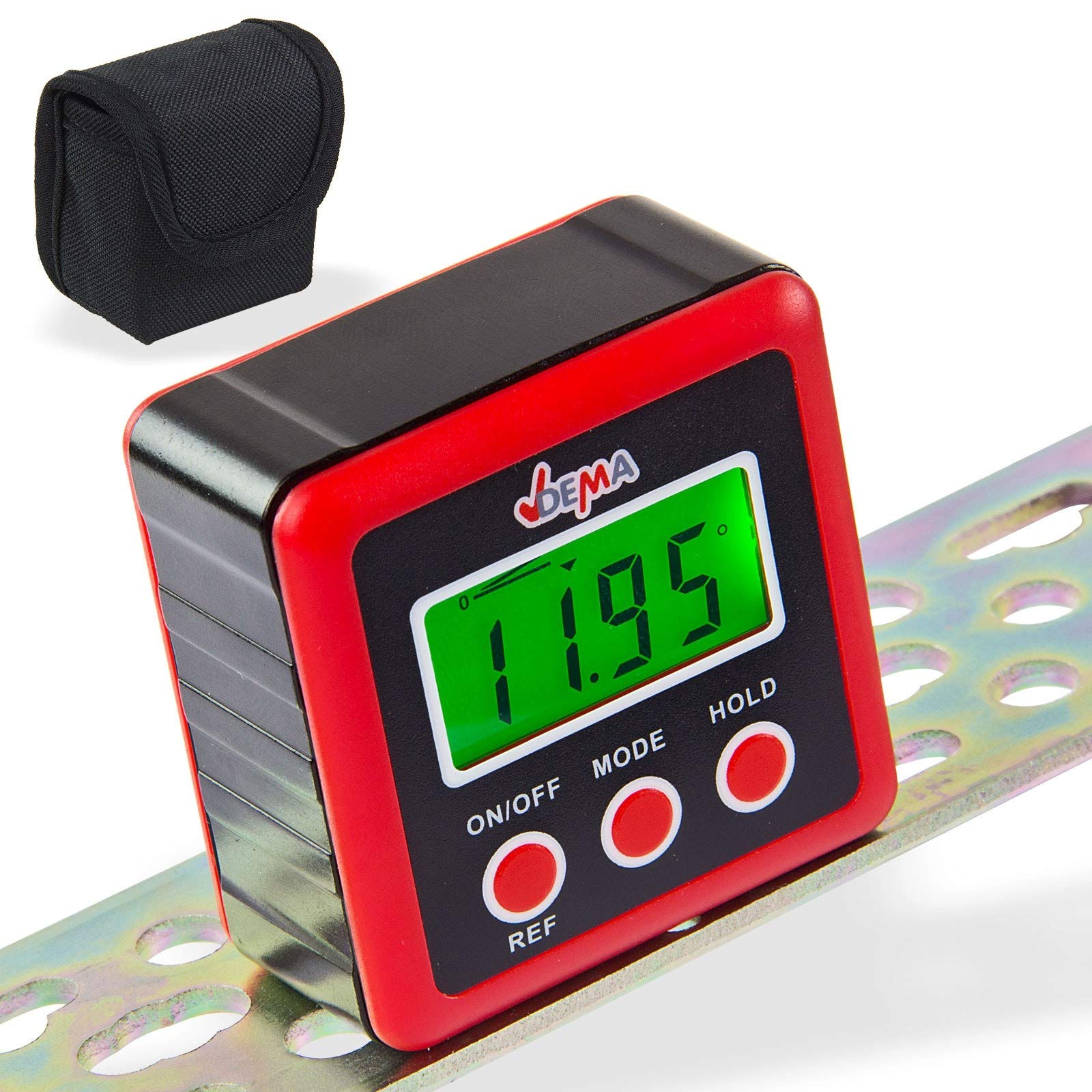
Figure 1: DEMA Digital Cube Level
2. Безбедносна упутства
- Technical advancements may lead to changes without prior notice from the manufacturer, which may not yet be reflected in this manual.
- Before initial operation, check the device for completeness and proper function.
- Never operate a defective or malfunctioning device. Contact the manufacturer or have the device inspected by a qualified mechanic.
- Увек радите пажљиво и са потребним опрезом.
- Never apply excessive force to the device.
- Ensure batteries are removed if the device will not be used for an extended period. Never touch leaking batteries with any part of your body.
- Држите децу и неовлашћене особе даље од радног простора.
- Never work when tired or under the influence of drugs, medication, or alcohol.
- Store packaging materials (foils, plastic bags, Styrofoam, etc.) only in places inaccessible to children, especially infants, as packaging parts often pose unrecognized dangers (e.g., choking hazard).
3. Наменска употреба
- The DEMA Digital Cube Level is suitable as a testing device for horizontal or vertical alignment of an object.
- The level is not designed for commercial purposes.
4. Подешавање
4.1. Инсталација батерије
- Пронађите поклопац батерије на задњој страни уређаја.
- Unscrew the three screws securing the battery cover.
- Insert two 1.5V AAA batteries (not included) into the compartment, ensuring correct polarity.
- Replace the battery cover and secure it by tightening the three screws.

Figure 2: Battery compartment on the back of the device
5. Упутство за употребу
5.1. Укључивање/искључивање
- Притисните тастер ОН/ОФФ дугме за укључивање уређаја.
- The device will automatically turn off if not used for approximately three minutes to conserve battery life.
5.2. Мерења
- Укључите уређај.
- Place the device firmly on the surface to be measured. The display will show the incline in degrees.

Слика 3: Прamples of display readings
5.3. Changing Display Units
- Притисните тастер МОДЕ button to cycle through different display units: degrees (°), percentage (%), millimeters per meter (mm/m), and slope (ft,in).
- The slope is displayed in 1/8 increments.
- The '0°' symbol indicates the current angle.
5.4. Relative Angle Measurement (REF Function)
- If the device is not perfectly level, it will display a value. To set the current angle as a reference (zero), press the РЕФ дугме.
- The device is now in relative angle measurement mode and will display 'S'.
- Притисните тастер РЕФ button again to exit the relative angle mode.
5.5. Позадинско осветљење екрана
- The display backlight turns on automatically when any button is pressed.
- The backlight will automatically turn off after 20 seconds of no button activity.
5.6. Функција задржавања
- Притисните тастер ХОЛД button to 'freeze' the current measurement result on the display. The 'H' symbol will be shown.
- Притисните ХОЛД again to reactivate the measurement mode.
5.7. Индикатор слабе батерије
- When the battery symbol appears on the screen, it is recommended to replace the batteries promptly.
6. Калибрација
For accurate measurements, periodic calibration is recommended.
- Искључите уређај.
- Place the level on a perfectly horizontal, flat, and stable surface.
- Притисните и држите оба тастера ОН/ОФФ и ХОЛД buttons simultaneously until 'CAL' is displayed. The device is now in calibration mode.
- Leave the device still for a moment, then press the ХОЛД button. The display will show 'CAL1'.
- Rotate the level 180° on the same surface and press the ХОЛД button. 'CAL2' will be displayed.
- Once 'CAL2' is no longer displayed, the calibration process is complete.
ПАЖЊА: During the calibration process, the surface must not be tilted or moved. After calibration, the original data will be overwritten with the new calibration data.
7. Одржавање
- Keep the device clean and dry. Wipe the exterior with a soft, damp тканина. Немојте користити абразивна средства за чишћење или раствараче.
- Избегавајте излагање уређаја екстремним температурама, влажности или директној сунчевој светлости.
- Remove batteries if the device is not used for an extended period to prevent leakage and damage.
- Store the device in its protective pouch (if included) when not in use to prevent scratches and damage.

Figure 4: Carrying pouch for the Digital Cube Level
КСНУМКС. Решавање проблема
8.1. Device Does Not Turn On
- Проверите да ли су батерије правилно уметнуте са исправним поларитетом.
- Replace the batteries with new 1.5V AAA batteries.
- Уверите се да су контакти батерије чисти и без корозије.
8.2. Нетачна очитавања
- Perform a calibration as described in Section 6.
- Ensure the measurement surface is stable and free from vibrations.
- Check for any physical damage to the device.
Ако проблеми и даље постоје, обратите се корисничкој подршци.
9. Техничке спецификације
| Феатуре | Спецификација |
|---|---|
| Резолуција екрана | ±0.01° |
| Прецизност приказа | ±0.1° at 0° and 90°, ±0.2° at other angles |
| Јединице које се могу приказати | ° / %, mm/m, in/ft |
| Радна температура | 0°Ц ~ 40°Ц |
| Потребне батерије | 2 к 1.5 В ААА |
| Димензије (Д к Ш к В) | 58 к 58 к 32 мм |
| Тежина (без батерија) | прибл. 70 г |
| Материјал | поливинил хлорид (ПВЦ) |
10. Одлагање
Do not dispose of this device with household waste. Please contact DEMA Vertriebs-GmbH, your local dealer, or a local recycling company for proper disposal. By disposing of the device correctly, you are making a valuable contribution to environmental protection.
11. Гаранција и подршка
Warranty information for the DEMA Digital Cube Level is not provided within this manual. Please refer to your purchase documentation or contact your seller for details regarding warranty coverage.
For technical support, questions, or service requests, please contact the retailer from whom you purchased the product or the manufacturer directly. Contact information can typically be found on the product packaging or the seller's webсајту.