
1. Увод
This manual provides instructions for the setup, operation, maintenance, and troubleshooting of your iKBC CD87BT mechanical keyboard. Please read this manual thoroughly to ensure proper use and to maximize the lifespan of your device.
2. Производ је готовview
The iKBC CD87BT is an 87-key mechanical keyboard offering both wired USB Type-C and wireless Bluetooth 3.0 connectivity. It features Cherry MX Brown switches, known for their tactile feedback, and durable PBT OEM profile keycaps. The keyboard is compatible with iOS, Android, Windows, and Mac operating systems.
Кључне карактеристике укључују:
- Cherry MX Brown Switches: Tactile feedback suitable for typing and gaming.
- Dual Connectivity: Wired (USB Type-A to C) and Wireless (Bluetooth 3.0).
- Multi-Device Support: Connects up to 4 Bluetooth devices simultaneously.
- Durable PBT Keycaps: OEM profile with laser-engraved legends.
- Adjustable Ergonomics: 3-level adjustable feet for preferred typing angle.
- Anti-Ghosting: 100% anti-ghosting with full key rollover in USB mode.
- Multimedia Keys: Dedicated functions via FN key combinations.
- DIP Switches: For advanced customization.
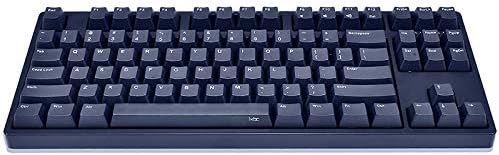
Image 1: The iKBC CD87BT 87-key mechanical keyboard in navy blue. This image displays the full keyboard layout, highlighting its compact tenkeyless design and the dark blue PBT keycaps.
3. Подешавање
3.1 Распакивање и садржај
Carefully remove all items from the packaging. The package should contain:
- iKBC CD87BT Mechanical Keyboard
- УСБ тип-А на Ц кабл
- Дуст Цовер
- Кеи Пуллер
- 2 AAA Batteries (pre-installed or included separately)
3.2 Инсталација батерије
The keyboard requires 2 AAA batteries for wireless operation. If not pre-installed, locate the battery compartment on the underside of the keyboard, open it, and insert the batteries according to the polarity indicators. Close the compartment securely.
3.3 Жична веза
Да бисте користили тастатуру у жичном режиму:
- Connect the USB Type-C end of the provided cable to the port on the keyboard.
- Повежите крај кабла типа А са слободним УСБ портом на рачунару.
- Тастатура ће бити аутоматски детектована и спремна за употребу.
3.4 Бежична (Bluetooth) веза
The iKBC CD87BT can connect to up to four Bluetooth devices. Follow these steps to pair your keyboard:
- Ensure the keyboard is powered on and in Bluetooth mode (if there's a physical switch, refer to the keyboard's underside).
- На свом уређају (рачунару, таблету, паметном телефону) омогућите Блутут и потражите нове уређаје.
- On the iKBC CD87BT, press and hold the FN key and one of the F1, F2, F3, или F4 keys for approximately 3 seconds. The indicator light above the corresponding F key will flash, indicating pairing mode.
- Select "iKBC CD87BT" from the list of available Bluetooth devices on your computer or mobile device.
- If prompted, enter the pairing code displayed on your screen using the iKBC CD87BT keyboard and press Ентер.
- Once paired, the indicator light will stop flashing and remain solid for a few seconds, then turn off. The keyboard is now connected.
To switch between paired devices, press FN + F1, F2, F3, или F4 corresponding to the desired device.
4. Упутство за употребу
4.1 Основно куцање
The iKBC CD87BT functions as a standard 87-key keyboard. Simply type as you would on any other keyboard.
4.2 Мултимедијалне функције
Access multimedia controls by holding the FN key and pressing the corresponding function key:
- FN + F9: Муте
- FN + Ф10: Utišavanje zvuka
- FN + Ф11: Појачавање звука
- FN + Ф12: Калкулатор
4.3 Windows Key Lock
To prevent accidental presses of the Windows key during gaming or other activities, the Windows key can be locked. Refer to the keyboard's specific key combination for this function, typically FN + Вин Кеи or a dedicated switch.
4.4 ДИП прекидачи
The keyboard features 4 DIP switches on its underside for advanced customization of key functions or layout. Consult the detailed manual provided with the product or the manufacturer's website for specific DIP switch configurations and their effects.
4.5 подесиве ноге
The keyboard is equipped with three levels of adjustable feet on the underside. Adjust them to find your preferred typing angle for comfort and ergonomics.
5. Одржавање
5.1 Чишћење тастатуре
Да бисте одржали оптималне перформансе и изглед:
- Disconnect the keyboard from your computer or turn off Bluetooth before cleaning.
- Користите меку крпу која не оставља длачицеampened with water or a mild cleaning solution to wipe the keycaps and case. Avoid harsh chemicals.
- За прашину и прљавштину између тастера користите компримовани ваздух.
- The included key puller can be used to carefully remove keycaps for deeper cleaning. Ensure to re-install them correctly.
5.2 Поклопац за прашину
Utilize the provided dust cover when the keyboard is not in use to protect it from dust and spills, extending its lifespan.
КСНУМКС. Решавање проблема
6.1 Тастатура не реагује (жичана)
- Уверите се да је USB кабл безбедно повезан и са тастатуром и са рачунаром.
- Покушајте да повежете кабл са другим УСБ портом на рачунару.
- Тестирајте тастатуру на другом рачунару да бисте искључили проблем специфичан за рачунар.
6.2 Keyboard Not Connecting (Bluetooth)
- Verify that the keyboard has fresh batteries and is powered on.
- Уверите се да је Блуетоотх омогућен на вашем уређају.
- Repeat the pairing process (Section 3.4).
- If previously paired, try removing the keyboard from your device's Bluetooth list and re-pairing.
- Уверите се да је тастатура унутар ефективног домета вашег Bluetooth уређаја.
6.3 Keys Not Registering or Double Typing
- Check for debris under the keycap. Use a key puller to remove the keycap and clean the switch area with compressed air.
- Ensure the keyboard firmware is up to date (check the iKBC official webсајт).
7. Спецификације
| Бранд | IKBC |
| Модел | ЦД87БТ |
| Тип прекидача | Cherry MX Brown (Tactile) |
| Кеицап Материал | PBT (OEM Profile, Laser Engraved) |
| Лаиоут | 87-Key (Tenkeyless), ANSI/US |
| Повезивање | Wired (USB Type-C), Wireless (Bluetooth 3.0) |
| Подршка за Bluetooth уређаје | До 4 уређаја |
| Компатибилност ОС | иОС, Андроид, Виндовс, Мац |
| Димензије (Д к Ш к В) | 38.58 x 20.4 x 5.49 cm (14.09" x 8.03" x 2.16" approx.) |
| Тежина | 1.43 кг (приближно 2.42 фунти) |
| Извор напајања | Wired (USB), 2 AAA Batteries (Wireless) |
| Укључене компоненте | USB Cable, Dust Cover, Key Puller |
8. Гаранција и подршка
For warranty information and technical support, please refer to the documentation included with your product or visit the official iKBC webсајт. Услови гаранције могу се разликовати у зависности од региона и продавца.