
1. Увод
The UNI-T UT251A is a high-accuracy, high-sensitivity leakage current clamp meter designed for precise testing of AC leakage current. This high-resolution meter is suitable for various applications, including checking leakage current in motors, home appliances, and other electrical equipment up to 600A. It features a 4-digit LCD digital display with 10000 display count, auto-ranging capabilities, a 2/s sampling rate, peak hold function, and the ability to store 99 sets of data. The device also includes an RS-232 interface for data transmission, data hold, auto power-off, overload indication, and low battery indication.
2. Безбедносне информације
Молимо вас да прочитате и разумете сва безбедносна упутства пре руковања уређајем. Непоштовање ових упутстава може довести до струјног удара, пожара или озбиљних повреда.
- Увек носите одговарајућу личну заштитну опрему (ЛЗО) када радите са електричним системима.
- Do not use the meter if it appears damaged or is operating abnormally.
- Ensure the battery compartment is securely closed before use.
- Не прекорачујте максималне улазне оптерећења за било коју функцију.
- Avoid touching live circuits with bare hands or conductive materials.
- Држите уређај сувим и чистим.
- Refer to local and national safety codes for proper electrical work procedures.
3. Производ је готовview
The UNI-T UT251A is a compact and robust leakage current clamp meter. Key features include:
- 4-digit LCD Digital Display: Provides clear readings with a 10000 display count.
- Аутоматски домет: Аутоматски бира одговарајући опсег мерења.
- 2/s Sampлинг рате: Ensures quick and responsive measurements.
- Максимално задржавање: Captures and displays the maximum measured value.
- Евидентирање података: Stores up to 99 sets of data for later analysis.
- РС-232 интерфејс: Allows connection to a PC for data transfer and analysis.
- Задржавање података: Замрзава тренутно очитавање на екрану.
- Аутоматско искључивање: Штеди трајање батерије аутоматским искључивањем након периода неактивности.
- Индикација преоптерећења: Alerts the user when the measurement exceeds the range.
- Индикација слабе батерије: Notifies the user when the battery needs replacement.

Слика 3.1: Предња страна view of the UNI-T UT251A Leakage Current Clamp Meter, showing the display, clamp jaw, and control buttons.
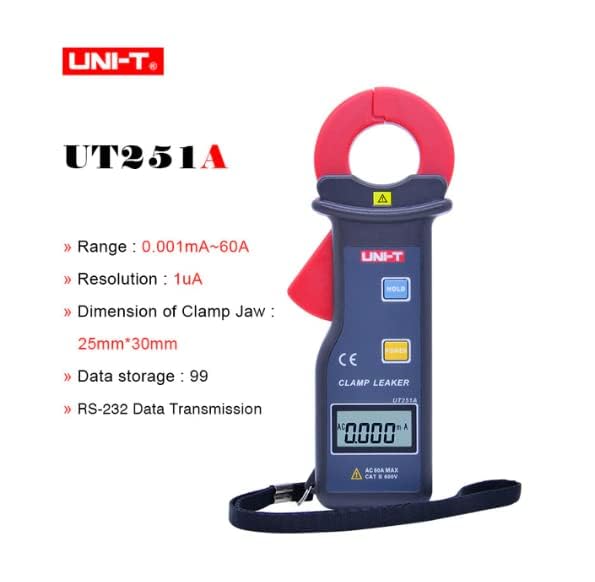
Figure 3.2: The UNI-T UT251A Clamp Meter highlighting its range, resolution, clamp jaw dimension, data storage, and RS-232 data transmission capabilities.
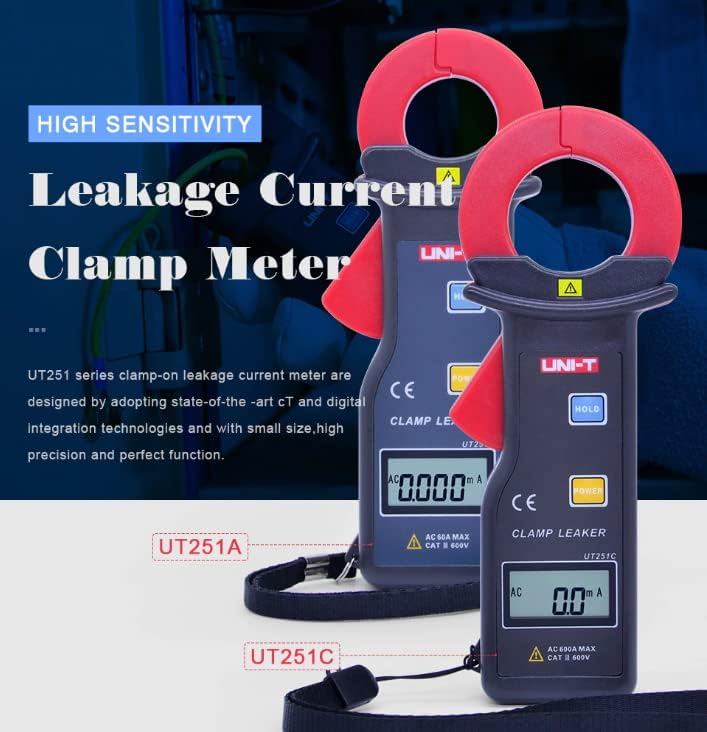
Figure 3.3: Comparison of UT251A and UT251C models, emphasizing their high sensitivity for leakage current measurement.
4. Подешавање
4.1 Инсталација батерије
- Пронађите поклопац одељка за батерије на задњој страни мерача.
- Use a screwdriver to loosen the screw(s) and remove the cover.
- Insert the 9V battery (6F22) into the compartment, observing correct polarity.
- Вратите поклопац одељка за батерије и затегните завртањ(е).
4.2 Иницијална провера
- Press the POWER button to turn on the meter.
- Verify that the LCD display shows "0.000mA" or a similar low reading in a stable environment.
- If a low battery indicator appears, replace the battery before use.
5. Упутство за употребу
5.1 Measuring AC Leakage Current
- Укључите мерач притиском на дугме ПОВЕР дугме.
- Отворите цлamp вилицу притиском на окидач.
- Пажљиво цлamp the meter around a single conductor (live, neutral, or ground wire) of the circuit you wish to measure. Ensure the jaw is completely closed.
- Read the leakage current value displayed on the LCD. The meter will automatically select the appropriate range.
- For accurate readings, ensure no other conductors are within the clamp вилица.
5.2 Функција задржавања података
- Током мерења, притисните ХОЛД дугме да бисте замрзнули тренутно очитавање на екрану.
- Притисните тастер ХОЛД button again to release the data hold and resume live measurement.
5.3 Функција задржавања врха
- The meter automatically captures peak values. Refer to the specific manual for detailed instructions on accessing and clearing peak hold readings.

Figure 5.1: The UNI-T UT251A Clamp Meter in use, measuring current on an electrical wire.

Figure 5.2: A user wearing protective gloves operating the UNI-T UT251A Clamp Meter within an electrical panel, demonstrating a typical application.
6. Data Logging and RS-232 Interface
The UT251A can store up to 99 sets of measurement data. This data can be retrieved and analyzed using the RS-232 interface and the provided PC software.
6.1 Чување података
- During a measurement, press the appropriate button (refer to the specific manual for button identification, often labeled "MEM" or similar) to save the current reading.
- The meter will indicate successful data storage, often by displaying a memory location number.
6.2 Connecting to PC via RS-232
- Install the PC software from the provided CD onto your computer.
- Connect the RS-232 interface cable to the meter's RS-232 port and to your computer's serial port (or a USB-to-serial adapter).
- Покрените софтвер за рачунар.
- Follow the software's instructions to establish communication with the meter and download the stored data.
Video 6.1: An official product video demonstrating the features and usage of the UNI-T UT251A/UT251C clamp meters, including a comparison of the two models and their accessories.
7. Одржавање
7.1 Чишћење
- Обришите ц бројилаasinг са огласомamp krpom i blagim deterdžentom. Ne koristite abrazivna sredstva ili rastvarače.
- Задржите цлamp jaw clean and free of debris to ensure accurate measurements.
7.2 Замена батерије
- When the low battery indicator appears, replace the 9V battery as described in the "Battery Installation" section.
- Извадите батерију ако мерач неће бити коришћен дуже време како бисте спречили цурење.
7.3 Складиштење
- Чувајте мерач на хладном и сувом месту, даље од директне сунчеве светлости и екстремних температура.
- Use the provided carrying bag for protection during storage and transport.
КСНУМКС. Решавање проблема
| Проблем | Могући узрок | Решење |
|---|---|---|
| Мерач се не укључује. | Мртва или неправилно инсталирана батерија. | Проверите поларитет батерије или замените 9V батерију. |
| Нетачна очитавања. | Дирти цлamp jaw; external magnetic fields; multiple conductors in jaw. | Очистите цлamp jaw; move away from strong magnetic fields; ensure only one conductor is clampед. |
| Приказано је „OL“ (преоптерећење). | Measured current exceeds the meter's range. | Ensure the current is within the meter's specified range (up to 60A for UT251A). |
| Не могу се повезати са рачунаром. | Incorrect cable connection; software not installed or configured properly. | Verify RS-232 cable connection; reinstall PC software; check software communication settings. |
9. Спецификације
| Карактеристично | Детаљ |
|---|---|
| Модел | УТКСНУМКСА |
| Range (Leakage Current) | 0.001mA ~ 60A |
| Резолуција | 1µА |
| Дисплаи Цоунт | 10000 |
| Sampлинг Рате | КСНУМКС пута / секунди |
| Clamp Jaw Dimension | 25 мм к 30 мм |
| Складиштење података | 99 сетова |
| Интерфејс | РС-232 |
| Повер | 9В батерија (6Ф22) |
| Величина екрана | 32 мм к 15 мм |
| Нето тежина производа | 120г |
| Величина производа | 175 мм к 70 мм к 38 мм |
| Сафети Ратинг | ЦАТ ИИИ 600В |
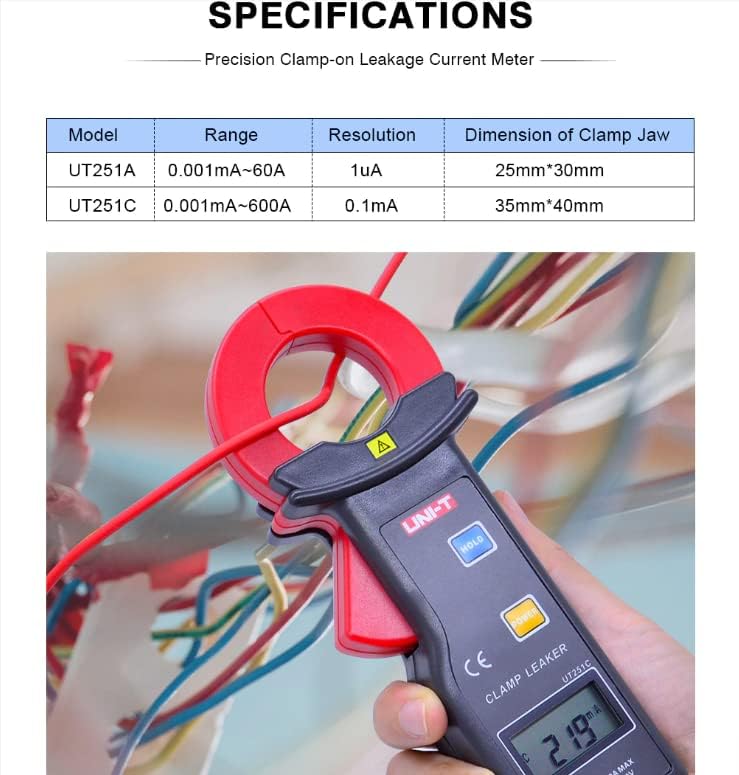
Figure 9.1: Detailed specifications table comparing the UT251A and UT251C models, including range, resolution, and clamp величина.
10. Шта је у кутији
The standard package for the UNI-T UT251A includes:
- UNI-T UT251A Leakage Current Clamp Метер
- 9V батерија (6F22)
- RS-232 интерфејс кабл
- PC Software CD
- Поклон кутија
- Торба за ношење
- Енглисх Мануал
- Кутија за алате

Figure 10.1: The UNI-T UT251A Clamp Meter shown with its packaging and included accessories, such as the RS-232 cable and software CD.
11. Гаранција и подршка
For warranty information and technical support, please refer to the documentation included with your product or contact UNI-T customer service directly. Details can typically be found on the official UNI-T webсајту или преко вашег места куповине.