
1. Увод
The SUNMI L2 SmartOrder is a rugged industrial terminal designed for various business applications requiring mobility and data capture. It features an Android 7.1 operating system, a 5-inch display, and an integrated 1D/2D Zebra scanner. This manual provides essential information for the proper setup, operation, and maintenance of your device.
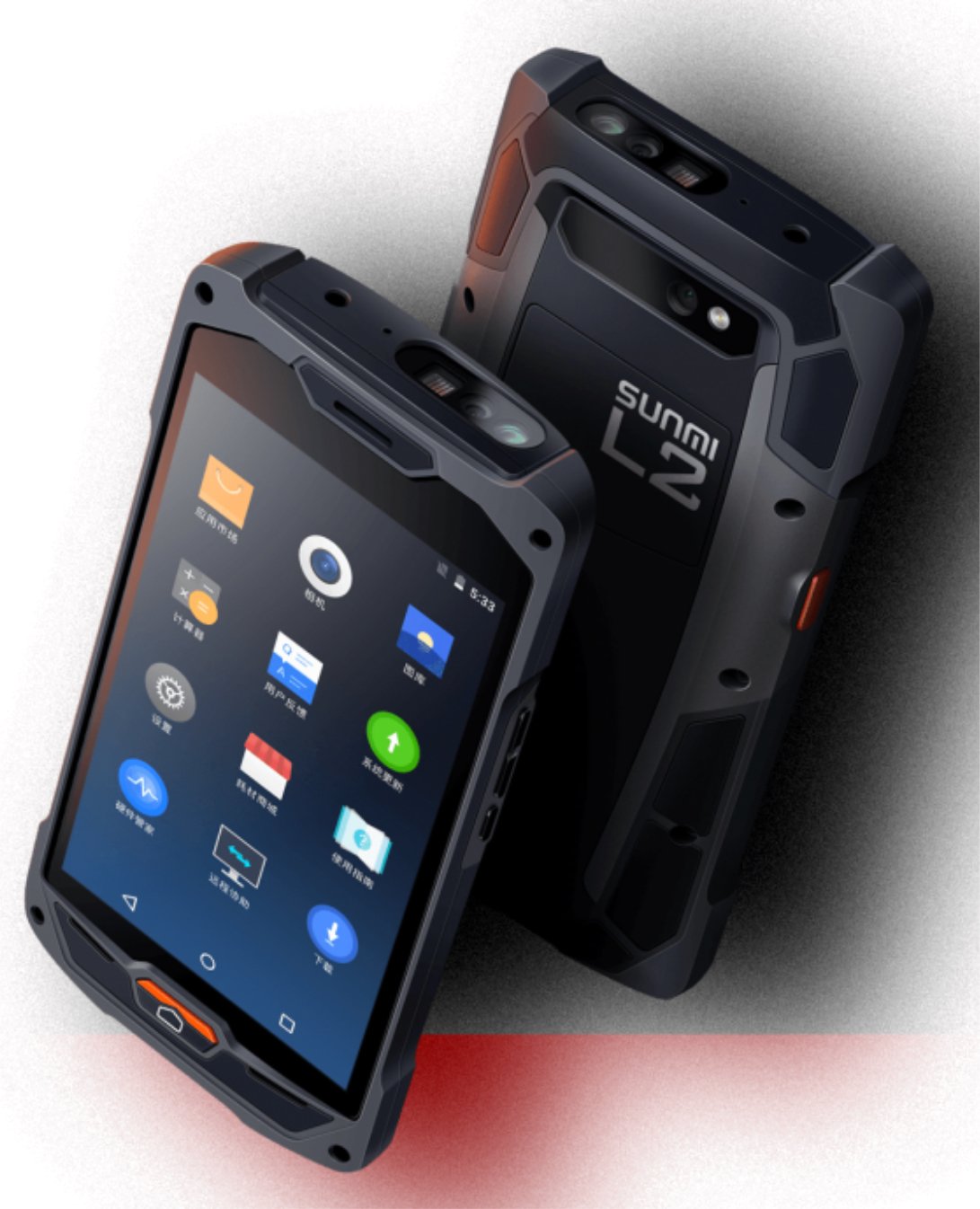
Слика 1: Предњи и задњи део view of the Sunmi L2 SmartOrder industrial terminal.
2. Безбедносне информације
Please read all safety instructions before using the device to prevent injury or damage. Keep this manual for future reference.
- Не излажите уређај екстремним температурама, директној сунчевој светлости или високој влажности.
- Use only SUNMI-approved accessories and power adapters.
- Avoid dropping or subjecting the device to severe impact, despite its rugged design.
- Не покушавајте сами да растављате или поправљате уређај. Обратите се квалификованом сервисеру.
- Држите уређај даље од медицинских уређаја, јер може ометати њихов рад.
3. Девице Оверview
The SUNMI L2 SmartOrder is designed for durability and functionality. Key features include:
- 5-инчни екран: High-resolution touchscreen for clear visibility.
- 1D/2D Zebra Scanner: Integrated for efficient barcode and QR code scanning.
- УСБ-Ц порт: За пуњење и пренос података.
- Слот за СИМ картицу: For cellular network connectivity.
- Слот за ТФ картицу: За прошириви простор за складиштење.
- PSAM Card Slot (Optional): For enhanced security in professional applications.
- NFC Induction Area: For near-field communication.

Слика 2: Задња страна view showing SIM card slot, TF card slot, PSAM card slot, and NFC induction area.

Figure 3: Three different scanner options for the Sunmi L2: Zebra Code Scanner, Standard Code Scanner, and without scanner.
4. Подешавање
4.1. Инсталација и пуњење батерије
The device is equipped with a 5000mAh high-volume battery. Ensure the battery is fully charged before initial use.
- Connect the provided USB-C cable to the USB-C port on the device.
- Connect the other end of the USB-C cable to a compatible power adapter and plug it into a power outlet.
- The charging indicator will illuminate. Allow the device to charge completely before disconnecting.

Figure 4: Illustration of the 5000mAh high-volume battery with Quick Charge technology.
4.2. Инсталација SIM и TF картице
To install SIM or TF cards:
- Locate the card slot cover on the rear of the device (refer to Figure 2).
- Carefully open the cover.
- Insert the SIM card into the designated SIM card slot with the gold contacts facing down.
- Insert the TF card (microSD) into the TF card slot if additional storage is required.
- Close the card slot cover securely to maintain the device's IP67 rating.
4.3. Прво укључивање
After charging, press and hold the power button located on the side of the device until the screen illuminates and the SUNMI logo appears. The device will boot into the Android 7.1 operating system.
5. Упутство за употребу
5.1. Основна навигација
The SUNMI L2 operates on Android 7.1. Navigate the interface using the touchscreen. Swipe to unlock, tap icons to open applications, and use the navigation buttons (Home, Back, Recent Apps) as standard for Android devices.
5.2. Using the 1D/2D Zebra Scanner
The integrated Zebra scanner is located at the top of the device.
- Open the scanning application on your device.
- Point the scanner window at the barcode or QR code you wish to scan.
- Press the dedicated scan button (if available on your model) or trigger the scan via the software interface.
- Ensure the barcode is well-lit and within the scanner's optimal range for accurate reading.

Слика 5: Дно view of the Sunmi L2, highlighting its rugged design and integrated scanner.
5.3. Повезивање
Уређај подржава разне опције повезивања:
- WLAN (Wi-Fi): Supports 2.4 GHz and 5 GHz bands. Access Wi-Fi settings from the Android system menu to connect to available networks.
- Блуетоотх (БТ): Pair with other Bluetooth-enabled devices such as printers or headsets via the Bluetooth settings.
- GPRS/LTE: Utilize cellular data by inserting a SIM card and configuring network settings.
- НФЦ: For short-range wireless communication, typically used for contactless payments or data exchange.
6. Одржавање
6.1. Чишћење уређаја
Да бисте одржали перформансе и изглед уређаја:
- Користите меку крпу која не оставља длачицеampened with water or a mild screen cleaner.
- Avoid using harsh chemicals, abrasive cleaners, or solvents, as these can damage the device's surface and seals.
- Ensure all port covers are securely closed before cleaning to maintain water and dust resistance.
6.2. Брига о батерији
Правилно одржавање батерије продужава њен век трајања:
- Избегавајте често потпуно пражњење батерије.
- Do not expose the device to extreme heat or cold, as this can degrade battery performance.
- If storing the device for an extended period, charge the battery to approximately 50% and store it in a cool, dry place.
6.3. Складиштење
When not in use, store the SUNMI L2 in a cool, dry environment, away from direct sunlight and corrosive materials.
КСНУМКС. Решавање проблема
This section addresses common issues you might encounter with your SUNMI L2 device.
- Уређај се не укључује: Ensure the battery is sufficiently charged. Connect the device to a power source and attempt to power it on again.
- Scanner not working: Verify that the scanning application is active and the scanner is enabled in the device settings. Ensure the barcode is clean, undamaged, and properly illuminated.
- Проблеми са повезивањем (Wi-Fi/мобилна мрежа): Check your Wi-Fi network connection or cellular data settings. Ensure the SIM card is correctly inserted. Try restarting the device.
- Екран осетљив на додир не реагује: Рестартујте уређај. Ако проблем и даље постоји, контактирајте подршку.
8. Спецификације
Key technical specifications for the SUNMI L2 SmartOrder:
| Број модела | Sunmi L2 Zebra T8900 |
| Оперативни систем | Андроид 7.1 |
| Дисплаи | 5-инчни |
| ЦПУ | Куад Цоре |
| РАМ | 2 ГБ |
| РОМ | 16 ГБ |
| Сцаннер | 1D/2D Zebra Scanner |
| Повезивање | USB-C, WLAN 2.4/5 GHz, Bluetooth, GPRS, LTE, NFC |
| Батерија | 5000mAh (up to 2 days use, 30 days standby) |
| Трајност | IP67 rated (dust-proof, water-resistant, drop-resistant) |
| Радна температура | -20°Ц до +55°Ц |
| Тежина | 349.27 г |
| Компатибилни уређаји | Desktop computer, Laptop, POS, Smartphone, Tablet |

Figure 6: Sunmi L2 device partially submerged in water, demonstrating its IP67 dust-proof and water-resistant capabilities.
9. Гаранција и подршка
For detailed warranty information, technical support, or service inquiries, please refer to the official SUNMI website or contact your authorized SUNMI distributor. Please retain your purchase receipt as proof of purchase for any warranty claims.