
Rfiver UT4001
Rfiver Universal Table Top TV Stand Instruction Manual
Model: UT4001 | For 27-60 Inch LCD LED Flat Curved Screen TVs
1. Увод
Thank you for choosing the Rfiver Universal Table Top TV Stand. This stand is designed to provide a stable and adjustable base for most 27 to 60-inch LCD, LED, Plasma, and 4K Smart TVs, including both flat and curved screens. It supports TVs weighing up to 88 lbs (40 kg) and is compatible with VESA mounting patterns up to 400x400mm. This manual provides detailed instructions for assembly, operation, and maintenance to ensure safe and optimal use of your TV stand.

Слика 1.1: Предња страна view of the Rfiver Universal Table Top TV Stand.
2. Важне информације о безбедности
Пажљиво прочитајте сва упутства пре склапања и употребе. Непоштовање ових упутстава може довести до материјалне штете, озбиљних повреда или смрти.
- Капацитет тежине: Do not exceed the maximum weight capacity of 88 lbs (40 kg). This stand is designed for TVs between 27 and 60 inches.
- ВЕСА компатибилност: Ensure your TV's VESA mounting pattern (distance between mounting holes on the back of the TV) is within the range of 100x100mm to 400x400mm.
- Стабилност: Always place the TV stand on a flat, level, and stable surface. Do not place heavy objects on the stand's base that could compromise stability.
- Деца и кућни љубимци: Keep children and pets away from the stand during assembly. Ensure the TV is securely mounted to prevent tipping. The stand includes a safety lock design to prevent TV falls.
- Алати: Use appropriate tools as specified in the assembly instructions. Do not overtighten screws.
- Оштећени делови: Do not use the stand if any parts are damaged or missing. Contact customer support for replacement parts.
3. Садржај пакета
Пре почетка монтаже, проверите да ли су све компоненте присутне и да нису оштећене. Пакет садржи:
- Main metal support column
- База од каљеног стакла
- TV mounting bracket (horizontal bar)
- Two vertical TV mounting arms
- Hardware kit (various screws, washers, spacers, and tools for assembly and TV attachment)
- Упутство за употребу

Image 3.1: Illustration of included components and labeled hardware for easy installation.
4. Подешавање и монтажа
Assembly is designed to be straightforward with labeled hardware. A Phillips screwdriver is the only additional tool required.
- Attach the Support Column to the Glass Base: Secure the main metal support column to the tempered glass base using the provided screws and tools. Ensure all connections are tight and stable.
- Assemble the TV Mounting Bracket: Attach the horizontal TV mounting bracket to the main support column. This bracket allows for height adjustment.
- Attach Vertical Arms to TV: Identify the correct screws, washers, and spacers from the hardware kit that fit your TV's VESA mounting holes. Attach the two vertical TV mounting arms to the back of your television. Ensure the arms are level and securely fastened.
- Mount TV to Stand: Carefully lift your TV and hook the vertical mounting arms onto the horizontal bracket of the stand. Ensure the TV is centered and seated correctly.
- Secure TV with Safety Lock: Engage the safety lock mechanism on the vertical arms to prevent the TV from accidentally lifting off the stand. This feature enhances stability and prevents tilting or falling.
- Управљање кабловима: Utilize the integrated cable management clips on the support column to organize and conceal TV cables for a tidy appearance.

Image 4.1: Visual guide for the installation process, highlighting labeled hardware.

Image 4.2: Detail of the safety lock, designed to prevent TV tilting or falling.

Image 4.3: Detail of the cable management feature for organizing wires.
5. Упутство за употребу
Подешавање висине
The Rfiver TV stand features 6 adjustable height settings, allowing you to customize the screen position for optimal viewing. To adjust the height:
- Unmount TV: Carefully unhook the TV from the horizontal mounting bracket. It is recommended to have assistance when handling larger TVs.
- Adjust Bracket Position: Loosen the screws securing the horizontal mounting bracket to the main support column. Slide the bracket up or down to your desired height. The stand offers multiple pre-drilled holes for precise adjustment.
- Сигурносни носач: Retighten the screws to firmly secure the horizontal bracket at the new height.
- Remount TV: Carefully re-mount your TV onto the bracket and engage the safety lock.

Image 5.1: Illustration of the 6-level height adjustment feature, ranging from 19.9 inches to 25.8 inches.

Image 5.2: Close-up showing the different height settings for the mounting bracket.
6. Одржавање
To ensure the longevity and appearance of your Rfiver TV stand, follow these simple maintenance guidelines:
- Чишћење: Wipe the metal and glass surfaces with a soft, damp крпом. Избегавајте употребу абразивних средстава за чишћење или јаких хемикалија које би могле оштетити завршну обраду.
- инспекција: Периодично проверавајте све завртње и спојеве како бисте били сигурни да су чврсто затегнути. По потреби поново затегните.
- Неклизајуће подлоге: The base includes non-slip pads to prevent scratches and provide stability. Ensure these pads are intact and clean.
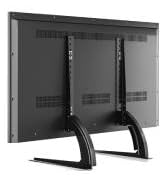
Image 6.1: Detail of the non-slip pad on the tempered glass base.
КСНУМКС. Решавање проблема
Ако наиђете на проблеме током склапања или употребе, погледајте следеће уобичајене проблеме и решења:
- TV Wobbles After Assembly:
решење: Ensure all screws are securely tightened, especially those connecting the support column to the base and the mounting bracket to the column. Verify the TV is properly seated on the mounting arms and the safety lock is engaged. Ensure the stand is on a flat, stable surface. - Screws for TV are Too Short/Long:
решење: The hardware kit includes various sizes of screws (M4, M6, M8) and spacers to accommodate different TV models. Refer to your TV's manual for the correct screw size. If the provided screws are still not suitable, you may need to purchase specific screws from a hardware store. - TV Does Not Fit the Stand:
решење: Double-check your TV's size and VESA mounting pattern. This stand supports TVs from 27-60 inches and VESA patterns from 100x100mm to 400x400mm. If your TV falls outside these specifications, it is not compatible with this stand. - Difficulty with Height Adjustment:
решење: Ensure the TV is unmounted before attempting to adjust the bracket height. Loosen the screws sufficiently to allow the bracket to slide freely, then retighten firmly once the desired height is achieved.
8. Спецификације
| Феатуре | Детаљ |
|---|---|
| Бранд | Рфајвер |
| Број модела | УТ4001 |
| Компатибилне величине телевизора | 27-60 инча |
| Максимални капацитет оптерећења | 88 фунти (40 кг) |
| ВЕСА компатибилност | 100к100мм до 400к400мм |
| Подешавање висине | 6 levels (approx. 19.9 to 25.8 inches) |
| Материјал | Метал, каљено стакло |
| Димензије производа (Д к Ш к В) | 15.7 x 9.4 x 25.8 inches (approximate maximum height) |
| Тежина артикла | 8.8 фунти |
| Боја | Црно |
| Тип монтаже | Таблетоп Моунт |
| Мовемент Типе | Fixed (with height adjustment) |
| УПЦ | 704139207803 |
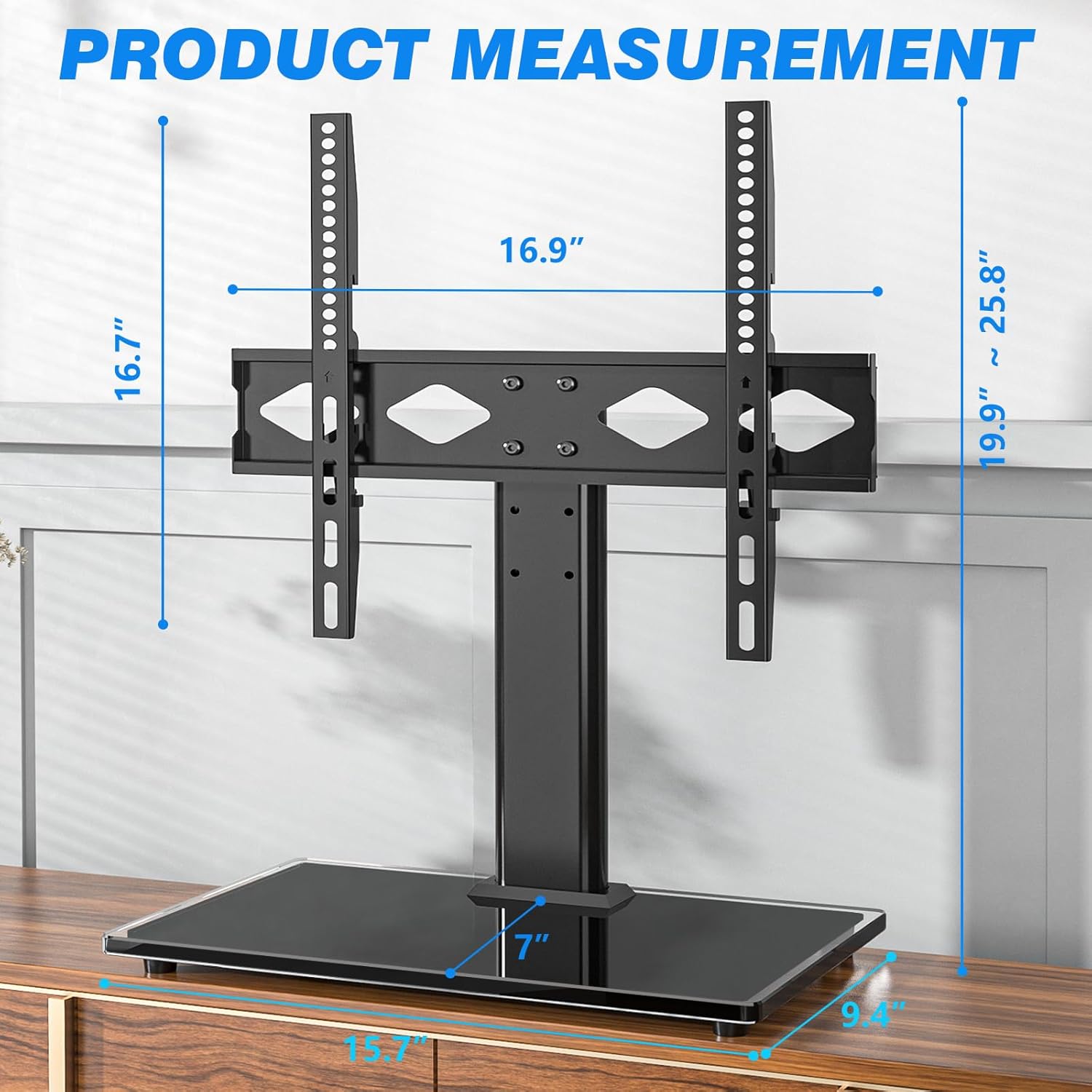
Image 8.1: Detailed product measurements including height, width, and depth.

Слика 8.2: Компатибилност прекоview for TV size, load capacity, VESA patterns, and screen types.
9. Гаранција и корисничка подршка
For warranty information or if you have any questions, concerns, or require assistance with your Rfiver Universal Table Top TV Stand, please contact Rfiver customer support. Details for contacting support are typically found on the product packaging or the official Rfiver webсајту.
Сачувајте доказ о куповини за гаранцијске захтеве.
Ask a question about this manual
Ask about setup, troubleshooting, compatibility, parts, safety, or missing instructions. Manuals+ will review the question and use this page’s manual context to help answer it.