
1. Увод
Thank you for choosing the Decdeal WiFi Electric Heating Thermostat. This programmable thermostat is designed to control electric heating systems, offering convenience through its dual sensor capabilities, white backlight display, and voice control compatibility. This manual provides detailed instructions for installation, operation, and maintenance to ensure optimal performance and longevity of your device.
2. Производ је готовview
The Decdeal WiFi Electric Heating Thermostat features a clear LCD display and intuitive buttons for easy control. It integrates with your home WiFi network for remote management via a smartphone application and supports voice commands through compatible smart home assistants like Amazon Alexa.
Кључне карактеристике:
- WiFi Connectivity for remote control
- Programmable scheduling for energy efficiency
- Dual sensor (internal air sensor and external floor sensor)
- White backlight for clear visibility
- Voice control compatible with Amazon Alexa
- Интерфејс дугмета на додир
Thermostat Components and Display:

This image illustrates the front panel of the thermostat, highlighting its display elements and control buttons. The display shows the current time, set temperature, and room temperature. The buttons include Turn ON/OFF, Set Key, Confirm Key, Increase Key, and Decrease Key.

This image shows the Decdeal thermostat mounted on a wall, with a smartphone displaying its control application. This demonstrates the WiFi connectivity and remote control capabilities of the device.
3. Подешавање и инсталација
Важне информације о безбедности: Installation should only be performed by a qualified electrician. Ensure the main power supply is turned off before beginning any wiring work to prevent electric shock.
Садржај пакета:
- Decdeal WiFi Electric Heating Thermostat
- External NTC Sensor (if included with your model)
- Монтажни завртњи
- Упутство за употребу

This image displays the thermostat alongside its external NTC sensor and mounting screws, representing the typical contents of the product package.
Упутства за ожичење:
Refer to the wiring diagram on the back of the thermostat for correct connections. Ensure all connections are secure.
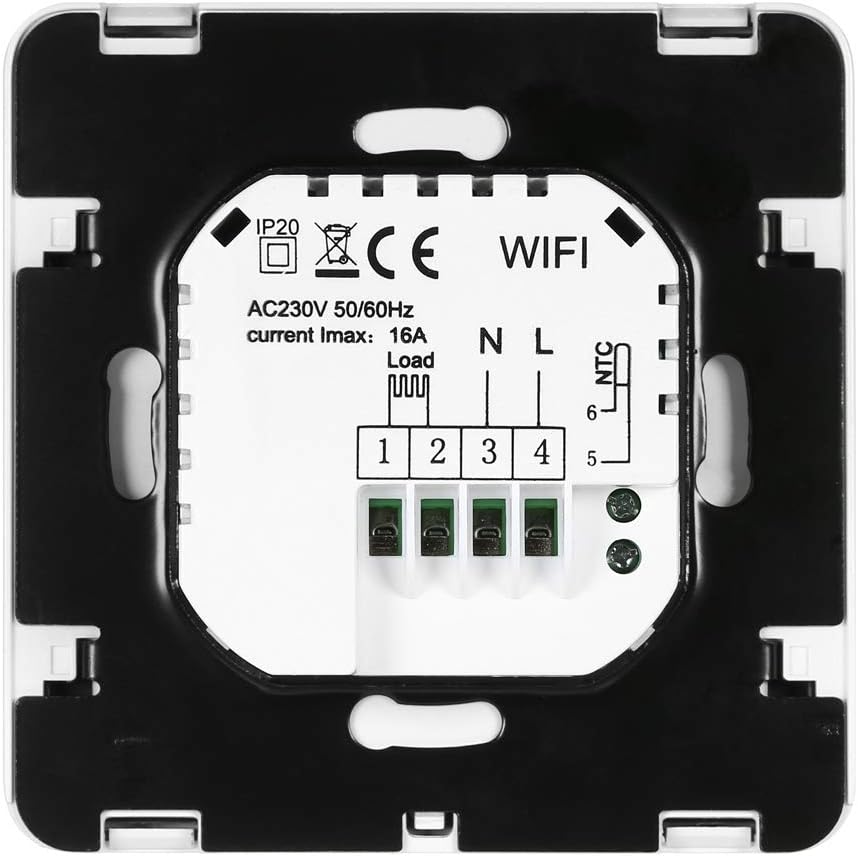
Ова слика приказује задњи део view of the thermostat, detailing the wiring terminals. Terminals 1 and 2 are for the load (heating element), 3 and 4 for the neutral (N) and live (L) power supply, and 5 and 6 for the NTC external sensor.
- Disconnect power to the heating circuit at the main breaker.
- Mount the thermostat base to a standard electrical box using the provided screws.
- Connect the heating load wires to terminals 1 and 2.
- Connect the live (L) and neutral (N) power supply wires to terminals 3 and 4 respectively.
- If using an external floor sensor, connect its wires to terminals 5 and 6.
- Carefully attach the thermostat front panel to the base.
Initial Power-On and WiFi Setup:
After installation, restore power. The thermostat display will light up. To connect to WiFi:
- Download the compatible smartphone application (refer to the user manual included in the box for QR code or app name).
- Follow the in-app instructions to add your device. This typically involves putting the thermostat into pairing mode (often by holding a specific button combination) and connecting to its temporary WiFi hotspot or allowing the app to discover it on your home network.
- Ensure your WiFi network is 2.4GHz, as 5GHz networks are generally not supported by this device.
4. Операција
The thermostat can be operated manually via its buttons or remotely through the smartphone application and voice commands.
Ручна контрола:
- Укључивање/искључивање: Press the power button (⏻) to turn the thermostat on or off.
- Подешена температура: Press the 'SET' button to enter temperature setting mode. Use the '▲' (Increase) and '▼' (Decrease) buttons to adjust the desired temperature. Press 'OK' to confirm.
- Избор режима: The thermostat supports manual mode and programmable mode. Use the 'SET' button to cycle through modes or access advanced settings.
Programmable Scheduling:
The thermostat allows you to set a weekly schedule with different temperature settings for various times of the day. Refer to the detailed instructions in the included paper manual or the smartphone application for setting up your personalized heating schedule.
WiFi and App Control:
Once connected to WiFi, you can control your thermostat from anywhere using the dedicated smartphone application. This includes:
- Подешавање температуре
- Промена режима рада
- Setting and modifying schedules
- Monitoring current room and set temperatures
Контрола гласом:
The thermostat is compatible with Amazon Alexa. To enable voice control:
- Ensure your thermostat is successfully connected to the smartphone app.
- Open the Amazon Alexa app and enable the skill for your thermostat (e.g., search for 'Smart Life' or the specific app name).
- Link your thermostat account with Alexa.
- Discover devices in the Alexa app. You can then use voice commands such as, "Alexa, set the thermostat to 22 degrees."
5. Одржавање
The Decdeal WiFi Electric Heating Thermostat requires minimal maintenance.
- Чишћење: Обришите екран и цasing with a soft, dry cloth. Do not use abrasive cleaners or solvents, as these can damage the surface.
- Брига о сензорима: Ensure the internal and external sensors are free from dust and obstructions for accurate temperature readings.
- Ажурирања софтвера: Periodically check the smartphone application for any available firmware updates for your thermostat to ensure optimal performance and security.
КСНУМКС. Решавање проблема
Ако наиђете на проблеме са термостатом, погледајте следеће уобичајене проблеме и решења:
| Проблем | Могући узрок | Решење |
|---|---|---|
| Термостат се не укључује | No power supply; incorrect wiring; tripped circuit breaker. | Check circuit breaker. Verify wiring connections (consult an electrician if unsure). Ensure main power is on. |
| Није могуће повезати се на ВиФи | Incorrect WiFi password; 5GHz network used; thermostat not in pairing mode; weak WiFi signal. | Ensure correct 2.4GHz WiFi password. Put thermostat into pairing mode. Move thermostat closer to router or improve signal. Restart router. |
| Грејање се не укључује/искључује | Temperature settings incorrect; thermostat in OFF mode; wiring issue; heating system fault. | Check set temperature and current room temperature. Ensure thermostat is ON. Verify heating system is functional. Check wiring. |
| Нетачно очитавање температуре | Sensor obstructed or faulty; thermostat placed near heat source/draft. | Ensure sensors are clean and unobstructed. Relocate thermostat if exposed to direct heat/cold sources. |
| Гласовна контрола не ради | Alexa skill not enabled; account not linked; incorrect commands. | Verify Alexa skill is enabled and linked. Use correct voice commands. Ensure thermostat is online. |
Ако проблем и даље постоји након покушаја ових решења, обратите се корисничкој подршци.
7. Спецификације
Detailed technical specifications for the Decdeal WiFi Electric Heating Thermostat:
| Феатуре | Детаљ |
|---|---|
| Бранд | Децдеал |
| Број модела | XOY6858830357994NM |
| Волtage | 230 волти, 250 волти |
| Цуррент Лоад | Мак 16А |
| Извор напајања | Цордед Елецтриц |
| Цоннецтивити Протоцол | Ви-Фи (2.4ГХз) |
| Тип контролера | Амазон Алека компатибилан |
| Позадинско осветљење | Да |
| Тежина артикла | 180 г |
| Димензије парцеле | 11.2 к 10.4 к 5.8 цм |
| Опсег контроле температуре | Typically 5℃ to 35℃ (may vary by model settings) |
| Прецизност температуре | +/- 0.5℃ |
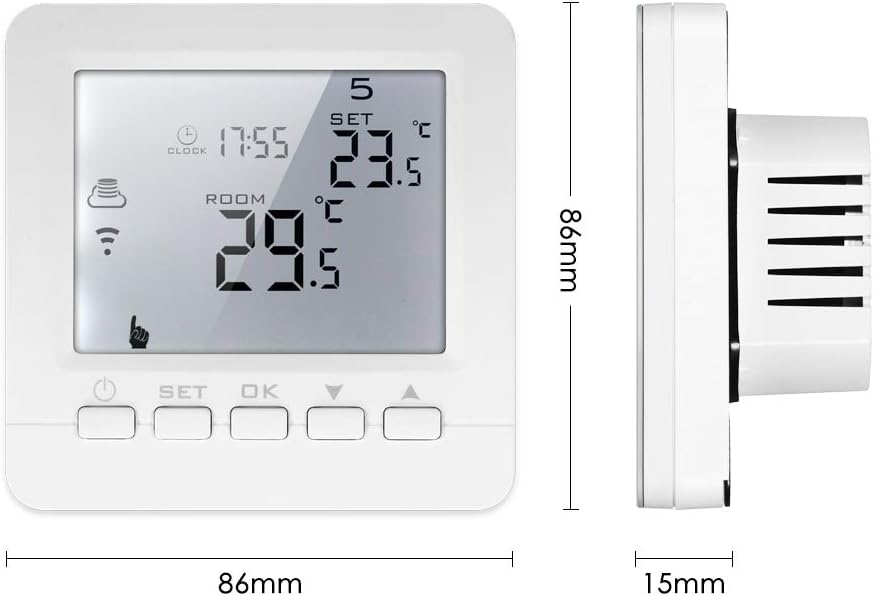
This image provides the physical dimensions of the thermostat, showing a width of 86mm and a height of 86mm, with a depth of 15mm from the wall surface.
8. Гаранција и подршка
For warranty information and technical support, please refer to the documentation included with your product or contact Decdeal customer service through their official website or the retailer where the product was purchased. Please have your model number (XOY6858830357994NM) and purchase date available when seeking support.