
1. Увод
The Azpen Dockall D101 is a versatile device combining a Qi wireless charging dock station, a Bluetooth speaker, and a phone stand. It is designed to enhance your audio experience while conveniently charging your compatible smartphones and tablets.
2. Шта је у кутији
- 1 x DockAll Slim D101
- 1 к ДЦ адаптер за напајање
- 1 к Упутство за употребу

Image: Box contents including the DockAll D101 unit, DC power adapter, and user manual.
3. Производ је готовview
The Dockall D101 features an innovative design that integrates multiple functionalities into one device for home and office use. Key components include:
- Подлога за бежично пуњење Ки: За компатибилне уређаје.
- Блутут звучник: For audio streaming.
- Подесиви сталак за телефон: Provides an upright viewугао уласка.
- Контролна дугмад: For power, volume, and playback.
- МицроСД слот: Supports cards up to 64 GB.

Слика: Фронт view of the Azpen Dockall D101 with a smartphone placed on the charging pad, illustrating wireless charging capability.
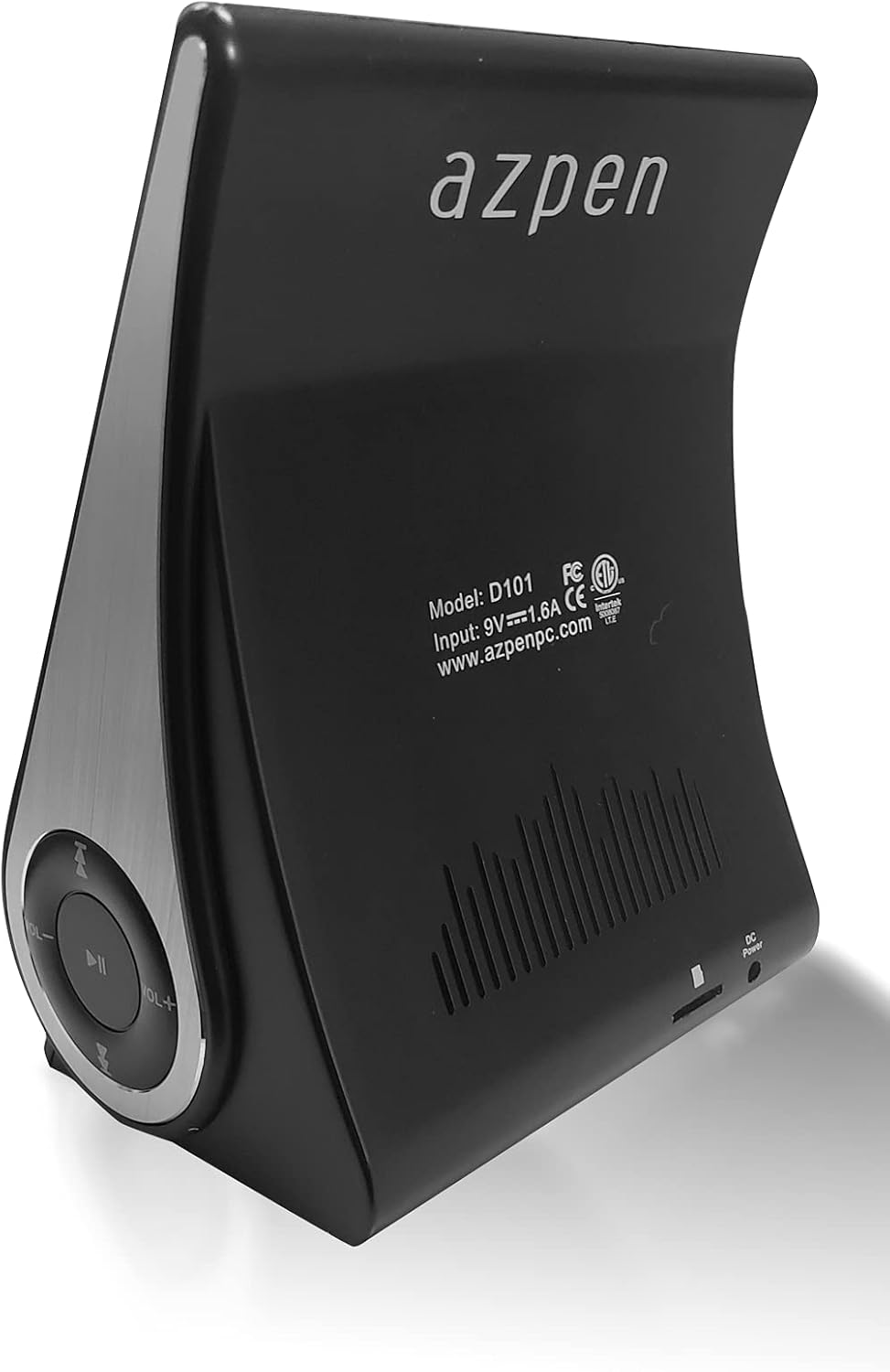
Слика: Позади view of the Azpen Dockall D101, displaying the model number (D101), input specifications, and regulatory certifications.

Слика: Сајд професионалацfile of the Azpen Dockall D101, highlighting the circular control panel with volume, playback, and phone call buttons.
4. Подешавање
- Прикључак за напајање: Connect the provided DC Power Adapter to the "DC Power" port on the back of the Dockall D101. Plug the adapter into a standard wall outlet.
- Позиционирање: Place the Dockall D101 on a stable, flat surface.
- Adjust Phone Stand: Gently pull up the phone stand to your desired viewing angle. Ensure the stand is securely locked in place.
5. Упутство за употребу
5.1 Укључивање/искључивање
- To power on, press and hold the Power button (usually indicated by a circle with a vertical line) on the control panel until the device activates.
- To power off, press and hold the Power button again until the device shuts down.
5.2 Qi Wireless Charging
- Ensure the Dockall D101 is powered on.
- Place your Qi-compatible smartphone or tablet onto the charging pad on the adjustable stand.
- Adjust the position of your device until the solid blue light appears, indicating that wireless charging has begun.
- The Dockall D101 supports fast Qi wireless charging (10W).
- Note: Charging may not work through metal cases or excessively thick phone cases (e.g., OtterBox Defender).
5.3 Функционалност Bluetooth звучника
- Упаривање:
- Power on the Dockall D101.
- Активирајте Bluetooth на свом паметном телефону или аудио уређају.
- Тражи "Dockall D101" (or similar name) in your device's Bluetooth settings and select it to pair.
- Звук потврде ће означити успешно упаривање.
- Аудио репродукција:
- Use the control buttons on the Dockall D101 to play/pause, skip tracks (forward/backward), and adjust volume.
- You can also control playback directly from your paired device.
- Хандс-фрее позивање:
- When a call comes in, press the Phone button (usually indicated by a phone icon) to answer.
- Speak into the built-in microphone on the Dockall D101.
- Press the Phone button again to end the call.

Image: A smartphone positioned on the Dockall D101 stand, displaying a music player interface, highlighting the device's audio capabilities.
Видео: Оверview of the Azpen DockAll Mini, demonstrating its features and functionality. While the video showcases a "Mini" model, the core operations for charging and Bluetooth are similar to the D101.
6. Одржавање
- Чишћење: Use a soft, dry cloth to clean the surface of the Dockall D101. Do not use liquid cleaners or aerosols.
- Складиштење: Када се уређај не користи дуже време, чувајте га на хладном и сувом месту, заштићено од директне сунчеве светлости.
- Руковање: Избегавајте испуштање уређаја или излагање екстремним температурама или влази.
КСНУМКС. Решавање проблема
| Проблем | Могуће решење |
|---|---|
| Уређај се не укључује. | Ensure the DC Power Adapter is securely connected to both the device and a working power outlet. |
| Бежично пуњење не ради. |
|
| Блутут се не повезује. |
|
| Лош квалитет звука. |
|
8. Спецификације
- Назив модела: Д101
- Тип звучника: Блуетоотх звучник
- Посебне карактеристике: Wireless Charger, Upright View Angle, Bluetooth Speaker, 3-in-1 Hub
- Препоручена употреба: За паметне телефоне или таблете
- Компатибилни уређаји: For iPhone 15/14/13/12/11, for Samsung Galaxy S24/S23/S22/S21/S20/S10
- Боја: Црно
- Тежина артикла: 11.2 унци
- је водоотпоран: ФАЛСЕ
- Врста гаранције: Ограничено
- Број ставки: 1
- Метод контроле: Додирните
- Технологија бежичне комуникације: Блуетоотх
- Величина звучника: 5 центиметара
- Извор напајања: Баттери Поверед
- Тип аудио драјвера: Динамички возач
- УПЦ: 859592006828
- Произвођач: Azpen
- Димензије производа: 5.9 к 4.3 к 3.75 инча
- Максимална излазна снага звучника: 5 Ваттс
- Технологија повезивања: Блуетоотх
- Режим аудио излаза: Моно
- Тип монтаже: Доцк

Image: Diagram showing the dimensions of the Azpen Dockall D101, with measurements in centimeters.
9. Гаранција и подршка
The Azpen Dockall D101 comes with a Limited Warranty. For specific details regarding warranty coverage and to access customer support, please refer to the warranty information provided in the original packaging or visit the official Azpen webсајту.
For further assistance, you may also contact Azpen customer service directly.