
Canyon CND-GPW5
Canyon Gaming Gamepad CND-GPW5 Wireless са тачпедом Упутство за употребу
Model: CND-GPW5
Увод
This manual provides comprehensive instructions for the Canyon Gaming Gamepad CND-GPW5, a wireless controller designed for PlayStation 4 with an integrated touchpad. Please read this manual carefully before using the product to ensure proper operation and to maximize your gaming experience.

Слика: Фронт view of the Canyon Gaming Gamepad CND-GPW5, showcasing its ergonomic design, dual analog sticks, directional pad, action buttons, and central touchpad.
Садржај пакета
- Canyon Gaming Gamepad CND-GPW5
- УСБ кабл за пуњење
- Кориснички приручник (овај документ)

Image: The Canyon Gaming Gamepad CND-GPW5 displayed within its retail packaging, highlighting key features like wireless connectivity, touchpad, and vibration feedback.
Сетуп
1. Пуњење геймпада
- Connect the small end of the USB charging cable to the charging port on the gamepad.
- Connect the larger end of the USB charging cable to a USB port on your PlayStation 4 console or a compatible USB wall adapter.
- The indicator light on the gamepad will illuminate to show it is charging. It will turn off or change color when fully charged.
2. Упаривање са PlayStation 4
- Уверите се да је ваша PlayStation 4 конзола укључена.
- For initial pairing, connect the gamepad to the PS4 console using the USB charging cable.
- Притисните тастер Дугме ПС (located in the center of the gamepad). The gamepad will power on and automatically pair with the console.
- Након упаривања, можете искључити УСБ кабл за бежичну репродукцију.
- To pair wirelessly after initial setup, simply press the Дугме ПС on the gamepad. It will attempt to connect to the last paired console.
Упутство за употребу
Распоред и функције гејмпада

Слика: Позади view of the Canyon Gaming Gamepad CND-GPW5, showing the M1, M2, M3, and M4 programmable buttons, along with regulatory information.
- Аналогни штапићи: Used for precise movement and camera control.
- Смерни тастер (D-Pad): For menu navigation and specific in-game actions.
- Дугмад за акције (троугао, круг, крст, квадрат): Perform various in-game actions.
- Дугмад на рамену (L1, R1) и окидачи (L2, R2): For aiming, firing, and other contextual actions.
- ПС дугме: Powers on the gamepad, accesses the PS4 home menu, and switches users.
- Дугме ДЕЛИ: Shares screenshots and video clips.
- Дугме ОПЦИЈЕ: Accesses in-game menus and options.
- Тоуцхпад: Functions as a clickable surface for navigation and specific game interactions.
- M1, M2, M3, M4 Buttons: These are additional programmable buttons located on the rear of the gamepad. Refer to your game's settings or the PS4 system settings for customization options.
Повратне информације о вибрацијама
The gamepad features vibration feedback to enhance immersion during gameplay. This function is automatically enabled when supported by the game.
Одржавање
Чишћење
- Обришите гејмпад меком, сувом крпом.
- Do not use liquid cleaners, solvents, or abrasive materials, as these can damage the surface and internal components.
Складиштење
- Чувајте гејмпад на хладном и сувом месту, даље од директне сунчеве светлости и екстремних температура.
- Избегавајте стављање тешких предмета на гејмпад.
Баттери Царе
- To prolong battery life, avoid fully discharging the gamepad frequently.
- If storing for an extended period, charge the gamepad to approximately 50% before storage.
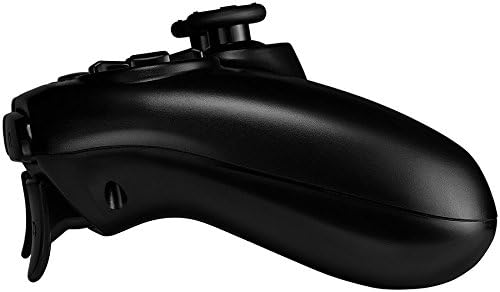
Слика: Сајд професионалацfile of the Canyon Gaming Gamepad CND-GPW5, illustrating its contoured grip and trigger button placement.
Решавање проблема
- Гејмпад се не повезује:
- Уверите се да је гејмпад напуњен.
- Connect the gamepad to the PS4 console with the USB cable and press the PS button to re-establish connection.
- Check for any interference from other wireless devices.
- Buttons or analog sticks unresponsive:
- Restart the gamepad by holding the PS button for 10 seconds, then press it again to power on.
- Ensure the gamepad's firmware is up to date (check Canyon's official website for updates if available).
- Проблеми са пуњењем:
- Try a different USB cable or USB port on the console/adapter.
- Ensure the charging port on the gamepad is clean and free of debris.
If problems persist, please refer to the support section or contact Canyon customer service.
Спецификације
| Феатуре | Детаљ |
|---|---|
| Број модела | CND-GPW5 (Item Model Number: 9598241) |
| Повезивање | Бежични |
| Компатибилност | ПлаиСтатион 4 |
| Карактеристике | Touchpad, Vibration Feedback |
| Батерија | 1 литијум-јонска батерија (обавезно) |
| Димензије производа (Д к Ш к В) | 50 к 50 к 28 цм |
| Тежина | 224 грама |
| ASIN | B07G37JCMC |
| Датум изласка | 1. јул 2020 |
Гаранција и подршка
For information regarding warranty coverage, please refer to the warranty card included with your product or visit the official Canyon website. For technical support or further assistance, please contact Canyon customer service through their official support channels.
Official Canyon Webсајт: https://canyon.eu/
Ask a question about this manual
Ask about setup, troubleshooting, compatibility, parts, safety, or missing instructions. Manuals+ will review the question and use this page’s manual context to help answer it.