
Aftershokz AS650SG-BR
Aftershokz Air Bone Conduction Wireless Bluetooth Headphones
Упутство за употребу
Model: AS650SG-BR
1. Увод
The Aftershokz Air Bone Conduction Wireless Bluetooth Headphones offer a unique open-ear listening experience, designed to keep you connected to your audio while remaining aware of your surroundings. Utilizing advanced bone conduction technology, these headphones transmit sound through your cheekbones, leaving your ears open to ambient sounds. This design is ideal for athletes, outdoor enthusiasts, and anyone who prioritizes situational awareness.

Image 1: Aftershokz Air Bone Conduction Wireless Bluetooth Headphones in Slate Grey. These lightweight headphones feature a flexible band and transducers that rest on the cheekbones.
The lightweight titanium frame ensures comfortable long-term wear, while features like PremiumPitch technology deliver rich audio. Integrated reflective strips enhance visibility during low-light activities, making them a safe choice for various environments.

Image 2: Two individuals running outdoors, demonstrating the open-ear design of the Aftershokz Air headphones, allowing them to hear their surroundings while enjoying audio.
2. Шта је у кутији
Upon opening your Aftershokz Air package, you should find the following components:
- Aftershokz Air Headphone
- Протецтиве Цасе
- Кабл за пуњење
- Earplugs (for use in noisy environments, if desired)
3. Водич за подешавање
3.1 Почетно пуњење
Before first use, fully charge your Aftershokz Air headphones. Connect the provided charging cable to the charging port on the headphones and plug the other end into a USB power source. The LED indicator will show charging status. A full charge provides up to 6 hours of continuous use.
3.2 Блуетоотх упаривање
- Укључено: Притисните и држите дугме за напајање 2 секунди.
- Активирајте Блуетоотх: На свом уређају (паметном телефону, таблету, рачунару) омогућите Блутут.
- Изаберите уређај: Look for "Aftershokz Air" in the list of available Bluetooth devices and select it.
- Потврдите везу: Once paired, the LED indicator will turn solid blue, and a voice prompt will confirm "Connected."
The headphones support multipoint pairing, allowing connection to two devices simultaneously. To use this feature, pair with the first device, then enter pairing mode again and pair with the second device. The headphones will automatically switch between devices.
4. Упутство за употребу
4.1 Ношење слушалица
Place the headphones with the transducers resting on your cheekbones, just in front of your ears. The band should wrap around the back of your head. Adjust for a comfortable and secure fit. The lightweight titanium material ensures minimal pressure.

Image 3: A man demonstrating the correct placement of the Aftershokz Air headphones, with the band resting comfortably around the back of his head and the transducers on his cheekbones.
4.2 Основне контроле
- Укључивање/искључивање: Притисните и држите дугме за напајање 2 секунди.
- Појачавање/утишавање: Use the volume buttons located on the side of the headphones.
- Пусти/паузирај: Притисните вишенаменско дугме једном.
- Прескочи стазу: Double-press the multi-function button for next track, triple-press for previous track.
- Одговори/заврши позив: Притисните вишефункционално дугме једном током долазног позива или активног позива.
- Гласовни асистент: Press and hold the multi-function button for 2 seconds to activate your device's voice assistant (e.g., Siri, Google Assistant).
The dual noise-canceling microphones ensure clear calls even in noisy environments.

Image 4: A close-up of a man wearing the Aftershokz Air headphones, emphasizing the discreet design and the quality of the audio experience provided by the PremiumPitch technology and dual noise-canceling microphones.
5. Медијски производи
5.1 Званични видео производа
Video 1: "Push yourself Beyond Your Limits with Trekz Air". This video showcases the Aftershokz Air headphones in various active scenarios, highlighting their open-ear design, comfort, and suitability for sports and outdoor activities.
5.2 Additional Product Images

Image 5: A woman exercising, demonstrating the water-resistant capabilities of the Aftershokz Air headphones, making them suitable for intense workouts and various weather conditions.
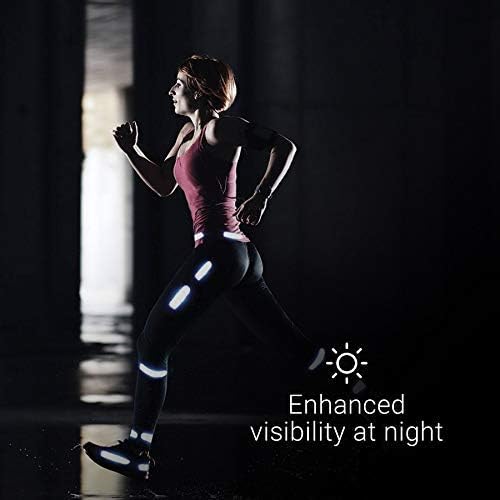
Image 6: A person running at night, illustrating the enhanced visibility provided by the reflective strips that can be adhered to clothing or gear, improving safety in low-light conditions.
6. Одржавање
6.1 Чишћење
To maintain the longevity and hygiene of your headphones, regularly wipe them with a soft, damp крпа. Избегавајте употребу јаких хемикалија или абразивних материјала. Уверите се да је порт за пуњење сув пре пуњења.
6.2 Складиштење
When not in use, store your Aftershokz Air headphones in the provided protective case to prevent damage from dust, dirt, and impacts. Store in a cool, dry place away from extreme temperatures.
6.3 Одржавање батерије
For optimal battery life, avoid fully discharging the headphones frequently. Charge them regularly, even if not in constant use. If storing for an extended period, charge them to about 50% before storage.
КСНУМКС. Решавање проблема
| Проблем | Могући узрок | Решење |
|---|---|---|
| Нема звука | Headphones not powered on or paired; volume too low; device volume too low. | Ensure headphones are on and paired. Increase headphone and device volume. |
| Није могуће упарити | Слушалице нису у режиму упаривања; Bluetooth уређаја је искључен; сметње. | Ensure headphones are flashing red/blue. Turn device Bluetooth off/on. Move closer to device. |
| Проблем са пуњењем | Cable or power source issue; charging port dirty. | Try a different cable or USB port. Clean charging port gently. |
| Лош квалитет звука | Ван домета Bluetooth-а; сметње; празна батерија. | Move closer to your device. Avoid strong electromagnetic fields. Charge headphones. |
If problems persist, please refer to the support section or visit the official Aftershokz webсајт за даљу помоћ.
8. Спецификације
| Назив модела | AfterShokz Air Open-Ear |
| Број модела | AS650SG-BR |
| Технологија повезивања | Блуетоотх в4.2 |
| Блуетоотх домет | 10 метара |
| Тип аудио драјвера | Драјвер коштане проводљивости |
| Фреквенцијски опсег | 20 Хз до 20,000 Хз |
| Трајање батерије | 6 сата |
| Време пуњења | (Not specified in input, omit or state typical) |
| Тежина артикла | 30 грама (1.06 унци) |
| Материјал | Титанијум |
| Ниво отпорности на воду | Водоотпорно (отпорно на зној) |
| Микрофон | Included, Noise Cancellation |
| Компатибилни уређаји | иОС и Андроид паметни телефони или таблети спремни за Блуетоотх и Мац и ПЦ рачунари и лаптопи |
| Контролни метод | Додир, глас |
| Боја | Слате Греи |
| УПЦ | 811071030540 |
| Произвођач | Aftershokz Limited Corporation |
9. Гаранција и подршка
For detailed warranty information and customer support, please refer to the warranty card included with your product or visit the official Aftershokz website. You can also find FAQs and additional resources there to help you with your Aftershokz Air headphones.
Подршка на мрежи: Aftershokz Official Store on Amazon
Ask a question about this manual
Ask about setup, troubleshooting, compatibility, parts, safety, or missing instructions. Manuals+ will review the question and use this page’s manual context to help answer it.