
Увод
This manual provides instructions for the installation, operation, and maintenance of your Audiovox ELEAUDAX80EXT Wireless Extension. This device is designed to expand the functionality of compatible Audiovox phone models, specifically the AX8001, AX8001E, and AX8101AM, by providing an additional wireless handset.
Садржај пакета
Please verify that all items are present in the package before proceeding with the setup.
- Audiovox ELEAUDAX80EXT Wireless Extension Unit
- Адаптер за напајање (ако је применљиво)
- Пуњива батерија (унапред инсталирана или засебно)
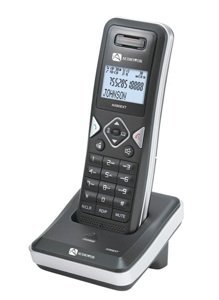
Image: The Audiovox ELEAUDAX80EXT Wireless Extension Unit. This image displays the compact design of the extension handset.
Сетуп
- Напуните батерију: If the battery is not pre-installed, insert it into the extension unit according to the markings. Place the extension unit on its charging cradle (if included) or connect the power adapter directly to the unit and a power outlet. Allow the unit to charge for at least 12-16 hours before initial use.
- Register the Extension:
- Ensure your main Audiovox phone base (AX8001, AX8001E, or AX8101AM) is powered on.
- On the main phone base, locate and press the "Register" or "Page" button. Hold it until the indicator light on the base begins to flash (refer to your main phone's manual for exact instructions).
- While the base is in registration mode, on the ELEAUDAX80EXT extension unit, navigate to the "Menu" and select "Register Handset" or a similar option. Follow the on-screen prompts.
- Once registration is successful, the extension unit will display a confirmation message, and the indicator light on the base will stop flashing.
- Тестна веза: Make a test call from the extension unit to ensure proper functionality.
Упутство за употребу
Упућивање позива
- Подигните слушалицу или притисните ТАЛК дугме.
- Позовите жељени број телефона.
- Притисните тастер ТАЛК поново притисните дугме или вратите слушалицу на постоље да бисте завршили позив.
Одговарање на позив
- Када телефон зазвони, подигните слушалицу или притисните ТАЛК дугме.
- Да бисте прекинули позив, притисните КРАЈ дугме или вратите слушалицу на постоље.
Intercom Function (if supported by base unit)
- Притисните тастер ИНТЕРЦОМ дугме.
- Dial the number of the extension you wish to call (e.g., "2" for the second handset).
- Притисните ТАЛК да бисте започели интерфонски позив.
Одржавање
- Чишћење: Обришите јединицу меком крпом, дamp тканина. Немојте користити јаке хемикалије или абразивна средства за чишћење.
- Одржавање батерије: For optimal battery life, avoid fully discharging the battery frequently. Keep the unit on its charger when not in use.
- Складиштење: If storing the unit for an extended period, remove the battery and store it in a cool, dry place.
Решавање проблема
| Проблем | Решење |
|---|---|
| No dial tone / Cannot make calls |
|
| Телефон се не пуни |
|
| Лош квалитет позива / Статични сигнал |
|
Спецификације
- Број модела: ELEAUDAX80EXT
- Компатибилне основне јединице: Audiovox AX8001, AX8001E, AX8101AM
- Димензије (Д к Ш к В): 20 к 40 к 30 милиметара
- Тежина: 20 грама
- УПЦ: 044476082719
Гаранција и подршка
For specific warranty information and technical support, please refer to the documentation included with your original Audiovox phone system or visit the official Audiovox webсајт. Сачувајте рачун као доказ о куповини за потребе гаранције.
For further assistance, please contact Audiovox customer service.