
FOINNEX H-DPF
ФОИННЕКС ХДМИ на ДисплаиПорт адаптер упутство за употребу
Brand: FOINNEX | Model: H-DPF
1. Производ је готовview
The FOINNEX HDMI to DisplayPort Adapter (Model H-DPF) is designed to transmit high-definition video and audio signals from an HDMI source device to a DisplayPort display. This active adapter supports resolutions up to 4K@60Hz, making it suitable for various applications including video streaming, gaming, and extending/mirroring displays.
Кључне карактеристике:
- Unidirectional Signal Transfer: Converts signal from HDMI output to DisplayPort input only.
- 4K@60Hz Resolution Support: Supports UHD resolutions up to 3840x2160 at 60Hz.
- Плуг анд Плаи: No drivers required for installation.
- Више режима: Supports extended and mirror display modes.
- Широка компатибилност: Compatible with various HDMI output devices (PCs, laptops, gaming consoles) and DisplayPort input devices (monitors, HDTVs, projectors).
- USB Power Option: Can be powered via USB for low-voltage devices like PS4 or Apple devices.
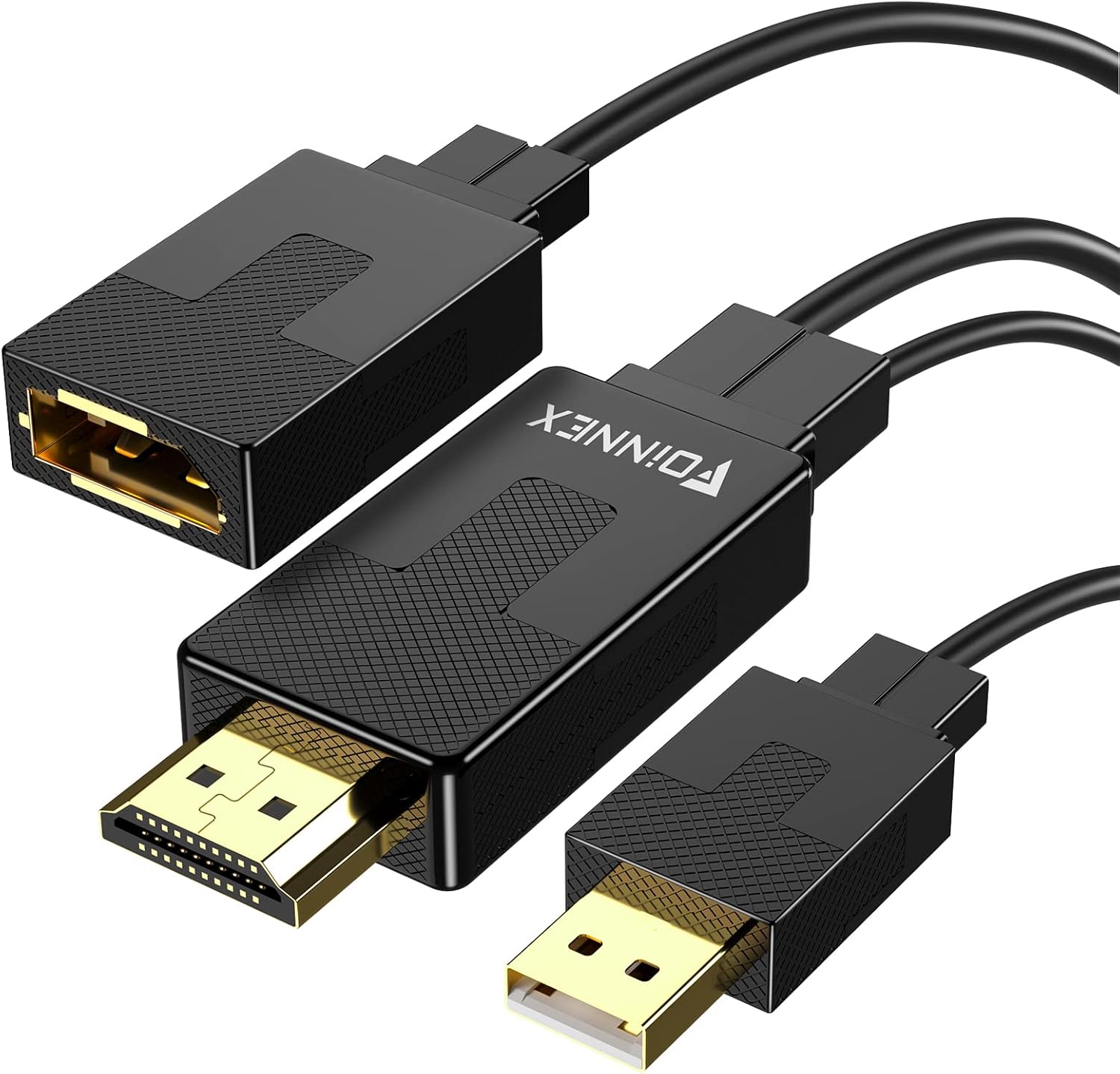
Figure 1: FOINNEX HDMI to DisplayPort Adapter. This image shows the adapter with its HDMI male connector, DisplayPort female port, and an attached USB-A male connector for optional power.
2. Упутства за подешавање
Follow these steps to connect your FOINNEX HDMI to DisplayPort Adapter:
- Идентификујте портове: Ensure your source device has an HDMI output port and your display device has a DisplayPort input port. Remember, this adapter is unidirectional (HDMI source to DisplayPort display).
- Повежите ХДМИ: Plug the HDMI male connector of the FOINNEX adapter into the HDMI output port of your source device (e.g., computer, PS4, Nintendo Switch).

Figure 2: Connecting the HDMI output from your source device to the adapter.
- Повежите DisplayPort: Connect a DisplayPort cable (not included) from the DisplayPort female port of the FOINNEX adapter to the DisplayPort input port on your monitor or display.

Figure 3: Connecting the DisplayPort cable from the adapter to your display.
- Опционо USB напајање: For low-power HDMI source devices (such as SONY PS4, MacBook Pro with Retina Display, Mac mini, or Nintendo Switch), connect the USB-A male connector of the adapter to a USB port on your source device or a USB power adapter. This provides additional power to ensure stable signal transmission.

Figure 4: Optional USB power connection for low-voltagе уређаје.
- Изаберите унос на екрану: On your display, navigate to the input/source menu and select "DisplayPort" as the active input.

Figure 5: Selecting DisplayPort input on your monitor.
The adapter is plug-and-play, so no additional drivers are typically needed. Your display should automatically detect the signal.
3. Упутство за употребу
Once connected, the FOINNEX HDMI to DisplayPort Adapter allows for seamless video and audio transmission. Here are common operating scenarios:
3.1. Режими приказа
The adapter supports both mirror and extended display modes, configurable through your operating system's display settings.
- Режим огледала: Duplicates your primary display's content onto the connected DisplayPort monitor.
- Проширени режим: Extends your desktop across both displays, providing more screen real estate for multitasking.

Figure 6: Using the adapter for dual monitors in extended mode for work.
3.2. Gaming and Multimedia
The adapter is suitable for connecting gaming consoles (PS3, Xbox One, Xbox 360, Nintendo Switch) or other multimedia devices to a DisplayPort monitor. It supports 4K@60Hz for compatible consoles and displays.
Напомена: This adapter cannot improve the native resolution of games. Game consoles supporting 4K@60Hz (e.g., Xbox One S) will display games at their native resolution on a compatible 4K@60Hz DisplayPort monitor.

Figure 7: Enhancing your gaming experience with 4K@60Hz support.
4. Одржавање
The FOINNEX HDMI to DisplayPort Adapter requires minimal maintenance to ensure optimal performance and longevity.
- Чишћење: Use a soft, dry cloth to gently wipe the adapter and its connectors. Avoid using liquid cleaners or abrasive materials.
- Складиштење: Када није у употреби, чувајте адаптер на хладном и сувом месту даље од директне сунчеве светлости и екстремних температура.
- Руковање: Avoid bending or twisting the cables excessively, as this can damage internal wires. Always grasp the connector ends when plugging or unplugging the adapter.
- Услови животне средине: Do not expose the adapter to water, high humidity, or dusty environments.
КСНУМКС. Решавање проблема
If you encounter issues with your FOINNEX HDMI to DisplayPort Adapter, refer to the following common problems and solutions:
| Проблем | Могући узрок | Решење |
|---|---|---|
| No display or flickering screen. | Incorrect connection, insufficient power, or incorrect display input selected. |
|
| Resolution is not 4K@60Hz. | Source device, display, or DisplayPort cable does not support 4K@60Hz. |
|
| Adapter does not work with my Rog Swift PG278Q or curved monitor. | Known incompatibility with specific gaming monitors. | This adapter is noted to be incompatible with certain gaming monitors like the Rog Swift PG278Q and some curved monitors when used with game consoles. No direct solution for these specific incompatibilities. |
| Нема аудио излаза. | Audio settings on source device or display. |
|
| Adapter does not work from DisplayPort source to HDMI display. | Unidirectional design. | This adapter is strictly unidirectional, converting signals only from HDMI output to DisplayPort input. It will not work in the reverse direction (DisplayPort source to HDMI display). You would need a different type of adapter for that purpose. |
6. Спецификације производа
| Феатуре | Детаљ |
|---|---|
| Бранд | ФОИННЕКС |
| Број модела | H-DPF |
| Тип конектора | HDMI Male to DisplayPort Female |
| Смер сигнала | Unidirectional (HDMI Source to DisplayPort Display) |
| Подржана максимална резолуција | 3840x2160 @ 60Hz (4K@60Hz) |
| Подршка за ХДЦП | HDCP 2.2 (Note: Does not support Dynamic HDR) |
| Повер Рекуиремент | Optional USB power for low-voltagе уређаје |
| Боја | Црно |
| Тежина артикла | 0.247 унци |
| Димензије пакета | 6.02 к 5.35 к 0.75 инча |
7. Гаранција и подршка
FOINNEX stands behind the quality of its products. This adapter comes with a 24-месечна гаранција од дана куповине.
Поред тога, а 30-day refund policy is available for eligible purchases.
For technical support, warranty claims, or any inquiries regarding your FOINNEX product, please contact FOINNEX customer service through the retailer where the product was purchased or visit the official FOINNEX webсајт за контакт информације.
FOINNEX is committed to providing high-quality products and customer experiences.
Ask a question about this manual
Ask about setup, troubleshooting, compatibility, parts, safety, or missing instructions. Manuals+ will review the question and use this page’s manual context to help answer it.