
Солид 5582697678
Solid Dual Lavalier Lapel Microphone Set User Manual
Модел: 5582697678
1. Увод
The Solid Dual Lavalier Lapel Microphone Set is designed to capture clear audio for various applications, including vlogging, interviews, and video recording. This set allows for single or dual participant recording with minimal background noise. It is compatible with a wide range of devices, including smartphones, laptops, PCs, and cameras, using standard 3.5mm audio jacks.
2. Садржај пакета
Молимо вас да проверите да ли су све ставке наведене у наставку укључене у ваш пакет:
- 2 x Solid Lavalier Microphones (59-inch cable each)
- 2 x Extension Cords (79-inch each)
- 2 x Foam Wind Muffs
- 1 x Y-Connector Adapter
- 1 x 3.5mm TRRS to TRS Adapter
- 1 к Торбица за чување

Слика 2.1: All components included in the Solid Dual Lavalier Lapel Microphone Set.
3. Упутства за подешавање
3.1 Attaching the Wind Muff
Gently slide a foam wind muff over the microphone head. This helps reduce wind noise and plosives for clearer audio, especially in outdoor environments.
3.2 Single Microphone Setup
- Connect the 3.5mm TRRS jack of one lavalier microphone directly into your recording device (smartphone, tablet, laptop with TRRS port).
- For extended reach, connect the microphone's 3.5mm TRRS jack to an extension cord, then connect the extension cord's 3.5mm TRRS jack to your recording device.
- If connecting to a device requiring a TRS input (e.g., DSLR camera, PC sound card), use the included 3.5mm TRRS to TRS adapter between the microphone/extension cord and the device.
3.3 Dual Microphone Setup
- Connect the 3.5mm TRRS jack of each lavalier microphone into the two input ports of the Y-connector adapter.
- Connect the single 3.5mm TRRS output jack of the Y-connector adapter directly into your recording device.
- For extended reach, you can connect extension cords between each microphone and the Y-connector, or between the Y-connector and your recording device.
- If connecting the Y-connector to a device requiring a TRS input, use the included 3.5mm TRRS to TRS adapter between the Y-connector and the device.

Слика 3.1: Веза екamples for single and dual microphone configurations.
4. Упутство за употребу
4.1 Постављање микрофона
Clip the lavalier microphone onto your clothing, typically near the chest area (e.g., shirt collar, lapel), approximately 6-8 inches from your mouth. Ensure the microphone head is facing towards the sound source for optimal audio capture.
4.2 Снимање
- Ensure all connections are secure and fully inserted into their respective ports. A loose connection can result in no audio or poor audio quality.
- Open your preferred audio or video recording application on your device.
- Start recording. It is recommended to perform a short test recording to verify audio input and quality before a main session.
- Monitor audio levels if your device or application allows. Adjust microphone placement or device input volume as needed to prevent clipping or low volume.

Слика 4.1: Example of lavalier microphone usage during an interview.
5. Компатибилност
The Solid Dual Lavalier Lapel Microphone Set is designed for broad compatibility:
- Smartphones & Tablets: Compatible with Android devices and iPhones/iPads with a standard 3.5mm audio jack (e.g., iPhone 5s, 6, 6 Plus, 6s, 6s Plus).
- iPhones without Headphone Jack: For iPhone 7, 7 Plus, 8, 8 Plus, X, XR, XS, XS Max, and newer models, an Apple Lightning to 3.5 mm Headphone Jack Adapter is required (not included).
- Laptops & PCs: Compatible with most laptops, PCs, and Chromebooks. Use the included 3.5mm TRRS to TRS adapter if your device has separate microphone and headphone jacks or requires a TRS input.
- DSLR Video Cameras: Compatible with cameras that have a 3.5mm audio input jack. The included 3.5mm TRRS to TRS adapter may be necessary.
- ГоПро: For GoPro Hero 5, Hero 5 Session, Hero 6, and up, a Pro 3.5mm Mic Adapter is required (not included).
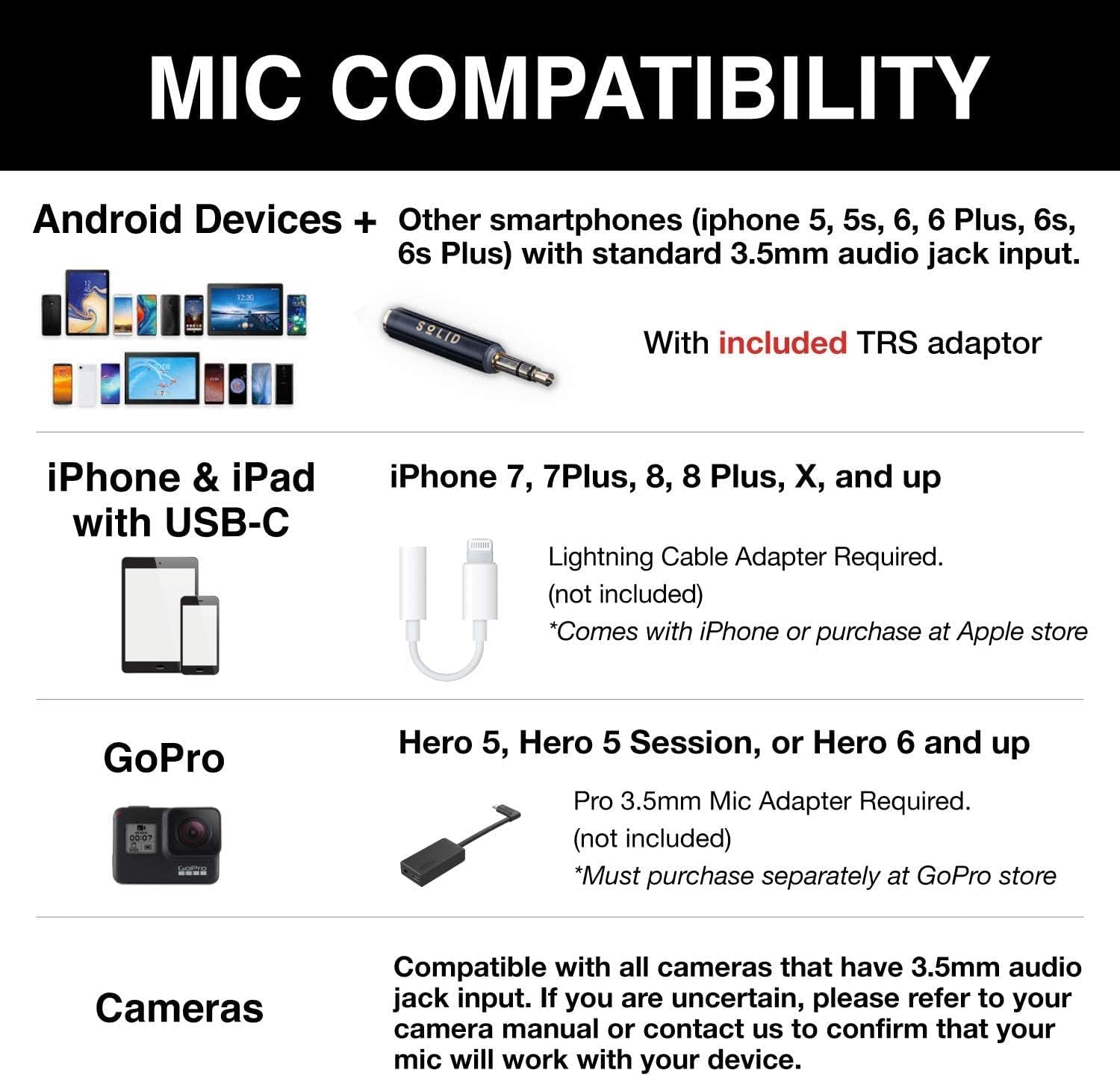
Слика 5.1: Device compatibility overview.
КСНУМКС. Решавање проблема
If you encounter issues with your microphone set, please refer to the following common solutions:
- No Audio or Low Audio Volume:
- Ensure all cables (microphone, extension, Y-connector, adapters) are fully and securely plugged into their respective ports. Connections should 'snap' into place.
- Verify that the correct adapter (TRRS to TRS) is used for devices requiring a TRS input (e.g., some cameras, PCs).
- Check your device's audio input settings. Ensure the external microphone is selected as the input source.
- Increase the input volume on your recording device or application.
- Test the microphone with a different device to rule out device-specific issues.
- Poor Audio Quality / Background Noise:
- Ensure the foam wind muff is properly installed over the microphone head.
- Check microphone placement; it should be 6-8 inches from the sound source.
- Record in a quiet environment to minimize external noise.
- Ensure cables are not tangled or near sources of electromagnetic interference.
- Microphone Clip Issues:
- If a clip feels stiff, gently work it open and closed a few times. Avoid excessive force.
7. Спецификације
| Феатуре | Спецификација |
|---|---|
| Бранд | Чврсто |
| Број модела | 5582697678 |
| Технологија повезивања | Auxiliary (3.5 mm Jack) |
| Фактор форме микрофона | Lavalier (Clip-On) |
| Полар Паттерн | Омнидирецтионал |
| Број канала | 2 |
| Однос сигнала и шума | 58 дБ |
| Материјал | нерђајући челик |
| Тежина артикла | 2.89 унци |
| Компатибилни уређаји | Camera, Laptop, PC, Smartphone, Tablet |
8. Одржавање
To ensure the longevity and optimal performance of your Solid Dual Lavalier Lapel Microphone Set, follow these maintenance guidelines:
- Чишћење: Use a soft, dry cloth to wipe down the microphone body and cables. Do not use liquid cleaners or solvents.
- Складиштење: When not in use, store the microphones and accessories in the provided storage pouch to protect them from dust, dirt, and physical damage. Avoid tightly coiling the cables to prevent internal wire damage.
- Руковање: Handle the microphones and cables gently. Avoid pulling on the cables or subjecting the connectors to undue stress.
- Услови животне средине: Keep the microphone set away from extreme temperatures, high humidity, and direct sunlight.
9. Гаранција и подршка
For warranty information or technical support regarding your Solid Dual Lavalier Lapel Microphone Set, please refer to the product packaging or contact Solid customer service through the retailer where the product was purchased. Please have your model number (5582697678) and purchase details available when contacting support.