
1. Увод
Хвала вам на куповиниasing the Xtrike Me GMP-501 Optical Gaming Mouse and Mat. This manual provides detailed instructions for setup, operation, and maintenance to ensure optimal performance and an enhanced gaming experience. Please read this manual thoroughly before using the product.
2. Садржај пакета
Молимо вас да проверите да ли се у вашем пакету налазе све доле наведене ставке:
- Xtrike Me GMP-501 Optical Gaming Mouse
- High-Density Gaming Mat (300 x 230 x 3 mm)
3. Кључне карактеристике
The Xtrike Me GMP-501 gaming set offers the following features:
- Ергономски дизајн: Engineered for a comfortable and secure grip during extended gaming sessions.
- Оптички сензор: Provides precise tracking and responsiveness.
- Подесиви ДПИ: Four selectable DPI levels (800 / 1600 / 2400 / 3200) for on-the-fly sensitivity adjustments.
- 7 Дугмад: Includes standard left/right click, scroll wheel, DPI button, and two side buttons for enhanced control.
- Backlit Illumination: Integrated lighting for an immersive gaming aesthetic.
- Жична USB веза: Reliable and lag-free connection with a 180 cm (approximately 70 inches) cable.
- Широка компатибилност: Supports Windows XP, Windows Vista, Windows 7, Windows 8, and Windows 10.
- High-Density Gaming Mat: Provides a smooth and consistent surface for optimal mouse movement.
4. Подешавање
4.1 Повезивање миша
- Unpack the Xtrike Me GMP-501 gaming mouse from its packaging.
- Пронађите слободан УСБ порт на рачунару.
- Plug the USB connector of the mouse firmly into the USB port.
- Ваш рачунар би требало аутоматски да детектује и инсталира потребне драјвере. Овај процес може потрајати неколико тренутака.
- Once installed, the mouse's backlight will illuminate, indicating it is ready for use.
4.2 Positioning the Gaming Mat
Place the high-density gaming mat on a flat, stable surface where you intend to use your mouse. Ensure there is enough space for comfortable and unrestricted mouse movement.
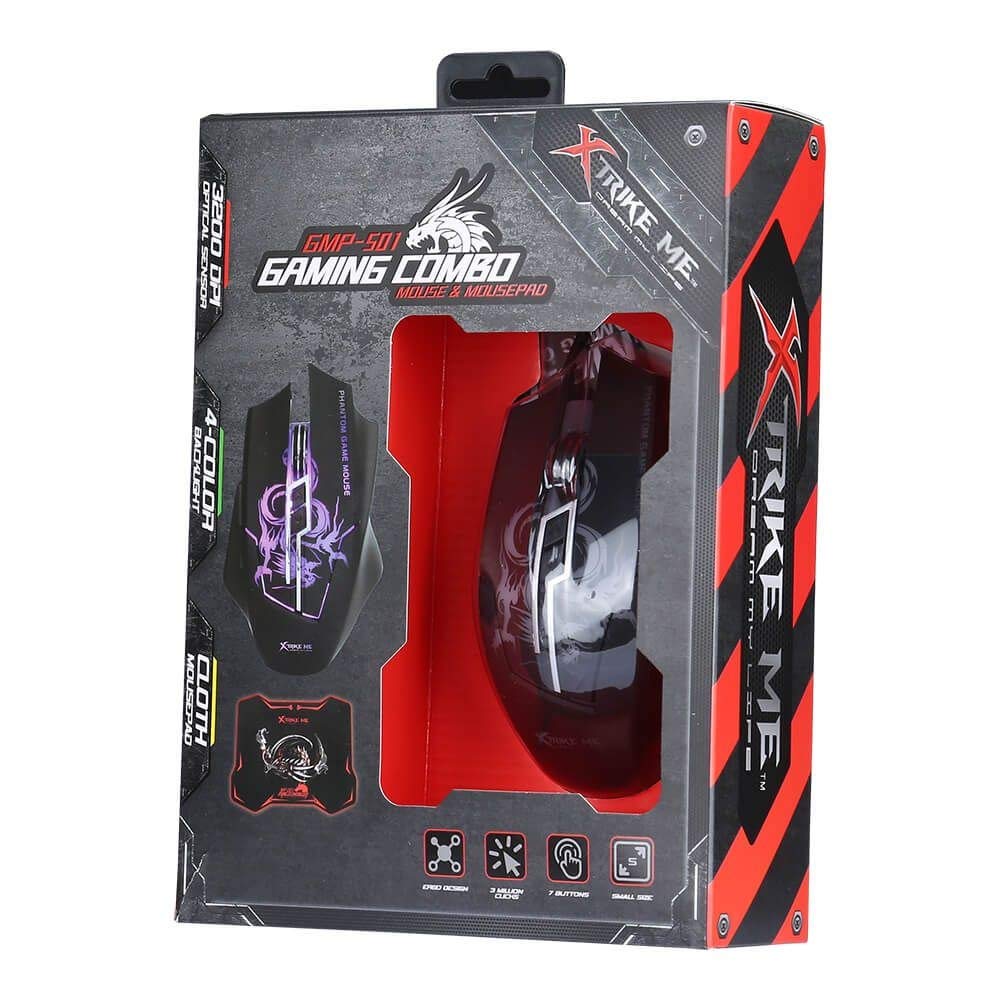
An image showing the Xtrike Me GMP-501 gaming mouse alongside its accompanying high-density gaming mat, which is rolled up. This illustrates the complete product package.
5. Упутство за употребу
5.1 Основни рад
The Xtrike Me GMP-501 functions as a standard optical mouse for general computer use. Move the mouse to control the cursor on your screen. Use the left and right click buttons for primary interactions, and the scroll wheel for vertical navigation.
5.2 ДПИ подешавање
The mouse features a dedicated DPI (Dots Per Inch) adjustment button, typically located behind the scroll wheel. Press this button to cycle through the four available DPI settings: 800, 1600, 2400, and 3200. Each press will change the mouse sensitivity, allowing you to quickly adapt to different tasks or game scenarios requiring varying cursor speeds.
5.3 Функције дугмета
The GMP-501 mouse is equipped with 7 buttons:
- Left Click (Button 1)
- Right Click (Button 2)
- Scroll Wheel Click (Button 3)
- DPI Adjustment (Button 4)
- Forward Side Button (Button 5)
- Backward Side Button (Button 6)
- Additional Button (Button 7, often located near the thumb rest or on top)
The functions of the side buttons and the additional button may be customizable through your operating system's mouse settings or third-party software (not included with the product).

Одозго надоле view of the Xtrike Me GMP-501 gaming mouse resting on its high-density gaming mat. The mouse features a black body with purple backlit accents and visible buttons, illustrating its ergonomic design.
6. Одржавање
Proper care will extend the life of your Xtrike Me gaming mouse and mat.
- Чишћење миша: Disconnect the mouse from your computer before cleaning. Use a soft, dry cloth to wipe the surface. For stubborn dirt, a slightly damp cloth can be used, but ensure no moisture enters the mouse's internal components. Avoid using harsh chemicals or abrasive cleaners.
- Cleaning the Gaming Mat: The high-density gaming mat can be cleaned with a damp крпу и благи сапун ако је потребно. Оставите да се потпуно осуши на ваздуху пре употребе.
- Складиштење: Store the mouse and mat in a clean, dry environment away from extreme temperatures.
- Растављање: Do not attempt to disassemble the mouse, as this will void the warranty and may cause damage.
КСНУМКС. Решавање проблема
If you encounter issues with your Xtrike Me GMP-501, please refer to the following common problems and solutions:
7.1 Миш не реагује
- Уверите се да је USB кабл безбедно прикључен у исправан USB порт на рачунару. Покушајте са другим USB портом.
- Поново покрените рачунар.
- Check if the mouse's backlight is illuminated. If not, the mouse may not be receiving power.
7.2 Кретање курсора је неправилно или скачкасто
- Clean the optical sensor on the underside of the mouse with a soft, dry cloth to remove any dust or debris.
- Ensure the gaming mat or surface you are using is clean, flat, and free of obstructions.
- Try adjusting the DPI setting to a lower value to see if sensitivity is the issue.
7.3 Buttons Not Working
- Уверите се да је миш правилно повезан са рачунаром.
- Test the mouse on another computer to determine if the issue is with the mouse or your computer's software/drivers.
- Check your operating system's mouse settings for any disabled buttons or conflicting software.
8. Спецификације
Detailed technical specifications for the Xtrike Me GMP-501:
| Феатуре | Спецификација |
|---|---|
| Модел | GMP-501 |
| Тип сензора | Оптицал |
| ДПИ подешавања | 800 / 1600 / 2400 / 3200 (подесиво) |
| Број дугмади | 7 |
| Повезивање | Жичани УСБ |
| Цабле Ленгтх | 180 цм |
| Компатибилност | Виндовс КСП / Виста / 7 /8 /10 |
| Gaming Mat Dimensions | 300 к 230 к 3 мм |
| Ергономија | Амбидектроус |
9. Информације о гаранцији и корисничка подршка
Specific warranty details for the Xtrike Me GMP-501 are not provided in the product information. For warranty claims, returns, or technical assistance, please refer to the retailer's return policy or contact Xtrike Me customer support directly. It is recommended to keep your proof of purchase for any warranty-related inquiries.
For further support and the latest product information, please visit the official Xtrike Me webсајт или контактирајте свог локалног дистрибутера.