
1. Увод
This manual provides detailed instructions for the setup, operation, and maintenance of your OWLENZ SD60 Wi-Fi Mini Projector. Please read this manual thoroughly before using the product to ensure proper functionality and safety. The SD60 features advanced LED light technology with 1500 lumens brightness, Wi-Fi screen sharing capabilities (Miracast/Airplay), and multiple media playback options for a versatile home theater experience. Its portable and compact design allows for easy installation and use.
2. Важне информације о безбедности
- Не гледајте директно у сочиво пројектора када је укљученоamp је укључен.
- Осигурајте одговарајућу вентилацију око пројектора како бисте спречили прегревање.
- Држите пројектор даље од воде или других течности.
- Користите само адаптер за напајање који се испоручује са пројектором.
- Избегавајте постављање пројектора на нестабилне површине.
- The LED light technology is designed to be gentle on the eyes and has no radiation.
3. Садржај пакета
Проверите да ли су све ставке наведене у наставку укључене у ваш пакет. Ако неке ставке недостају или су оштећене, обратите се корисничкој подршци.
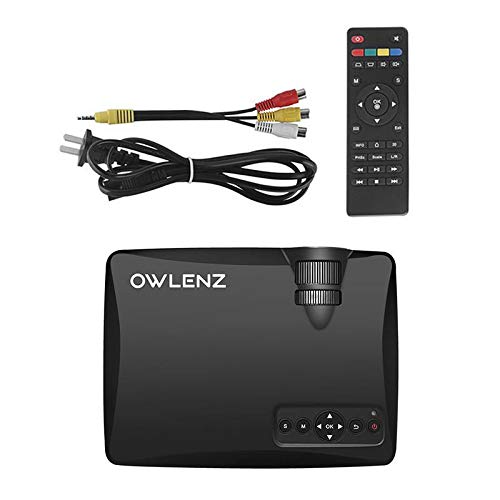
Image: OWLENZ SD60 Projector, remote control, power cable, and AV cables.
- OWLENZ SD60 Mini Projector
- Ремоте Цонтрол
- Повер Цабле
- АВ кабл
- Кориснички приручник (овај документ)
4. Производ је готовview
Familiarize yourself with the various parts and controls of your OWLENZ SD60 projector.
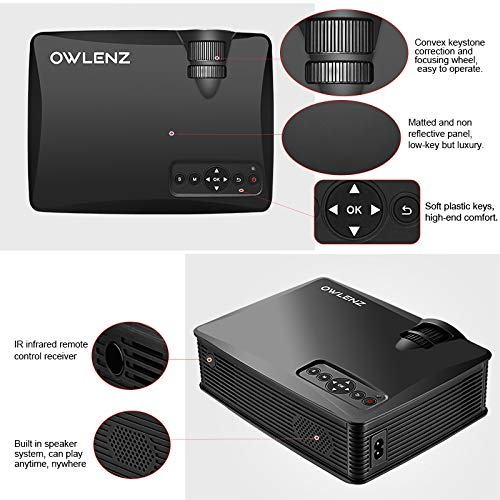
Image: Key features of the OWLENZ SD60 projector, including the focusing wheel, keystone correction, control panel, IR receiver, and built-in speaker.
- Convex Keystone Correction and Focusing Wheel: Located on the top, these allow for easy image adjustment.
- Matted and Non-Reflective Panel: Provides a sleek, low-key appearance.
- Soft Plastic Keys: For comfortable and responsive control.
- IR Infrared Remote Control Receiver: For remote operation.
- Built-in Speaker System: A 3W speaker for integrated audio playback.
- Улазни портови: HDMI, USB, AV, SD Card slot (located on the side/rear).
5. Подешавање
5.1 Прикључак за напајање
- Прикључите кабл за напајање на улазни порт за напајање пројектора.
- Укључите други крај кабла за напајање у одговарајућу електричну утичницу.
- Притисните дугме за напајање на пројектору или даљинском управљачу да бисте га укључили.
5.2 Повезивање улазних извора
The projector supports various input options:
- ДВИ: Connect an HDMI cable from your device (laptop, gaming console, etc.) to the projector's HDMI port.
- УСБ: Insert a USB drive into the USB port for direct media playback.
- АВ: Use the provided AV cable to connect to devices with AV output.
- СД картица: Insert an SD card into the SD card slot for media playback.
After connecting, select the appropriate input source from the projector's menu using the remote or control panel.
5.3 Wi-Fi Screen Sharing (Miracast / Airplay)
The SD60 supports wireless screen sharing from compatible smartphones and tablets.
- Ensure your mobile device and the projector are connected to the same Wi-Fi network.
- On the projector, navigate to the "Screen Share" or "Miracast/Airplay" option in the main menu.
- On your mobile device, activate the screen mirroring function (e.g., "Smart View" on Android, "Screen Mirroring" on iOS).
- Изаберите име пројектора са листе доступних уређаја да бисте успоставили везу.
5.4 Подешавање фокуса и трапезоидног искривљења
- Фокус: Rotate the focusing wheel near the lens until the projected image is clear and sharp.
- Кеистоне Цоррецтион: Use the keystone correction wheel to adjust the image shape if it appears trapezoidal (wider at the top or bottom).
6. Операција
6.1 Основне контроле
Користите контролну таблу на пројектору или даљински управљач за навигацију кроз меније и подешавање подешавања.
- Дугме за напајање: Укључује/искључује пројектор.
- Навигациона дугмад (Стрелице/ОК): За навигацију и избор у менију.
- Дугме извора: Switches between input sources (HDMI, USB, AV, SD Card, Wi-Fi).
- Дугме менија: Приступа менију подешавања пројектора.
6.2 Репродукција медија
Once an input source is selected, the projector will display content. For USB/SD card playback, navigate through the file browser to select your desired media.
6.3 Аудио излаз
- Уграђени звучник: The projector has a built-in 3W speaker suitable for small viewинг области.
- Спољни звучник: For a better listening experience, connect external speakers or headphones to the 3.5mm audio port.
6.4 Projection Size
The projector supports projection sizes ranging from 40 to 150 inches, offering a large screen experience.
7. Одржавање
7.1 Чишћење
- Користите меку, суву крпу за чишћење спољашњости пројектора.
- For the lens, use a lens cleaning cloth and specialized lens cleaning solution. Do not use abrasive materials.
- Regularly clean the ventilation openings to ensure proper airflow and prevent dust buildup.
7.2 LED Bulb Lifespan
The OWLENZ SD60 features an LED bulb with a lifespan of up to 30,000+ hours, significantly longer than traditional projector lamps. No regular bulb replacement is typically required under normal usage conditions.
8. Случајеви употребе
The OWLENZ SD60 Mini Projector is versatile and suitable for various applications:
- Кућни биоскоп: Уживајте у филмовима, ТВ емисијама и спорту на великом екрану.
- Играње: Connect gaming consoles for an immersive gaming experience.
- образовне сврхе: Project educational content, videos, and presentations.
- Children's Entertainment: Ideal for playing videos and cartoons for children.
- Мала ViewОбласти: Its compact design and built-in speaker make it perfect for use in smaller rooms or spaces.
КСНУМКС. Решавање проблема
| Проблем | Могући узрок | Решење |
|---|---|---|
| Нема приказане слике | Incorrect input source selected; loose cable connection; source device not powered on. | Select the correct input source. Check all cable connections. Ensure the source device is powered on. |
| Слика је мутна | Focus not adjusted correctly. | Adjust the focusing wheel until the image is clear. |
| Слика је трапезоидног облика | Keystone not adjusted correctly. | Подесите точак за корекцију трапезоидног изобличења. |
| Нема звука | Јачина звука је прениска; спољни звучници нису правилно повезани; аудио формат није подржан. | Increase volume. Check external speaker connection or use built-in speaker. Ensure audio format is compatible. |
| Wi-Fi screen sharing not working | Devices not on the same Wi-Fi network; screen mirroring function not activated on mobile device. | Ensure both devices are on the same Wi-Fi. Activate screen mirroring on your mobile device and select the projector. |
10. Спецификације
| Феатуре | Детаљ |
|---|---|
| Бранд | ОВЛЕНЗ |
| Модел | СД60 |
| Димензије производа (ДкШкВ) | 20.8 к 16.5 к 8 цм |
| Тежина артикла | 949 г |
| Хардверски интерфејс | ХДМИ, УСБ |
| Технологија повезивања | HDMI, USB, Wi-Fi |
| Компатибилни уређаји | Smartphones, Tablets, Laptops |
| Посебне карактеристике | Уграђени звучник, преносиви |
| Дисплаи Тецхнологи | ЛЦД |
| Осветљеност | 1500 лумена |
| LED Bulb Lifespan | До 30,000+ сата |
| Величина пројекције | 40 до 150 инча |
| Уграђена снага звучника | 3W |
| Форм Фацтор | Портабле |
| Тип монтаже | Таблетоп Моунт |
| Ватtage | 24 Ваттс |
| Батерије су потребне | Yes (for remote control, not included) |
11. Видео производа прекоview
Погледајте овај кратки видео за брзи прегледview of the OWLENZ SD60 Mini Projector's features and capabilities.
Видео: Кратак прегледview highlighting the OWLENZ SD60 projector's display, sound, smart features, other features, portability, and use cases.
12. Гаранција и подршка
The OWLENZ SD60 Mini Projector comes with a standard brand warranty. For detailed warranty information, technical support, or service inquiries, please refer to the product detail page on Amazon.in or contact OWLENZ customer service directly.
For further information, visit the product detail page: Страница производа на Амазону