
Kaadas K7-5
Kaadas K7-5 Push-Pull Keyless Smart Lock User Manual
Увод
This manual provides comprehensive instructions for the installation, operation, and maintenance of your Kaadas K7-5 Push-Pull Keyless Smart Lock. Please read this manual thoroughly before using the product to ensure proper function and safety. Keep this manual for future reference.
Производ је завршенview и карактеристике
The Kaadas K7-5 is an advanced keyless smart lock designed for convenience and security. It offers multiple access methods and intelligent features.
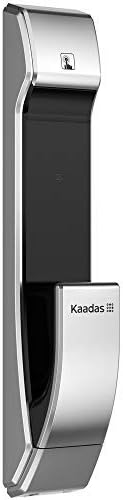
Слика: Са стране view of the Kaadas K7-5 Smart Lock, showcasinг његов елегантан дизајн.
Кључне карактеристике:
- Push-Pull Operation: One-step intuitive door opening experience.
- Аутоматско закључавање: Ensures the door is locked automatically after closing.
- Вишеструки методи приступа: Fingerprint, Password, RFID Card, and Mechanical Key.
- Sweden FPC Fingerprint Sensor: Provides accurate and swift recognition (less than 1 second).
- Функција лажног ПИН кода: Allows adding random numbers before and after the real password to prevent exposure.
- Двострука аутентификација: Strengthens security by requiring two authentication methods (e.g., password + fingerprint/card).
- In-Home Security (Double-locking): Prevents unexpected unlocking attempts from outside when activated.
- Safe Handle Function: Locks the indoor handle to prevent unauthorized opening from inside, useful for child safety or peephole security.
- Unlock Records Query: Allows checking who unlocked the door and when.
- Резервно напајање за хитне случајеве: Use a 5V power bank via Micro USB in case of battery discharge.
- Упозорење о ниској батерији: Voice sound and LED light alert for battery replacement.
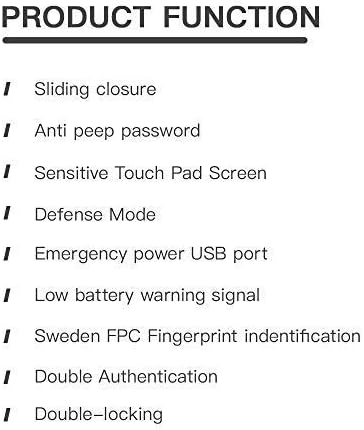
Image: A list detailing key product functions such as sliding closure, anti-peep password, sensitive touch pad, defense mode, emergency power USB port, low battery warning, Sweden FPC fingerprint identification, double authentication, and double-locking.
Подешавање и инсталација
The Kaadas K7-5 smart lock requires precise installation for optimal performance and security. It is highly recommended to have this lock installed by a qualified professional.
Општа разматрања за инсталацију:
- Ensure your door thickness is compatible (typically 38-60mm).
- The lock is designed for universal installation, suitable for various door opening directions.
- Refer to the detailed installation template and hardware provided with your lock.

Image: An exploded diagram showing all components of the Kaadas K7-5 Smart Lock, including the front and back panels, mortise, and various screws and pins for assembly.
Упутство за употребу
The Kaadas K7-5 offers multiple ways to unlock your door. Ensure the lock is properly powered with 8 AA alkaline batteries (DC 6V).
1. Откључавање отиском прста
Place your registered finger on the FPC fingerprint sensor. The lock will recognize your fingerprint in less than 1 second and unlock.
2. Unlocking with Password
Enter your registered password on the touch pad. The lock supports 6-12 digit passwords. Press the confirmation key to unlock.
- Лажни ПИН код: To prevent others from guessing your password, you can enter random numbers before or after your actual password. For example, if your password is "123456", you can enter "987123456321" where "123456" is embedded within other numbers.
3. Откључавање помоћу РФИД картице
Present your registered RFID card to the card reader area on the lock. The lock will verify the card and unlock.
4. Откључавање механичким кључем
In case of emergency or battery failure, use the provided mechanical key to manually unlock the door.
5. Аутоматско закључавање
After the door closes, the lock will automatically engage the mortise to secure the door. This eliminates the need to manually check if the door is locked.
6. Double Authentication Mode
This mode enhances security by requiring two different authentication methods to unlock the door. For example, you might need to use a password followed by a fingerprint, or a card followed by a password. Refer to the lock's settings menu for activation and configuration.
7. In-Home Security (Double-locking)
When you are inside your home, activate the double-locking feature using the [CLOSE] button on the indoor unit. This prevents any unlocking attempts from the outside, even with valid credentials.
8. Safe Handle Function
When enabled, the indoor handle will be locked. This feature is useful for preventing children from accidentally opening the door or for added security if your door has a peephole that could be exploited.
Одржавање
Proper maintenance ensures the longevity and reliable operation of your Kaadas K7-5 smart lock.
1. Замена батерије
The lock will provide a voice sound and LED light warning when the batteries are low. Replace all 8 AA alkaline batteries promptly to avoid interruption of service. Do not mix old and new batteries or different types of batteries.
2. Emergency Power Backup
If the batteries are completely discharged, you can temporarily power the lock using a 5V power bank connected to the Micro USB port located on the exterior unit. This allows you to unlock the door and replace the internal batteries.
3. Чишћење
Очистите спољашње површине браве меком, сувом крпом. Избегавајте употребу абразивних средстава за чишћење, растварача или јаких хемикалија, јер оне могу оштетити завршну обраду и електронске компоненте.
Решавање проблема
If you encounter issues with your Kaadas K7-5 smart lock, consider the following common solutions:
- Брава не реагује: Check the batteries. If the batteries are low or dead, replace them or use the emergency power backup.
- Отисак прста није препознат: Уверите се да вам је прст чист и сув. Поново региструјте отисак прста ако проблем и даље постоји.
- Лозинка не ради: Double-check the entered password. Ensure you are not in Fake PIN code mode if you are not intentionally using it.
- Врата се не закључавају/откључавају глатко: Check for any obstructions in the door frame or mortise. Ensure the lock is properly aligned.
- Unusual sounds: If the lock makes unusual sounds, it may indicate a mechanical issue. Contact customer support.
For persistent issues, refer to the full troubleshooting guide available on the Kaadas official webсајту или контактирајте корисничку подршку.
Спецификације
Below are the technical specifications for the Kaadas K7-5 Push-Pull Keyless Smart Lock.
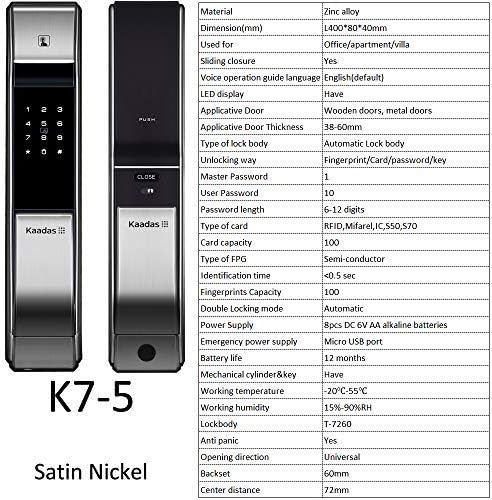
Слика: Предња и задња страна views of the Kaadas K7-5 Smart Lock, accompanied by a detailed table of specifications including material, dimensions, unlocking methods, and power supply.
| Материјал | Легура цинка |
| Димензије (Д к Ш к В) | 400 к 80 к 40 мм (приближно 15.75 к 3.15 к 1.57 инча) |
| Применљиви тип врата | Wooden doors, metal doors |
| Применљива дебљина врата | 38-60мм |
| Type of Lock Body | Automatic Lock body |
| Методе откључавања | Fingerprint, Card, Password, Key |
| Master Password Capacity | 1 |
| User Password Capacity | 10 |
| Дужина лозинке | 6-12 цифара |
| Тип картице | RFID, Mifare, IC550, 570 |
| Капацитет картице | 100 |
| Тип отиска прста | Semi-conductor (FPC) |
| Време идентификације | <0.5 сек |
| Fingerprints Capacity | 100 |
| Double Locking Mode | Аутоматски |
| Повер Суппли | 8pcs DC 6V AA alkaline batteries |
| Хитно напајање | Мицро УСБ порт |
| Трајање батерије | Прибл. 12 месеци |
| Mechanical Cylinder & Key | Да |
| Радна температура | -20°Ц до 55°Ц |
| Радна влажност | 15%-90% РХ |
| Лоцкбоди | Т-7260 |
| Анти-паника | Да |
| Смер отварања | Универсал |
| Бацксет | 60мм |
| Центре Дистанце | 72мм |

Image: A technical drawing illustrating the dimensions of the Kaadas K7-5 Smart Lock, showing a height of 400mm, width of 80mm, and depth of 40mm. Note: Manual measurements may have slight deviations.
Гаранција и подршка
For information regarding warranty coverage, technical support, or service, please refer to the warranty card included with your product or visit the official Kaadas website. You may also contact your point of purchase for assistance.
Произвођач: Каадас
Ask a question about this manual
Ask about setup, troubleshooting, compatibility, parts, safety, or missing instructions. Manuals+ will review the question and use this page’s manual context to help answer it.