
1. Увод
This manual provides detailed instructions for the proper installation, operation, and maintenance of your Roadstar RD8410N and RD8200N TV Tuner and TV Antenna. Please read this manual thoroughly before using the product to ensure safe and efficient operation. Keep this manual for future reference.
2. Безбедносне информације
- Уверите се да је напајање волtagе одговара захтевима наведеним на уређају.
- Не излажите уређај киши, влази или екстремним температурама.
- Избегавајте постављање уређаја у близини извора топлоте или на директном сунцу.
- Не отварајте цasing of the TV tuner; refer all servicing to qualified personnel.
- Keep the antenna away from high-voltage power lines and other electrical hazards.
- Искључите адаптер за напајање током грмљавине или када се не користи дуже време.
3. Садржај пакета
Молимо вас да проверите садржај паковања након отварања. Ако неке ставке недостају или су оштећене, обратите се продавцу.
- Roadstar TV Tuner (RD8410N or RD8200N)
- ТВ антена
- Повер Адаптер
- Remote Control (if included with your model)
- Кориснички приручник (овај документ)
4. Производ је готовview
Familiarize yourself with the components of your Roadstar TV Tuner and Antenna.
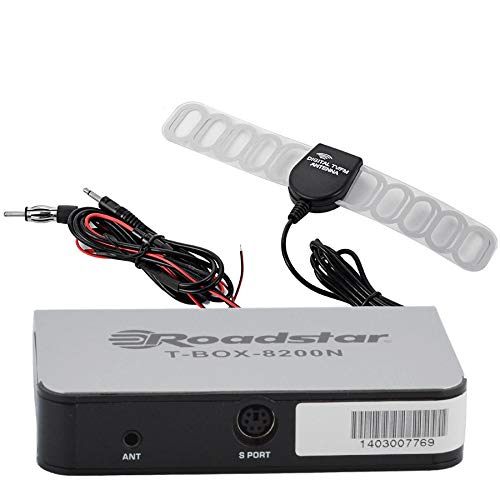
Figure 1: Roadstar T-BOX-8200N TV Tuner
This image displays the Roadstar T-BOX-8200N TV Tuner. It is a compact, silver-grey rectangular device with black side panels. The front face prominently features the "Roadstar" logo and the model name "T-BOX-8200N". On the right side, two ports are visible: one labeled "12V" for power input and another labeled "ANT" for antenna connection. This device is designed to receive and process television signals.
4.1. TV Tuner Ports and Indicators
- ANT улаз: Connects to the TV antenna for receiving broadcast signals.
- 12В ДЦ улаз: Повезује се са приложеним адаптером за напајање.
- (Other ports like HDMI Out, USB, AV Out may be present depending on specific model variant. Refer to your device for exact port configuration.)
4.2. TV Antenna
The included TV antenna is designed to capture terrestrial broadcast signals. Its performance may vary based on location, signal strength, and obstacles.
5. Подешавање
5.1. Connecting the TV Tuner
- Повежите антену: Plug the antenna cable into the "ANT" input port on the Roadstar TV Tuner.
- Повезивање са ТВ-ом: Use an appropriate cable (e.g., HDMI, AV) to connect the TV tuner's output port to an available input port on your television. Note the input port you use (e.g., HDMI 1, AV 2).
- Прикључите напајање: Insert the small end of the power adapter into the "12V DC" input port on the TV tuner. Plug the other end of the power adapter into a standard electrical outlet.
5.2. Positioning the TV Antenna
- Place the antenna in a location with minimal obstructions, ideally near a window or high up.
- Experiment with different antenna positions to find the best signal reception.
- Avoid placing the antenna near large metal objects or other electronic devices that may cause interference.
6. Упутство за употребу
6.1. Почетно укључивање и скенирање канала
- Turn on your television and select the correct input source (e.g., HDMI 1, AV 2) that the TV tuner is connected to.
- The TV tuner should power on automatically or can be turned on using its power button or remote control.
- Follow the on-screen prompts for initial setup. This typically includes selecting your language and country.
- Initiate an "Auto Scan" or "Channel Search" from the TV tuner's menu. This process will scan for available digital television channels. This may take several minutes.
- Once the scan is complete, the tuner will save the found channels, and you should be able to view њих.
6.2. Basic TV Viewинг
- Use the remote control's channel up/down buttons to navigate through channels.
- Use the volume buttons on your TV's remote control to adjust audio levels.
- Access the menu to adjust settings, view program guides (EPG), or manage channels.
7. Одржавање
7.1. Чишћење
- Уверите се да је уређај искључен пре чишћења.
- Wipe the exterior of the TV tuner and antenna with a soft, dry cloth.
- Do not use liquid cleaners, aerosols, or abrasive chemicals.
7.2. Складиштење
- Ако уређај складиштите дуже време, искључите га из струје и чувајте га на хладном и сувом месту.
- Држите га даље од директне сунчеве светлости и екстремних температура.
КСНУМКС. Решавање проблема
| Проблем | Могући узрок | Решење |
|---|---|---|
| Нема струје | Адаптер за напајање није повезан или је утичница неисправна. | Ensure power adapter is securely connected to the tuner and a working electrical outlet. |
| No signal / "No Channel" message | Antenna not connected, poor antenna position, or no channels scanned. |
|
| Poor picture quality / pixelation | Weak signal, interference, or antenna position. |
|
| Нема звука | TV volume muted or too low, incorrect audio settings. |
|
9. Спецификације
Напомена: Спецификације се могу променити без најаве.
- Модел: Roadstar RD8410N, Roadstar RD8200N
- Тип производа: TV Tuner and Antenna Package
- Тип тјунера: Digital Terrestrial Television (DTT)
- Улазни волtage: 12V DC (преко приложеног адаптера за напајање)
- Тип антене: Passive or Active (depending on specific antenna model)
- Повезивање: ANT In, 12V DC In, (e.g., HDMI Out, USB, AV Out - specific to model)
- ASIN: B07GXJPR3R
- Бренд: Роадстар
10. Гаранција и подршка
For warranty information and technical support, please refer to the documentation provided with your purchase or contact your retailer. Keep your proof of purchase for warranty claims.