
1. Увод
This manual provides detailed instructions for the KECAG KC-608EW Portable DVD/CD Player. This device integrates multiple functions including a DVD player, CD player, Bluetooth speaker, FM radio, and USB player, offering versatile audio and video entertainment. Please read this manual thoroughly before use to ensure proper operation and to maximize your product experience.
2. Безбедносне информације
- Не излажите уређај киши или влази како бисте спречили пожар или струјни удар.
- Не отварајте цasinг. Сва сервисирања препустите квалификованом особљу.
- Уверите се да напајање одговара запреминиtage requirements specified on the device.
- Држите уређај даље од извора топлоте као што су радијатори, грејни регистри, пећи или други уређаји који производе топлоту.
- Чистите само сувом крпом.
- Avoid placing the device on unstable surfaces.
- Не блокирајте вентилационе отворе.
3. Садржај пакета
Проверите да ли су све ставке наведене у наставку укључене у ваш пакет. Ако неке ставке недостају или су оштећене, обратите се корисничкој подршци.

Image: Contents of the KECAG KC-608EW player package, showing the DVD player, wall mount plate, wall mount kit, desk stand, 5V2A USB adapter, disc cover, remote control, HDMI cord, and AV cord.
- KECAG KC-608EW DVD/CD Player (with 2.5m power cord)
- Плоча за зидни зид
- Wall Mount Kit (screws and anchors)
- Деск Станд
- 5V2A USB Adapter
- Поклопац диска
- Даљински управљач (са 1 CR2 батеријом укљученом)
- ХДМИ кабл
- АВ кабл
4. Производ је готовview
4.1 Главне карактеристике

Слика: Фронт view of the KECAG KC-608EW player on a desk stand, highlighting its functions: DVD player, CD player, Bluetooth speaker, FM radio, USB player, and Line in/out.
- ДВД плејер: Full-HD 1080p output via HDMI, 480p+720p output via AV port.
- ЦД плејер: Supports various CD/DVD formats including CD, DVD, CD-R/RW, DVD-R/+R, DVD+RW/-RW, VCD, SVCD.
- Блутут звучник: Built-in Bluetooth 4.2 receiver for wireless audio streaming.
- ФМ радио: Full band 87.5KHz-108.0MHz with auto search and manual set, 99 presets.
- УСБ плејер: Reads and plays video, audio, and photo fileс са УСБ дискова.
- Линијски улаз/излаз: 3.5mm auxiliary input for connecting external devices (laptops, iPods) and output for headphones/external speakers/ampлифиерс.
- Интегрисани звучници: Built-in HiFi stereo speakers.
- Мерач спавања: Adjustable sleep timer from 30 to 180 minutes.
4.2 Контроле и портови

Слика: Одозго надоле view of the KECAG KC-608EW player, showing the disc protection dust cover, various control buttons (MODE, VOL-, VOL+, PREV/REWIND, NEXT/FORWARD), and connection ports (AV, HDMI, USB charging, USB reading). The pull switch for power on/off is also illustrated.
- Прекидач за повлачење: Located at the bottom, pull the power cord to turn the unit ON or OFF.
- Дугме МОДЕ: Cycles through DVD, USB, Bluetooth (BT), FM Radio, and AUX input modes.
- VOL - / VOL + Buttons: Подесите нивое јачине звука.
- PREV/REWIND Button: Skips to the previous track/chapter or rewinds during playback.
- NEXT/FORWARD Button: Skips to the next track/chapter or fast-forwards during playback.
- Disc Cover: A removable transparent cover protects the disc slot.
- ХДМИ излаз: For connecting to a TV or projector for Full HD 1080p video output.
- АВ излаз: For connecting to a TV or display using composite video and stereo audio cables (480p + 720p output).
- УСБ порт: За репродукцију медија fileс са УСБ диска.
- AUX Input/Output (3.5mm jack): For connecting external audio sources or outputting audio to headphones/speakers.
5. Подешавање
5.1 Прикључак за напајање
- Connect the power cord to the DC IN port on the player.
- Plug the 5V2A USB adapter into a standard wall outlet.
- To power on the device, gently pull the power cord downwards (the pull switch). Pull again to power off.
5.2 Опције монтаже
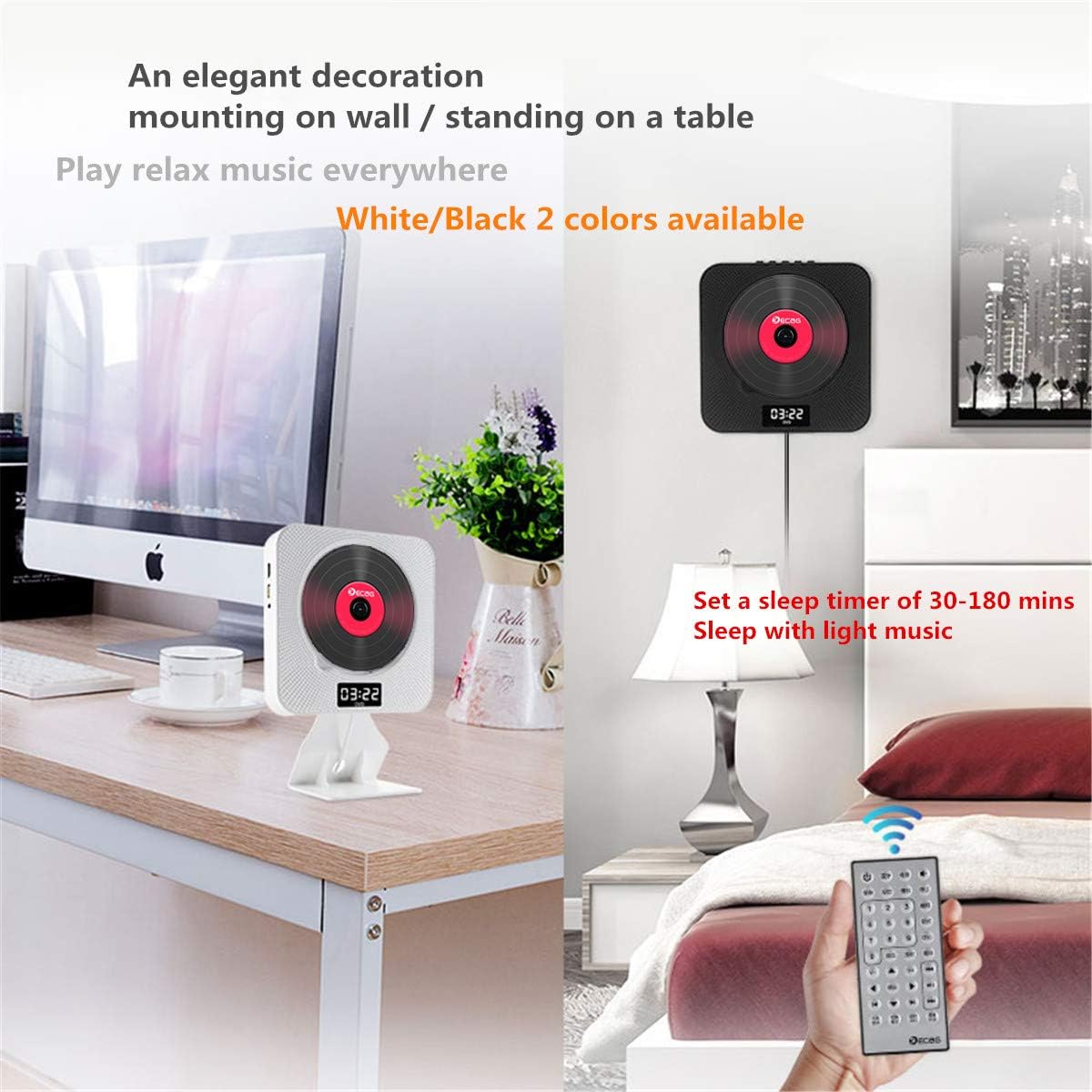
Image: Two KECAG KC-608EW players, one mounted on a wall and another standing on a desk with its stand, demonstrating flexible placement options.
5.2.1 Монтажа на зид
- Изаберите одговарајуће место на зиду.
- Use the provided wall mount plate as a template to mark the drilling points.
- Избушите рупе и уметните анкере у зид.
- Secure the wall mount plate to the wall using the screws.
- Carefully slide the DVD player onto the mounted plate until it clicks into place.
5.2.2 Desk Stand Installation
- Insert the bottom edge of the DVD player into the slot on the desk stand.
- Ensure the player is securely seated in the stand.
- Place the assembled unit on a stable, flat surface.
5.3 Connecting to a TV/Display
5.3.1 HDMI Connection (Recommended for Full HD)

Image: The KECAG KC-608EW player connected to a television via an HDMI cable, illustrating its use as a home entertainment device.
- Ensure both the DVD player and your TV are powered off.
- Connect one end of the HDMI cable to the HDMI OUT port on the DVD player.
- Повежите други крај HDMI кабла са HDMI IN портом на вашем телевизору.
- Power on both devices and select the correct HDMI input source on your TV.
5.3.2 АВ веза
- Ensure both the DVD player and your TV are powered off.
- Connect the AV cable to the AV OUT ports on the DVD player (Yellow for Video, White for Left Audio, Red for Right Audio).
- Connect the other end of the AV cable to the corresponding AV IN ports on your TV.
- Power on both devices and select the correct AV input source on your TV.
6. Упутство за употребу
Use the MODE button on the player or the remote control to switch between functions.
6.1 Репродукција DVD/CD дискова
- Уверите се да је плејер укључен.
- Gently remove the disc protection dust cover.
- Insert a DVD or CD into the disc slot with the label side facing outwards.
- Replace the disc protection dust cover.
- Press the MODE button until "DVD" or "CD" mode is selected.
- The disc should begin playing automatically. If not, press the PLAY button on the remote control.
- Use the PREV/REWIND, NEXT/FORWARD, PLAY, PAUSE, and STOP buttons on the player or remote for control.
Подржани формати дискова: DVD, CD, CD-ROM, CD-RM, CD-G, HD-CD, DVD-RM, DVD-R, VCD, WMA, AVI, XVID, MP3, JPEG.
6.2 Блуетоотх режим

Image: The KECAG KC-608EW player wirelessly connected via Bluetooth to a smartphone, indicating its use for streaming music.
- Press the MODE button until "BT" (Bluetooth) mode is selected. The display will show "BT" and a blinking Bluetooth icon, indicating it's ready for pairing.
- На свом мобилном уређају (паметном телефону, таблету итд.) омогућите Блутут и потражите доступне уређаје.
- Select "KECAG KC-608EW" from the list of devices.
- Once paired, the Bluetooth icon on the player's display will stop blinking.
- You can now play audio from your mobile device through the player's speakers. Use your mobile device or the player's controls for playback.
6.3 Режим ФМ радија
- Press the MODE button until "FM" mode is selected.
- Аутоматска претрага: Press the PLAY/PAUSE button on the remote control or player to initiate an auto-scan for FM stations. The player will automatically save found stations (up to 99 presets).
- Ручно подешавање: Use the PREV/REWIND or NEXT/FORWARD buttons to manually tune to specific frequencies or navigate through saved presets.
6.4 Репродукција са УСБ-а
- Insert a USB flash drive into the USB port on the player.
- Press the MODE button until "USB" mode is selected.
- The player will automatically detect and begin playing compatible media fileс са УСБ диска.
- Use the PREV/REWIND, NEXT/FORWARD, PLAY, PAUSE, and STOP buttons for control.
Подржани УСБ File Формати: WMA, AVI, XVID, MP3, JPEG.
6.5 AUX Input/Output
- АУКС улаз: Connect an external audio device (e.g., smartphone, MP3 player) to the 3.5mm AUX jack using an audio cable. Press the MODE button until "AUX" mode is selected. Audio from the external device will play through the player's speakers.
- АУКС излаз: Connect headphones or external speakers/amplifiers to the 3.5mm AUX jack. The player's audio will be routed to the connected device.
6.6 Тајмер за спавање
The sleep timer allows you to set a duration after which the player will automatically turn off. This feature is useful for falling asleep to music or radio.
- While the player is on, press the SLEEP button on the remote control.
- Repeatedly press the SLEEP button to cycle through available timer settings (e.g., 30, 60, 90, 120, 180 minutes, or OFF).
- The selected time will be displayed briefly. The player will automatically power off after the set duration.
7. Одржавање
7.1 Чишћење јединице
- Увек искључите кабл за напајање пре чишћења.
- Use a soft, dry cloth to wipe the exterior surfaces of the player.
- Не користите абразивна средства за чишћење, воскове или раствараче јер могу оштетити завршну обраду.
7.2 Руковање диском
- Држите дискове за ивице како бисте избегли отиске прстију на површини за репродукцију.
- Keep discs clean and free from scratches. Wipe discs gently from the center outwards with a soft, lint-free cloth if cleaning is necessary.
- Store discs in their cases when not in use to prevent dust and damage.
КСНУМКС. Решавање проблема
| Проблем | Могући узрок | Решење |
|---|---|---|
| Нема струје | Power cord not properly connected or unit not turned on via pull switch. | Ensure the power adapter is securely plugged into the wall outlet and the player. Pull the power cord downwards to activate the pull switch and turn on the unit. |
| Нема звука | Volume too low; incorrect mode selected; external speakers/headphones not connected properly. | Increase the volume. Ensure the correct mode (DVD, BT, FM, USB, AUX) is selected. Check connections if using external audio devices. |
| No video output to TV | Incorrect TV input selected; HDMI/AV cable loose or faulty. | Select the correct HDMI or AV input on your TV. Check that the HDMI or AV cables are securely connected to both the player and the TV. |
| Disc error or disc not playing | Диск је прљав, изгребан или је некомпатибилног формата. | Очистите диск меком крпом. Пробајте други диск. Уверите се да плејер подржава формат диска. |
| Блуетоотх упаривање није успело | Player not in BT mode; device too far; Bluetooth on mobile device is off. | Ensure the player is in "BT" mode. Keep your mobile device within range. Turn Bluetooth on your mobile device off and on again. |
| Лош ФМ радио пријем | Слаб сигнал; сметње. | Adjust the position of the player. Try auto-scanning again. Avoid placing near other electronic devices that may cause interference. |
9. Спецификације
- Број модела: KC-608EW
- Бренд: КЕЦАГ
- Технологија повезивања: HDMI, AV, AUX 3.5 mm
- Боја: Бела
- Тип звучника: Дуал Спеакерс
- Димензије артикла (Д к Ш к В): КСНУМКС к КСНУМКС к КСНУМКС цм (КСНУМКС к КСНУМКС к КСНУМКС инча)
- Извор напајања: Electric Cable (5V2A USB adapter)
- Supported Standards (Disc): CD, MP3, WMA, WAV, DVD, CD-ROM, CD-RM, CD-G, HD-CD, DVD-RM, DVD-R, VCD, AVI, XVID, JPEG
- Блуетоотх компатибилан: Да (Блутут 4.2)
- Подржани аудио формат: MP3, WMA, CD-DA
- Број звучника: 2
- ФМ радио фреквенција: 87.5КХз-108.0МХз
- Батерија (даљински управљач): 1 CR2 (укључен)
10. Гаранција и подршка
Specific warranty information for the KECAG KC-608EW is not available in the provided product details. For warranty claims or technical support, please refer to the documentation included with your purchase or contact the retailer/manufacturer directly.